


Better image sizes
Dynamically generate only needed image sizes for only needed images, with manually selected focal point for crops

Choix solide
Better image sizes is a solid plugin choice in 2026, with a few things worth checking first. It runs on 2K+ sites, is rated 5/5 and was last updated 1 month ago, and scores 76/100 on our health check.
- Testé avec le dernier WordPress (7.1)
Comment s'accumule-t-il ?
Côte à côte sur les installations, les mises à jour, les évaluations et le support



Téléchargements quotidiens
Les pics de téléchargement suivent généralement une nouvelle version - chaque site qui met à jour automatiquement compte comme un téléchargement.
Classements
Where Better image sizes stands todayWordPress.org Classements de recherche
Position en direct dans la recherche de plugins, Top 100| Mot-clé | Position |
|---|---|
| médias | >100 |
| Optimiser | >100 |
| sensible | >100 |
| retina | #11 |
| vignettes | #68 |
Adoption de version
Part de sites actifs par version.
Répartition des notes
★★★★★ ★★★★★ 5 sur 5 avis
About Better image sizes
À partir du Lisezmoi officiel · v4.0.1Description
This plugin is ment mostly for developers. You need to use its functions in your theme or plugin to make it works.
This plugin offers functionality like face detection crop, focal point selector for every image, function to output responsive <picture> sizes and more.
Why to use this plugin?
WordPress will automatically create a lot of smaller images for every uploaded image.
You mostly need just 1 or 2 of them, so this is a waste of your server space and resources.
Also cropped images are generated from the center by default, which can be a problem many times.
This plugin allows you to:
- disable autogenerated image sizes
- dynamically generate only needed image sizes for only needed images
- delete generated image sizes from this plugin individually or all together
- specify different focal point that will be in the focus while creating cropped versions of the image
- automatically detect focal point by face detection algorithm
- disable big image size threshold, so image bigger than 2560x2560px will be NOT scaled down
Comment cela fonctionne
- if you disable existing autogenerated image sizes, then newly uploaded images will not create its sizes
- you need to specify in your code what size is needed for the image
- image is dynamically created on the first visit of the page and is stored in
uploadsfolder - every next visit of that page will just load already generated image
Functions
bis_get_attachment_image_src( $attachment_id, $size, $crop )
Function inspired by default wp_get_attachment_image_src.
If you used Fly Dynamic Image Resizer before, you don’t need to replace fly_get_attachment_image_src functions in your code – there is a fallback, so you can deactivate Fly Dynamic Image Resizer and it will still work.
Paramètres :
-
attachment_id (integer)(required)
The ID of the image attachment
Example:123orget_post_thumbnail_id()orget_field('my_image') -
size (array)(required)
An array with the width and height
Example:[ 1920, 1080 ] -
crop (boolean/integer/array/string)(optional)
Skip this or passfalseor0if you don’t want to crop, just rescale,
otherwise passtrueor1to use focal point crop that is selected in admin media (by default center),
or pass array with string x-axis and y-axis parameters like[ 'right', 'bottom' ]
or pass array with numeric x-axis and y-axis parameters like[ 0.5, 0.8 ]
or pass string'face'to automatically detect face position (can be exhaustive on server resources)
Returns:
array(
    'src' => (string) url of the image,
    'width' => (integer) width in pixels,
    'height' => (integer) height in pixels
)
bis_get_attachment_image( $attachment_id, $size, $crop, $attr )
Function inspired by default wp_get_attachment_image.
If you used Fly Dynamic Image Resizer before, you don’t need to replace fly_get_attachment_image functions in your code – there is a fallback, so you can deactivate Fly Dynamic Image Resizer and it will still work.
Paramètres :
-
attachment_id (integer)(required)
The ID of the image attachment
Example:123orget_post_thumbnail_id()orget_field('my_image') -
size (array)(required)
An array with the width and height
Example:[ 1920, 1080 ] -
crop (boolean/integer/array/string)(optional)
Skip this or passfalseor0if you don’t want to crop, just rescale,
otherwise passtrueor1to use focal point crop that is selected in admin media (by default center),
or pass array with string x-axis and y-axis parameters like[ 'right', 'bottom' ]
or pass array with numeric x-axis and y-axis parameters like[ 0.5, 0.8 ]
or pass string'face'to automatically detect face position (can be exhaustive on server resources) -
attr (array)(optional)
An array of attributes
Special attributeretinaallows you to automatically generate srcset for@2xretina devices
Example:array( 'retina' => true, 'alt' => 'Custom alt text', 'class' => 'my-class', 'id' => 'my-id' )
Returns:
<img src="https://web.com/wp-content/uploads/bis-images/1234/your-image-500x500-f50_50.jpg" width="500" height="500" alt="Alt text">
bis_get_attachment_picture( $attachment_id, $sizes, $attr )
Paramètres :
-
attachment_id (integer)(required)
The ID of the image attachment
Example:123orget_post_thumbnail_id()orget_field('my_image') -
sizes (array)(required)
An array with thekey => valuepair
wherekeymeans breakpoint
andvalueis array of width, height, crop and alternative_attachment_id
Example:[ 767 => [ 767, 400, 1, 987 ], 9999 => [ 1200, 500, 1 ] ]
This will generate<source media="(max-width:767px)" srcset="image987_767x400.jpg">
and<source media="(max-width:9999px)" srcset="image_1200x500.jpg">
and<source media="(min-width:10000px)" srcset="image.jpg">
If you will provide also key0then it will replace<img>. -
attr (array)(optional)
An array of attributes
Special attributeretinaallows you to automatically generate srcset for@2xretina devices
Example:array( 'retina' => true, 'alt' => 'Custom alt text', 'class' => 'my-class', 'id' => 'my-id' )
Example:
To generate perfect fullwidth hero image, that will looks great on 4K devices and also on small phones, but it will load only needed size, you can use:
echo bis_get_attachment_picture(
    get_post_thumbnail_id(),
    [
        375 => [ 375, 500, 1, 987 ],
        575 => [ 575, 500, 1, 987 ],
        767 => [ 767, 500, 1, 987 ],
        991 => [ 991, 500, 1 ],
        1199 => [ 1199, 500, 1 ],
        1399 => [ 1399, 500, 1 ],
        1600 => [ 1600, 500, 1 ],
        1920 => [ 1920, 500, 1 ],
        2560 => [ 2560, 500, 1 ],
        3440 => [ 3440, 500, 1 ],
        3840 => [ 3840, 500, 1 ],
    ]
);
Returns:
<picture>
    <source media="(max-width:375px)" srcset="https://web.com/wp-content/uploads/bis-images/987/your-image-375x500-f50_50.jpg">
    <source media="(max-width:575px)" srcset="https://web.com/wp-content/uploads/bis-images/987/your-image-575x500-f50_50.jpg">
    <source media="(max-width:767px)" srcset="https://web.com/wp-content/uploads/bis-images/987/your-image-767x500-f50_50.jpg">
    <source media="(max-width:991px)" srcset="https://web.com/wp-content/uploads/bis-images/123/your-image-991x500-f50_50.jpg">
    <source media="(max-width:1199px)" srcset="https://web.com/wp-content/uploads/bis-images/123/your-image-1199x500-f50_50.jpg">
    <source media="(max-width:1399px)" srcset="https://web.com/wp-content/uploads/bis-images/123/your-image-1399x500-f50_50.jpg">
    <source media="(max-width:1600px)" srcset="https://web.com/wp-content/uploads/bis-images/123/your-image-1600x500-f50_50.jpg">
    <source media="(max-width:1920px)" srcset="https://web.com/wp-content/uploads/bis-images/123/your-image-1920x500-f50_50.jpg">
    <source media="(max-width:2560px)" srcset="https://web.com/wp-content/uploads/bis-images/123/your-image-2560x500-f50_50.jpg">
    <source media="(max-width:3440px)" srcset="https://web.com/wp-content/uploads/bis-images/123/your-image-3440x500-f50_50.jpg">
    <source media="(max-width:3840px)" srcset="https://web.com/wp-content/uploads/bis-images/123/your-image-3840x500-f50_50.jpg">
    <source media="(min-width:3841px)" srcset="https://web.com/wp-content/uploads/2022/11/your-image.jpg">
    <img width="4000" height="2000" src="https://web.com/wp-content/uploads/2022/11/your-image.jpg" alt="Some alt" loading="lazy">
</picture>
There is no fallback for fly_add_image_size function
If you used Fly Dynamic Image Resizer before, you need to remove fly_add_image_size functions from your code.
You can create your own variables for sizes if you need it, like
define( 'MY_CUSTOM_SIZE', [ 1000, 200 ] );
and then just us it inside functions, like:
echo bis_get_attachment_image( get_post_thumbnail_id(), MY_CUSTOM_SIZE );
Support other extensions than JPG, PNG and WEBP
This plugin works by default only with JPG, PNG and WEBP files,
but you can easily allow any other mime types,
just use this code eg. in wp-config.php or in your functions.php
define( 'BIS_ALLOWED_MIME_TYPES', array( 'image/jpeg', 'image/png', 'any_other/mime_type' ) );
Get selected image focal point
Focal point data are stored in the attachement post metas.
There is also custom sanitize function, that you can use.
$focal_point = sanitize_focal_point( get_post_meta( get_post_thumbnail_id(), 'focal_point', true ) );
Returns:
array( 0.5, 0.8 )
which means that focal point is 50% from left and 80% from top
Installation
- Upload the plugin files to the /wp-content/plugins/ directory, or install the plugin through the WordPress plugins screen directly.
- Activez le plugin via l'écran "Plugins" dans WordPress
Journal de modifications
4.0.1
- prevent a rare case fatal error when $attr is not an array
4.0
- tested on WP 7.1
- remove retina attribute from tag output
3.9
- tested on WP 6.9
- new user role capability regenerate_images that allows users to regenerate images
3.8
- bis_get_attachment_picture function using $sizes argument with key 0 will replace tag in
3.7
- tested on WP 6.8
- new option “Disable upscaling” that is checked by default – it will return the full original image if it’s smaller than requested size
3.6
- tested on WP 6.5
Captures d'écran


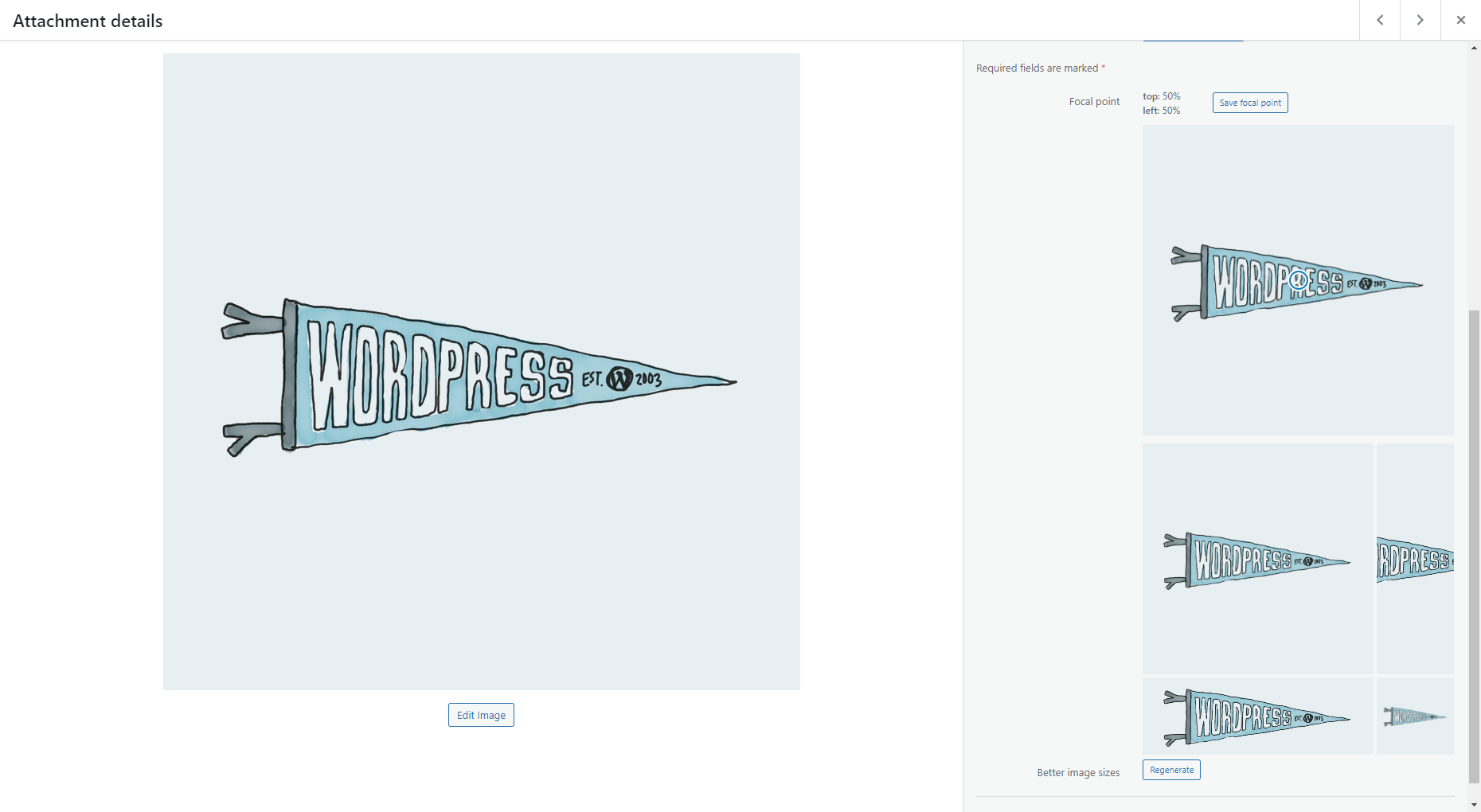
Pour les développeurs
Est-ce votre plugin ? Montrez les chiffres.
Ajoutez un badge en direct à votre site, docs ou github readme. Il se met à jour par lui-même - aucun compte n'est nécessaire.
Best Better image sizes alternatives
All media plugins →





FAQ
Better image sizes: quick answers
Réponses directes, extraites des données en direct WordPress.org.
Source : WordPress.org
Is Better image sizes free?
Yes. Better image sizes is free to download and use from the official WordPress.org plugin directory.
Is Better image sizes safe to use in 2026?
Better image sizes is a solid plugin choice in 2026, with a few things worth checking first. It runs on 2K+ sites, is rated 5/5 and was last updated 1 month ago, and scores 76/100 on our health check.
How many websites use Better image sizes?
Better image sizes is active on 2K+ WordPress websites and has been downloaded 37,267 times since it launched in November 2022. It was downloaded 3,551 times in the last 30 days.
Does Better image sizes work with WordPress 7.1?
Yes. The developer has tested Better image sizes up to WordPress 7.1.5, the latest release. It requires WordPress 3.0.1 or newer.
What PHP version does Better image sizes need?
Better image sizes requires PHP 5.6 or higher. Most hosts run PHP 8.x today, so it works on any modern WordPress hosting.
When was Better image sizes last updated?
The latest version, 4.0.1, was released on October 5, 2026 (1 month ago).
Who makes Better image sizes?
Better image sizes is developed and maintained by kubiq.
What are the best alternatives to Better image sizes?
The most popular alternatives to Better image sizes are Safe SVG (1M+ installs), FileBird (200K+ installs) and Media Cleaner: Delete Unuse… (90K+ installs).
Propulsé par PageForge
Un modèle et une feuille de calcul. Une vraie page pour chaque recherche.
PageForge transforme chaque ligne d'un CSV en une page WordPress avec son propre titre, URL, SEO et schéma, construit sur la mise en page que vous Déjà conçu. Gratuit sur WordPress.org.
- CSV et XLSX, plus Google Sheets sur les professionnels et les entreprises
- Son propre titre, URL, SEO champs et schéma pour chaque page
- Fonctionne avec l'éditeur de blocs, Elementor, Divi et Avada
- Gratuit sur WordPress.org, pas de carte de crédit