


Advanced Sidebar Menu
Fully automatic sidebar menus.

Choix
Yes — Advanced Sidebar Menu is a safe, well-maintained plugin to use in 2026. It runs on 10K+ sites, is rated 4.5/5 and was last updated 1 week ago, and scores 88/100 on our health check.
- Prouvé à grande échelle sur plus de 10 000 sites actifs
- Loved by users — 4.5/5 from 37 reviews
- Développé activement — Dernière mise à jour il y a 1 semaine
- Testé avec le dernier WordPress (7.1)
- Momentum — downloads up 256.4% vs the previous 30 days
Téléchargements quotidiens
Les pics de téléchargement suivent généralement une nouvelle version - chaque site qui met à jour automatiquement compte comme un téléchargement.
Classements
Where Advanced Sidebar Menu stands todayWordPress.org Classements de recherche
Position en direct dans la recherche de plugins, Top 100| Mot-clé | Position |
|---|---|
| category menus | #10 |
| hierarchy | #11 |
| menus | #26 |
| page menus | #23 |
| sidebars | #9 |
Adoption de version
Part de sites actifs par version.
Répartition des notes
★★★★★★★★★★ 4.5 from 37 reviews
About Advanced Sidebar Menu
From the official readme · v9.9.0Description
Fully automatic sidebar menus.
Uses the parent/child relationship of your pages or categories to generate menus based on the current section of your site. Assign a page or category to a parent, and Advanced Sidebar Menu will do the rest for you.
Keeps the menu clean and usable. Only related items display, so you don’t have to worry about keeping a custom menu up to date or displaying links to items that don’t belong.
Blocks are available to display menus where you need them. Look for the “Advanced Sidebar – Pages” block, or the “Advanced Sidebar – Categories” block. Widgets are also available for page builders or sites using classic widgets.
Developed and Supported by OnPoint Plugins.
Documentation
The official documentation for the plugin may be found here.
Modèle de démonstration
An interactive demonstration of the generated menu structure may be found here.
You may also use the Live Preview to use a playground site to test the plugin.
Comment cela fonctionne
When your users view a page or category, the Advanced Sidebar Menu plugin will calculate the related content based on what you have selected using the standard WordPress parent selectors.
The menu will be different for every page that displays the Advanced Sidebar Blocks because the menu is generated specifically to the current page.
Depending on “Pages” block options, the menu will display:
- The current page.
- Parent page.
- Child pages.
- Grandparent pages.
- Grandchild pages.
- First level child pages related to the current item.
Depending on “Categories” block options, the menu will display:
- The current category.
- Parent category.
- Child categories.
- Grandparent categories.
- Grandchild categories.
- First level child categories related to the current item.
Menu Locations
Blocks may be added to:
- Page/post content.
- Widget areas.
- Theme customizer.
- Site Editor.
- Really anywhere blocks are supported.
Classic widgets are also available for areas like:
- Elementor.
- Beaver Builder.
- Sites that have classic widgets enabled.
Traits
- Page and Category menu Gutenberg blocks.
- Page and Category menu widgets.
- Option to display or not display the highest level parent page or category.
- Option to display the menu when there is only the highest level parent.
- Ability to order pages by (date, title, page order).
- Exclude pages or categories by entering a comma separated list of ids.
- Option to always display child pages or categories.
- Option to select the levels of pages or categories to display when always display child is used.
- Option to display or not display categories on single posts.
- Ability to display each single post’s category in a new widget/block or in same list.
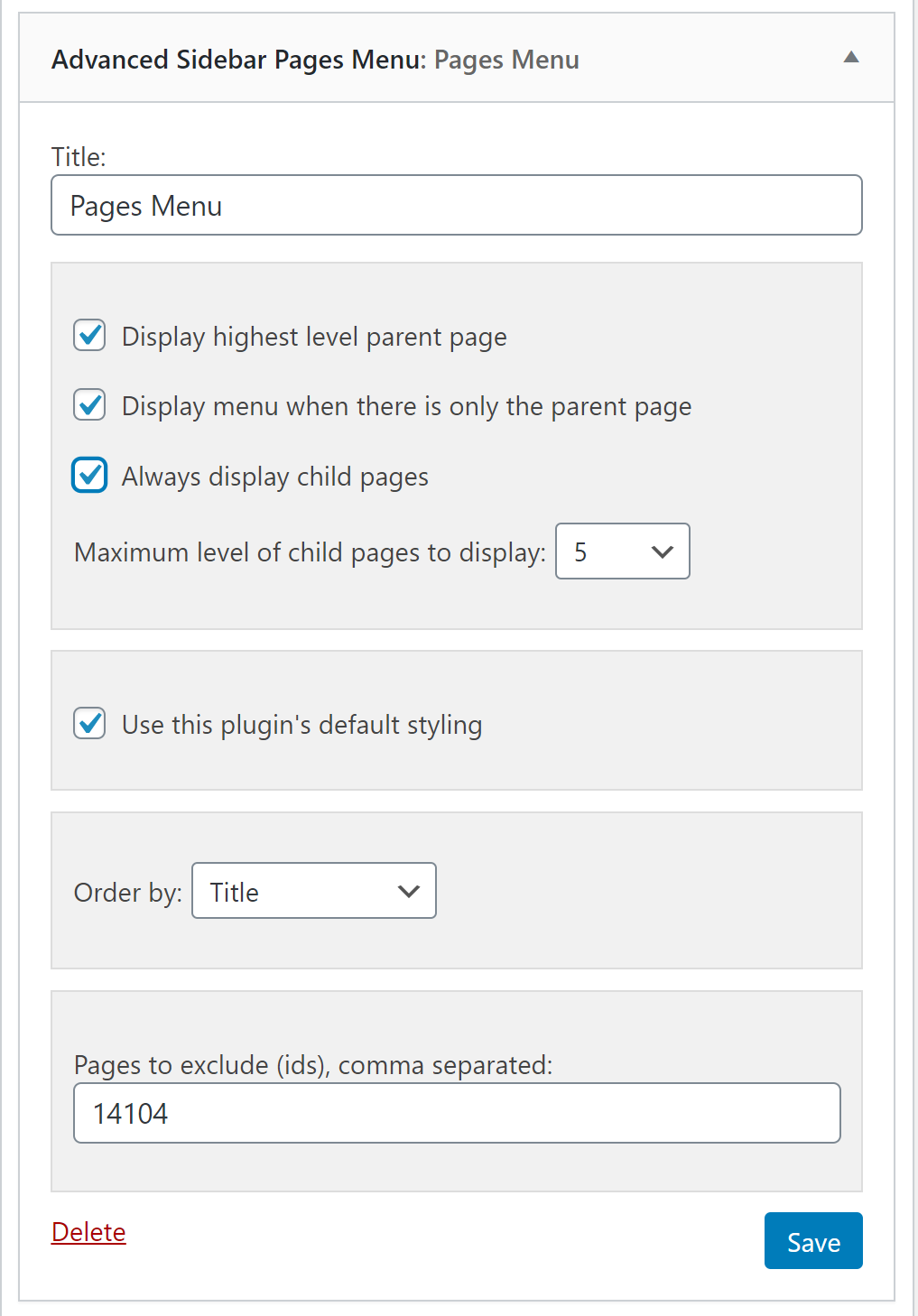
Page Menu Options
- Display the highest level parent page.
- Display menu when there is only the parent page.
- Order pages by (date, title, page order).
- Exclude pages.
- Always display child Pages.
- Levels of child pages to display when always display child pages is checked.
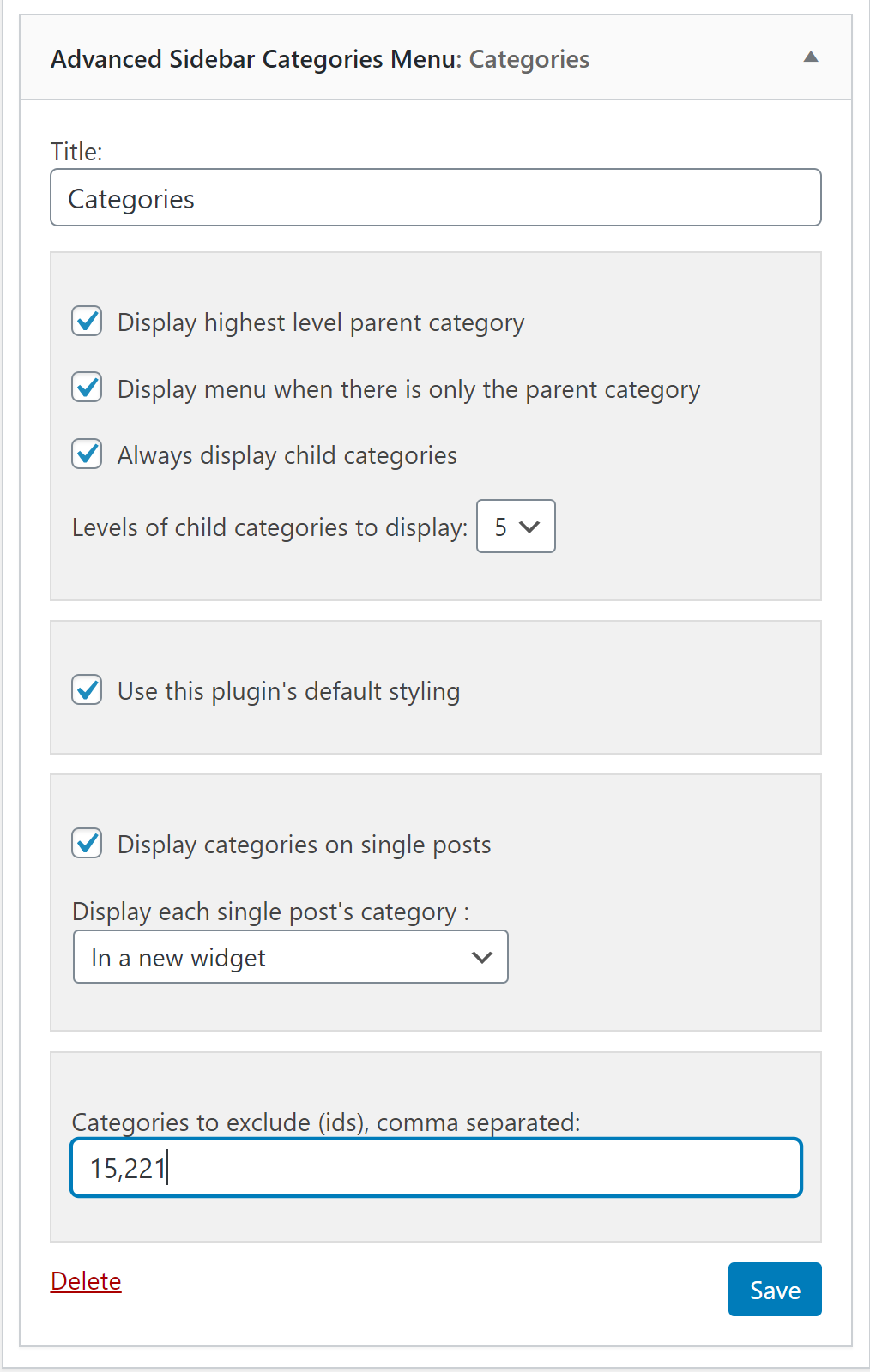
Category Menu Options
- Display the highest level parent category.
- Display menu when there is only the parent category.
- Display categories on single posts.
- Display each single post’s category in a new widget/block or in same list.
- Exclude categories.
- Always display child categories.
- Levels of Categories to display when always display child categories is checked.
Traductions linguistiques incluses
- Anglais (EN_US).
- Français (FR_FR).
- Allemand (DE_DE).
- Espagnol (ES_ES).
Développeurs
Docs du développeur peut être trouvé ici.
Contribuer
Send pull requests via GitHub Repo
Devenir pro
Notre version Pro apporte des fonctionnalités supplémentaires à ce plugin. Découvrez la démo pour voir si la version Pro vous est utile.
- Navigation menu widget.
- Navigation menu Gutenberg block.
- Ability to customize each page or navigation menu item link’s text.
- Click-and-drag styling for page, category, and navigation menus.
- Styling options for links including color, background color, size, hover, and font weight.
- Styling options for different levels of links.
- Styling options for the current page or category.
- Styling options for the parent of the current page or category.
- Blocked styling options including borders, border width, and border colors.
- Option to choose from 7 bullet styles or no bullets.
- Accordion menu support for pages, categories, and navigation menus.
- Accordion icon style and color selection.
- Accordion option to keep all sections closed until clicked.
- Accordion option to include highest level parent in accordion.
- Accordion option to use links for open/close.
- Ability to exclude a page from all menus using a simple checkbox.
- Link ordering for the category menus.
- Number of levels of pages to show when “always display child pages” is not checked.
- Ability to select and display custom post types.
- Ability to select and display custom taxonomies.
- Ability to display category post counts.
- Exclude pages or categories using intuitive search and select. NEW
- Option to display only the current page’s parents, grandparents, and children.
- Option to display child page siblings when on a child page (with or without grandchildren available).
- Ability to display the menu everywhere the widget area is used (including homepage if applicable).
- Ability to select the highest level parent page/category.
- Ability to select which levels of categories assigned posts will display under.
- Ability to display assigned posts or custom post types under categories or taxonomies.
- Ability to limit the number of posts or custom post types to display under categories.
- Support for custom navigation menus from Appearance -> Menus.
- Ability to display the current navigation menu item’s parents and children only.
- Option to display the top-level navigation menu items when there are no child items or not viewing a menu item.
- Un soutien prioritaire avec un accès aux membres uniquement dans la zone de soutien.
Installation
Use the standard WordPress plugins search and install.
Installation manuelle
- Téléchargez le dossier
advanced-sidebar-menudans le répertoire/wp-content/plugins/ - Activez le plugin via le menu « Plugins » dans WordPress
- Drag the “Advanced Sidebar – Pages” widget, or the “Advanced Sidebar – Categories” widget into a sidebar.
- Use the block inserter to insert the “Advanced Sidebar – Pages” block, or the “Advanced Sidebar – Categories” block into Gutenberg content.
Journal de modifications
Update to support PRO version 9.10.0
9.9.0
- Added support for multiple top-level pages in the pages menu, each displaying its own child pages.
- Fixed menu classes leaking onto other page lists and
page_css_classfilters piling up. - Changed
List_Pages::add_list_item_classes()to static and registered once, so classes apply only to lists built fromList_Pagesargs. - Improved page menu performance by querying and caching child page ids in one place.
- Improved
List_Pagescaching by keying entries on query arguments only. - Introduced
Utils::clean_post_ids()for sanitizing lists of post ids. - Fixed excluded categories displaying when supplied by
top-level-term-idsfilter callbacks. - Upgraded js-boilerplate to version 11.
- Tested to WordPress Core 7.1.4.
9.8.6
- Support WordPress 7.1
- Tested to WordPress Core 7.1
9.8.5
- Harden node security and resolve dependabot security alerts.
- Required PRO version 9.10.1+.
- Tested to WordPress Core 7.0.2
9.8.4
- Improve page ordering defaults.
- Prend en charge officiellement PHP 8.5.
- Tested to WordPress Core 7.0.
9.8.3
- Added JSON serialization to block attributes.
- Improved block attribute translation naming.
- Removed temporary common attribute filters.
- Tested to WordPress Core 6.9.0.
9.8.2
- Fixed the display of the “Show on single posts” option in category blocks.
Captures d'écran


Pour les développeurs
Est-ce votre plugin ? Montrez les chiffres.
Ajoutez un badge en direct à votre site, docs ou github readme. Il se met à jour par lui-même - aucun compte n'est nécessaire.
FAQ
Advanced Sidebar Menu: quick answers
Réponses directes, extraites des données en direct WordPress.org.
Source : WordPress.org
Is Advanced Sidebar Menu free?
Yes. Advanced Sidebar Menu is free to download and use from the official WordPress.org plugin directory.
Is Advanced Sidebar Menu safe to use in 2026?
Yes — Advanced Sidebar Menu is a safe, well-maintained plugin to use in 2026. It runs on 10K+ sites, is rated 4.5/5 and was last updated 1 week ago, and scores 88/100 on our health check.
How many websites use Advanced Sidebar Menu?
Advanced Sidebar Menu is active on 10K+ WordPress websites and has been downloaded 1,398,977 times since it launched in October 2011. It was downloaded 8,711 times in the last 30 days.
Does Advanced Sidebar Menu work with WordPress 7.1?
Yes. The developer has tested Advanced Sidebar Menu up to WordPress 7.1.5, the latest release. It requires WordPress 6.2.0 or newer.
What PHP version does Advanced Sidebar Menu need?
Advanced Sidebar Menu requires PHP 7.4.0 or higher. Most hosts run PHP 8.x today, so it works on any modern WordPress hosting.
When was Advanced Sidebar Menu last updated?
The latest version, 9.9.0, was released on November 16, 2026 (1 week ago).
Who makes Advanced Sidebar Menu?
Advanced Sidebar Menu is developed and maintained by Mat Lipe.
Propulsé par PageForge
Un modèle et une feuille de calcul. Une vraie page pour chaque recherche.
PageForge transforme chaque ligne d'un CSV en une page WordPress avec son propre titre, URL, SEO et schéma, construit sur la mise en page que vous Déjà conçu. Gratuit sur WordPress.org.
- CSV et XLSX, plus Google Sheets sur les professionnels et les entreprises
- Son propre titre, URL, SEO champs et schéma pour chaque page
- Fonctionne avec l'éditeur de blocs, Elementor, Divi et Avada
- Gratuit sur WordPress.org, pas de carte de crédit