


Advanced Cron Manager – debug & control
View, pause, remove, edit and add WP Cron events and schedules.

Choix solide
Advanced Cron Manager is a solid plugin choice in 2026, with a few things worth checking first. It runs on 30K+ sites, is rated 4.7/5 and was last updated 1 day ago, and scores 79/100 on our health check.
- Prouvé à grande échelle sur plus de 30 000 sites actifs
- Loved by users — 4.7/5 from 39 reviews
- Développé activement — Dernière mise à jour il y a 1 jour
- Testé avec le dernier WordPress (7.1)
- Momentum — downloads up 85.1% vs the previous 30 days
Comment s'accumule-t-il ?
Côte à côte sur les installations, les mises à jour, les évaluations et le support



Téléchargements quotidiens
Les pics de téléchargement suivent généralement une nouvelle version - chaque site qui met à jour automatiquement compte comme un téléchargement.
Classements
Where Advanced Cron Manager stands todayWordPress.org Classements de recherche
Position en direct dans la recherche de plugins, Top 100| Mot-clé | Position |
|---|---|
| cron | #1 |
| cron manager | #1 |
| crontrol | #2 |
| directeur | #31 |
| wpcron | #1 |
Adoption de version
Part de sites actifs par version.
Répartition des notes
★★★★★★★★★★ 4.7 from 39 reviews
About Advanced Cron Manager – debug & control
From the official readme · v2.8.0Description
Take full control of your WordPress cron system. Advanced Cron Manager gives you complete visibility into every scheduled task running on your site — so you can find problems, fix them, and keep your site running smoothly.
WordPress relies on WP-Cron for critical background tasks: sending emails, publishing scheduled posts, running backups, syncing data, and more. But by default, you have zero visibility into what’s happening. Events fail silently, schedules pile up, and debugging is guesswork. Advanced Cron Manager changes that.
What you can do with the free version:
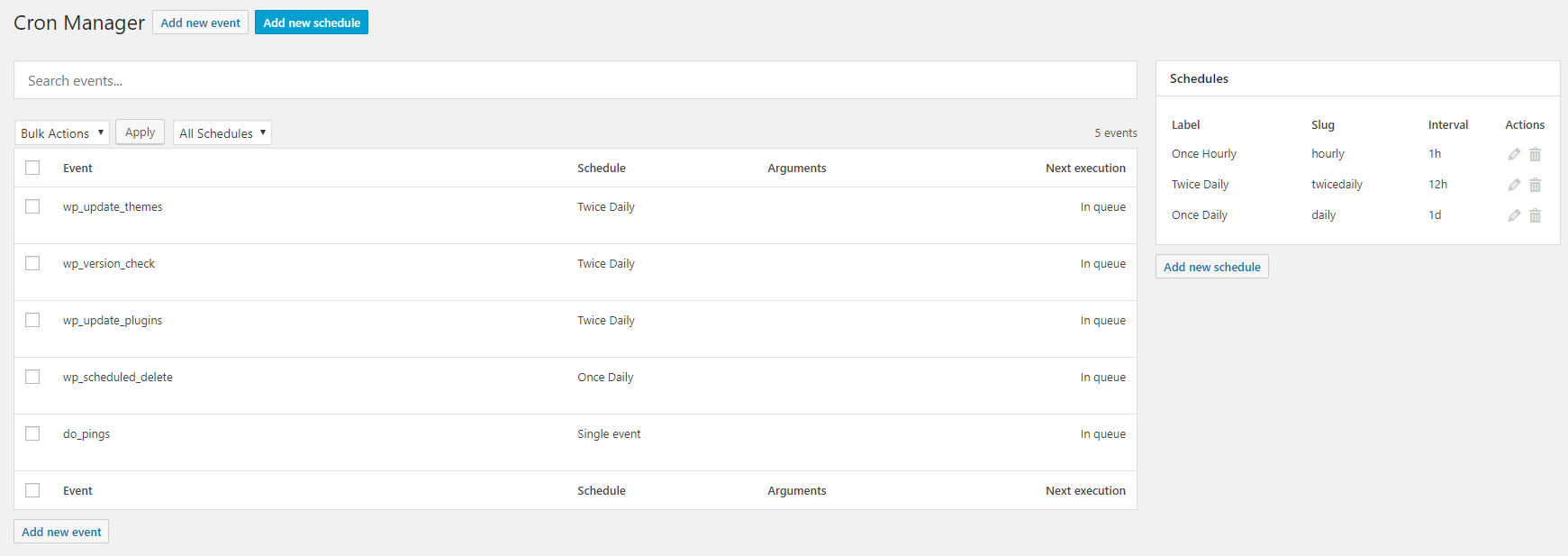
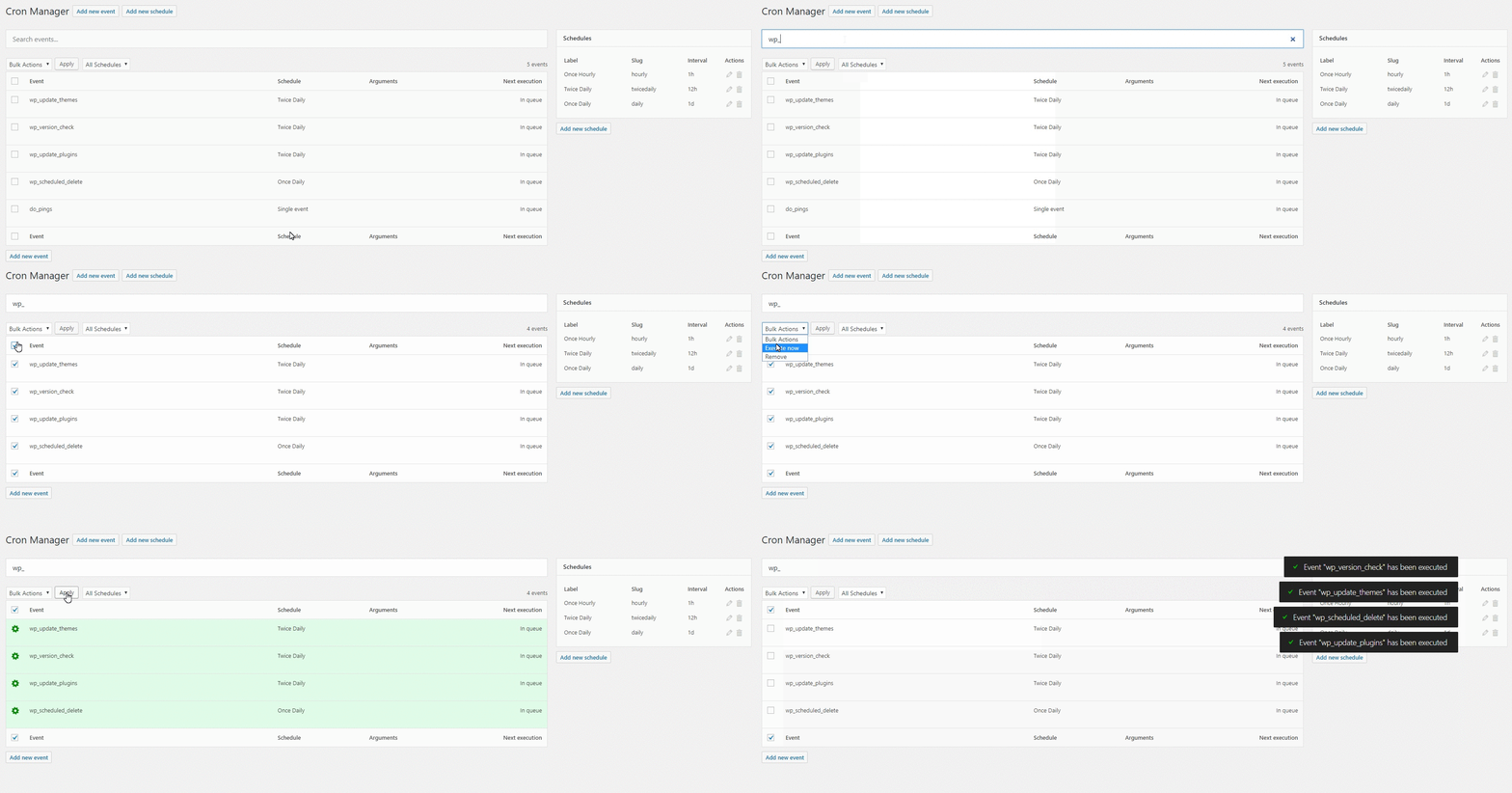
- See every scheduled event — view all registered cron events with their hooks, arguments, schedules, and next execution times, all in one clean dashboard
- Search and filter — quickly find the event you’re looking for, even on sites with hundreds of cron jobs
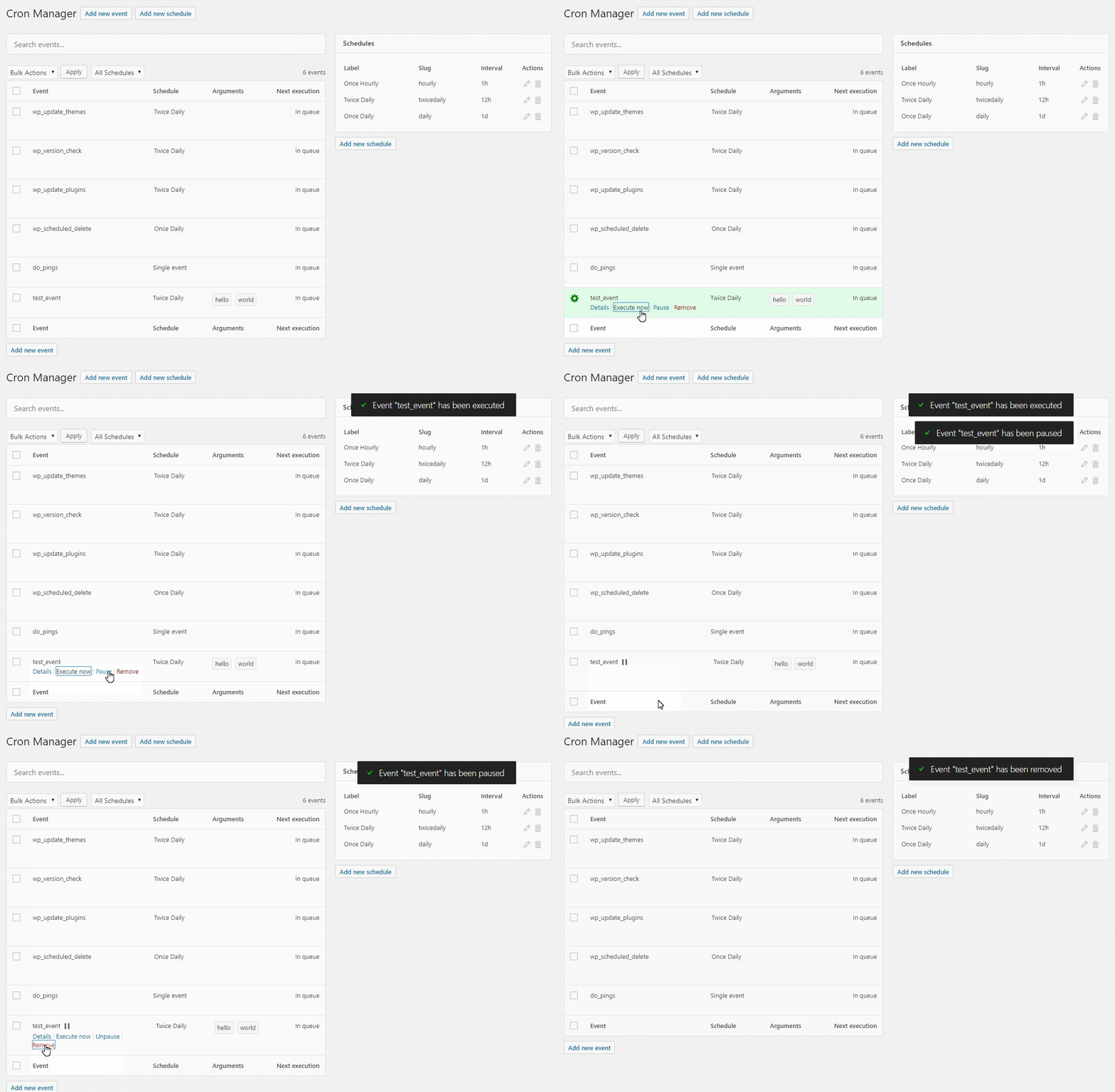
- Run events manually — trigger any cron event on demand to test it or force an immediate execution
- Pause and resume events — temporarily disable events without losing their configuration, perfect for troubleshooting
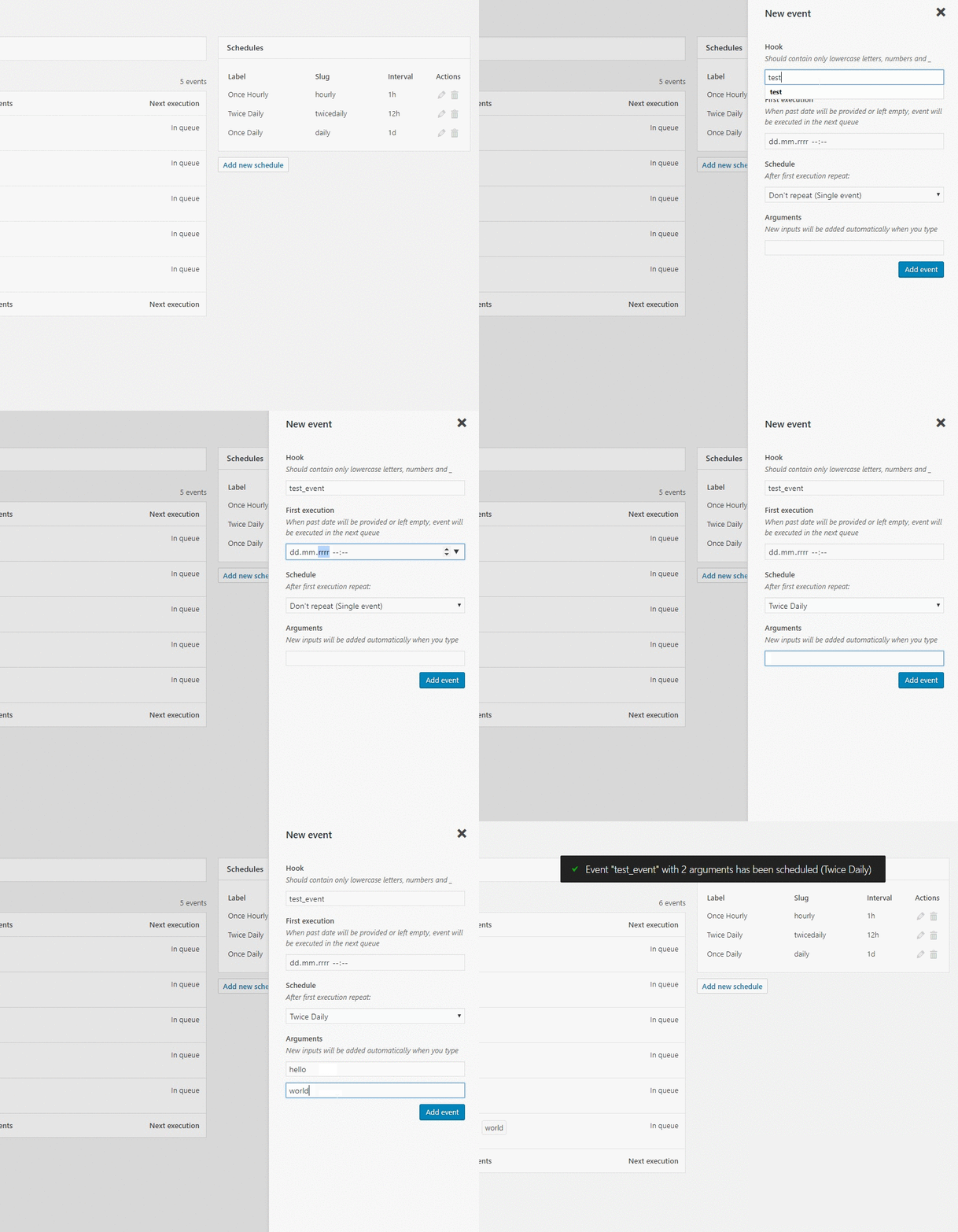
- Add and remove events — create new cron events or unschedule ones you no longer need
- Copy-paste PHP implementation — get ready-to-use code snippets for each event’s action hook and callback
- Bulk actions — manage multiple events at once: remove, pause, or unpause in batch
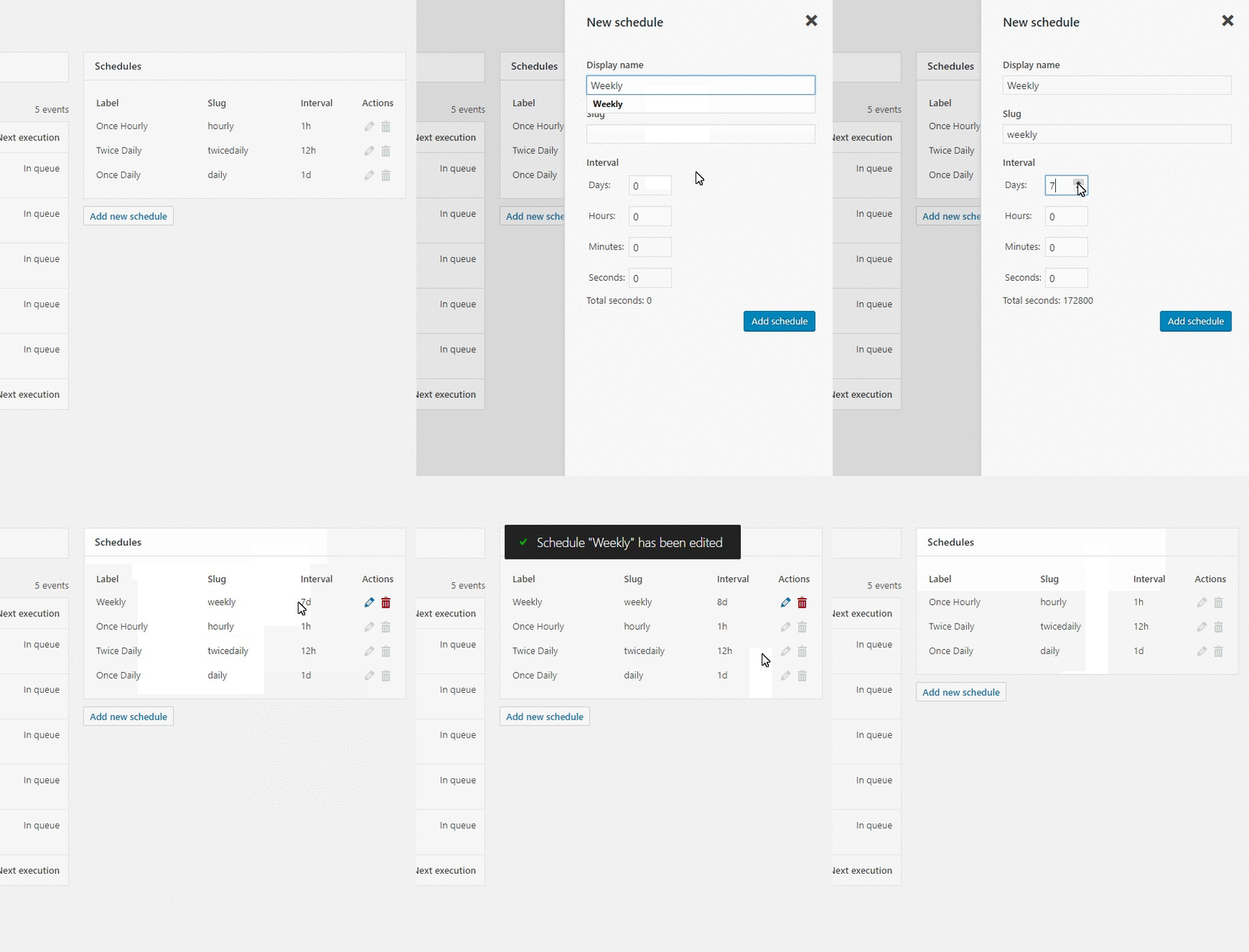
- Manage schedules — view, add, edit, and remove custom cron schedules (intervals)
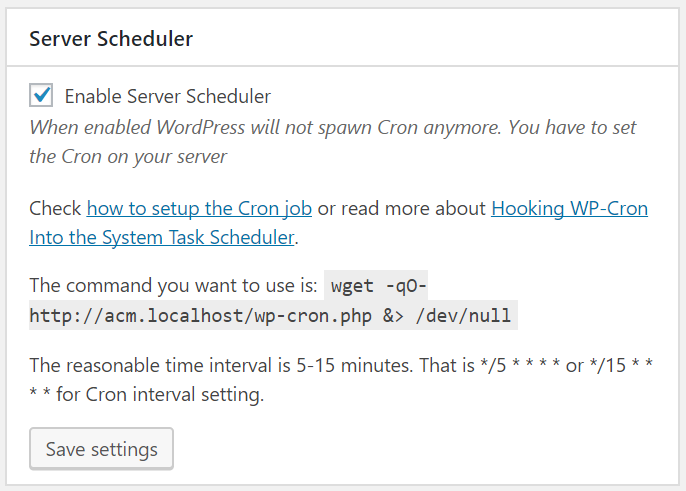
- Server Scheduler — disable WP-Cron’s default page-load triggering and get instructions for setting up a real server cron job for more reliable execution
Advanced Cron Manager PRO
The free version shows you what’s scheduled. PRO shows you what actually happened.
Without logging and diagnostics, cron issues are invisible until something breaks. PRO gives you the tools to monitor, debug, and optimize every cron job on your site.
- Cron Logger — full execution history with timestamps and status for every event. Know exactly what ran, when it ran, and whether it succeeded or failed.
- Performance Stats — execution time and peak memory usage tracked per event. Spot slow or resource-heavy cron jobs before they become a problem.
- Error Catcher — automatically catches fatal errors thrown by cron callbacks and displays them in the log. No more silent failures.
- Debug Tool — log custom data from inside your cron callbacks using
do_action('advanced-cron-manager/log'). Get full visibility into what your code is doing during cron execution. - Event Rescheduling — change the next execution date and schedule of any event. Shift heavy tasks away from peak hours to balance server load.
- Event Listeners — see every function and method hooked into each cron event. Understand exactly what code runs behind each hook.
- Advanced Scheduling (Schyntax) — go beyond simple intervals. Schedule events for specific times like noon on the last day of the month, only on weekdays, every Tuesday and Friday, and more.
14-day money-back guarantee — no risk, no questions asked.
Good to know about WP-Cron
WordPress Cron is triggered by page visits, which means scheduled tasks may not run exactly on time on low-traffic sites. For precise timing, use the Server Scheduler feature to set up a real system cron job. Note: custom schedules added by this plugin are only available while the plugin is active. Events you create will continue to exist after deactivation.
Custom Development
BracketSpace — the company behind this plugin — provides custom WordPress plugin development services. We can build any custom plugin for you.
Installation
Download and install this plugin from Plugins -> Add New admin screen.
Plugin’s page sits under Tools menu item.
Journal de modifications
Security release.
2.8.0
- [Added] Option to keep plugin data in the database when the plugin is uninstalled
- [Changed] Minimum requirements are now PHP 7.4 and WordPress 6.0
- [Changed] Tested with WordPress 7.2 and PHP 8.5
- [Fixed] Deprecated jQuery methods that relied on jQuery Migrate
- [Fixed] PHP warnings and errors with events having null or object arguments, schedules registered without a display name, and an empty timezone offset
- [Fixed] PHP warnings when AJAX requests or stored options are missing expected data
- [Fixed] Admin screen layout in RTL languages
- [Fixed] Paused events using custom schedules not being restored on uninstall
2.7.0
- [Changed] Event hash no longer includes next execution timestamp, making it stable across reschedulings
- [Fixed] “In queue” cron events failing to delete, run, or pause with “wrong_nonce” error
- [Fixed] Bulk actions (remove, pause, unpause) failing due to parallel AJAX race conditions
- [Fixed] Undefined $errors variable when removing non-protected events
- [Security] Added nonce verification to rerender AJAX endpoints to prevent CSRF
- [Security] Added capability check to form provider endpoints
- [Security] Improved output escaping in implementation code and view templates
2.6.4
- [Security] Improved event hook sanitization using sanitize_text_field() to prevent XSS while allowing valid hook characters
- [Security] Added validation for schedule intervals to prevent invalid values
- [Security] Strengthened authorization checks in admin screen methods
- [Security] Enhanced output escaping in event row view template
- [Security] Standardized nonce verification in AJAX handlers with better input validation
- [Security] Added proper validation and sanitization for server settings
- [Security] Fixed unsanitized input in FormProvider.php schedule slug handling
- [Fixed] Fixed PHP 8.4 deprecation warning with trigger_error() by replacing with exception
- [Fixed] Fixed TypeError on PHP 8.3+ where count() was called on non-countable value in Event implementation
- [Changed] Updated WordPress Coding Standards to version 3.2 and resolved all coding standard warnings
- [Changed] Renamed reserved keyword parameters for better PHP compatibility ($protected to $is_protected, $new to $new_event)
2.6.3
- [Fixed] Fixed translation loading issue that was triggered too early in AdminScreen constructor.
- [Fixed] Fixed AdminScreen instance inconsistency that prevented CSS and JS assets from loading on plugin page.
- [Fixed] Fixed schedules variable conflict that prevented schedules table from displaying properly.
- [Changed] Merged ScreenRegisterer class with AdminScreen class for better code organization.
2.6.2
- [Fixed] Fixed stable package creation issues – moved package exclusions to .distignore and ensured vendor and assets directories are included.
2.6.1
- [Changed] Exclude Claude configuration files from plugin distribution exports.
- [Changed] Add composer and yarn build steps to stable release workflow.
Captures d'écran
Pour les développeurs
Est-ce votre plugin ? Montrez les chiffres.
Ajoutez un badge en direct à votre site, docs ou github readme. Il se met à jour par lui-même - aucun compte n'est nécessaire.
Best Advanced Cron Manager alternatives
All cron plugins →





FAQ
Advanced Cron Manager: quick answers
Réponses directes, extraites des données en direct WordPress.org.
Source : WordPress.org
Is Advanced Cron Manager free?
Yes. Advanced Cron Manager is free to download and use from the official WordPress.org plugin directory. The developer also sells premium add-ons or a Pro version with extra features.
Is Advanced Cron Manager safe to use in 2026?
Advanced Cron Manager is a solid plugin choice in 2026, with a few things worth checking first. It runs on 30K+ sites, is rated 4.7/5 and was last updated 1 day ago, and scores 79/100 on our health check.
How many websites use Advanced Cron Manager?
Advanced Cron Manager is active on 30K+ WordPress websites and has been downloaded 860,225 times since it launched in February 2014. It was downloaded 11,506 times in the last 30 days.
Does Advanced Cron Manager work with WordPress 7.1?
Yes. The developer has tested Advanced Cron Manager up to WordPress 7.2, the latest release. It requires WordPress 6.0 or newer.
What PHP version does Advanced Cron Manager need?
Advanced Cron Manager requires PHP 7.4 or higher. Most hosts run PHP 8.x today, so it works on any modern WordPress hosting.
When was Advanced Cron Manager last updated?
The latest version, 2.8.0, was released on November 18, 2026 (1 day ago).
Who makes Advanced Cron Manager?
Advanced Cron Manager is developed and maintained by Kuba Mikita.
What are the best alternatives to Advanced Cron Manager?
The most popular alternatives to Advanced Cron Manager are WP Crontrol (300K+ installs), Missed Scheduled Posts Publ… (20K+ installs) and Transients Manager (20K+ installs).
Propulsé par PageForge
Un modèle et une feuille de calcul. Une vraie page pour chaque recherche.
PageForge transforme chaque ligne d'un CSV en une page WordPress avec son propre titre, URL, SEO et schéma, construit sur la mise en page que vous Déjà conçu. Gratuit sur WordPress.org.
- CSV et XLSX, plus Google Sheets sur les professionnels et les entreprises
- Son propre titre, URL, SEO champs et schéma pour chaque page
- Fonctionne avec l'éditeur de blocs, Elementor, Divi et Avada
- Gratuit sur WordPress.org, pas de carte de crédit