


ActivityPub
Connect your site to the Open Social Web and let millions of users follow, share, and interact with your content from Mastodon, Pixelfed, and more.

Choix
Yes — ActivityPub is a safe, well-maintained plugin to use in 2026. It runs on 6K+ sites, is rated 4.9/5 and was last updated 2 weeks ago, and scores 88/100 on our health check.
- Loved by users — 4.9/5 from 40 reviews
- Développé activement — Dernière mise à jour il y a 2 semaines
- Testé avec le dernier WordPress (7.1)
- Momentum — downloads up 279.6% vs the previous 30 days
Comment s'accumule-t-il ?
Côte à côte sur les installations, les mises à jour, les évaluations et le support



Téléchargements quotidiens
Les pics de téléchargement suivent généralement une nouvelle version - chaque site qui met à jour automatiquement compte comme un téléchargement.
Classements
Where ActivityPub stands todayWordPress.org Classements de recherche
Position en direct dans la recherche de plugins, Top 100| Mot-clé | Position |
|---|---|
| activitypub | #1 |
| activitystream | #2 |
| fediverse | #2 |
| indieweb | #3 |
| social web | #16 |
Adoption de version
Part de sites actifs par version.
Répartition des notes
★★★★★★★★★★ 4.9 from 40 reviews
About ActivityPub
From the official readme · v9.4.4Description
Enter the fediverse with ActivityPub, broadcasting your blog to a wider audience! Attract followers, deliver updates, and receive comments from a diverse user base of ActivityPub-compliant platforms.
With the ActivityPub plugin installed, your WordPress blog itself functions as a federated profile, along with profiles for each author. For instance, if your website is example.com, then the blog-wide profile can be found at @example.com@example.com, and authors like Jane and Bob would have their individual profiles at @jane@example.com and @bob@example.com, respectively.
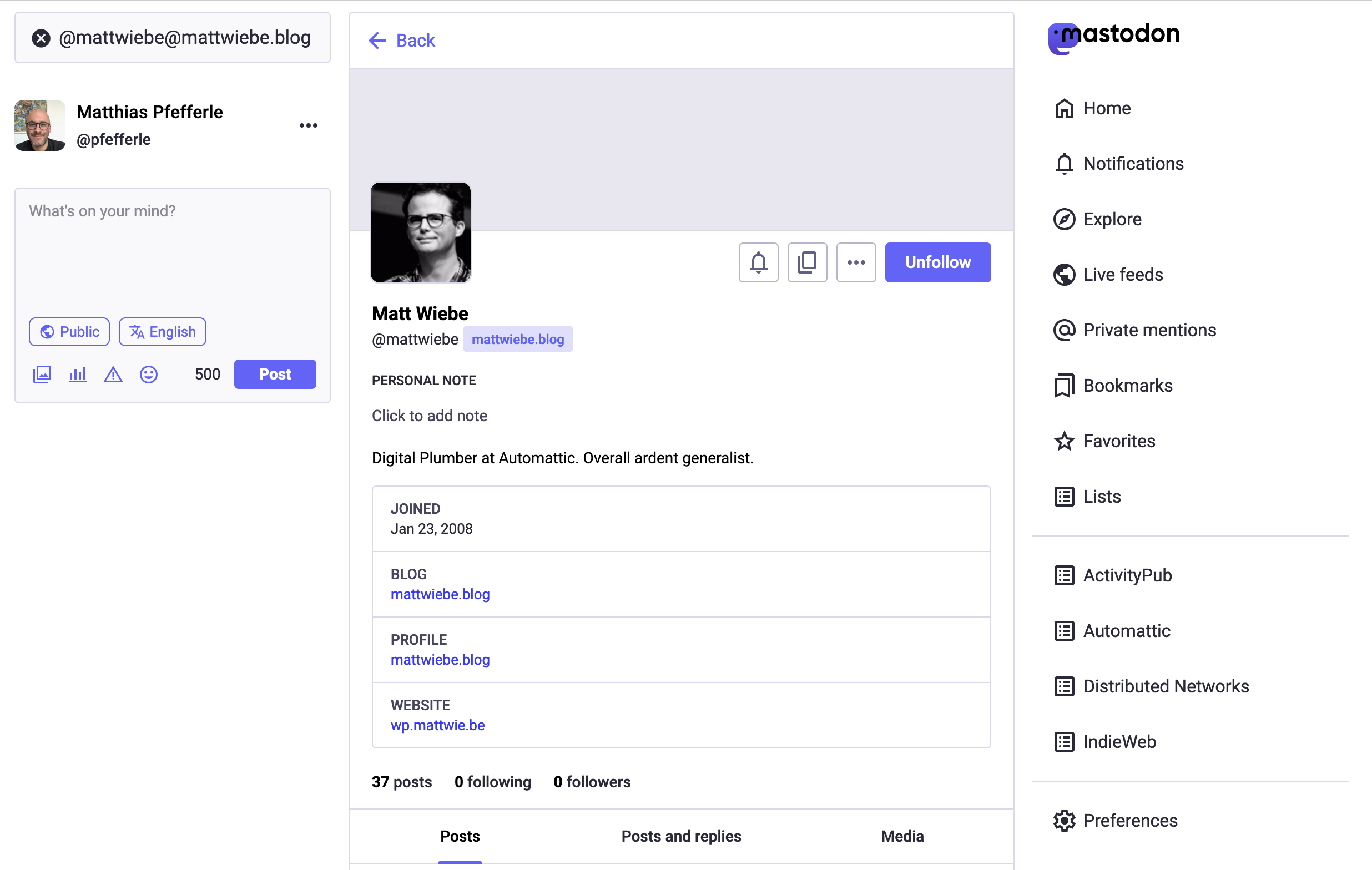
An example: I give you my Mastodon profile name: @pfefferle@mastodon.social. You search, see my profile, and hit follow. Now, any post I make appears in your Home feed. Similarly, with the ActivityPub plugin, you can find and follow Jane’s profile at @jane@example.com.
Once you follow Jane’s @jane@example.com profile, any blog post she crafts on example.com will land in your Home feed. Simultaneously, by following the blog-wide profile @example.com@example.com, you’ll receive updates from all authors.
Note: If no one follows your author or blog instance, your posts remain unseen. The simplest method to verify the plugin’s operation is by following your profile. If you possess a Mastodon profile, initiate by following your new one.
The plugin works with the following tested federated platforms, but there may be more that it works with as well:
Some things to note:
- The blog-wide profile is only compatible with sites with rewrite rules enabled. If your site does not have rewrite rules enabled, the author-specific profiles may still work.
- Many single-author blogs have chosen to turn off or redirect their author profile pages, usually via an SEO plugin like Yoast or Rank Math. This is usually done to avoid duplicate content with your blog’s home page. If your author page has been deactivated in this way, then ActivityPub author profiles won’t work for you. Instead, you can turn your author profile page back on, and then use the option in your SEO plugin to noindex the author page. This will still resolve duplicate content issues with search engines and will enable ActivityPub author profiles to work.
- Once ActivityPub is installed, only new posts going forward will be available in the fediverse. Likewise, even if you’ve been using ActivityPub for a while, anyone who follows your site will only see new posts you publish from that moment on. They will never see previously-published posts in their Home feed. This process is very similar to subscribing to a newsletter. If you subscribe to a newsletter, you will only receive future emails, but not the old archived ones. With ActivityPub, if someone follows your site, they will only receive new blog posts you publish from then on.
So what’s the process?
- Install the ActivityPub plugin.
- Go to the plugin’s settings page and adjust the settings to your liking. Click the Save button when ready.
- Make sure your blog’s author profile page is active if you are using author profiles.
- Go to Mastodon or any other federated platform, and search for your profile, and follow it. Your new profile will be in the form of either
@your_username@example.comor@example.com@example.com, so that is what you’ll search for. - On your blog, publish a new post.
- From Mastodon, check to see if the new post appears in your Home feed.
Note: It may take up to 15 minutes or so for the new post to show up in your federated feed. This is because the messages are sent to the federated platforms using a delayed cron. This avoids breaking the publishing process for those cases where users might have lots of followers. So please don’t assume that just because you didn’t see it show up right away that something is broken. Give it some time. In most cases, it will show up within a few minutes, and you’ll know everything is working as expected.
Installation
Follow the normal instructions for installing WordPress plugins.
Installation automatique des plugins
To add a WordPress Plugin using the built-in plugin installer:
- Go to Plugins > Add New.
- Type “
activitypub” into the Search Plugins box. - Find the WordPress Plugin you wish to install.
- Click Details for more information about the Plugin and instructions you may wish to print or save to help setup the Plugin.
- Cliquez sur Installer maintenant pour installer le plugin WordPress.
- The resulting installation screen will list the installation as successful or note any problems during the install.
- If successful, click Activate Plugin to activate it, or Return to Plugin Installer for further actions.
Installation manuelle des plug-ins
There are a few cases when manually installing a WordPress Plugin is appropriate.
- If you wish to control the placement and the process of installing a WordPress Plugin.
- If your server does not permit automatic installation of a WordPress Plugin.
- If you want to try the latest development version.
Installation of a WordPress Plugin manually requires FTP familiarity and the awareness that you may put your site at risk if you install a WordPress Plugin incompatible with the current version or from an unreliable source.
Backup your site completely before proceeding.
To install a WordPress Plugin manually:
- Download your WordPress Plugin to your desktop.
- Download from the WordPress directory
- Download from GitHub
- If downloaded as a zip archive, extract the Plugin folder to your desktop.
- With your FTP program, upload the Plugin folder to the
wp-content/pluginsfolder in your WordPress directory online. - Go to Plugins screen and find the newly uploaded Plugin in the list.
- Click Activate to activate it.
Journal de modifications
When people answer your posts from the Fediverse with a photo, it can now show right below their comment. Turn on images in replies in the ActivityPub settings.
9.4.4 – 2026-11-18
La sécurité
- Connected apps now only have access to the site they were connected on. On multisite networks, apps have to be connected again after the update.
- Improve how content from other servers is matched by its address.
- Improve how custom emoji from other servers are shown in content and names.
- Improve how emoji and images from other servers are handled.
- Improve how incoming activities and profiles are read.
- Improve how signatures of incoming requests are read.
- Improve how the follow, reply and reaction buttons look up Fediverse profiles.
- Only remove a profile or post when a deleted ID matches it exactly.
Fixé
- Fix remote profiles with special characters in their address showing up twice after they were updated.
- Fix the post sidebar on the Social Web screen running into the window edges on WordPress 7.2, and a console error when the screen loads.
- Fixed a fatal error when Stream 4.5.0 or newer is active.
- Live updates in apps connected through the ActivityPub API now reach every open app or browser tab, not only the first one.
- Mentions, hashtags and links are now linked the same way in every language version of a post or profile.
- Rate limit new follower notification emails to prevent repeated notifications when an actor cycles follow and unfollow.
- The blog profile can be found by its Fediverse handle again when an author uses the same name in the WebFinger plugin.
- The page for connecting apps is no longer shown while the ActivityPub API is turned off.
- WooCommerce order notes and other comments of single items show in the admin again while ActivityPub is active.
9.4.3 – 2026-11-05
La sécurité
- Improve how custom emoji are shown in names and replies.
- Improve the check for commenters with a previously approved comment.
Fixé
- Fix two small wording mistakes: notification emails said “You are receiving this emails”, and the dashboard widget said “can not” instead of “cannot”.
9.4.2 – 2026-11-04
La sécurité
- The app authorization screen only shows apps that are already known to your site and no longer fetches unknown ones.
- The check for previously approved commenters now also works on sites that save comments without a comment type, such as WordPress.com.
9.4.1 – 2026-11-04
La sécurité
- Only earlier comments of the same verified account count as previously approved: replies from the Fediverse follow your moderation settings, and a Fediverse name and handle typed into the comment form are no longer approved automatically.
Captures d'écran
Pour les développeurs
Est-ce votre plugin ? Montrez les chiffres.
Ajoutez un badge en direct à votre site, docs ou github readme. Il se met à jour par lui-même - aucun compte n'est nécessaire.
Best ActivityPub alternatives
All activitypub plugins →





FAQ
ActivityPub: quick answers
Réponses directes, extraites des données en direct WordPress.org.
Source : WordPress.org
Is ActivityPub free?
Yes. ActivityPub is free to download and use from the official WordPress.org plugin directory.
Is ActivityPub safe to use in 2026?
Yes — ActivityPub is a safe, well-maintained plugin to use in 2026. It runs on 6K+ sites, is rated 4.9/5 and was last updated 2 weeks ago, and scores 88/100 on our health check.
How many websites use ActivityPub?
ActivityPub is active on 6K+ WordPress websites and has been downloaded 618,083 times since it launched in September 2018. It was downloaded 23,195 times in the last 30 days.
Does ActivityPub work with WordPress 7.1?
Yes. The developer has tested ActivityPub up to WordPress 7.1.5, the latest release. It requires WordPress 6.5 or newer.
What PHP version does ActivityPub need?
ActivityPub requires PHP 7.4 or higher. Most hosts run PHP 8.x today, so it works on any modern WordPress hosting.
When was ActivityPub last updated?
The latest version, 9.4.4, was released on November 18, 2026 (2 weeks ago).
Who makes ActivityPub?
ActivityPub is developed and maintained by Automattic.
What are the best alternatives to ActivityPub?
The most popular alternatives to ActivityPub are WebFinger (1K+ installs), NodeInfo(2) (900+ installs) and Enable Mastodon Apps (500+ installs).
Propulsé par PageForge
Un modèle et une feuille de calcul. Une vraie page pour chaque recherche.
PageForge transforme chaque ligne d'un CSV en une page WordPress avec son propre titre, URL, SEO et schéma, construit sur la mise en page que vous Déjà conçu. Gratuit sur WordPress.org.
- CSV et XLSX, plus Google Sheets sur les professionnels et les entreprises
- Son propre titre, URL, SEO champs et schéma pour chaque page
- Fonctionne avec l'éditeur de blocs, Elementor, Divi et Avada
- Gratuit sur WordPress.org, pas de carte de crédit