


WordSec – Malware Scanner & Removal, Web Application Firewall (WAF), and 2FA
WordPress security plugin with firewall, malware scanner, and login protection. Block attacks and scan for malware from one dashboard.

Solid choice
WordSec is a solid plugin choice in 2026, with a few things worth checking first. It runs on 20+ sites, is rated 5/5 and was last updated 3 months ago, and scores 70/100 on our health check.
- Tested with the latest WordPress (7.1)
- Small user base (20+ active installs)
- Very few reviews so far
How does it stack up?
Side-by-side on installs, updates, ratings & support



Daily downloads
Download spikes usually follow a new release — each site that auto-updates counts as a download.
Rankings
Where WordSec stands todayWordPress.org search rankings
Live position in the plugin search, top 100| Keyword | Position |
|---|---|
| firewall | #79 |
| malware removal | #22 |
| malware scanner | #40 |
| security | >100 |
| WAF | #23 |
Version adoption
Share of active sites per release.
Rating breakdown
★★★★★★★★★★ 5 from 2 reviews
About WordSec
From the official readme · v1.1.2Description
WordSec is a complete WordPress security plugin. Eight modules cover the firewall, malware scanner, login security, live traffic, IP and country blocking, supply-chain intelligence, audit log and alerts, so you block attacks and harden your site from one dashboard instead of installing eight plugins.
If your site gets hacked you do not just lose the site. You lose customer trust, your search rankings, and days of work restoring backups. WordSec is built to stop that before it happens, and to help you recover if it already has: the scanner finds the malware, quarantine takes it out of the way, and modified core, plugin and theme files are repaired from their original copies.
Free, and no license key to enter. WAF firewall rules, malware and file-integrity scanning, brute force protection, two factor authentication, IP and country blocking, the audit log and one-click hardening all run locally on your own server.
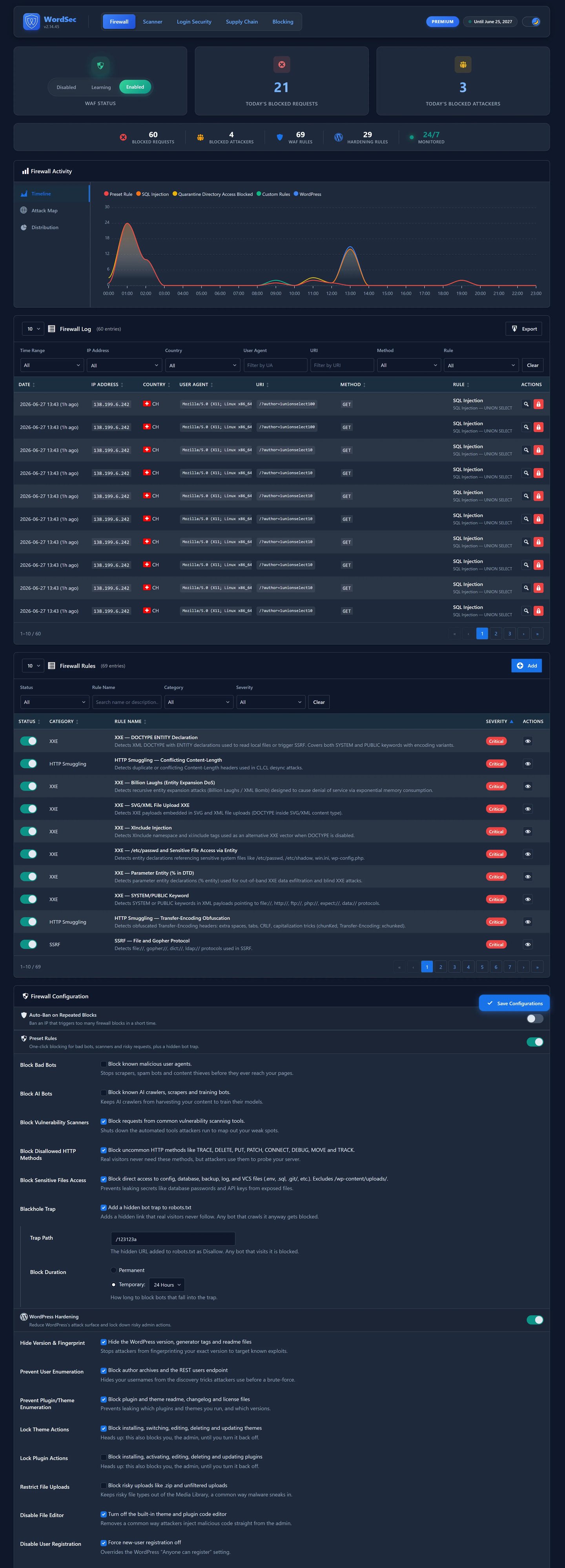
Web Application Firewall (WAF)
- Custom rule builder with regex and wildcard matching
- Built-in rules for SQL injection, XSS, path traversal, PHP and command injection
- Learning and active modes, bot blocking, security headers, rate limiting
- 25+ hardening toggles for wp-config access, author enumeration and REST API
- Optional Extended Protection: pre-WordPress request inspection (opt-in, fully reversible)
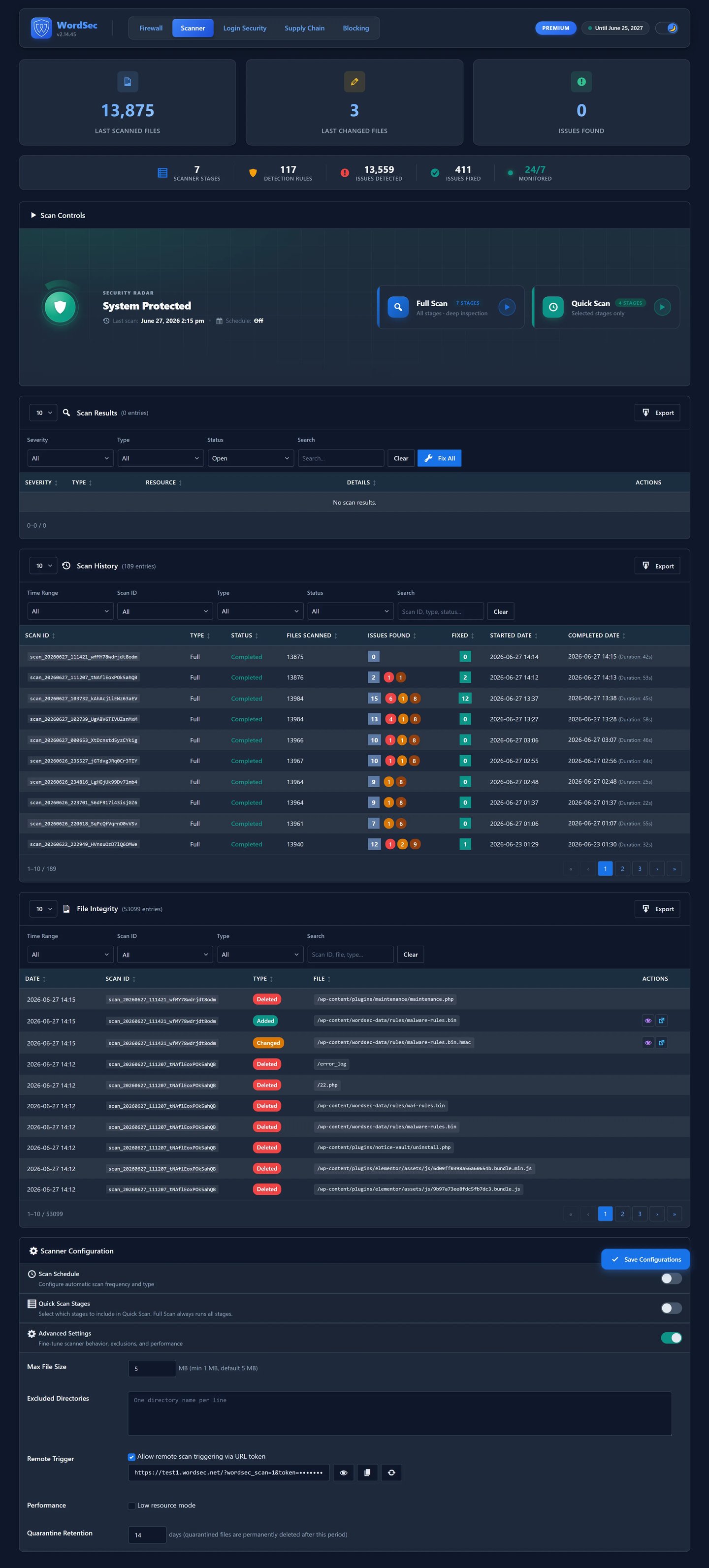
Malware Scanner and Removal
- Malware detection rules across files, the database and scheduled tasks
- Core, plugin and theme file-integrity verification via the WordPress.org API
- Scheduled scans, one-click quarantine and restore
- Malware removal on a hacked site: quarantine a finding, or repair a modified core, plugin or theme file from its original copy
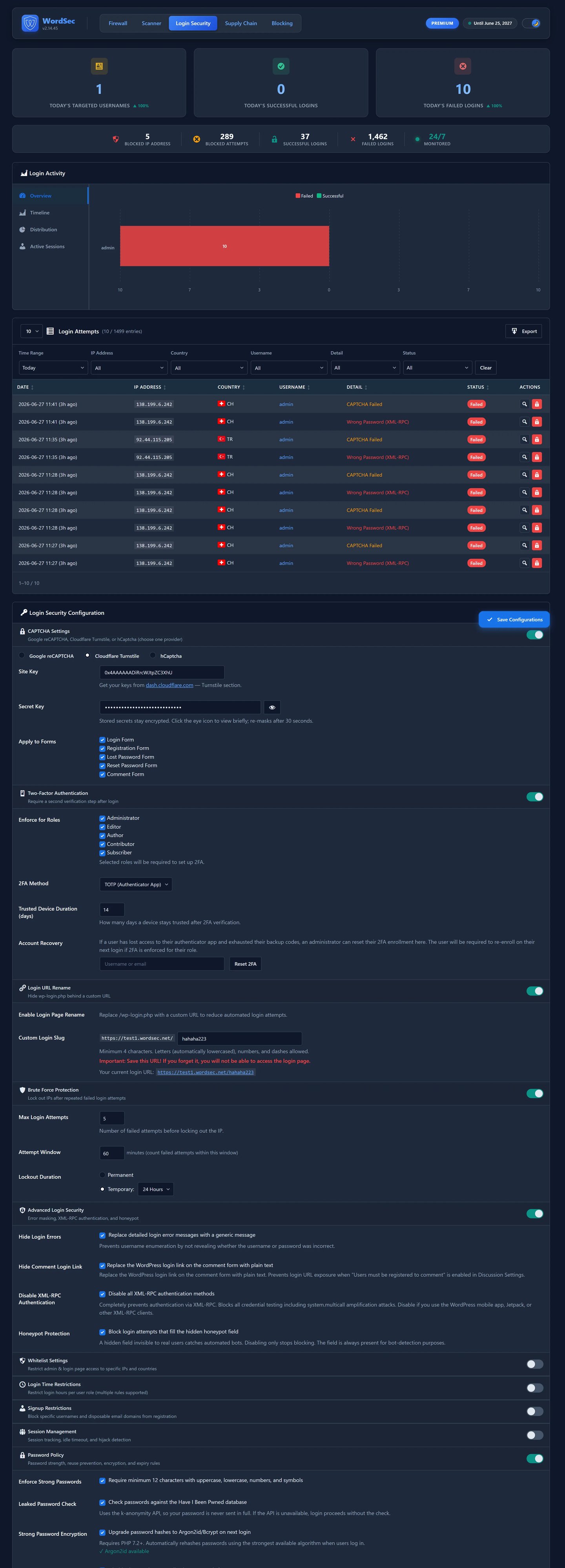
Login Security, Two-Factor Authentication (2FA) and Brute Force Protection
- Role-based two-factor authentication (RFC 6238 TOTP)
- reCAPTCHA, hCaptcha and Cloudflare Turnstile, plus a built-in math CAPTCHA
- Brute-force protection with progressive lockout, honeypot and login URL rename
- Leaked-password checking, session management, custom login page
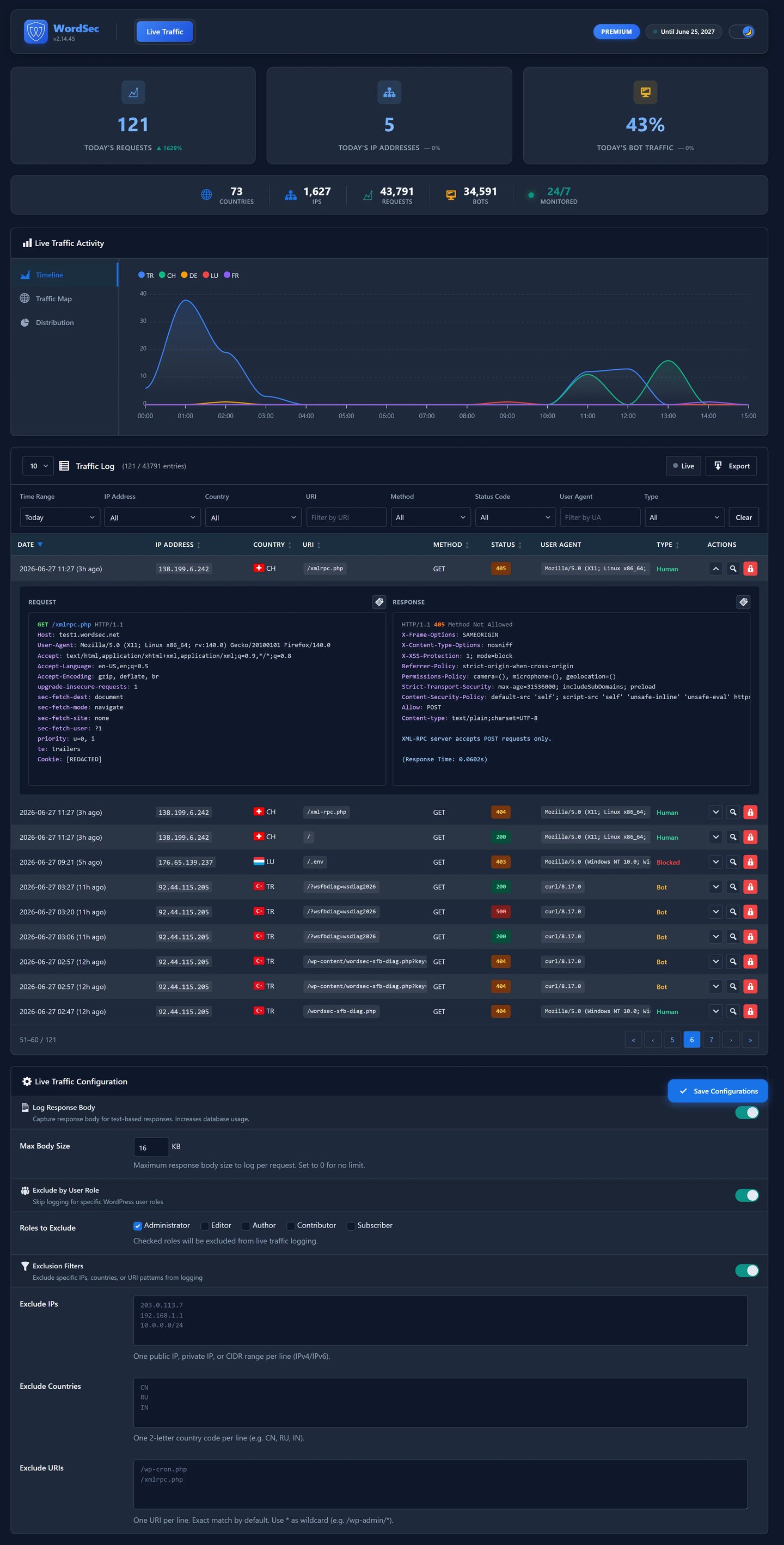
Live Traffic
- Real-time request logging with bot detection and CSV export
- Exclusion filtering by role, IP, country or URI
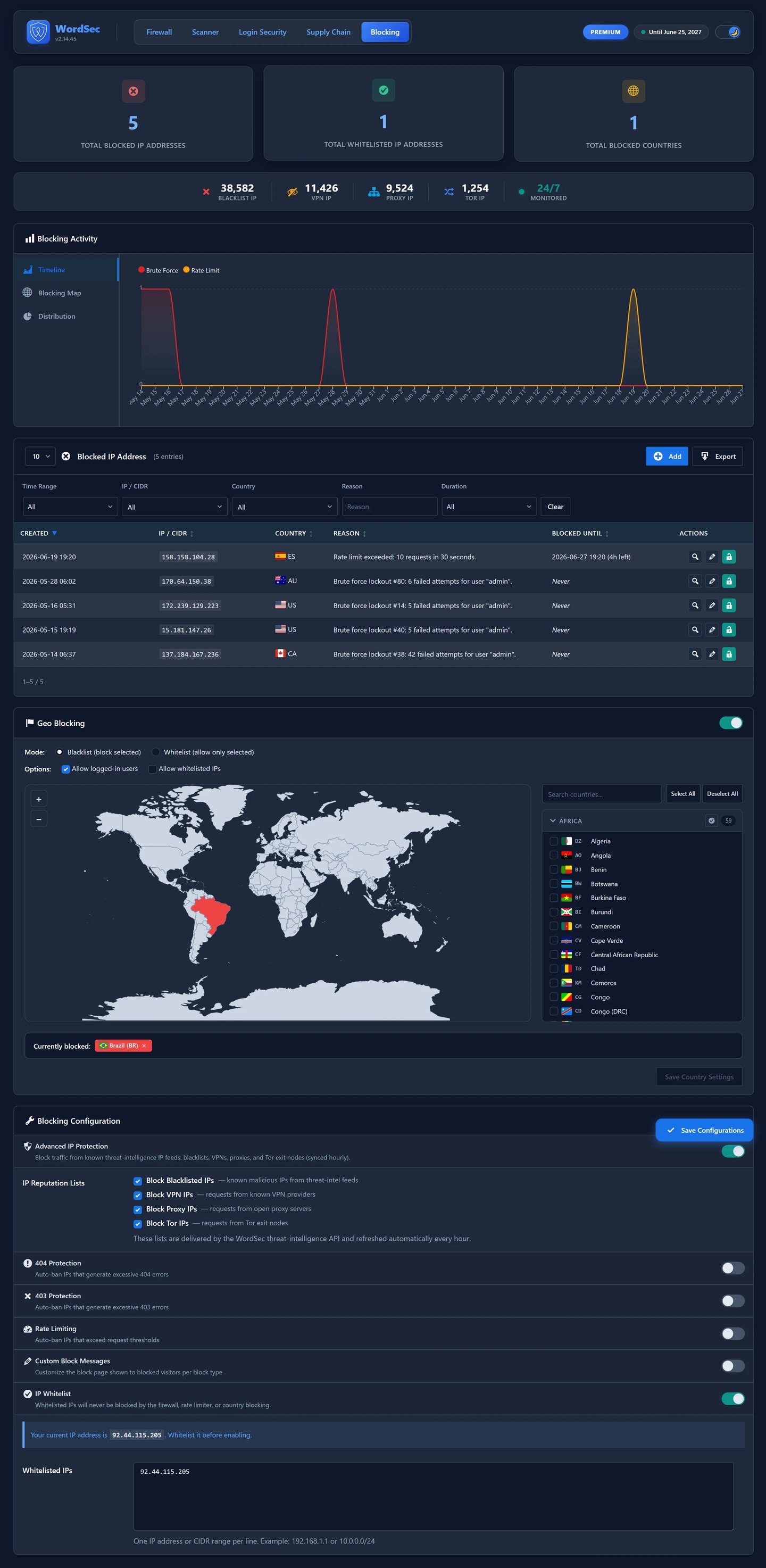
IP and Country Blocking
- Country and continent allow or block lists
- IP and CIDR blocking, temporary or permanent, with allow-list support
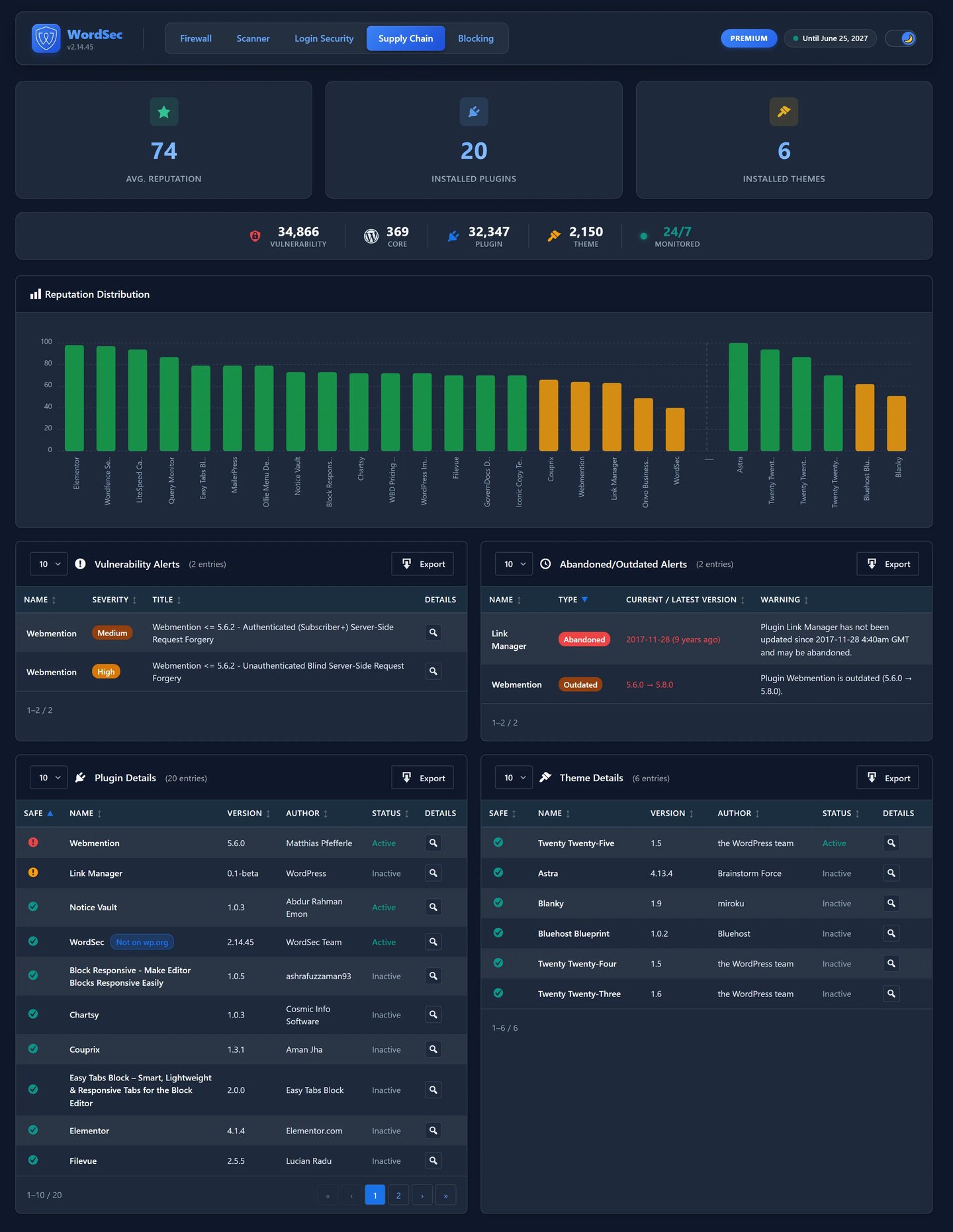
Supply Chain and Threat Intelligence
- Reputation scoring and abandoned-plugin detection
- Known-vulnerability alerts for core, plugins, themes and PHP
- Update-integrity verification with backups and an SBOM inventory
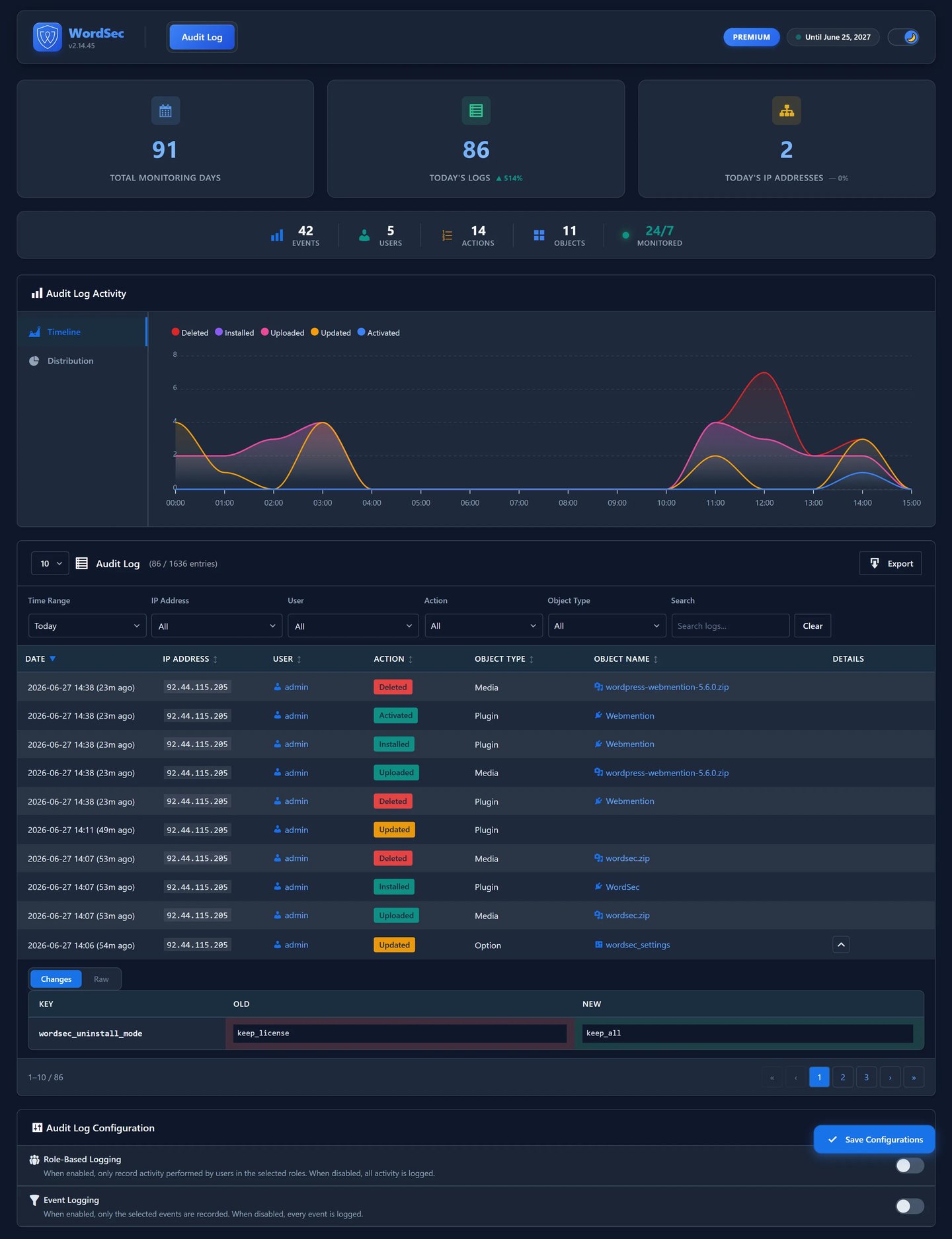
Audit Log
- Activity tracking across 11 object types and 14 actions
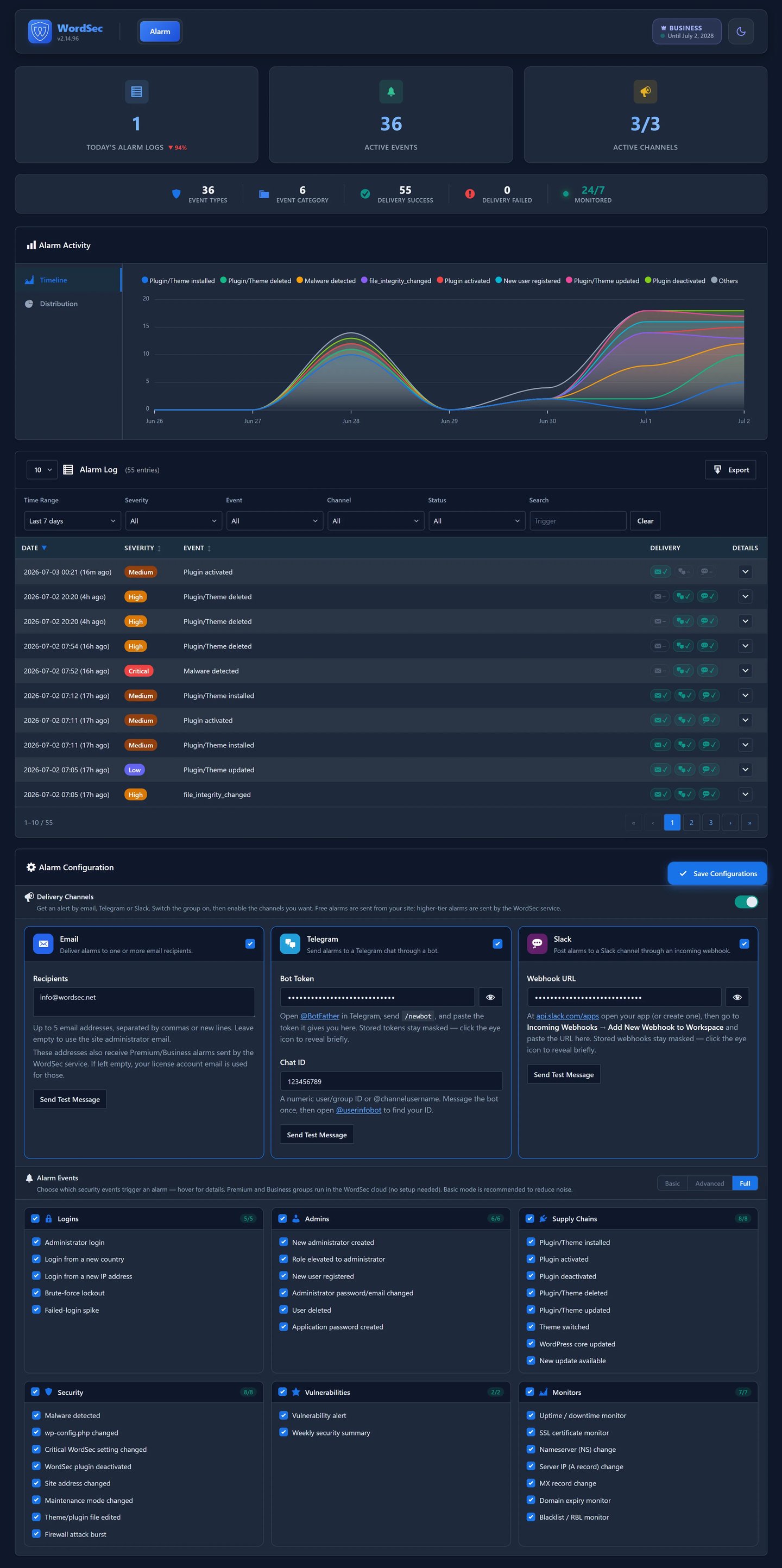
Alarms
- 36 alert event types delivered by Email, Telegram or Slack
Every feature runs locally with no license key. Optionally, the WordSec service at wordsec.net supplies threat-intelligence data that cannot be produced locally: managed WAF rule sets, the malware signature feed, IP-reputation lists, the GeoIP database and vulnerability records. Connecting is optional and every external service is documented in “External services” below.
External services
WordSec is designed to run locally, and with no license key it makes no outbound requests to the WordSec service. Core request filtering and file scanning run on your server. The services listed below are contacted only for the specific features described, and most of them only when you explicitly enable that feature (or, for the WordSec API, only after you activate a license key). This section documents every third-party service the plugin can connect to and the data each one receives.
WordSec API (api.wordsec.net)
WordSec runs free without a license, in which case it does not contact this service at all. A free license is available to everyone; once you activate a key the plugin communicates with the WordSec service for two distinct purposes:
- Required service calls (only while a license key is active): license activation and validation, and threat-data updates (firewall rules, malware signatures, IP reputation lists, GeoIP data, the disposable-email domain list and known-vulnerability data). These enable the cloud-backed features and cannot be performed locally; with no key, none of these calls are made. The local enforcement code for these features (the WAF engine, the malware scanner, the IP-blocking filters and the signup-restriction filter) is always present and active; without an up-to-date feed it simply has no threat-intelligence data to check requests against.
* When: on activation/validation and on scheduled threat-data update checks.
* Data sent: your site URL and license key (used to authenticate you and bind the license to this site) and, for update checks, the current versions of your installed threat-data feeds.
- Optional usage/environment telemetry (OPT-IN, OFF by default): an anonymous once-daily snapshot used to improve WordSec. It is only sent after you explicitly enable “Share usage & environment data” (at license activation or in Settings → Advanced → Usage Data) and can be turned off again at any time.
* When: once daily, only while the opt-in is enabled.
* Data sent: a non-personal snapshot of the site environment (server, WordPress, PHP and database versions, the list of active plugins and themes) and aggregate WordSec feature-usage and security statistics. No passwords, database credentials, secret keys or e-mail addresses are ever sent.
- Terms of Service: https://wordsec.net/terms
- Privacy Policy: https://wordsec.net/privacy
Have I Been Pwned (api.pwnedpasswords.com)
Used by the optional leaked-password check to detect whether a password appears in known data breaches, using k-anonymity.
* When: when a user sets or submits a password and the leaked-password check is enabled.
* Data sent: only the first 5 characters of the SHA-1 hash of the password. The password itself and its full hash never leave your site.
* Terms & Privacy: https://haveibeenpwned.com/Privacy
WordPress.org API (api.wordpress.org, downloads.wordpress.org, wordpress.org, core.svn.wordpress.org, plugins.svn.wordpress.org, themes.svn.wordpress.org)
Used to verify WordPress core, plugin and theme file integrity, to look up public plugin/theme information (plugins_api/themes_api) for the supply-chain reputation scores and update-integrity checks, to download WordSec’s own translation language pack from translate.wordpress.org when you pick a Display Language that is not installed yet (the same mechanism WordPress itself uses when the site language changes), and — only when you click “Repair” on a scanner finding — to download the original copy of a modified core/plugin/theme file so it can be restored. Repair downloads fetch single original files from plugins.svn.wordpress.org / themes.svn.wordpress.org / core.svn.wordpress.org, falling back to full packages from downloads.wordpress.org (plugin/theme zips) and wordpress.org (core release zips).
* When: during malware/integrity scans and supply-chain reputation checks, on an explicit repair action, and when you save a Display Language whose translation is not installed yet.
* Data sent: the WordPress core version, site locale, and the slugs/versions of the plugins/themes being checked; for a language download, the plugin slug/version and the chosen locale.
* Terms & Privacy: https://wordpress.org/about/privacy/
RDAP (rdap.org)
Used by the WHOIS/RDAP lookup tool on the Tools page to show ownership information for an IP address or domain you inspect.
* When: only when you run the WHOIS/RDAP lookup tool.
* Data sent: the IP address or domain you chose to look up.
* Terms & Privacy: https://about.rdap.org/
ipify (api.ipify.org)
Used by the Tools page blacklist checker and the server-info tool to determine your server’s own public IP address.
* When: only when you run the “Blacklist Check” or “Server IPs” tool.
* Data sent: a plain request from your server; no site data is included (the service simply echoes the requesting IP).
* Terms & Privacy: https://www.ipify.org/
DNS blocklist providers (Blacklist Check tool)
The Tools page “Blacklist Check” queries DNS-based blocklists (DNSBLs) to tell you whether your server’s public IPv4 address is listed. Each provider receives a standard DNS query containing your server’s IP address in reversed form. Five providers are queried:
* Spamhaus ZEN (zen.spamhaus.org) – https://www.spamhaus.org/privacy-notice/
* SpamCop (bl.spamcop.net), operated by Cisco – https://www.cisco.com/c/en/us/about/legal/privacy-full.html
* Barracuda Reputation Block List (b.barracudacentral.org) – https://www.barracuda.com/company/legal/privacy-policy
* UCEPROTECT Level 1 (dnsbl-1.uceprotect.net) – https://www.uceprotect.net/en/index.php
* PSBL (psbl.surriel.com) – https://psbl.org/
Details:
* When: only when you click “Blacklist Check” on the Tools page.
* Data sent: your server’s public IPv4 address, embedded in each DNS blocklist query.
Telegram Bot API (api.telegram.org)
Optional alarm delivery channel. Active only when you configure your own Telegram bot token and chat ID.
* When: when a security alarm you enabled fires and Telegram delivery is configured.
* Data sent: the alarm message text (event type, site name, relevant IP/user context) to the bot/chat you configured.
* Terms of Service: https://telegram.org/tos
* Privacy Policy: https://telegram.org/privacy
Slack Incoming Webhooks (hooks.slack.com)
Optional alarm delivery channel. Active only when you configure your own Slack incoming-webhook URL.
* When: when a security alarm you enabled fires and Slack delivery is configured.
* Data sent: the alarm message text (event type, site name, relevant IP/user context) to the webhook you configured.
* Terms of Service: https://slack.com/terms-of-service
* Privacy Policy: https://slack.com/privacy-policy
Google reCAPTCHA (www.google.com, www.gstatic.com)
Optional login/registration CAPTCHA. Active only when you select reCAPTCHA and provide your own keys.
* When: on login and registration forms while enabled.
* Loaded remotely: reCAPTCHA requires its widget script (www.google.com/recaptcha/api.js, served with assets from www.gstatic.com) to be loaded from Google in the visitor’s browser; it is enqueued only on those forms and only while reCAPTCHA is the selected provider. Token verification is a server-side call from your site to www.google.com.
* Data sent: the CAPTCHA response token, your public site key, and the visitor’s IP address.
* Terms of Service: https://policies.google.com/terms
* Privacy Policy: https://policies.google.com/privacy
hCaptcha (hcaptcha.com, js.hcaptcha.com)
Optional login/registration CAPTCHA. Active only when you select hCaptcha and provide your own keys.
* When: on login and registration forms while enabled.
* Loaded remotely: hCaptcha requires its widget script (js.hcaptcha.com/1/api.js) to be loaded from hCaptcha in the visitor’s browser; it is enqueued only on those forms and only while hCaptcha is the selected provider. Token verification is a server-side call from your site to hcaptcha.com.
* Data sent: the CAPTCHA response token, your public site key, and the visitor’s IP address.
* Terms of Service: https://www.hcaptcha.com/terms
* Privacy Policy: https://www.hcaptcha.com/privacy
Cloudflare Turnstile (challenges.cloudflare.com)
Optional login/registration CAPTCHA. Active only when you select Turnstile and provide your own keys.
* When: on login and registration forms while enabled.
* Loaded remotely: Turnstile requires its widget script (challenges.cloudflare.com/turnstile/v0/api.js) to be loaded from Cloudflare in the visitor’s browser; it is enqueued only on those forms and only while Turnstile is the selected provider. Token verification is a server-side call from your site to challenges.cloudflare.com.
* Data sent: the CAPTCHA response token, your public site key, and the visitor’s IP address.
* Terms of Service: https://www.cloudflare.com/website-terms/
* Privacy Policy: https://www.cloudflare.com/privacypolicy/
ipwhois.io (ipwho.is)
Optional IP details service, disabled by default. All requests go over HTTPS with certificate verification, and none are made until you enable “External IP Lookup Service” in WordSec Settings (Visitor IP Handling section). It is used for exactly one thing: the “IP details” lookup in Live Traffic (country, region, city, ISP, organization, ASN). Traffic logging never contacts this service; country resolution during logging uses only the local GeoIP database.
* When: only while the External IP Lookup Service opt-in is enabled, and only on your click in the IP details lookup.
* Data sent: the IP address you chose to inspect.
* Terms of Service: https://ipwhois.io/terms
* Privacy Policy: https://ipwhois.io/privacy
VirusTotal (virustotal.com)
Not contacted automatically. The scanner shows a “Check on VirusTotal” link you can click to open VirusTotal in your browser for a given file.
* When: only when you click the link.
* Data sent: the file hash contained in the link URL.
* Terms & Privacy: https://docs.virustotal.com/docs/privacy-policy
Qualys SSL Labs (ssllabs.com)
Not contacted automatically. The Tools page “Check SSL Health” test runs entirely on your own server (it opens a TLS connection to your own domain and reads the certificate). Next to it, a “Deep Scan (SSL Labs)” link opens the Qualys SSL Labs test in a new browser tab; SSL Labs then connects to your site from the outside and grades its TLS configuration. The link carries the “hide results” flag, so the report is not published on the SSL Labs public board.
* When: only when you click the “Deep Scan (SSL Labs)” link.
* Data sent: your site’s domain name, contained in the link URL.
* Terms: https://www.ssllabs.com/about/terms.html
* Privacy: https://www.qualys.com/company/privacy/
Credits
WordSec bundles the third-party libraries listed below. Every library is distributed under a license compatible with WordSec’s own “GPLv2 or later” license. Each bundled library keeps its in-file license banner and/or its upstream license file, and the full original (unminified) source for each is available at the linked project and version.
PHP libraries (`vendor/`)
TCPDF 6.11.3
* License: LGPL-3.0-or-later
* Copyright: Nicola Asuni, Tecnick.com LTD
* Source: https://github.com/tecnickcom/TCPDF
* License file: vendor/tecnickcom/tcpdf/LICENSE.TXT
* Used for: PDF report/export generation
SimpleXLSXGen 1.5.x
* License: MIT
* Copyright: (c) 2020-2022 Sergey Shuchkin
* Source: https://github.com/shuchkin/simplexlsxgen
* License file: vendor/shuchkin/simplexlsxgen/LICENSE
* Used for: XLSX (Excel) export
JavaScript / CSS libraries (`assets/*/vendor/`)
Select2 4.1.0-rc.0
* License: MIT
* Copyright: Kevin Brown, Igor Vaynberg, and the Select2 contributors
* Source: https://github.com/select2/select2
* License text: https://github.com/select2/select2/blob/master/LICENSE.md
* Bundled files: assets/js/vendor/select2.min.js, assets/css/vendor/select2.min.css
ApexCharts 5.16.0
* License: MIT
* Copyright: (c) 2018-2026 ApexCharts
* Source: https://github.com/apexcharts/apexcharts.js
* License text: https://github.com/apexcharts/apexcharts.js/blob/main/LICENSE
* Bundled files: assets/js/vendor/apexcharts.min.js
jsVectorMap 1.7.0
* License: MIT
* Copyright: (c) Mustafa Omar and the jsVectorMap contributors
* Source: https://github.com/themustafaomar/jsvectormap
* License text: https://github.com/themustafaomar/jsvectormap/blob/master/LICENSE
* Bundled files: assets/js/vendor/jsvectormap.min.js, assets/css/vendor/jsvectormap.min.css
* Used for: world map visualizations (Live Traffic / Blocking / Firewall)
World map data (world_mill), registered as the jsVectorMap “world” map
* License: MIT
* Copyright: jvectormap-content contributors; map geometry derived from Natural Earth (public domain)
* Source: https://www.npmjs.com/package/jvectormap-content
* Bundled files: assets/js/vendor/world.js
* Used for: the country geometry rendered by the world map visualizations above
qrcode-generator 1.4.4
* License: MIT
* Copyright: Kazuhiko Arase
* Source: https://github.com/kazuhikoarase/qrcode-generator
* License text: https://github.com/kazuhikoarase/qrcode-generator/blob/master/LICENSE
* Bundled files: assets/js/vendor/qrcode.min.js
Icons / assets
flag-icons (country flag SVGs)
* License: MIT (SVG markup); the flag designs themselves are in the public domain
* Copyright: (c) 2013 Panayiotis Lipiridis
* Source: https://github.com/lipis/flag-icons
* License text: https://github.com/lipis/flag-icons/blob/main/LICENSE
* Bundled files: assets/images/flags/*.svg (country flags, 4×3 viewBox="0 0 640 480")
Installation
- Upload the plugin files to
/wp-content/plugins/wordsec/, or install through the WordPress Plugins screen. - Activate the plugin through the Plugins screen in WordPress.
- Open the WordSec menu to start configuring.
Activation only creates the plugin’s database tables, default settings and its own data directory. WordSec never modifies .htaccess, .user.ini or wp-config.php, changes file permissions, or installs the pre-WordPress WAF bootstrap without an explicit, clearly-labelled action from you, and deactivation reverts every such change.
Changelog
Confirmed compatibility with WordPress 7.1.
1.1.2
- Changed: Confirmed compatibility with WordPress 7.1.
1.1.1
- Security: REST API responses no longer honour the ?_jsonp= callback parameter, which let any other site read a response through a script tag. A “Disable JSONP Responses” toggle in Firewall Config covers it and ships on.
- Fixed: A number of bugs reported since 1.1.0. The login CAPTCHA logged a failed challenge and then let the login through, and its widget did not render for Turnstile and hCaptcha; the setup wizard applied your choices one step early and could lock itself out of the license step; removing an orphaned scheduled task did not always remove it, and tasks owned by an active plugin kept coming back as findings; a file with an ownership mismatch offered delete and quarantine as its only fix; and the “critical issues found” notice stayed on screen after the findings were repaired.
- Fixed: A site behind a same-server reverse proxy could ban itself, because every visitor arrived as 127.0.0.1. Loopback addresses are never blocked now, at any layer, and rows written before this fix are ignored.
- Changed: Request rate limiting now ships off by default. A blanket per-IP request cap also catches crawlers and shared office connections, so it is an opt-in like the other options that can turn visitors away.
1.1.0
- Fixed: Uninstalling the plugin with a data-removal option and later reinstalling it could permanently lock two-factor authentication users out of the login, because the stored 2FA secrets survived the uninstall while their encryption key did not. Uninstall now removes the plugin’s per-user data together with the key, and the “keep only the license key” option preserves the key material the stored license needs.
- Fixed: Uninstall left cached entries and the GeoIP/quarantine folders behind; everything under uploads/wordsec is now removed unless “keep everything” is selected.
1.0.10
- Changed: The optional ipwhois.io service is now contacted only when you open the “IP details” window in Live Traffic. Traffic logging never calls it anymore, so background visits can no longer spend the monthly lookup quota and leave the IP details window reporting “Rate limit exceeded”.
- Changed: The Live Traffic log no longer stores a per-request city, and the unused city database column is removed. City is still shown in the IP details window.
- Fixed: The Blocked IP Address table loaded 25 rows after a page refresh even though 10 per page was selected. The rows-per-page choice, sorting and current page are now remembered like the other log tables, and the Clear button returns the time range to All.
- Fixed: Sorting the Alarm Log or Firewall Log table could flip the column arrow to the opposite of the order actually applied.
1.0.9
- Fixed: On sites where WordPress is installed in a subdirectory, Login URL Rename left no way in: the custom login address returned a 404 while wp-login.php and wp-admin stayed blocked. The custom address now works, and so do the /login, /admin and /dashboard shortcuts.
- Fixed: “Block Sensitive Files Access” blocked legitimate media library downloads (.zip, .sql, .log and similar) on subdirectory installations, because the exception for the uploads folder did not match. The exception now follows the real uploads location.
- Fixed: The Blackhole trap never triggered on subdirectory installations, and a request carrying a query string slipped past it everywhere.
- Fixed: The login IP and country whitelist did not cover a renamed login page on subdirectory installations.
- Fixed: Plugin and theme enumeration blocking did not run on subdirectory installations when the request reached PHP.
- Fixed: The Nginx and IIS rule examples shown for servers that ignore .htaccess now include the installation path, so they match on subdirectory installations.
- Fixed: An invalid custom login slug was silently replaced instead of reported, and on a site that had no slug yet it could become a predictable default. The value is now rejected with a message and the previous slug is kept.
- Fixed: When a stored two-factor secret could no longer be decrypted (for example after a security key rotation), login was refused even with the correct password and turning two-factor authentication off did not help. The 2FA toggle now fully disables the check, and a WORDSEC_DISABLE_2FA constant in wp-config.php provides emergency access.
- Fixed: “Hide Login Errors” no longer replaces two-factor and site-state error messages with the generic “credentials incorrect” text; only credential errors are masked.
- Improved: Two-factor secrets stored in older encryption formats are now re-encrypted to the current format in the background, so a future security key rotation can no longer invalidate them.
1.0.8
- Fixed: File Permission Hardening could make a site unreachable. It set the root .htaccess to mode 0440, which takes away read access for the web server on hosting panels where the web server runs as a different user than the file owner (Plesk, cPanel and similar). Apache then answered every request with 403 and logged “AH00529 pcfg_openfile: unable to check htaccess file”. The root .htaccess is now set to 0644 so the web server can always read it, while wp-config.php still becomes read-only at 0440. Affected sites are repaired automatically the next time an admin page is opened with the option enabled.
- Fixed: The malware scanner recommended the same 0440 mode for the root .htaccess, so Fix All (and scheduled scans with automatic fixing) could re-apply it. The scanner now expects 0644 and reports a .htaccess the web server cannot read as an issue instead.
- Fixed: The Tools file permission check listed 0440 as the recommended mode for .htaccess and now recommends 0644.
- Fixed: The security score no longer expects the .htaccess file to be unreadable by the web server; only group or world write access counts against the score.
Screenshots
For developers
Is this your plugin? Show off the numbers.
Add a live badge to your site, docs or GitHub README. It updates on its own — no account needed.
Best WordSec alternatives
All firewall plugins →





FAQ
WordSec: quick answers
Straight answers, pulled from live WordPress.org data.
Source: WordPress.org
Is WordSec free?
Yes. WordSec is free to download and use from the official WordPress.org plugin directory.
Is WordSec safe to use in 2026?
WordSec is a solid plugin choice in 2026, with a few things worth checking first. It runs on 20+ sites, is rated 5/5 and was last updated 3 months ago, and scores 70/100 on our health check.
How many websites use WordSec?
WordSec is active on 20+ WordPress websites and has been downloaded 1,036 times since it launched in July 2026. It was downloaded 134 times in the last 30 days.
Does WordSec work with WordPress 7.1?
Yes. The developer has tested WordSec up to WordPress 7.1.5, the latest release. It requires WordPress 6.9 or newer.
What PHP version does WordSec need?
WordSec requires PHP 7.4 or higher. Most hosts run PHP 8.x today, so it works on any modern WordPress hosting.
When was WordSec last updated?
The latest version, 1.1.2, was released on September 10, 2026 (3 months ago).
Who makes WordSec?
WordSec is developed and maintained by WordSec.
What are the best alternatives to WordSec?
The most popular alternatives to WordSec are Wordfence Security (5M+ installs), Limit Login Attempts Securi… (1M+ installs) and Security Optimizer (1M+ installs).
Powered by PageForge
One template and a spreadsheet. A real page for every search.
PageForge turns each row of a CSV into a WordPress page with its own title, URL, SEO fields and schema, built on the layout you already designed. Free on WordPress.org.
- CSV and XLSX, plus Google Sheets on Professional and Enterprise
- Its own title, URL, SEO fields and schema for every page
- Works with the block editor, Elementor, Divi and Avada
- Free on WordPress.org, no credit card