


Recent Posts Shortcode & Widget
The “Recent Posts Shortcode & Widget” helps users to easily display latest posts in a page or in sidebar by just using simple shortcode [recentposts-sc] By default it displays “latest posts” or “recent posts” which can…

Betrachten Sie eine Alternative
Recent Posts Shortcode & Widget shows warning signs in 2026 — compare the alternatives below before installing. It runs on 300+ sites, is rated 5/5 and was last updated 9 years ago, and scores 38/100 on our health check.
- Kleine Benutzerbasis (300+ aktive Installationen)
- Kein Update in 8 Jahren
- Nur getestet bis WordPress 4.9 (letzter IS 7.1)
Wie stapelt es sich?
Side-by-side bei Installationen, Updates, Bewertungen und Support



Tägliche Downloads
Download-Spitzen folgen normalerweise einer neuen Version - jede Website, die automatisch aktualisiert wird, gilt als Download.
Ranglisten
Where Recent Posts Shortcode & Wi… stands todayWordPress.org Ranglisten suchen
Live-Position in der Plugin-Suche, Top 100| Stichwort | Position |
|---|---|
| latest posts | >100 |
| latest posts shortcode | >100 |
| Beiträge | >100 |
| recent posts | >100 |
| recent posts shortcode | >100 |
Versionsübernahme
Anteil aktiver Sites pro Release.
Bewertungsaufschlüsselung
★★★★★★★★★★ 5 from 6 reviews
About Recent Posts Shortcode & Widget
From the official readme · v1.8Beschreibung
The “Recent Posts Shortcode & Widget” helps users to easily display latest posts in a page or in sidebar by just using simple shortcode [recentposts-sc]
By default it displays “latest posts” or “recent posts” which can be changed to display “random posts”, display by ‘title’ etc using ‘orderby’.
Options and Features Includes
All Parameters/Shortcodes can be seen in FAQ:
* FAQ
- Ausgewähltes Bild
- Auto generates and adds featured image using first image of the post if no featured image is found
- Custom excerpt length
- Limit number of posts
- Posts from specific category
- Posts from multiple categories (comma separated)
- Posts from specific author
- Post type option
- Order/Display by date, name etc.
- Display post date.
- Display specific posts using post IDS (comma separated)
- Display/filter posts by tag
- Display/filter posts by meta key and meta values
- Custom “Read more” label option.
- Display default/custom image size instead of featured image (like thumbnail, medium etc)
Wie man benutzt
- Basic: [recentposts-sc] (by default 3 latest posts)
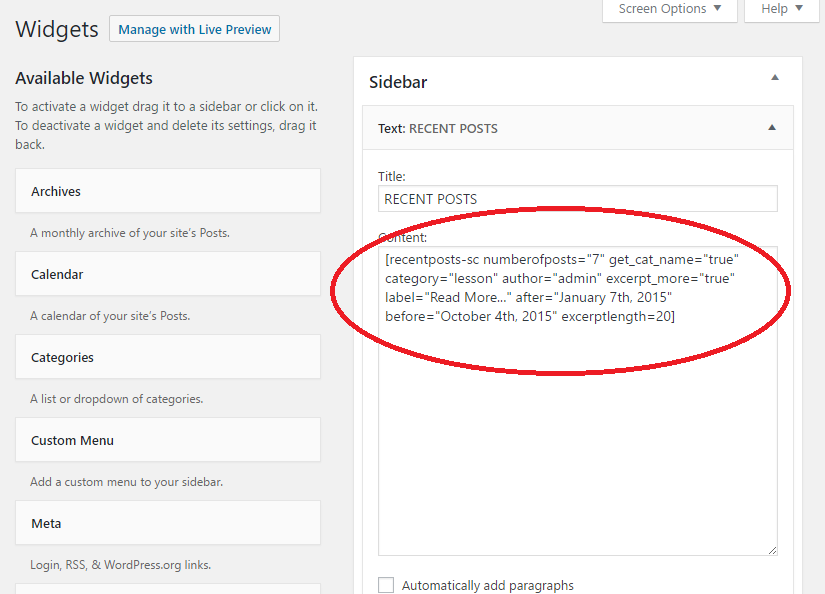
- For sidebar also use [recentposts-sc] in text widgets (refer screenshots as well for further help)
Advanced Parameters:
-
numberofposts (Number of posts)
Limit/Specify the number of posts you want to display
Default: 3
Example: [recentposts-sc numberofposts=”6″] -
post_type (Post Type)
Specify which post type you want to use. For example posts or pages
Default type: post
Example: [recentposts-sc post_type=”page”] -
get_cat_name (Category Name)
If you want to display category name in list of posts
Default: False
Example: [recentposts-sc get_cat_name=”true”] -
excerptlength (Custom Excerpt Length)
Define custom excerpt length
Example: [recentposts-sc excerptlength=”30″] -
enable_excerpt (Show/hide Excerpt display)
Sometimes you may not want to display excerpt and only like to keep title and image. To turn off/disable excerpts use enable_excerpt=”false” (default is true)
Example: [recentposts-sc enable_excerpt=”false”] -
image_size (Display default/custom image size instead of featured image)
Select image size like thumbnail, medium etc (by default featured image is displayed)
use image_size (default is false)
Example: [recentposts-sc image_size=”thumbnail”] or [recentposts-sc image_size=”medium”]
You can also use any custom image size if present in your website. -
category (Posts from specific Category/categories)
Filter posts from single category or multiple categories
Example single category: [recentposts-sc category=”lesson”]
Example multiple categories: [recentposts-sc category=”lesson,lesson2,lesson3″] -
author (Posts from specific author)
Filter posts from specific author
Example: [recentposts-sc author=”admin”]
More Parameters/Shortcodes can be seen in FAQ:
* FAQ.
Unterstützen
Developed by rajros
Installation
Automatische Installation
- Log in to WordPress admin panel and go to Plugins -> Add New
- Type ‘Recent Posts Shortcode & Widget’ in the search box and click on search button.
- From the search results find ‘Recent Posts Shortcode & Widget’ plugin.
- Click on “Install Now”
- Once installed click on “activate” button/link to activate the plugin.
- Add the shortcode [recentposts-sc] to a page/post or in text widget for sidebar.
Manuelle Installation
- Download the plugin from the wordpress plugin page.
- Unzip the plugin and upload “recentpostssc” folder into your plugins directory.
- Log in to WordPress admin panel and click the Plugins menu.
- From the list of plugins on the plugin page find “Recent Posts Shortcode & Widget” plugin and then click to activate the plugin.
- Add the shortcode [recentposts-sc] to a page/post or in text widget for sidebar.
Änderungsprotokoll
Version 1.8
* Option to show/hide images using show_image. Tested upto wordpress version 4.9.4
Version 1.7
* Option to show/hide images using show_image. Tested upto wordpress version 4.9.1
Version 1.6
- Fixed some css issues while selecting thumbnail, medium images etc
Version 1.5
- Added feature to display default/custom image size instead of featured image (like thumbnail, medium etc)
Version 1.4
- Added feature to hide/show excerpt
Version 1.3
- Fixed issue with featured image
Version 1.2
- Fixed display issue in sidebar
Version 1.1
- This version is first release of the plugin.
Screenshots



Für Entwickler
Ist das dein Plugin? Zeigen Sie die Zahlen.
Fügen Sie Ihrer Website, Docs oder GitHub Readme ein Live-Badge hinzu. Es wird von selbst aktualisiert - kein Konto erforderlich.
Best Recent Posts Shortcode & Widg… alternatives
All latest posts plugins →


Fragen und Antworten
Recent Posts Shortcode & Widget: quick answers
Gerade Antworten, gezogen von Live WordPress.org Daten.
Quelle: WordPress.org
Is Recent Posts Shortcode & Widget free?
Yes. Recent Posts Shortcode & Widget is free to download and use from the official WordPress.org plugin directory.
Is Recent Posts Shortcode & Widget safe to use in 2026?
Recent Posts Shortcode & Widget shows warning signs in 2026 — compare the alternatives below before installing. It runs on 300+ sites, is rated 5/5 and was last updated 9 years ago, and scores 38/100 on our health check.
How many websites use Recent Posts Shortcode & Widget?
Recent Posts Shortcode & Widget is active on 300+ WordPress websites and has been downloaded 13,874 times since it launched in March 2017. It was downloaded 205 times in the last 30 days.
Does Recent Posts Shortcode & Widget work with WordPress 7.1?
Recent Posts Shortcode & Widget is officially tested up to WordPress 4.9.36, while the latest release is 7.1.5. It may still work, but try it on a staging site first.
When was Recent Posts Shortcode & Widget last updated?
The latest version, 1.8, was released on March 14, 2018 (9 years ago).
Who makes Recent Posts Shortcode & Widget?
Recent Posts Shortcode & Widget is developed and maintained by rajros.
What are the best alternatives to Recent Posts Shortcode & Widget?
The most popular alternatives to Recent Posts Shortcode & Widget are Category Posts Block (40K+ installs), Latest Posts (4K+ installs) and news ticker benaceur (1K+ installs).
Angetrieben von PageForge
Eine Vorlage und eine Tabelle. Eine echte Seite für jede Suche.
PageForge Verwandelt jede Zeile eines CSV in eine WordPress-Seite mit eigenem Titel, URL, SEO Felder und Schema entworfen. Kostenlos auf WordPress.org.
- CSV und XLSX, plus Google Sheets auf Beruf und Unternehmen
- seinen eigenen Titel, URL, SEO Felder und Schema für jede Seite
- Arbeitet mit dem Blockeditor, Elementor, Divi und Avada
- Kostenlos auf WordPress.org, keine Kreditkarte