


Expandable FAQ
First – differently than any other similar plugin, this plugin is based on MIT license, which is a holly-grail for premium theme authors on i.e. ThemeForest or similar marketplaces. Differently to standard GPLv2 license…

Betrachten Sie eine Alternative
Expandable FAQ shows warning signs in 2026 — compare the alternatives below before installing. It runs on 40+ sites, is rated 4/5 and was last updated 7 years ago, and scores 28/100 on our health check.
- Kleine Benutzerbasis (40+ aktive Installationen)
- Bisher sehr wenige Bewertungen
- Kein Update in 7 Jahren
- Nur getestet bis WordPress 5.2 (letzt ist 7.1)
Wie stapelt es sich?
Side-by-side bei Installationen, Updates, Bewertungen und Support


Tägliche Downloads
Download-Spitzen folgen normalerweise einer neuen Version - jede Website, die automatisch aktualisiert wird, gilt als Download.
Ranglisten
Where Expandable FAQ stands todayWordPress.org Ranglisten suchen
Live-Position in der Plugin-Suche, Top 100| Stichwort | Position |
|---|---|
| collapse | >100 |
| collapsible | >100 |
| expand | >100 |
| expandable | >100 |
| faqs | >100 |
Versionsübernahme
Anteil aktiver Sites pro Release.
Bewertungsaufschlüsselung
★★★★★★★★★★ 4 from 4 reviews
About Expandable FAQ
From the official readme · v6.1.10Beschreibung
First – differently than any other similar plugin, this plugin is based on MIT license, which is a holly-grail for premium theme authors on i.e. ThemeForest or similar marketplaces.
Differently to standard GPLv2 license you are not required to open-source your theme and you CAN include this plugin into your premium websites bundle packs.
I do say here bundle packs, because you should never have an F.A.Q. to be a part of your theme, because that would be a bad idea – you need to leave your customers a flexibility for the future scale:
What if your customers will decide later go with some kind of fancy knowledge base system like in Change.org /help/ part or Envato.com Support part – if your customer will grow that big, he won’t need to have F.A.Q. plugin anymore on their website, he will want to replace it with that fancy knowledge base system.
So my advise is to include this plugin in your bundle pack’s /Optional Plugins/ folder, so that you can tell about in the installation instructions, but make it fully independent from your theme.
Second – this plugin is fully MVC + Templates based. This means that it’s code is not related at all to it’s UI, and that allows you easily to override it’s UI templates and Assets (CSS, JS, Images) by your theme very easily (and there is detailed step-by-step instructions given how to do that).
This means that you making a theme to be what the theme has to be – a UI part of your website, nothing more.
Third – it is much more secure than any other plugin’s on the market. It is based on top-end S.O.L.I.D. coding principle with input data validation with data-patterns, output escaping.
Fourth – this plugin is scalable – it’s source code is fully object-oriented, clean & logical, based on MVC architectural pattern with templates engine, compliant with strict PSR-2 coding standard and PSR-4 autoloaders, and easy to understand how to add new features on your own.
Fifth – this plugin works well with big databases & high-traffic websites – it is created on optimal BCNF database structure and was tested on live website with 1M customers database and 500,000 active daily views.
Sixth – it does support official WordPress multisite as network-enabled plugin, as well as it does have support WPML string translation.
At this point, if you need more than one language, I’d strongly advise to go with official WordPress multisite setup, because it is free, it is official (so you will never need to worry about the future support), and, most important – WordPress multisite is much more suitable for websites that needs to scale. You don’t want to have that additional translation bottle-neck code layer to be processed via database.
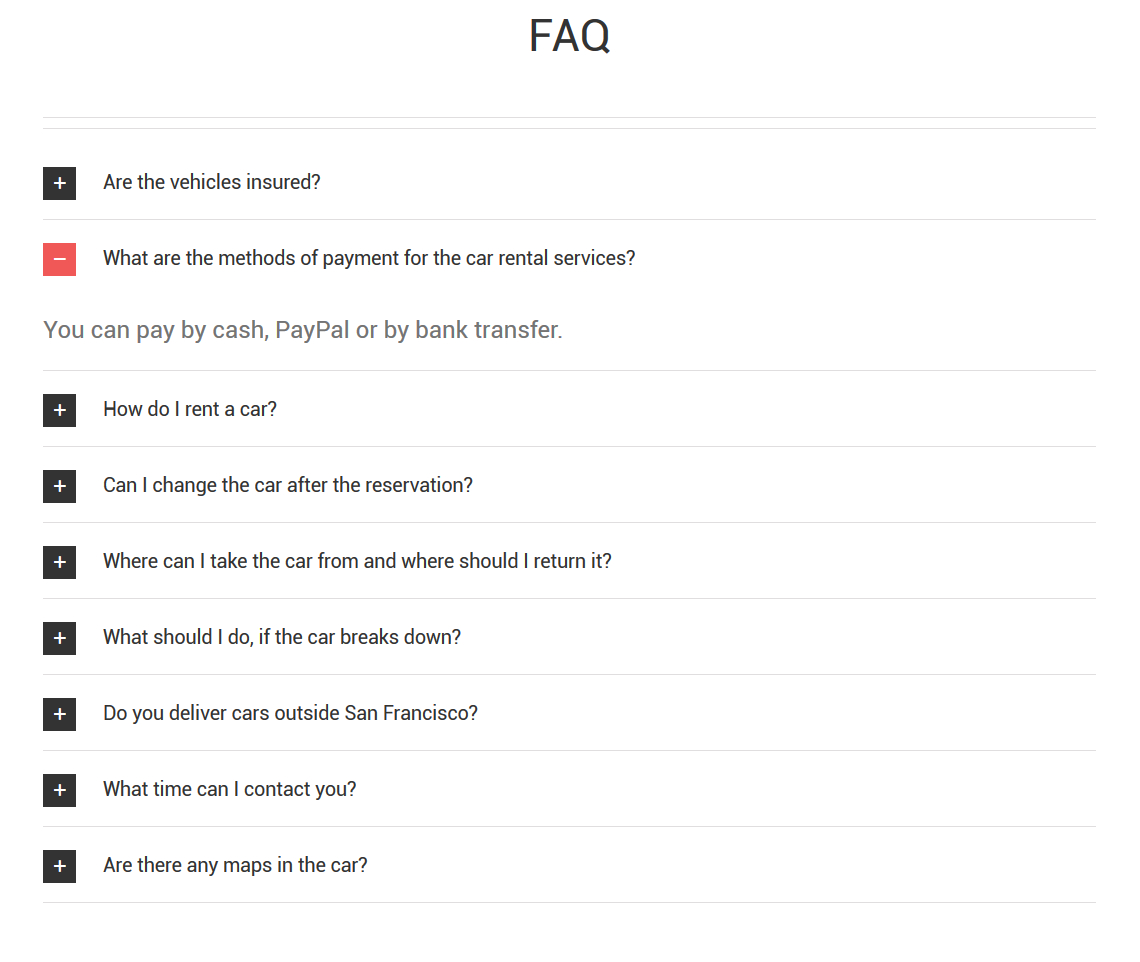
Seventh – it has nice user experience – it’s has a default design, it does allow you to have more than one F.A.Q. item open at the same time – so it don’t have that annoying accordion feature.
But the most important is that this plugin is and always be ads-free. I personally really hate these freemium, ads-full or tracking plugins which makes majority of the plugins on w.org plugins directory (and, actually, many of premium marketplaces). So this is the key features we always maintain:
1. Never track your data (nor even by putting some kind of GDPR-compliance agreement checkbox, like Error Log Monitor plugin),
2. Never make it pseudo-ads-full (even such a big plugins like WooCommerce or Contact Form 7 has nearly 80% of their home screen or 20% of their main buttons about how to install \ buy other plugins
– this is a really ugly behavior of pushing-more and going to Facebook-like business, where you get like drug-addicted to company products).
The goal of this plugin is to full-fill the needs of website-starter, that needs a great tool which can last him for many years until it will grow that big so he would grow-out current plugins and would need some kind of different plugins.
And, I believe, that many other developers had the same issue when tried to create their first premium theme or set-up a website for their client. Starting with the issues with license type to the moment when F.A.Q. is hardcoded into theme code.
So I wanted to help all these developers to save their time, and I’m releasing this plugin for you to simplify your work. And I’m releasing it under MIT license, which allows you to use this plugin your website bundle without any restrictions for both – free and commercial use.
Plus – I’m giving a promise to you, that this plugin is and will always be 100% free, without any ads, ‘Subscribe’, ‘Follow us’, ‘Check our page’, ‘Get Pro Version’ or similar links.
Finally – the code is poetry – the better is the web, the happier is the world.
Live Demo
GitHub Repository (for those, who want to contribute via “Pull Requests”)
Installation
In diesem Abschnitt wird beschrieben, wie Sie das Plugin installieren und zum Laufen bringen.
- Upload
ExpandableFAQ(orexpandable-faq) to the/wp-content/plugins/directory. - Activate the plugin through the ‘Plugins’ menu in WordPress.
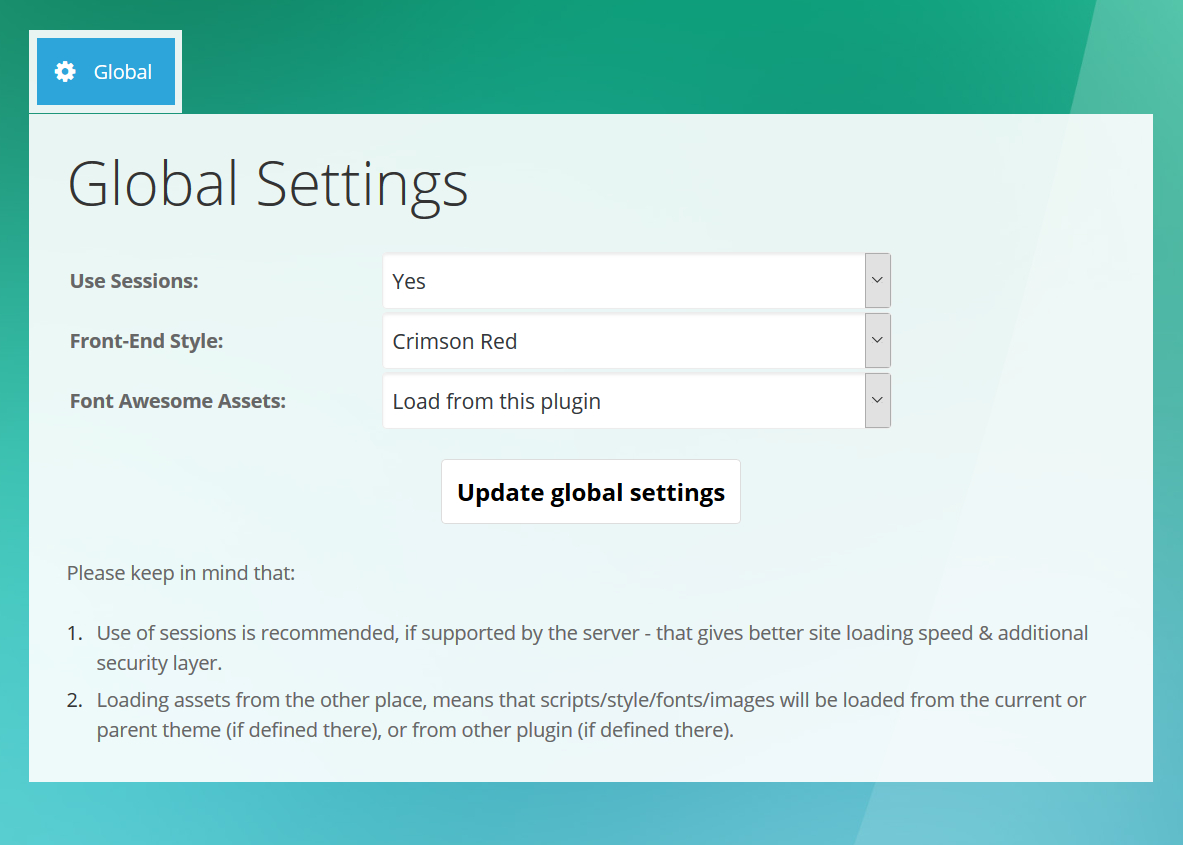
2.1. If your theme does not* support FontAwesome icons, please **enable FontAwesome in Expandable FAQ -> Settings -> “Global” tab. - Go to admin menu item
Expandable FAQ->FAQ Managerand add F.A.Q.’s. - Now create a page by clicking the [Add New] button under the page menu.
- Add
[expandable_faq display="faqs" layout="list"]shortcode to page content and click on[Publish]button. - In WordPress front-end page, where you added Expandable FAQ shortcode, you will see expandable F.A.Q.’s.
- Congratulations, you’re done! We wish you to have a pleasant work with our Expandable FAQ for WordPress.
Änderungsprotokoll
Just drag and drop new plugin folder or click 'update' in WordPress plugin manager.
6.1.10
- Semver alignment with other SolidMVC models.
6.1.9
- Fixed compatibility style routing bug
- Refactored time(UTC)
- HTTP changed to HTTPS
- Refactored CSSFile to CSS_File
6.1.8
- Minor HTML improvements.
- Segregated core and plugin language files.
- Global plugin lang path issue fixed.
- Improved language file.
- Improved language text.
- License line text patched.
- Duplicating demo UID check added to demos observer.
- CSS class naming improved.
6.1.7
- One template minorly patched, front-end main JS file renamed to correct name.
6.1.6
- Minor CSS tune-up.
6.1.5
- Abbreviation functions support added as
es(..),at(..),abh(..),eh(),ej(),et()for use mostly in templates, but they can also be used in models, if you use observer models that may be generating and returning to controller whole HTML blocks. Also these functions may be valuable for developers, that wants to have their HTML templates (or PHP-enhanced templates) be fully based only on SolidMVC (MIT-licensed), and not WordPress (GPL-licensed), as in this case your templates would be intensively calling only the MIT-licensed SolidMVC micro-framework’s functions. Additionally, this allows you to write a shorter code for your templates, which is easier to read for your designers. - escBrHTML(..) support added for language interface.
- Minor documentation and code tune-up.
Screenshots



Für Entwickler
Ist das dein Plugin? Zeigen Sie die Zahlen.
Fügen Sie Ihrer Website, Docs oder GitHub Readme ein Live-Badge hinzu. Es wird von selbst aktualisiert - kein Konto erforderlich.
Best Expandable FAQ alternatives
All collapse plugins →





Fragen und Antworten
Expandable FAQ: quick answers
Gerade Antworten, gezogen von Live WordPress.org Daten.
Quelle: WordPress.org
Is Expandable FAQ free?
Yes. Expandable FAQ is free to download and use from the official WordPress.org plugin directory.
Is Expandable FAQ safe to use in 2026?
Expandable FAQ shows warning signs in 2026 — compare the alternatives below before installing. It runs on 40+ sites, is rated 4/5 and was last updated 7 years ago, and scores 28/100 on our health check.
How many websites use Expandable FAQ?
Expandable FAQ is active on 40+ WordPress websites and has been downloaded 3,406 times since it launched in October 2018. It was downloaded 122 times in the last 30 days.
Does Expandable FAQ work with WordPress 7.1?
Expandable FAQ is officially tested up to WordPress 5.2.31, while the latest release is 7.1.5. It may still work, but try it on a staging site first.
What PHP version does Expandable FAQ need?
Expandable FAQ requires PHP 5.6 or higher. Most hosts run PHP 8.x today, so it works on any modern WordPress hosting.
When was Expandable FAQ last updated?
The latest version, 6.1.10, was released on August 12, 2019 (7 years ago).
Who makes Expandable FAQ?
Expandable FAQ is developed and maintained by KestutisIT.
What are the best alternatives to Expandable FAQ?
The most popular alternatives to Expandable FAQ are Accordion FAQ (30K+ installs), Show-Hide / Collapse-Expand (10K+ installs) and BBSpoiler (4K+ installs).
Angetrieben von PageForge
Eine Vorlage und eine Tabelle. Eine echte Seite für jede Suche.
PageForge Verwandelt jede Zeile eines CSV in eine WordPress-Seite mit eigenem Titel, URL, SEO Felder und Schema entworfen. Kostenlos auf WordPress.org.
- CSV und XLSX, plus Google Sheets auf Beruf und Unternehmen
- seinen eigenen Titel, URL, SEO Felder und Schema für jede Seite
- Arbeitet mit dem Blockeditor, Elementor, Divi und Avada
- Kostenlos auf WordPress.org, keine Kreditkarte