


Easy Content Manager (ECM) – Custom Post Types, Custom Fields & Content Management
Add extra data fields, custom post types and taxonomies, and manage all your WordPress content visually — without writing any code.

Solide Wahl
Easy Content Manager (ECM) is a solid plugin choice in 2026, with a few things worth checking first. It runs on 100+ sites, is rated 5/5 and was last updated 1 month ago, and scores 75/100 on our health check.
- Getestet mit dem neuesten WordPress (7.1)
- Kleine Benutzerbasis (100+ aktive Installationen)
- Bisher sehr wenige Bewertungen
Wie stapelt es sich?
Side-by-side bei Installationen, Updates, Bewertungen und Support



Tägliche Downloads
Download-Spitzen folgen normalerweise einer neuen Version - jede Website, die automatisch aktualisiert wird, gilt als Download.
Ranglisten
Where Easy Content Manager (ECM) stands todayWordPress.org Ranglisten suchen
Live-Position in der Plugin-Suche, Top 100| Stichwort | Position |
|---|---|
| content management | #13 |
| custom fields | #75 |
| Benutzerdefinierte Post-Typ | #72 |
| repeater | #91 |
| taxonomy | >100 |
Versionsübernahme
Anteil aktiver Sites pro Release.
Bewertungsaufschlüsselung
★★★★★★★★★★ 5 from 3 reviews
About Easy Content Manager (ECM)
From the official readme · v1.3.1Beschreibung
Easy Content Manager (ECM) – Add extra data fields and manage website content in WordPress
Easy Content Manager is the fast, flexible content management plugin built for creators, developers, and website owners who want better control over their WordPress posts, pages, users, settings, taxonomy and custom post types—without the clutter, bloat, or manual work.
From docs, blogs, services, portfolios, courses, and products—to any type of custom post, ECM lets you create and manage everything in one place. Add advanced taxonomies and custom fields like ratings, videos, author details, product data, client feedback, and more. You get full flexibility to organize, filter, and control how content is displayed—without writing a single line of code.
👥 Who Should Use Easy Content Manager?
- 🎯 Website Owners – Running a portfolio, blog, recipe site, job board, or local business directory? ECM makes it easy to manage structured content without relying on extra plugins or developers.
- 🧑💻 Freelancers & Agencies – Deliver client-specific content types fast. Build and manage post types for real estate listings, staff directories, service lists, product catalogs, or testimonials—right from the dashboard. Create functional client sites even without extra third-party tools.
- 📝 Bloggers – Add advanced fields like “Author Bio”, “Post Rating”, “Reading Time”, or “Source Link” directly to your blog posts—without bloating your theme. A full-featured blogging site can be built with ECM alone.
- 🎓 Course Creators – Need to display instructor info, course outline, video links, or duration on course pages? Do it all visually—no coding needed. Build a basic course website even without an LMS plugin.
- 🛒 Store Owners & eCommerce Sites – Add extra product info like expiration dates, supplier links, additional images, or video reviews. You can launch a product showcase site without using any eCommerce plugin.
- 🏢 Local Businesses – Showcase team members, services, client feedback, or service areas with clean, professional layouts. Even without extra add-ons, you can build a working business website.
- 📇 Directory or Listing Sites – Manage complex databases like job listings, restaurants, agencies, or vendors. ECM supports user reviews, ratings, ownership claims, popularity tracking, and saved listings—ideal for directory-style websites.
- 👨🔧 Developers – Get a quick, clean visual editor to test custom post types and field structures before pushing to production. Build full content prototypes without relying on external plugins.
🔧 What Is Easy Content Manager (ECM) and Why It Matters
Working with dynamic content in WordPress can be painful—especially when you need to manage custom post types, structured data, or repeatable content sections. Most solutions either focus only on adding custom fields or force you into a clunky third-party plugin or manual coding and post edits.
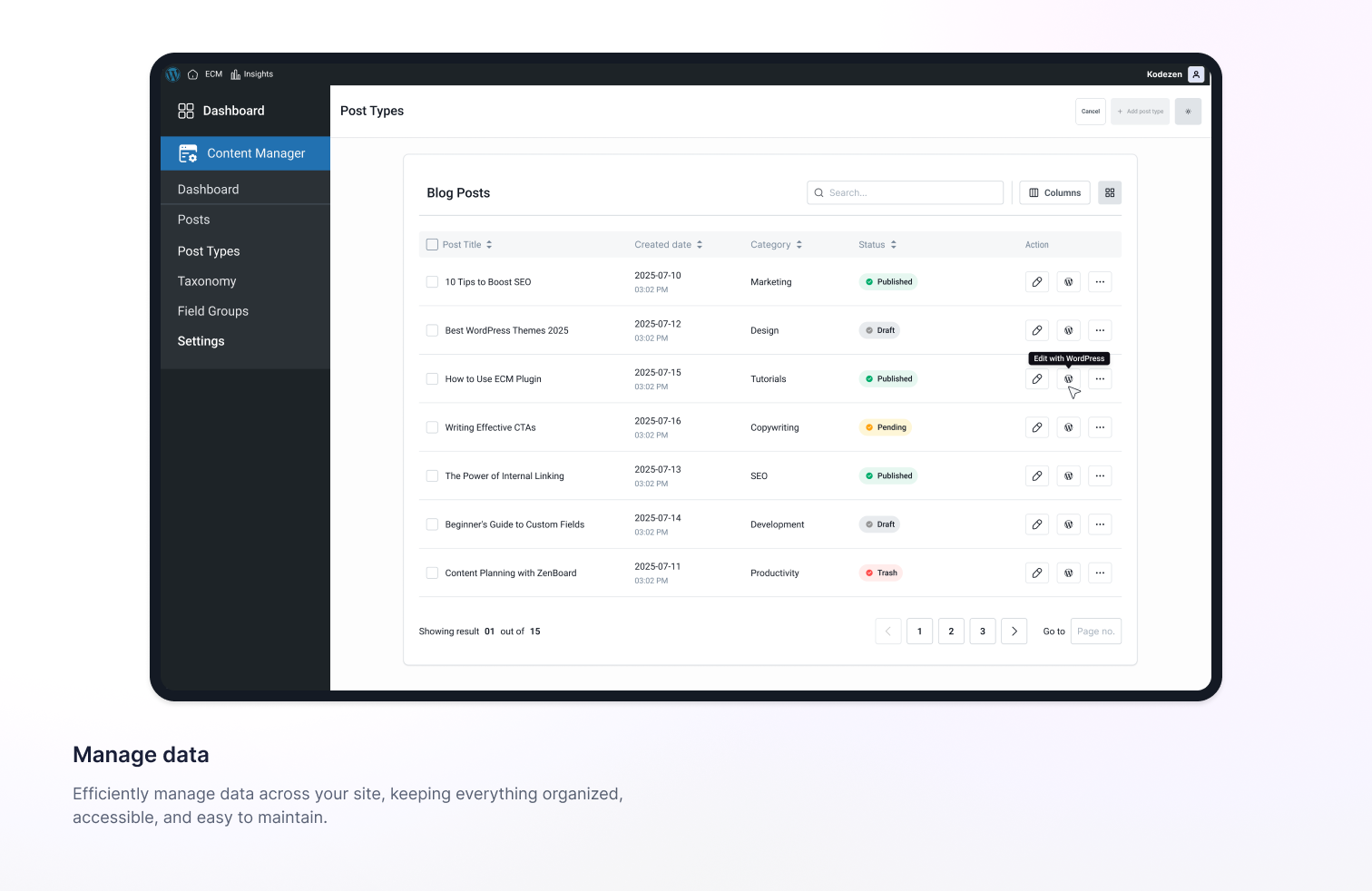
Easy Content Manager (ECM) solves this from both sides. You’re not just creating custom fields—you’re also getting a dedicated interface to manage those fields visually, without jumping into individual post screens. ECM provides a clean, fast UI where you can add, update, organize, and filter your content—all from a single screen.
Instead of just inserting fields into a form, you can:
- View and manage field values
- Instantly filter posts by categories or status
- Create repeatable field groups and display them visually
- Control your content types and field logic without writing a single line of code
Where others stop at field creation, ECM gives you full content control—for posts, products, courses, testimonials, or any custom content type. You can:
- Edit, duplicate, delete, and filter any post type
- Manage custom fields, taxonomies, and content settings visually
- Create your own dashboard layout using custom field views
- Avoid the mess of jumping between WordPress menus and post screens
Beyond content structure, ECM also supports built-in user interaction features. You can enable reviews, ratings, reactions, upvotes, bookmarks, and view counts on any post type and manage all engagement data directly from the dashboard—without installing separate plugins.
🧠 Why Use ECM Over Traditional Custom Field Plugins?
Most developers know tools like Advanced Custom Fields (ACF). These are solid for adding custom fields—but limited when it comes to actually managing content. ECM is more than a custom field builder—it’s a complete content management tool for WordPress.
- ✅ Visual Field Management – Not Just Creation – ACF creates fields. ECM goes further with a dedicated interface to view and manage field values directly from the dashboard—no digging through single post pages.
- ✅ Manage Fields and Content from One Dashboard – Add, edit, delete, and duplicate posts; manage categories, tags, comments, and featured images; apply filters to find content instantly; and work across all post types from one place.
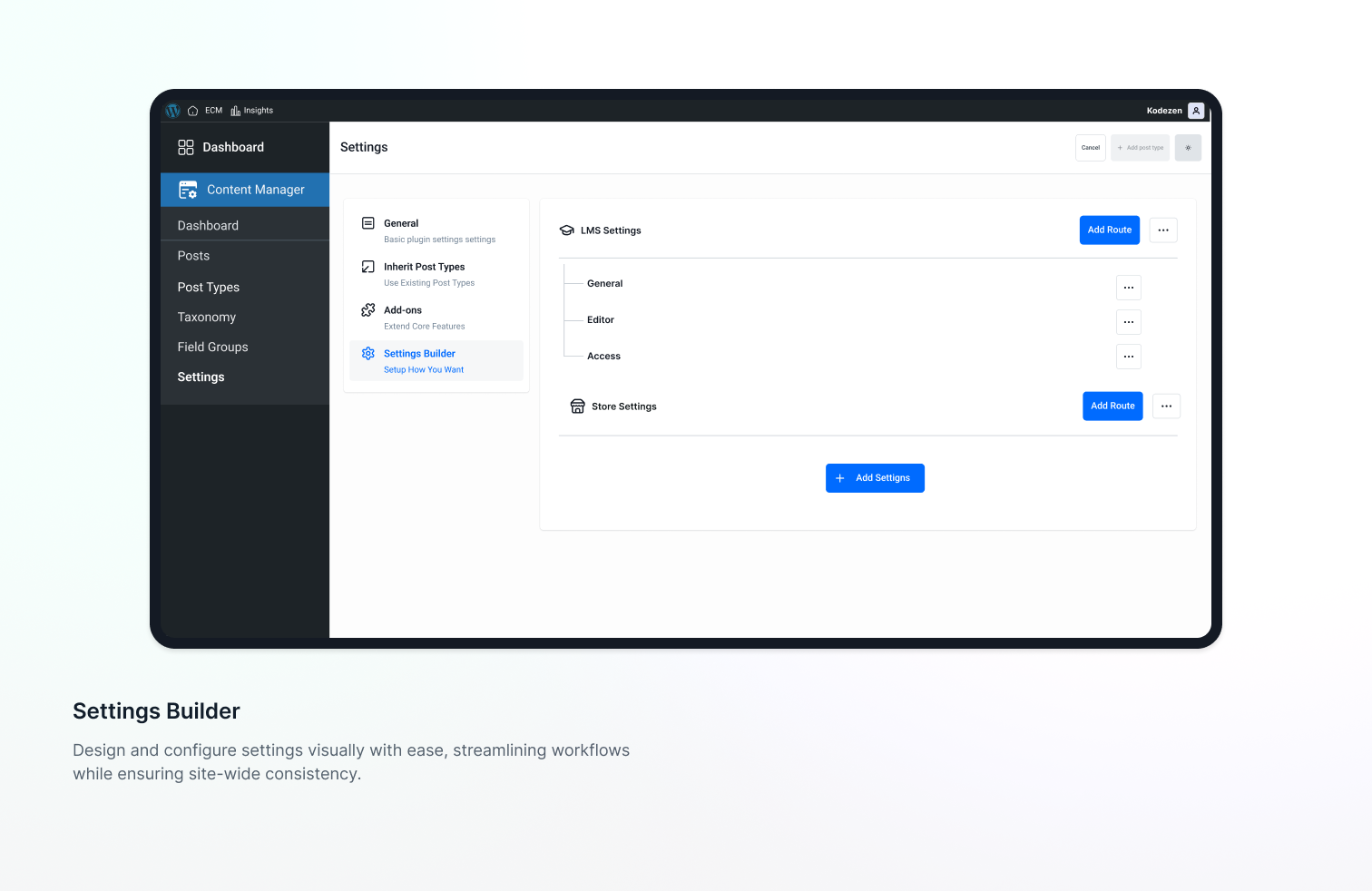
- ✅ Custom Settings Builder (Pro) – Create custom settings panels for site-wide data like contact info, social links, and global banners—something ACF doesn’t offer by default. No code needed.
✨ Easy Content Manager Features
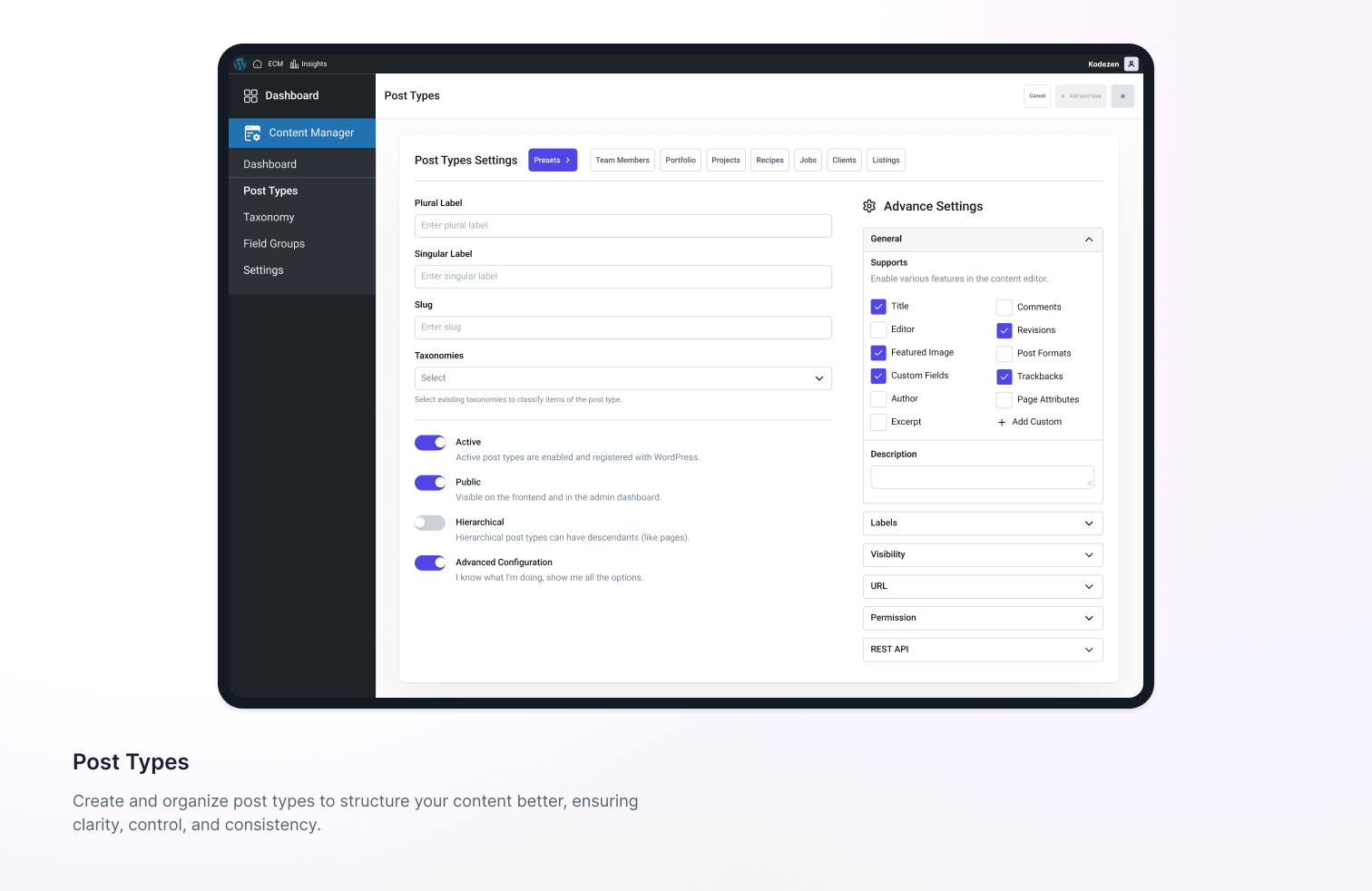
- Create Custom Post Types Without Coding – Set names, slugs, icons, visibility, and more in a few clicks. Supports advanced post sorting by title or date (ascending/descending).
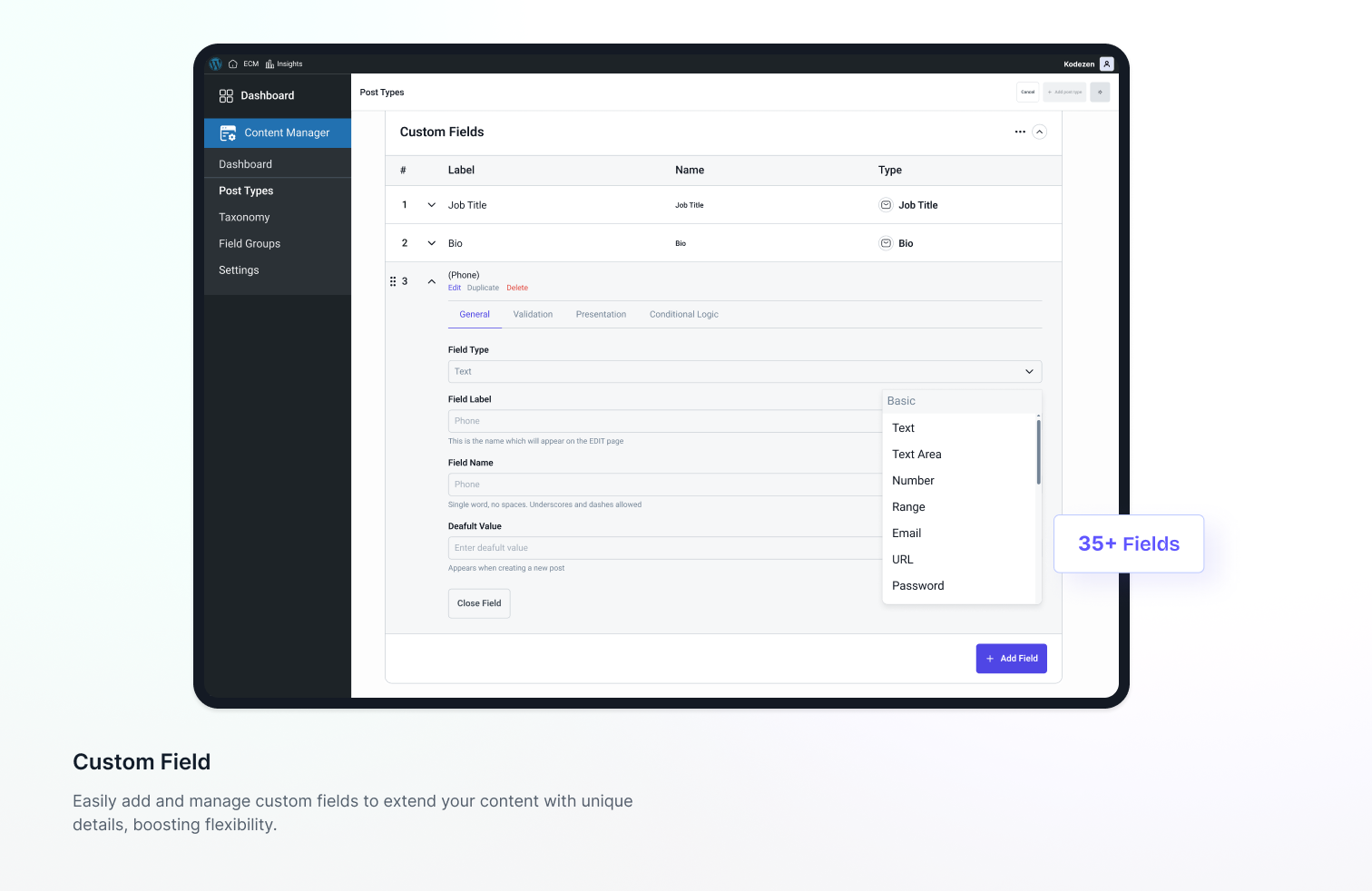
- Add Advanced Custom Fields to Any Post Type – Collect structured content and display dynamic data without extra plugins.
- Visual Field Management Interface – View, edit, and manage custom field values across posts from one clean dashboard.
- Create and Group Fields Logically – Organize related fields using Field Groups and apply them to specific post types.
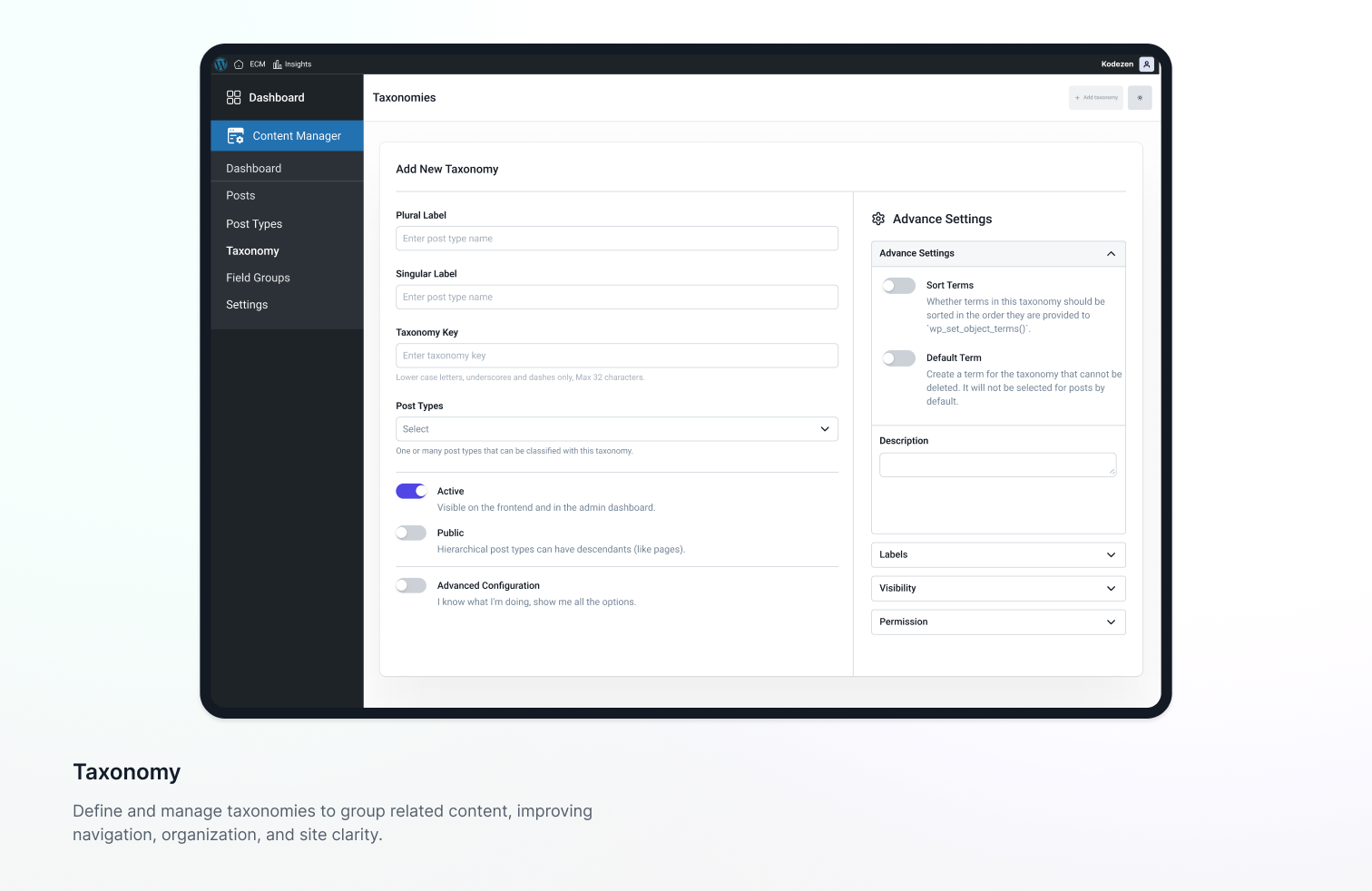
- Built-In Taxonomy Support – Create and manage custom taxonomies like “Job Type,” “Course Level,” or “Project Status.”
- Settings Panel Builder for Global Data (Pro) – Store site-wide values like contact info, header scripts, or social links.
- Supports 35+ Field Types Out of the Box – Text, Textarea, Number, Email, URL, Password, Rich Text, Image, File, Video, Date, Time, Switch, and more.
- Reusable Field Groups Across Post Types – Apply the same group of fields to multiple post types without rebuilding.
- Test and Preview Changes Instantly – Post types, taxonomies, and field groups apply and load instantly in WordPress.
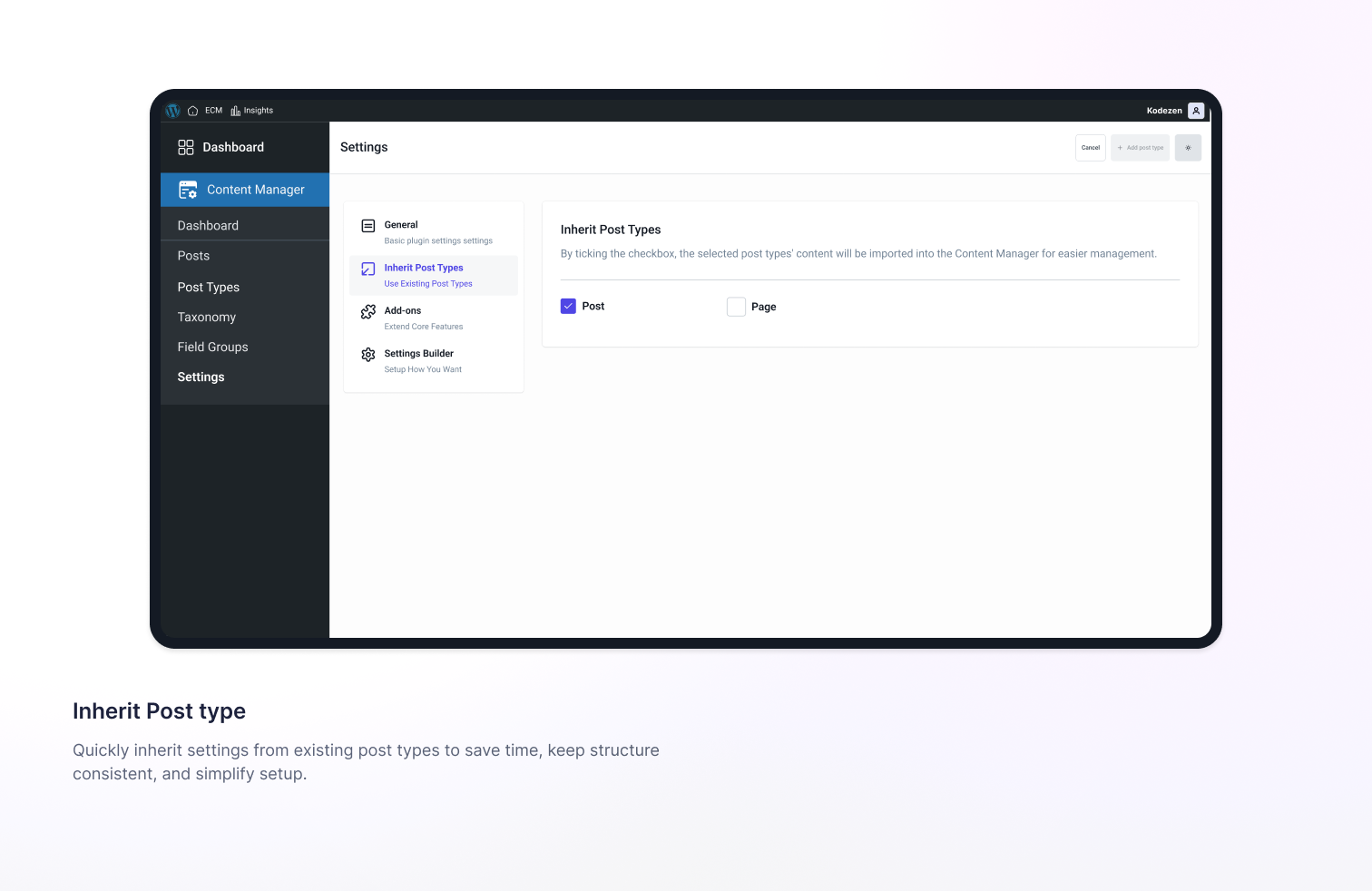
- Manage Existing Post Types with ECM – Attach custom fields, taxonomies, and settings to WordPress defaults like Posts and Pages.
- Clean and Lightweight Codebase – Loads only when needed and integrates smoothly with modern WordPress setups.
- Settings Builder (Pro) – Create custom settings pages for any WordPress plugin/theme and extend existing plugins/themes without complex code.
- Display Custom Field Data Anywhere Using Shortcodes – The
[ecm_field]shortcode displays any custom field value—text, image, link, file, or any supported type—inside pages or posts.
🔌 Easy Content Manager Pro
This plugin is complete and fully functional on its own. A separate Pro package, available from easycontentmanager.pro, adds gallery and repeater field types, the Settings Builder, and the following add-ons. None of this Pro code is included in this plugin.
- Claim Addon – Lets users submit ownership claims for posts, listings, or custom post types. Admins can review, approve, or reject claims from the dashboard.
- Review Addon – Enables users to submit reviews on any post type, with admin moderation controls and per-post-type enable/disable.
- Ratings Addon – Adds numeric or star-based ratings to any post type, managed from the backend per content type.
- Bookmark Addon – Lets users save posts for later (custom post types supported). Bookmarks are stored per user and shown in profiles or dashboards.
- Upvote Addon – Enables post upvoting to measure popularity, with anonymous voting, abuse prevention, and admin controls.
- View Counter Addon – Tracks post and page views automatically (custom post types supported), with anonymous tracking and time-based count control.
- Reaction Addon – Adds multiple reaction types such as like, love, or wow for any post type, managed from the admin panel.
Externe Dienste
Easy Content Manager connects to the external services listed below, only in the situations described.
OpenStreetMap map tiles and Nominatim search (Map field, admin editor)
When you edit a post that has a Map field, the map preview loads map tile images from the OpenStreetMap tile servers (tile.openstreetmap.org). If you type an address into the Map field’s search box, the text you typed is sent to the OpenStreetMap Nominatim geocoding service (nominatim.openstreetmap.org) to look up its coordinates. Your browser’s IP address and user agent are visible to these servers as part of the requests. Nothing is sent unless a Map field is displayed in the editor.
Service provider: OpenStreetMap Foundation.
Terms of Use: https://osmfoundation.org/wiki/Terms_of_Use (tiles: https://operations.osmfoundation.org/policies/tiles/, Nominatim: https://operations.osmfoundation.org/policies/nominatim/)
Privacy Policy: https://osmfoundation.org/wiki/Privacy_Policy
Google Maps embed (Map field, front end)
When a Map field is displayed on the front end of your site (for example with the [ecm_field] shortcode), the plugin embeds a Google Maps iframe for the saved latitude, longitude and zoom level. Those coordinates are sent to Google (www.google.com) when a visitor loads the page, and Google receives the visitor’s IP address and browser details. Nothing is sent on pages that do not display a Map field.
Service provider: Google LLC.
Terms of Service: https://maps.google.com/help/terms_maps/
Privacy Policy: https://policies.google.com/privacy
Kodezen (store.kodezen.com) — optional feedback and usage data
-
Deactivation feedback (optional). If you deactivate the plugin and submit the optional feedback form, the deactivation reason you select plus the plugin slug and version are sent to https://store.kodezen.com. No personal or site data is sent unless you explicitly tick the “Also send my site data” checkbox shown in that form. If you tick it, the form additionally sends your admin name and email, site name and URL, server IP address, server/PHP/database versions and operating-system details, WordPress version and locale, and your list of active/inactive plugins and active theme. Choosing “Skip & Deactivate” sends nothing.
-
Usage tracking (optional, off by default). The plugin can periodically send the same site-environment data described above to help improve the product, but only after you explicitly opt in. Tracking is disabled until you opt in and can be turned off again at any time.
This plugin does not perform license checks; no feature depends on a license or on this service.
Service provider: Kodezen.
Terms of Service: https://kodezen.com/terms-and-conditions/
Privacy Policy: https://store.kodezen.com/privacy-policy/
Source Code
The full source code is publicly available on GitHub: https://github.com/kodezen/easy-content-manager
The JavaScript and CSS in assets/build/ are compiled from the human-readable sources included in this plugin:
dev_contentManager/— React/JavaScript sources for every bundle.assets/scss/— SCSS sources for the stylesheets.package.jsonandwebpack.config.js— build configuration (uses@wordpress/scripts).composer.json— PHP dependencies installed intovendor/.
To rebuild the assets:
- Install Node.js 20 or newer and Composer.
- Run
composer install --no-devandnpm installin the plugin folder. - Run
npm run build(ornpm run startwhile developing).
Installation
- Upload the
easy-content-managerfolder to the/wp-content/plugins/directory, or install the plugin through the WordPress plugins screen directly. - Aktivieren Sie das Plugin über den Bildschirm „Plugins“ in WordPress.
- Use the Easy Content Manager menu in the admin to create your post types, taxonomies, and fields.
Änderungsprotokoll
Security release: protects password fields, blocks visitor term creation, enforces the CAPTCHA setting and keeps unreviewed uploads private. Also adds a redesigned upload field and fixes several front-end shortcode issues. Recommended for all users.
1.3.1 — 2026-10-24
- Security: Password fields are never shown in plain text: the field template shows a mask,
[ecm_fields]skips them, and the REST API only returns them to users who can edit the post. - Security: Visitors can no longer create new tags or terms through frontend submission; they can only choose existing ones.
- Security: “Require CAPTCHA” now blocks visitor submissions until GemSecurity’s CAPTCHA is set up, instead of silently skipping the check. The settings screen warns when it isn’t configured.
- Security: Files uploaded by visitors are no longer publicly downloadable before review, and each visitor can upload at most 50 MB per day (filterable).
- Security: With anonymous submission on, logged-in users still need one of the allowed roles to submit.
- Added: A redesigned image/file upload field with drag and drop for visitors, the accepted file types and size limit, a preview card, and Replace/Remove buttons.
- Added: Add-on shortcodes share one look: card lists for bookmarks, upvotes, reactions and claims, count badges, a view counter with an icon, and styled empty and login messages.
- Changed: The Set Order modal saves typed priorities and drag-and-drop changes only when you click Save.
- Changed: The frontend submission form fits the theme’s content width; logged-out visitors no longer see an empty sidebar.
- Changed: List tables, the Set Order button and modal, and the Tools Export/Import card have updated borders and colors.
- Changed: Add-on shortcode output is more compact.
- Fixed: Add Featured Image on the front end did nothing (the media library is now loaded for users who can upload).
- Fixed: Front-end form placeholders looked like real text, and the textarea used a monospace font.
- Fixed: Reactions and the review form stopped working on pages with bookmarks or upvote/reaction lists.
- Fixed: The Claim Now button threw a JavaScript error.
- Fixed: Review lists showed the post’s average instead of each review’s own rating, rating bars were nearly empty, and totals didn’t update when a review was approved from the Comments screen.
- Fixed: Logged-out messages and counts appeared outside the content area in block themes.
- Fixed: A missing image (404) on empty lists in the frontend submission app.
1.3.0 — 2026-10-20
- Added: Anonymous frontend submission — visitors can submit without an account, protected by a GemSecurity CAPTCHA option and a per-visitor submission limit.
- Added: Visitors see their own submissions with
show_list="true"and can edit or delete the ones that are not yet published (tracked by a signed cookie). - Added: Visitors can upload files directly. Files are validated and held privately, become attachments when an admin opens the submission, and appear on the site only after it is published.
- Added:
[ecm_fields]shortcode that shows every custom field of a post with its label (post_id,label,include,exclude). - Added: Tools › Shortcodes now has one sub item per add-on in the sidebar, plus a dedicated Custom Field section.
- Added: Frontend submission topbar stays sticky, a “Back to List” button on the form, and notifications appear at the top right.
- Changed: Submission status in the Frontend Submission settings is now a Pending/Draft radio choice.
- Changed: The front-end editor only shows the content field when the post type supports the editor.
- Changed: The submission form uses the full width when the post type has no sidebar fields.
- Changed: Editing your own submission no longer counts towards the submission limit.
- Fixed: Custom field labels missing on the front-end form.
- Fixed: A failed submission request showed an extra “res is undefined” error.
1.2.10 — 2026-10-17
- Fixed: PHP 7.4 compatibility — replaced PHP 8-only string functions used in AJAX requests.
- Fixed: Escaped the admin app wrapper attributes and restricted oEmbed output to safe tags.
- Changed: Namespaced the internal Hooks class to avoid collisions with other plugins.
- Changed: Plugin header no longer declares “Tested up to”; readme and header versions now match.
- Changed: Widget scan reads widget data via the Options API.
1.2.9 — 2026-10-12
- Changed: The plugin no longer contains any Pro code or license checks; gallery/repeater fields, the Settings Builder and add-ons are provided by the separate Pro package.
- Changed: The HTML source view no longer loads an editor from a public CDN.
- Changed: oEmbed previews now use WordPress core’s oEmbed proxy instead of a third-party service.
- Changed: Admin menu moved lower in the dashboard menu.
- Fixed: Replaced deprecated
get_page_by_title()withWP_Query. - Fixed: Import uploads now go through
wp_handle_upload(). - Security: Post priority listing now requires edit access to the requested post type.
- Added: Readable JS/SCSS sources,
composer.jsonand build instructions are included; external services are fully documented.
1.2.8 — 2026-09-27
- Fixed: The 1.2.7 release package mistakenly contained a nested
trunkfolder. This release ships a clean package.
1.2.7 — 2026-09-27
- Improved: The StoreEngine licence SDK is now loaded by requiring its
init.phpdirectly instead of relying on Composer’sfilesautoload, so a newer bundled SDK is no longer silently skipped when several active plugins each ship a copy. - Improved: Declared
critical_pathsfor the licence SDK’s pre-swap update validation, so an incomplete or truncated update package is rejected before WordPress swaps the plugin folder. - Improved: Updated the bundled licence SDK to 1.5.9 — no more licence-server calls on every admin page load, batched background update checks, and a circuit breaker when the licence server is down.
- Improved: Refactored the React content editor’s styles onto CSS variables and separated out WordPress admin-chrome overrides for more consistent theming across the backend, block editor, and classic editor.
- Fixed: Taxonomies attached to another plugin’s post type (e.g. an LMS course type) now get an admin submenu placed under that plugin’s menu correctly.
- Fixed: The post list no longer loses its current page, search term, status filter, or sort order when its data refreshes.
Screenshots

Für Entwickler
Ist das dein Plugin? Zeigen Sie die Zahlen.
Fügen Sie Ihrer Website, Docs oder GitHub Readme ein Live-Badge hinzu. Es wird von selbst aktualisiert - kein Konto erforderlich.
Best Easy Content Manager (ECM) alternatives
All content management plugins →





Fragen und Antworten
Easy Content Manager (ECM): quick answers
Gerade Antworten, gezogen von Live WordPress.org Daten.
Quelle: WordPress.org
Is Easy Content Manager (ECM) free?
Yes. Easy Content Manager (ECM) is free to download and use from the official WordPress.org plugin directory.
Is Easy Content Manager (ECM) safe to use in 2026?
Easy Content Manager (ECM) is a solid plugin choice in 2026, with a few things worth checking first. It runs on 100+ sites, is rated 5/5 and was last updated 1 month ago, and scores 75/100 on our health check.
How many websites use Easy Content Manager (ECM)?
Easy Content Manager (ECM) is active on 100+ WordPress websites and has been downloaded 4,271 times since it launched in July 2025. It was downloaded 432 times in the last 30 days.
Does Easy Content Manager (ECM) work with WordPress 7.1?
Yes. The developer has tested Easy Content Manager (ECM) up to WordPress 7.1.5, the latest release. It requires WordPress 6.4 or newer.
What PHP version does Easy Content Manager (ECM) need?
Easy Content Manager (ECM) requires PHP 7.4 or higher. Most hosts run PHP 8.x today, so it works on any modern WordPress hosting.
When was Easy Content Manager (ECM) last updated?
The latest version, 1.3.1, was released on October 25, 2026 (1 month ago).
Who makes Easy Content Manager (ECM)?
Easy Content Manager (ECM) is developed and maintained by Kodezen LLC.
What are the best alternatives to Easy Content Manager (ECM)?
The most popular alternatives to Easy Content Manager (ECM) are Enable Abilities for MCP (7K+ installs), Real Category Management: C… (2K+ installs) and Spots (700+ installs).
Angetrieben von PageForge
Eine Vorlage und eine Tabelle. Eine echte Seite für jede Suche.
PageForge Verwandelt jede Zeile eines CSV in eine WordPress-Seite mit eigenem Titel, URL, SEO Felder und Schema entworfen. Kostenlos auf WordPress.org.
- CSV und XLSX, plus Google Sheets auf Beruf und Unternehmen
- seinen eigenen Titel, URL, SEO Felder und Schema für jede Seite
- Arbeitet mit dem Blockeditor, Elementor, Divi und Avada
- Kostenlos auf WordPress.org, keine Kreditkarte