


Cherrylift – Selective Content Sync
Move selected posts, pages, terms and media between WordPress sites without overwriting live data. IDs and links are remapped automatically.

Solide Wahl
Cherrylift is a solid plugin choice in 2026, with a few things worth checking first. Was last updated 4 days ago, and scores 64/100 on our health check.
- Actively developed — last update 4 days ago
- Getestet mit dem neuesten WordPress (7.1)
- Kleine Benutzerbasis (<10 aktive Installationen)
- Bisher sehr wenige Bewertungen
Wie stapelt es sich?
Side-by-side bei Installationen, Updates, Bewertungen und Support



Tägliche Downloads
Download-Spitzen folgen normalerweise einer neuen Version - jede Website, die automatisch aktualisiert wird, gilt als Download.
Ranglisten
Where Cherrylift stands todayWordPress.org Ranglisten suchen
Live-Position in der Plugin-Suche, Top 100| Stichwort | Position |
|---|---|
| Inhalt | >100 |
| deployment | >100 |
| Migration | >100 |
| Aufführung | >100 |
| sync | >100 |
About Cherrylift – Selective Content Sync
From the official readme · v0.3.1Beschreibung
Cherrylift copies the content you choose from one WordPress site to another, for example from staging to production, without migrating the database.
Copying a whole database (or whole tables) overwrites everything created on the target since the last sync: orders, user accounts, form entries, comments. Cherrylift only moves the items you pick, plus everything they depend on, and leaves the rest of the target site alone.
Wie es funktioniert
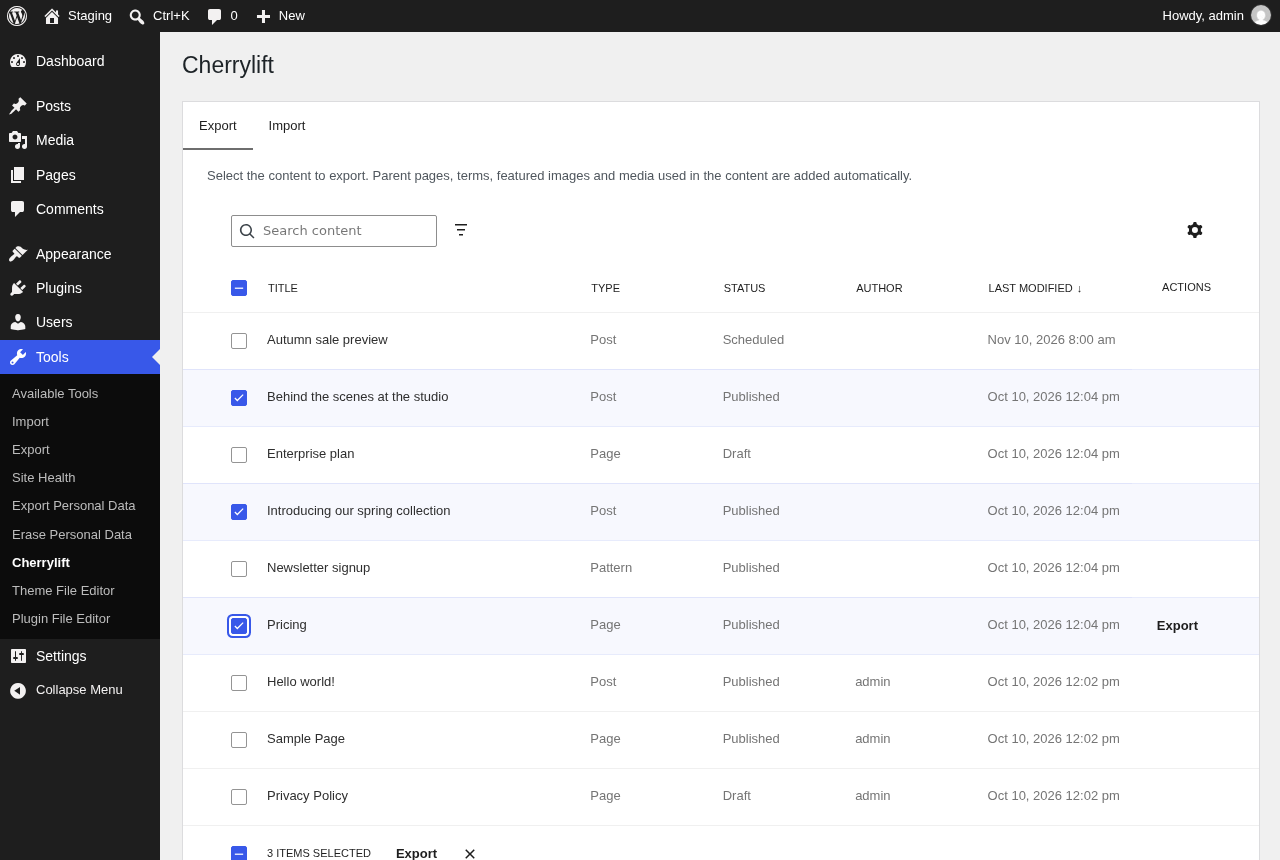
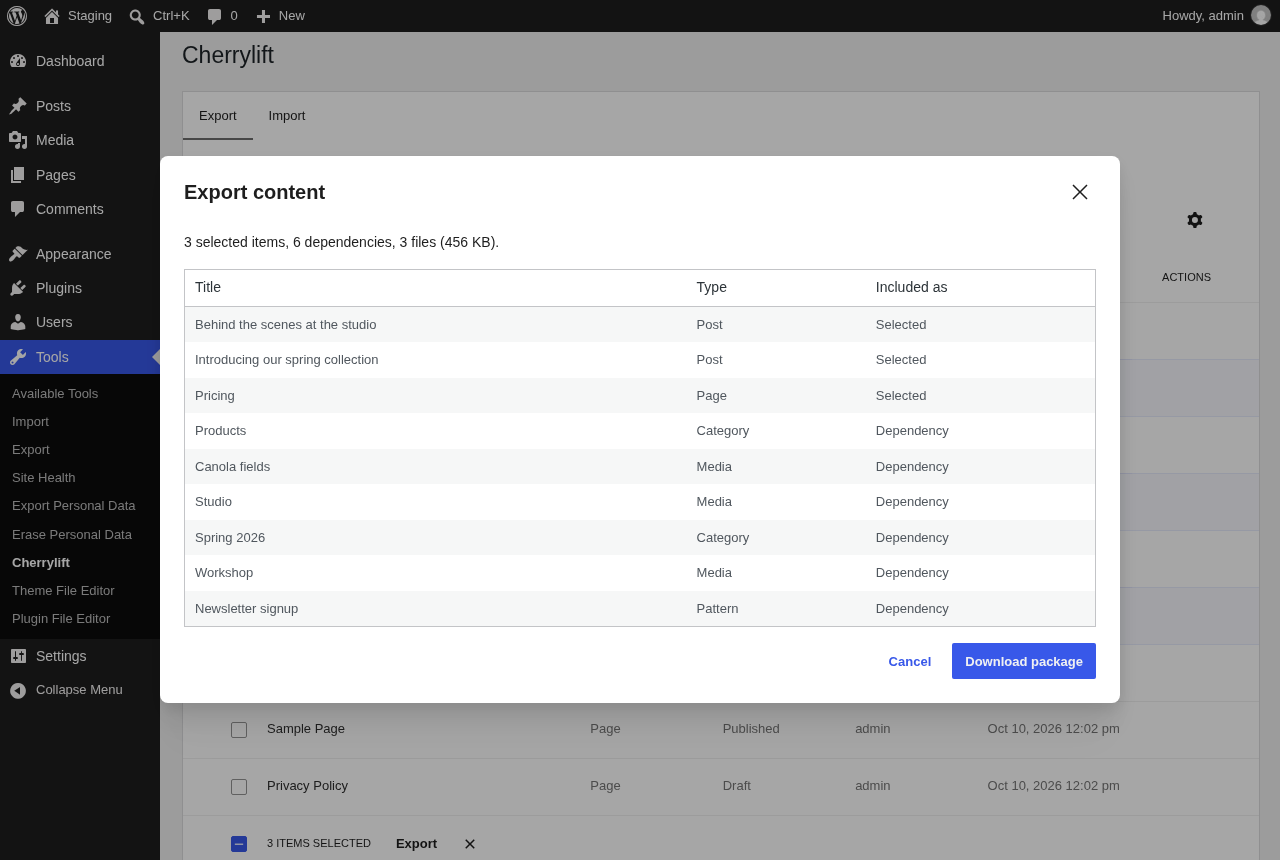
- On the source site, go to Tools → Cherrylift → Export, select content and download a package (a zip file).
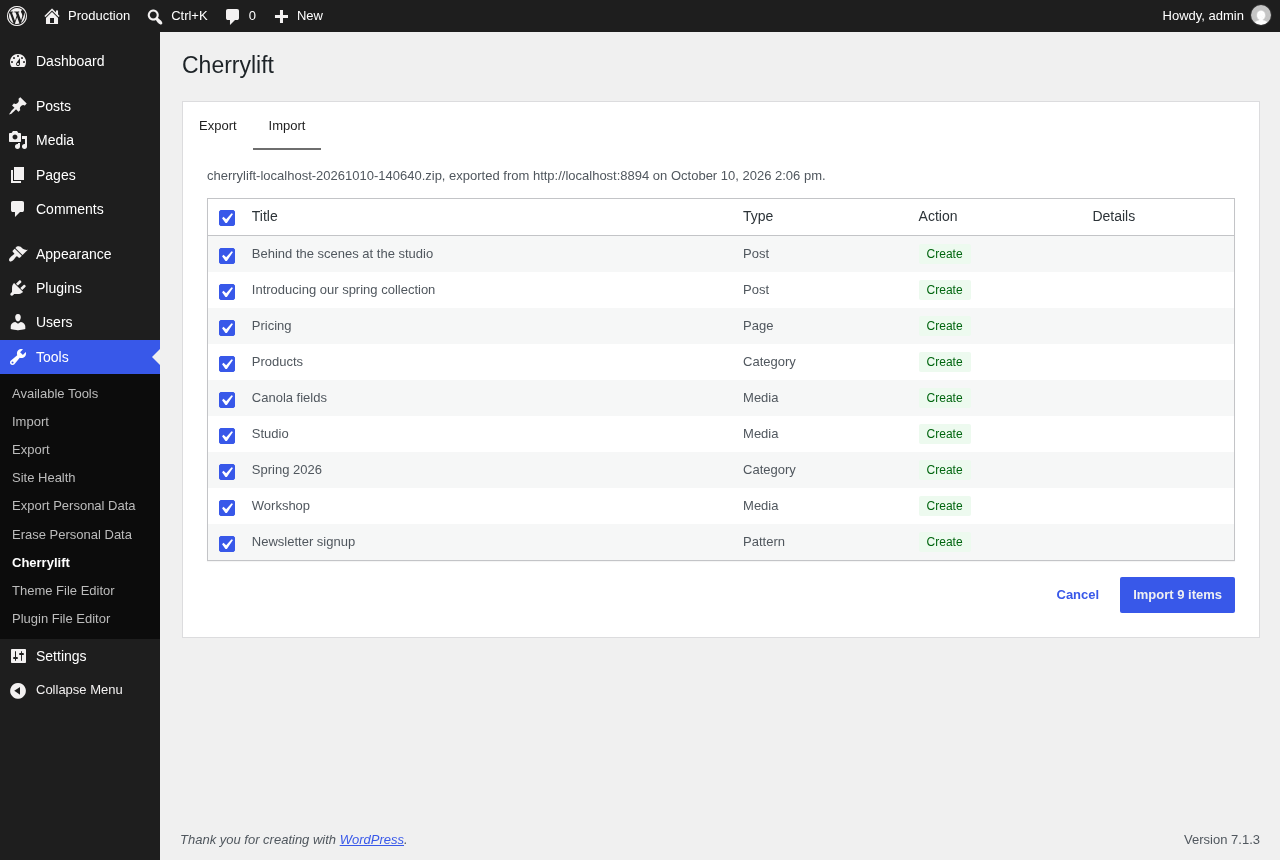
- On the target site, upload it under Import. A preview shows what will be created or updated, and you can untick anything you don’t want to change.
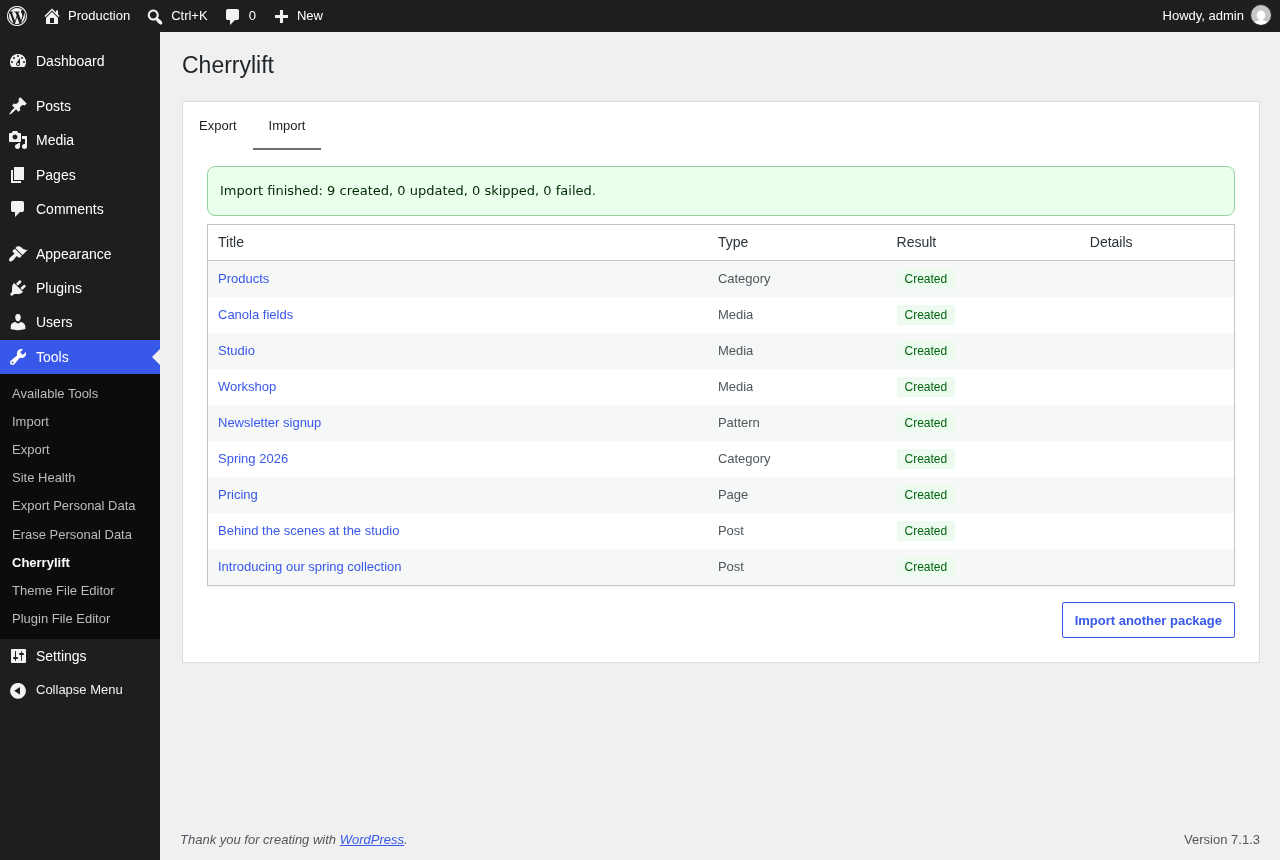
- Import. Every reference is remapped to the target site’s IDs and URLs.
Merkmale
- Dependencies included automatically: parent pages, categories and tags (with their parent terms), featured images, media used in blocks and galleries, and synced patterns.
- Safe to repeat: every item gets a stable ID that travels with it, so syncing again updates the same content instead of duplicating it. Content created separately with the same slug is recognized too.
- References remapped: parent pages, featured images, term hierarchy, image, gallery, cover, file and video block IDs,
wp-image-…classes,[gallery]shortcodes, media URLs (including every image size) and links to the source domain. - Media handled carefully: files are uploaded with WordPress’s usual checks and image sizes are regenerated; existing media is only replaced when the file actually changed.
- Meta merged, not wiped: custom fields in the package are updated; fields that only exist on the target are kept.
- Large packages are imported in batches with a progress bar.
- Drafts, scheduled and private content can be synced and keep their status.
- WP-CLI:
wp cherrylift exportandwp cherrylift import, including dry runs. - REST API for automation.
- Developer-friendly: more than 25 actions and filters to change what is exported, how content is matched, which meta keys hold IDs, and more. See the hooks reference.
- Translation-ready.
What is never synced
Users, comments, orders and other non-content data, by design. Site settings, themes, plugins, menus, templates and global styles are not synced either.
Source code
The full source code, tests and issue tracker are on GitHub. The admin screen’s JavaScript in build/ is compiled from src-js/ in that repository with @wordpress/scripts: run npm install and npm run build to rebuild it. Contributions are welcome; see CONTRIBUTING.md in the repository.
Installation
- Install and activate the plugin on both the source and the target site.
- Go to Tools → Cherrylift.
- Export from the source site, then import the package on the target site.
Imports from the admin screen are limited by PHP’s upload size (upload_max_filesize and post_max_size). For very large packages, use WP-CLI on the target site:
wp cherrylift import package.zip --user=admin
Änderungsprotokoll
Required for WordPress 7.2: fixes the Export screen going blank when you click "Export".
0.3.1
- Fixed: WordPress 7.2 compatibility. The Export screen no longer goes blank when you click “Export”.
0.3.0
- Changed:
wp cherrylift exportwrites packages towp-content/uploads/cherrylift/exports/and prints their path (--porcelainprints only the path). The--fileoption is removed. - Changed: uploaded packages waiting for import are kept in
wp-content/uploads/cherrylift/packages/.
0.2.0
- Renamed from Selective Entity Sync to Cherrylift. Hooks (
cherrylift_*), the REST API (cherrylift/v1) and the WP-CLI command (wp cherrylift) use the new name. - Fixed: when a site lowers the plugin’s capability, the Export list only shows content the user can read.
- Changed: WP-CLI exports only write new
.zipfiles and never overwrite existing ones. - Translations now come from translate.wordpress.org.
0.1.1
- Fixed: error messages are now escaped for safe display everywhere, and still read normally in the admin screen, the import report and WP-CLI.
- The plugin package now includes composer.json.
0.1.0
- Initial release: export, import with preview and batching, ID and URL remapping, WP-CLI commands, REST API, French translation.
Screenshots
Für Entwickler
Ist das dein Plugin? Zeigen Sie die Zahlen.
Fügen Sie Ihrer Website, Docs oder GitHub Readme ein Live-Badge hinzu. Es wird von selbst aktualisiert - kein Konto erforderlich.
Best Cherrylift alternatives
Alle Content-Plugins →





Fragen und Antworten
Cherrylift – Selective Content Sync: quick answers
Gerade Antworten, gezogen von Live WordPress.org Daten.
Quelle: WordPress.org
Is Cherrylift free?
Yes. Cherrylift is free to download and use from the official WordPress.org plugin directory.
Is Cherrylift safe to use in 2026?
Cherrylift is a solid plugin choice in 2026, with a few things worth checking first. Was last updated 4 days ago, and scores 64/100 on our health check.
How many websites use Cherrylift?
Cherrylift is active on <10 WordPress websites and has been downloaded 250 times since it launched in October 2026. It was downloaded 140 times in the last 30 days.
Does Cherrylift work with WordPress 7.1?
Yes. The developer has tested Cherrylift up to WordPress 7.2, the latest release. It requires WordPress 6.9 or newer.
What PHP version does Cherrylift need?
Cherrylift requires PHP 7.4 or higher. Most hosts run PHP 8.x today, so it works on any modern WordPress hosting.
When was Cherrylift last updated?
The latest version, 0.3.1, was released on November 26, 2026 (4 days ago).
Who makes Cherrylift?
Cherrylift is developed and maintained by Gabriel de Tassigny.
What are the best alternatives to Cherrylift?
The most popular alternatives to Cherrylift are One Click Demo Import (1M+ installs), Advanced Excerpt (80K+ installs) and Rara One Click Demo Import (20K+ installs).
Angetrieben von PageForge
Eine Vorlage und eine Tabelle. Eine echte Seite für jede Suche.
PageForge Verwandelt jede Zeile eines CSV in eine WordPress-Seite mit eigenem Titel, URL, SEO Felder und Schema entworfen. Kostenlos auf WordPress.org.
- CSV und XLSX, plus Google Sheets auf Beruf und Unternehmen
- seinen eigenen Titel, URL, SEO Felder und Schema für jede Seite
- Arbeitet mit dem Blockeditor, Elementor, Divi und Avada
- Kostenlos auf WordPress.org, keine Kreditkarte