


AltoSum – AI Post Summary, TL;DR & Key Takeaways
Add an AI TL;DR summary & key-takeaways box to your posts. No API key, no setup. Free for 10 summaries a month.

Solide Wahl
AltoSum is a solid plugin choice in 2026, with a few things worth checking first. Was last updated 5 days ago, and scores 64/100 on our health check.
- Aktiv entwickelt – letztes Update vor 5 Tagen
- Getestet mit dem neuesten WordPress (7.1)
- Kleine Benutzerbasis (<10 aktive Installationen)
- Bisher sehr wenige Bewertungen
Wie stapelt es sich?
Side-by-side bei Installationen, Updates, Bewertungen und Support



Tägliche Downloads
Download-Spitzen folgen normalerweise einer neuen Version - jede Website, die automatisch aktualisiert wird, gilt als Download.
Ranglisten
Where AltoSum stands todayWordPress.org Ranglisten suchen
Live-Position in der Plugin-Suche, Top 100| Stichwort | Position |
|---|---|
| ai summary | >100 |
| key takeaways | #13 |
| summarize | >100 |
| summary | >100 |
| tldr | #9 |
About AltoSum
From the official readme · v1.0.32Beschreibung
No API key. No account. No setup. AltoSum runs the AI on our hosted service, so there is nothing to configure. You generate each summary with one click from the post editor, free for the first 10 every month.
Each summary is a short TL;DR plus a few key-takeaway bullets, written from your post. It appears in a box at the top (or bottom) of the article once you switch on automatic insertion in Settings, or wherever you put the [altosum] shortcode.
Watch it work: a short demo on a test site, with an AI-generated voiceover.
The free plan covers 10 summaries per month; AltoSum Pro raises that limit to 500 a month.
- No API key or third-party account. The AI runs on our service.
- One click to generate a summary from the post editor.
- Bulk generation for posts you have already published: select them on the Posts or Pages list, or generate for every post that has no summary from Settings. Each one waits for your review on one screen, with its own Approve and Discard.
- Optional generation when you publish. The summary waits in the editor for your approval and is not shown until you approve it.
- Edit the summary and its bullets in the editor box before you approve them, or any time after.
- Show it via the
[altosum]shortcode, or auto-insert it into single posts and pages. - Optional key-takeaway bullets.
- Privacy-friendly: automation is off until you switch it on. To generate a summary we send the post title and content, with a site ID (a hash of your site URL) and the plugin version. The External services section below lists everything that is sent.
- Pro: up to 500 summaries a month.
Externe Dienste
This plugin connects to the Really Useful App Company API to generate summaries. It is required
for the plugin’s core feature.
- What is sent and when: the plugin sends the post title and post content to the API on
each of these actions, and nothing else triggers a send of your content:- when you click “Generate summary” in the editor
- when you publish a post with “Generate a summary when a post is published” ticked
- when you use “Generate summaries (AltoSum)” on the Posts or Pages list, or “Generate summaries for posts that have none” in Settings
- Also sent: a site ID (a hash of your site URL) for usage counting, and the
plugin version, so we can tell which release a report relates to. We treat the site ID as personal data, because it can be matched to your site’s address. Our privacy policy explains how we use it. Whether this site’s review prompt was shown, snoozed, dismissed or clicked is also sent, so we can tell whether that prompt is working. It records the site, not the individual user, and says nothing about what you did on WordPress.org afterwards. If you choose to give us an email address, it is sent on its own, only when you submit your email address on the settings screen. It is optional, you are asked once (and again only after we have deleted it), and every feature keeps working if you skip or dismiss it. It is sent only if you tick the sign-up box, together with the wording you agreed to. We use it to send release notes and product updates and to give you a way to reach us. These emails are sent from our Microsoft 365 mailbox. You can unsubscribe from any message, and we delete it 24 months after your last contact with us. Whether this site’s email prompt was shown, dismissed or submitted is also sent, so we can tell whether it is working; it does not include the address itself. - Where it goes: the API (default
https://api.thereallyusefulappcompany.com), which uses Anthropic as an AI
subprocessor to generate the text. - Terms / privacy: https://www.thereallyusefulappcompany.com/altosum/terms , https://www.thereallyusefulappcompany.com/altosum/privacy ,
https://www.anthropic.com/legal/privacy
Nothing is sent until you click generate, start a bulk run, or publish with “Generate a summary when a post is published” ticked. If you choose to give us an email address, it is sent when you submit it.
Installation
- Install and activate AltoSum.
- Go to Settings → AltoSum, review the external-service notice, and choose how the box should display.
- Edit a post and click Generate summary in the AltoSum box. To show it on the page, use the
[altosum]shortcode or turn on automatic insertion. - (Optional) Enter an AltoSum Pro licence key to raise the monthly limit.
Änderungsprotokoll
Adds summaries for posts you have already published, in bulk. Each one waits for your review on one screen before it is shown. Nothing changes for summaries you generate one at a time.
1.0.32
- Added: summaries for posts you have already published. Select posts on the Posts or Pages list and choose “Generate summaries (AltoSum)”, or use “Generate summaries for posts that have none” in Settings. The run works through them a few at a time with a progress line, and you can leave and resume it. Each summary waits for your review on one screen (Posts, then AltoSum review), with Approve and Discard for each, and nothing is shown on your site until you approve it. Each post counts towards your monthly allowance.
- Changed: the plugin description now states Pro’s 500 a month in place of fair use.
1.0.31
- Added: the card of our other plugins on the settings screen now lists AltoRewrite, our new AI content rewriter for posts. Nothing else changes.
1.0.30
- Fixed: while a summary waits for your approval, “Generate summary” is no longer the main button, so the obvious click does not use another monthly summary. It reads “Regenerate summary”, and the line above the waiting summary says no summary is saved yet, instead of “No summary yet.” If you discard it and none is saved, Generate summary is the main button again.
- Changed: the editor box now says automatic insertion shows the summary on single posts and pages, not single posts only.
1.0.29
- Added: you can edit a summary and its bullets in the editor box. A summary waiting for approval opens in two fields, and Approve saves what is in them; a saved summary has an Edit summary link. Once you change the text, the box says it was edited by you rather than AI-generated. Saving an edit does not use one of your monthly summaries.
- Fixed: after Generate summary, the editor box showed only the summary paragraph, not the key-takeaway bullets, so you approved text you had not fully seen. The box now shows the summary and its bullets, as your post will. If the bullets are switched off in Settings, they are listed in the box as saved but not shown.
- Changed: the settings screen and this readme now say automatic insertion covers pages as well as single posts.
1.0.27
- Fixed: with AltoSum Pro, the settings screen now shows how many summaries you have generated this month. It used to say your usage would appear after your first generation, however many you had made.
- Fixed: deleting the plugin now also removes the usage snapshot, notice dismissals and review-prompt settings it stored, so nothing is left behind.
1.0.26
- Fixed: on a password-protected post, the summary box no longer shows to visitors who have not entered the password.
- Fixed: the Dashboard notice about summaries waiting for approval now lists only posts you can edit, so it no longer names other people’s private posts.
- Changed: the settings screen now says the site ID is treated as personal data, as our privacy policy does.
- Changed: the free plan is now 10 summaries a month (it was 25).
- Changed: a summary generated when a post is published, or generated again on a post that is already published, now waits for your approval in the editor and is not shown on your site until you approve it. The Dashboard lists any that are waiting. Generation on publish runs once per post, so a summary you discard is not generated again.
- Changed: small wording fixes on the settings screen and in the list of our other plugins.
- Added: the AltoSum Summary box in the editor always shows how many free summaries are left this month, not only once you are close to the limit.
- Fixed: on a site with more than one Alto plugin, an older Alto plugin could supply this plugin’s shared code, which could silently switch off newer features such as the monthly-limit notice. Each Alto plugin now uses its own copy.
- Added: an optional sign-up for release notes and product updates by email, offered once on the settings screen after you have used the plugin a few times. You sign up by ticking a box, every feature works without it, and you can unsubscribe from any message.
Screenshots
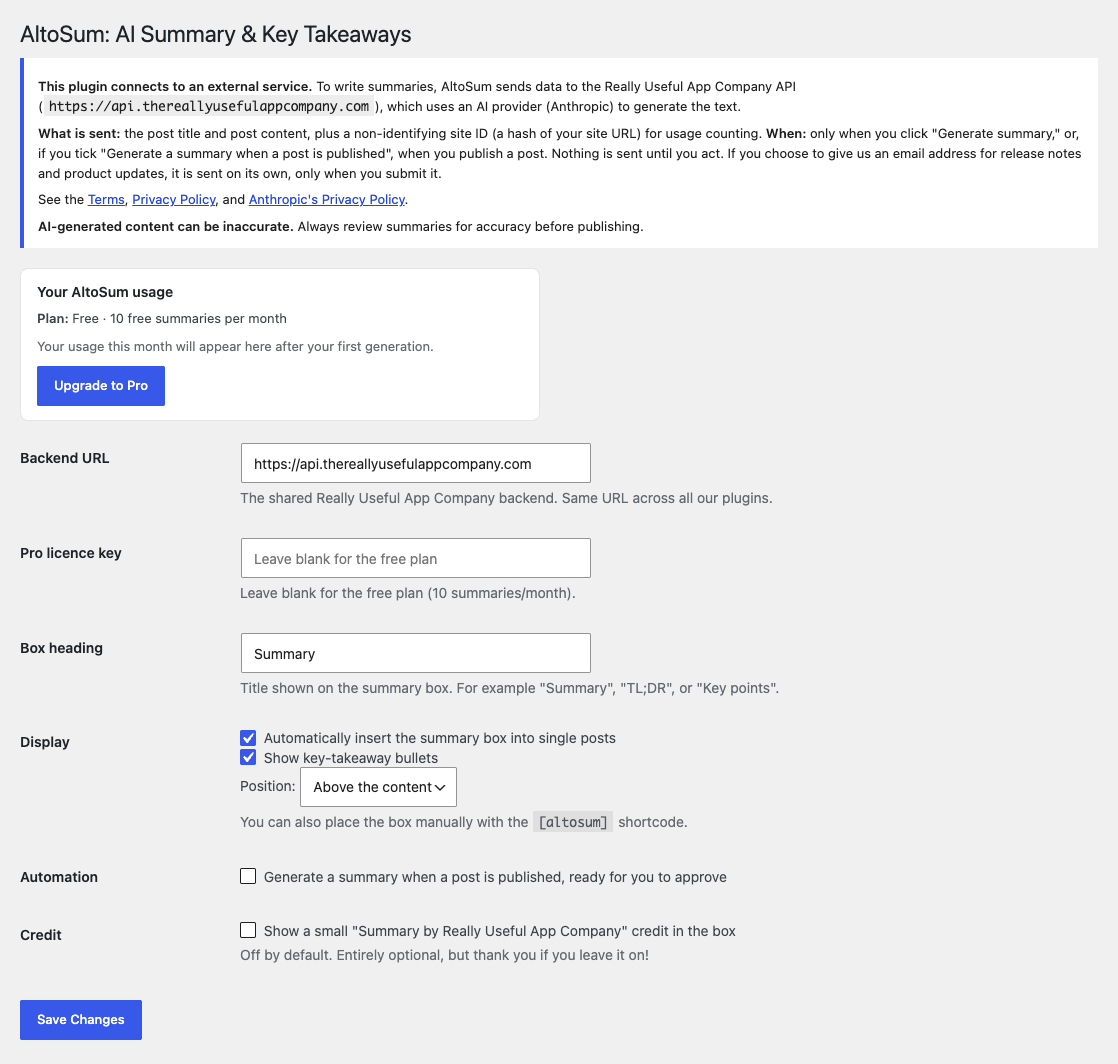

Für Entwickler
Ist das dein Plugin? Zeigen Sie die Zahlen.
Fügen Sie Ihrer Website, Docs oder GitHub Readme ein Live-Badge hinzu. Es wird von selbst aktualisiert - kein Konto erforderlich.
Best AltoSum alternatives
All ai summary plugins →


Fragen und Antworten
AltoSum: quick answers
Gerade Antworten, gezogen von Live WordPress.org Daten.
Quelle: WordPress.org
Is AltoSum free?
Yes. AltoSum is free to download and use from the official WordPress.org plugin directory.
Is AltoSum safe to use in 2026?
AltoSum is a solid plugin choice in 2026, with a few things worth checking first. Was last updated 5 days ago, and scores 64/100 on our health check.
How many websites use AltoSum?
AltoSum is active on <10 WordPress websites and has been downloaded 1,321 times since it launched in July 2026. It was downloaded 340 times in the last 30 days.
Does AltoSum work with WordPress 7.1?
Yes. The developer has tested AltoSum up to WordPress 7.1.5, the latest release. It requires WordPress 6.0 or newer.
What PHP version does AltoSum need?
AltoSum requires PHP 7.4 or higher. Most hosts run PHP 8.x today, so it works on any modern WordPress hosting.
When was AltoSum last updated?
The latest version, 1.0.32, was released on November 24, 2026 (5 days ago).
Who makes AltoSum?
AltoSum is developed and maintained by The Really Useful App Company.
What are the best alternatives to AltoSum?
The most popular alternatives to AltoSum are XHTheme AI Toolbox (100+ installs), Sumtics (50+ installs) and AI Summarize Buttons & Goog… (30+ installs).
Angetrieben von PageForge
Eine Vorlage und eine Tabelle. Eine echte Seite für jede Suche.
PageForge Verwandelt jede Zeile eines CSV in eine WordPress-Seite mit eigenem Titel, URL, SEO Felder und Schema entworfen. Kostenlos auf WordPress.org.
- CSV und XLSX, plus Google Sheets auf Beruf und Unternehmen
- seinen eigenen Titel, URL, SEO Felder und Schema für jede Seite
- Arbeitet mit dem Blockeditor, Elementor, Divi und Avada
- Kostenlos auf WordPress.org, keine Kreditkarte