

AlphaListing
Provides an A to Z index page and widget.

Safe pick
Yes — AlphaListing is a safe, well-maintained plugin to use in 2026. It runs on 600+ sites, is rated 5/5 and was last updated 1 month ago, and scores 82/100 on our health check.
- Tested with the latest WordPress (7.1)
- Small user base (600+ active installs)
How does it stack up?
Side-by-side on installs, updates, ratings & support
Daily downloads
Download spikes usually follow a new release — each site that auto-updates counts as a download.
Rankings
Where AlphaListing stands todayWordPress.org search rankings
Live position in the plugin search, top 100| Keyword | Position |
|---|---|
| a to z | #2 |
| a-z | #4 |
| index | #19 |
| listing | #87 |
| widget | >100 |
Version adoption
Share of active sites per release.
Rating breakdown
★★★★★★★★★★ 5 from 6 reviews
About AlphaListing
From the official readme · v4.6.2Description
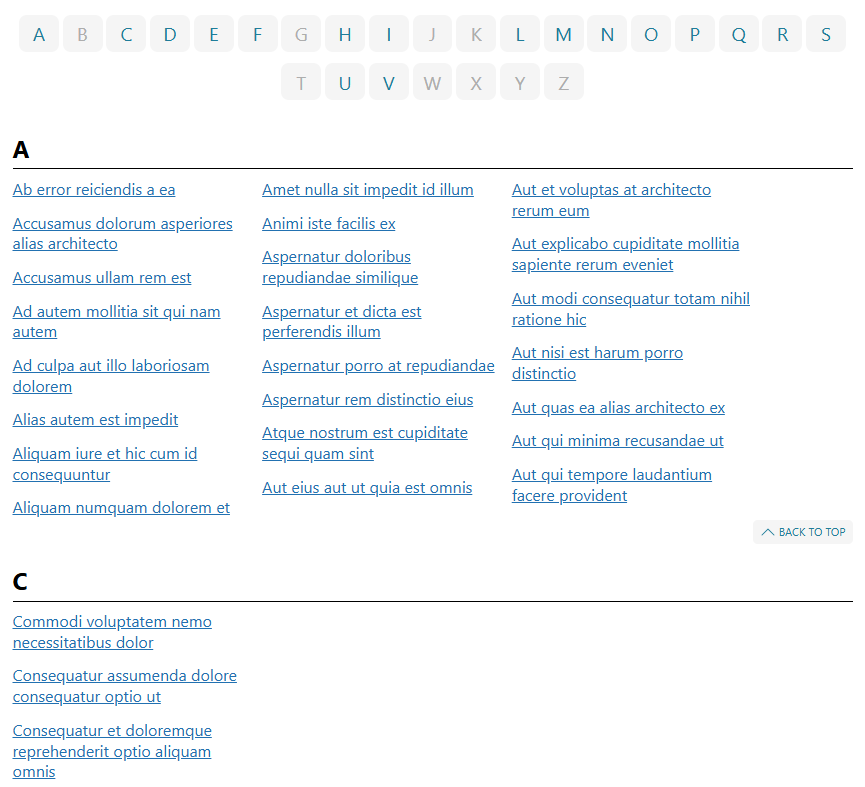
Display posts, pages, and terms alphabetically in a Rolodex-, catalog-, or directory-style list with the AlphaListing plugin!
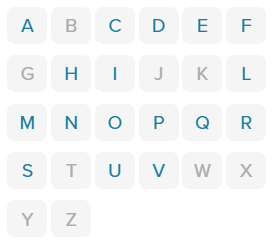
This plugin includes a block and shortcode for the list, along with a widget for linking to the list from any location on a site. If a letter has no associated pages, the widget will display the letter unlinked, while the list page will omit the letter entirely.
Show posts from any single or multiple post types, including built-in posts and pages. Post types from plugins like WooCommerce products are also supported. Alternatively, display terms such as categories or tags.
This plugin is based on the original A-Z Listing by Lucy (formerly Dani) Llewellyn, which is no longer maintained. Custom templates built for the original plugin may not work reliably with this version. For the most up-to-date example template, see the example template.
Documentation
Comprehensive documentation is now available:
Installation
This section describes how to install the plugin and get it working.
Requirements
- PHP 8.0 or higher is required.
- The plugin requires mbstring to be enabled in the PHP installation. Without this feature, the plugin may behave unexpectedly or fail.
Instructions
- Upload the
alphalistingfolder to the/wp-content/plugins/directory. - Activate the plugin through the “Plugins” menu in WordPress.
- Use the AlphaListing block in the (Gutenberg) block editor or the
[alphalisting]shortcode on the desired page or post. - (Optional) Add the A-Z Site Map widget to a sidebar.
Changelog
4.6.2
- Security: A listing’s
taxonomyvalue can no longer contain path segments that make the plugin load a PHP file from outside the theme in place of the listing template. Theme template overrides such asa-z-listing.phpwork as before. - Security: The
post-typeandtaxonomysettings now only list public or publicly viewable content types. Internal types such as reusable blocks (wp_block) or navigation menus (nav_menu) render an empty listing instead of their titles. Every type offered in the block and widget settings is unaffected. A site that needs to list a non-public type can allow it with the newalphalisting_post_type_is_listableoralphalisting_taxonomy_is_listablefilter. - Change: Identical listings on the same page, such as the A-Z Site Map widget and the listing it links to, now share one database query. The
alphalisting_reuse_query_resultsfilter turns this off.
4.6.1
- Bugfix: Converting an
[alphalisting]shortcode into a block no longer drops the last attribute in the shortcode.
4.6.0
- New: Post listings can ignore a leading article when choosing a title’s letter and when sorting, so “The Great Gatsby” is listed under G. Choose a language under “Ignore leading articles” in the block settings, or add
ignore-articles="en"to the shortcode. English, French, Spanish, and Italian are supported, one language per listing, and elided forms such as “L’Étranger” and “Un’Altra Vita” are recognized. The full title is still displayed.
4.5.1
- Bugfix: Items under a grouped letter heading (such as
A-C, from the “Group letters” setting orgrouping="3") are listed in alphabetical order again. They were previously ordered by the second character of the title, so “Banana” could appear before “Apple”. - Bugfix: Items under the grouped
0-9heading are now ordered the same way as when the numbers are listed individually. - New: The block’s “Include all descendants” toggle is now available when a parent post is selected, matching the shortcode’s
get-all-childrenattribute. It was previously only offered for taxonomy term listings. - Change: The block’s column settings move into their own “Layout” panel, leaving the rest under “Display options”. Every setting and its shortcode attribute is unchanged.
- Change: The block’s “CSS class names” field is removed in favour of WordPress’ built-in “Additional CSS class(es)” field under Advanced, which edits the same value. Existing class names are preserved.
- Change: The block’s “Listing ID” setting now explains that it sets the listing’s HTML id attribute, not a post or term ID.
- Change: Every shortcode attribute is now declared by its own query-part extension, so there is a single list of settings behind both the block and the shortcode. Attribute names, defaults, and filters are unchanged.
4.5.0
- New: Post listings can be grouped and sorted by the last word of each post title. Enable “Group by last word” in the block settings, or add
group-by="last-word"to the shortcode. - Bugfix: The widget’s “Terms to exclude” setting is now saved. It was previously discarded every time the widget was saved.
- Bugfix: The widget’s “Hide empty terms” checkbox now takes effect. It previously had no effect on the listing.
- Bugfix: Listings no longer produce a fatal error when given an unregistered taxonomy, a
parent-termin an unregistered taxonomy, or atargetpointing at a deleted post. - Bugfix: The template-tag functions (
have_a_z_letters(),the_a_z_letter(),have_a_z_items(), and friends) now work in theme templates. They previously looped forever because each call rebuilt the listing from scratch. - Bugfix: CSS class names passed to the letter list are split on commas and spaces again.
- Bugfix: The widget’s post-title autocomplete no longer shows stray backslashes in titles containing apostrophes.
- Security: Widget settings are no longer interpolated into a shortcode string, so a value containing a quote or bracket can no longer alter the rendered shortcode.
- Change: The
instance-idattribute is sanitized for use in an HTML id and URL fragment. - Change: The plugin now declares
Requires PHP: 8.0andRequires at least: 6.0, so WordPress will block activation on unsupported versions instead of causing fatal error.
4.4.0
- New: add a block setting option and
back-to-topshortcode attribute to show/hide the “Back to Top” link. - Change: the post type select control now allows multiple selections, enabling listings across multiple post types simultaneously.
- Bugfix: fix shortcode attribute not properly carried over to the block setting during shortcode to block conversion.
- Bugfix: prevent PHP 8 TypeError in callbacks.
- Change: remove jQuery-UI Tabs script. It was never used or fully implemented and appeared to be abandoned by the previous developer.
Screenshots
For developers
Is this your plugin? Show off the numbers.
Add a live badge to your site, docs or GitHub README. It updates on its own — no account needed.
Best AlphaListing alternatives
All a to z plugins →FAQ
AlphaListing: quick answers
Straight answers, pulled from live WordPress.org data.
Source: WordPress.org
Is AlphaListing free?
Yes. AlphaListing is free to download and use from the official WordPress.org plugin directory.
Is AlphaListing safe to use in 2026?
Yes — AlphaListing is a safe, well-maintained plugin to use in 2026. It runs on 600+ sites, is rated 5/5 and was last updated 1 month ago, and scores 82/100 on our health check.
How many websites use AlphaListing?
AlphaListing is active on 600+ WordPress websites and has been downloaded 5,899 times since it launched in March 2025. It was downloaded 610 times in the last 30 days.
Does AlphaListing work with WordPress 7.1?
Yes. The developer has tested AlphaListing up to WordPress 7.1.5, the latest release. It requires WordPress 6.0 or newer.
What PHP version does AlphaListing need?
AlphaListing requires PHP 8.0 or higher. Most hosts run PHP 8.x today, so it works on any modern WordPress hosting.
When was AlphaListing last updated?
The latest version, 4.6.2, was released on October 26, 2026 (1 month ago).
Who makes AlphaListing?
AlphaListing is developed and maintained by Ethan Lin.
What are the best alternatives to AlphaListing?
The most popular alternatives to AlphaListing are AtoZ Sorting (20+ installs) and Ananyoo Accessible A to Z I… (<10 installs).
Powered by PageForge
One template and a spreadsheet. A real page for every search.
PageForge turns each row of a CSV into a WordPress page with its own title, URL, SEO fields and schema, built on the layout you already designed. Free on WordPress.org.
- CSV and XLSX, plus Google Sheets on Professional and Enterprise
- Its own title, URL, SEO fields and schema for every page
- Works with the block editor, Elementor, Divi and Avada
- Free on WordPress.org, no credit card