


Hide Posts
Hide posts or WooCommerce products from the homepage, archives, search, RSS, REST API, sitemaps and SEO tools — per-post control in any editor.

Solid choice
Hide Posts is a solid plugin choice in 2026, with a few things worth checking first. It runs on 20K+ sites, is rated 4.7/5 and was last updated 4 weeks ago, and scores 78/100 on our health check.
- Proven at scale on 20K+ active sites
- Loved by users — 4.7/5 from 22 reviews
- Actively developed — last update 4 weeks ago
- Tested with the latest WordPress (7.1)
- Momentum — downloads up 380% vs the previous 30 days
How does it stack up?
Side-by-side on installs, updates, ratings & support


Daily downloads
Download spikes usually follow a new release — each site that auto-updates counts as a download.
Rankings
Where Hide Posts stands todayWordPress.org search rankings
Live position in the plugin search, top 100| Keyword | Position |
|---|---|
| hide | #5 |
| hide posts | #1 |
| hide products | #3 |
| show | #62 |
| visibility | #53 |
Version adoption
Share of active sites per release.
Rating breakdown
★★★★★★★★★★ 4.7 from 22 reviews
About Hide Posts
From the official readme · v2.1.3Description
Publish it — without putting it everywhere. Hide Posts gives you a simple checklist on every post, page, or product that controls exactly where it appears: keep a post out of the homepage and archives, off the search results, out of your RSS feed and REST API, or invisible to XML sitemaps and Yoast SEO — while it stays perfectly reachable at its own URL.
Perfect for syndication-only articles, landing pages, evergreen content you don’t want cluttering the blog roll, or products that should only be found via direct link.
Choose exactly where a post is hidden:
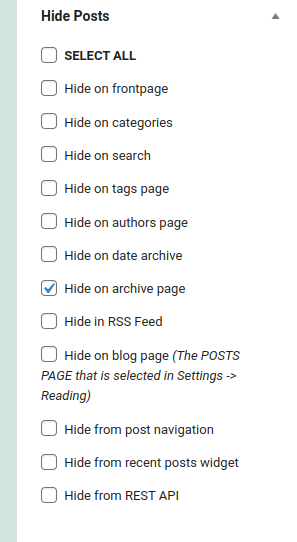
- Site pages — homepage, blog page, category, tag, author, and date archives, search results, post navigation (previous/next), and the Recent Posts widget
- Feeds & APIs — RSS feed and the REST API
- Sitemaps & SEO — WordPress core XML sitemaps, Yoast SEO sitemap, Yoast breadcrumbs, and Yoast internal link suggestions
- WooCommerce — hide products from the shop page, product category pages, and the store REST API
Built for real editorial workflows:
- Full Block Editor support — a native sidebar panel with all hide options, plus the classic metabox
- Works with the Query Loop block and custom queries
- Enable hiding for any Custom Post Type from the settings page
- Bulk Edit and Quick Edit support for managing many posts at once
- “Hidden On” column in the posts list so you always see what’s hidden where
- Custom database table and layered caching — no postmeta bloat, no slow queries on busy sites
Installation
Installation and uninstallation are extremely simple. You can use WordPress’ automatic install or follow the manual instructions below.
Installing:
- Download the package.
- Extract it to the “plugins” folder of your WordPress directory.
- In the Admin Panel, go to “Plugins” and activate it.
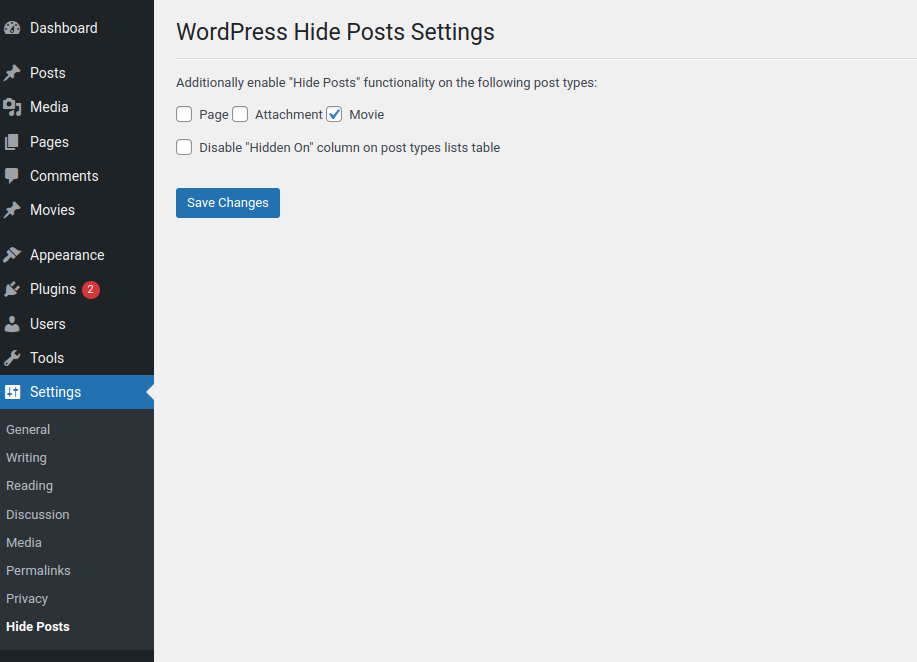
- Go to Settings -> Hide Posts to enable the hide functionality for additional post types beside ‘post’.
Uninstalling:
- In the Admin Panel, go to “Plugins”, deactivate the plugin and click “Delete”.
Usage:
Using this plugin is simple. Once it has been activated, navigate to Settings -> Hide Posts and select additional post types for which
you want to use the Hide functionality. The functionality is enabled by default for ‘Posts’ and cannot be disabled for that type post.
If you need any additional help fell free to contact me at martin@martincv.com for more information.
Changelog
2.1.3
Release Date – 3 November 2026
- Fixed: the “Additionally enable Hide Posts on the following post types” setting (e.g. WooCommerce Products) not being remembered on sites with a persistent object cache (Redis/Memcached). The enabled post types list was cached and never invalidated after saving, so the Hide Posts metabox never appeared on products and products were never excluded from the XML sitemap. The list is now read directly from the option.
- Fixed: the block editor sidebar sent a burst of repeated REST requests to
/whp/v1/hide-settingson every Update click (reported as excessive admin AJAX traffic). It now sends at most one request per save, and none when the hide options did not change. - Improved: the block editor receives the post’s hide options on page load instead of fetching them with an extra REST request.
- Performance: hide options for a post are now read with a single database query instead of one query per option. This applies to the block editor, the Classic Editor metabox, the “Hidden On” column in post lists (previously ~20 queries per row), and saving.
- New: a “Hidden on…” dropdown on post list screens filters the list to posts hidden on a given place, or with any hide option, so hidden posts are easy to find.
- Fixed: the “Hidden On” column now also lists the sitemap and Yoast SEO options.
- Fixed: on sites that have not yet migrated to the new table, the legacy post-meta fallback could widen a query that used a
relation => ORmeta query, showing posts that should have been filtered out. - Fixed: hidden posts could still appear when another plugin or theme (e.g. a search plugin) had already restricted the query with
post__in, because WordPress ignorespost__not_inin that case. Hidden IDs are now also removed frompost__in. - Fixed: “Hide on shop page” for WooCommerce products had no effect, because the shop page was handled as the generic product archive first. The shop page now honours both “Hide on shop page” and “Hide on CPT archive page”, product search results honour “Hide on search”, and the Query Loop / Product Collection blocks recognise the shop and product category contexts.
- Fixed: the
whp_posts_visibilitytable could end up missing for good. The schema version was recorded even when table creation failed, and it survived a manual (FTP) removal of the plugin, so a reinstall skipped creation again. The table is now created on activation, the version is only recorded once the table really exists, a failed creation shows an admin notice with the database error, and a missing table is recreated automatically. - Removed: unused Quick Edit code (the Quick Edit panel was never enabled; hide options are managed in the editor and via Bulk Edit).
2.1.2
Release Date – 30 July 2026
- Fixed: posts marked “Hide from Yoast internal link suggestions” disappearing from the admin Posts list. The integration now uses Yoast’s
wpseo_link_suggestions_indexablesfilter and correctly hides posts from internal link suggestions (Yoast SEO Premium) instead of altering unrelated queries. - Fixed: “Hide on Yoast SEO sitemap” not working — the integration now uses Yoast’s
wpseo_exclude_from_sitemap_by_post_idsfilter to exclude individual posts. - Fixed: cache invalidation when hide options are saved from the Classic Editor, Quick Edit, or the Gutenberg sidebar — changes now take effect immediately.
- Fixed: empty results are now cached, avoiding a repeated database query on every request.
- Fixed: uninstall now also removes the legacy “Hide in RSS feed” post meta.
- Fixed: translation loading moved to
initfor WordPress 6.7+ compatibility. - Improved: hardened input handling in the Classic Editor save handler and the Gutenberg REST endpoint; removed unused code.
- Compatibility: tested up to WordPress 7.1.
2.1.1
Release Date – 30 December 2025
- Potential bug fix where hidden posts do not show in the admin area.
2.1.0
Release Date – 24 November 2025
Major Update: Gutenberg Block Editor Support & Custom Database Architecture
New Features
- Full Gutenberg Block Editor Support – Complete React-based sidebar panel with live checkboxes
- Custom REST API Integration – Dedicated REST endpoints for Gutenberg editor (
/whp/v1/hide-settings/{id}) - Select All / Deselect All Buttons – Quick bulk selection in Gutenberg sidebar
- Custom Database Table Architecture – All data stored in
wp_whp_posts_visibilitytable (NO wp_postmeta usage) - Smart Metabox Detection – Classic Editor metabox hidden in Gutenberg to avoid confusion
- SEO Plugin Integration – Hide posts from WordPress XML sitemap, Yoast SEO sitemap, breadcrumbs, and internal link suggestions
- Gutenberg Query Loop Block Support – Hidden posts properly excluded from Query Loop blocks
- Latest Posts Block Support – Hidden posts excluded from Gutenberg Latest Posts block
- Complete Bulk Edit & Quick Edit – Full AJAX functionality for efficient bulk operations
- Migration Notice Improvements – Only shows when legacy data exists with clear migration path
Gutenberg/Block Editor Enhancements
- React-based sidebar panel using WordPress
@wordpress/pluginsAPI - Real-time checkbox state management with React hooks
- Auto-save when clicking Update/Publish (integrated with Gutenberg save cycle)
- Conditional field display (CPT, WooCommerce, Yoast options shown only when relevant)
- WordPress 6.6+ compatibility (
wp.editor.PluginDocumentSettingPanel) - Backward compatibility with older WP versions (
wp.editPostfallback)
Screenshots

For developers
Is this your plugin? Show off the numbers.
Add a live badge to your site, docs or GitHub README. It updates on its own — no account needed.
Best Hide Posts alternatives
All hide plugins →



FAQ
Hide Posts: quick answers
Straight answers, pulled from live WordPress.org data.
Source: WordPress.org
Is Hide Posts free?
Yes. Hide Posts is free to download and use from the official WordPress.org plugin directory.
Is Hide Posts safe to use in 2026?
Hide Posts is a solid plugin choice in 2026, with a few things worth checking first. It runs on 20K+ sites, is rated 4.7/5 and was last updated 4 weeks ago, and scores 78/100 on our health check.
How many websites use Hide Posts?
Hide Posts is active on 20K+ WordPress websites and has been downloaded 291,467 times since it launched in October 2017. It was downloaded 13,449 times in the last 30 days.
Does Hide Posts work with WordPress 7.1?
Yes. The developer has tested Hide Posts up to WordPress 7.1.5, the latest release. It requires WordPress 5.0 or newer.
What PHP version does Hide Posts need?
Hide Posts requires PHP 7.3 or higher. Most hosts run PHP 8.x today, so it works on any modern WordPress hosting.
When was Hide Posts last updated?
The latest version, 2.1.3, was released on November 3, 2026 (4 weeks ago).
Who makes Hide Posts?
Hide Posts is developed and maintained by MartinCV.
What are the best alternatives to Hide Posts?
The most popular alternatives to Hide Posts are Email Encoder (90K+ installs), If Menu (50K+ installs) and WP Hide & Security Enhancer (50K+ installs).
Powered by PageForge
One template and a spreadsheet. A real page for every search.
PageForge turns each row of a CSV into a WordPress page with its own title, URL, SEO fields and schema, built on the layout you already designed. Free on WordPress.org.
- CSV and XLSX, plus Google Sheets on Professional and Enterprise
- Its own title, URL, SEO fields and schema for every page
- Works with the block editor, Elementor, Divi and Avada
- Free on WordPress.org, no credit card