


WP Customizer
This plugin allows you to manage and load site specific functions, scripts and CSS files into your WordPress site without the need to edit your theme’s functions.php or any other source file.

Betrachten Sie eine Alternative
WP Customizer shows warning signs in 2026 — compare the alternatives below before installing. It runs on 20+ sites, is rated 5/5 and was last updated 9 years ago, and scores 31/100 on our health check.
- Kleine Benutzerbasis (20+ aktive Installationen)
- Bisher sehr wenige Bewertungen
- Kein Update in 9 Jahren
- Nur getestet bis WordPress 4.8 (letzt ist 7.1)
Wie stapelt es sich?
Side-by-side bei Installationen, Updates, Bewertungen und Support



Tägliche Downloads
Download-Spitzen folgen normalerweise einer neuen Version - jede Website, die automatisch aktualisiert wird, gilt als Download.
Ranglisten
Where WP Customizer stands todayWordPress.org Ranglisten suchen
Live-Position in der Plugin-Suche, Top 100| Stichwort | Position |
|---|---|
| customise | >100 |
| anpassen | >100 |
| functions | >100 |
| scripts | >100 |
| wp-customizer | >100 |
Versionsübernahme
Anteil aktiver Sites pro Release.
Bewertungsaufschlüsselung
★★★★★★★★★★ 5 from 2 reviews
About WP Customizer
Aus der offiziellen Readme · V1.0.2Beschreibung
This plugin allows you to manage and load site specific functions, scripts and CSS files into your WordPress site without the need to edit your theme’s functions.php or any other source file.
Settings and options include:
- Choose the type of customization you want to load; functions, scripts, CSS in any combination.
- Choose where you want the customizations to load; in the WordPress front-end, in the WordPress admin screens or both.
- Choose where you want to store your customization files, without the need to add to or modify your theme’s or your plugin’s source files.
Filter Support And Usage
WP Customizer supports multiple filters; the plugin’s filters allow you to
- modify the set of functions files that are about to be loaded
- modify the set of script files that are about to be loaded
- modify the characteristics of each script file that is about to be loaded and which will be passed as arguments to
wp_enqueue_script - modify the set of CSS files that are about to be loaded
- modify the characteristics of each CSS file that is about to be loaded and which will be passed as arguments to
wp_enqueue_style
Each filter will be only be called if the customization type is enabled in the plugin’s options; if a customization type is enabled but no files are found to be loaded, the filter will still be called but will be passed an empty argument.
As with all WordPress filters, any filter hook function should either return the modified argument or the original argument if no modification were made.
wp_customizer_functions, wp_customizer_admin_functions, wp_customizer_common_functions
The functions filters are called when preparing to load the list of front-end functions (wp_customizer_functions), of admin functions (wp_customizer_admin_functions) and of common functions (wp_customizer_common_functions). The arguments that each filter hook function receives is identical in all cases. The filter hook function takes a single argument which is an array of file names.
Example: Prevent all function files from loading by returning an empty file list.
add_filter('wp_customizer_functions', 'function_handler', 10, 1);

function function_handler($files) {
    // $files = array(
    //      array(
    //          'file' => (absolute path of function file)
    //      ),
    //      array(...)
    //  );

    return array();
}
wp_customizer_scripts, wp_customizer_admin_scripts, wp_customizer_common_scripts
The scripts filters are called when preparing to load the list of front-end scripts (wp_customizer_scripts), of admin scripts (wp_customizer_admin_scripts) and of common scripts (wp_customizer_common_scripts). The arguments that each filter hook function receives is identical in all cases. The filter hook function takes a single argument which is an array of file details.
Example: Add jQuery as a dependency to all scripts and enable each script to load in the post’s footer.
add_filter('wp_customizer_scripts', 'script_handler', 10, 1);

function script_handler($files) {
    // $files = array(
    //      array(
    //          'file' => (absolute path of script file),
    //          'handle' => (auto-generated handle for script),
    //          'src' => (URL of script file),
    //          'deps' => (dependencies, defaults to an empty array),
    //          'ver' => (version, defaults to false),
    //          'in_footer' => (load in footer, defaults to false),
    //      ),
    //      array(...)
    // );

    foreach ($files as $file) {
        $file['deps'] = array('jquery');
        $file['in_footer'] = true;
    }

    return $files;
}
wp_customizer_css, wp_customizer_admin_css, wp_customizer_common_css
The CSS filters are called when preparing to load the list of front-end CSS (wp_customizer_css), of admin CSS (wp_customizer_admin_css) and of common CSS (wp_customizer_common_css). The arguments that each filter hook function receives is identical in all cases. The filter hook function takes a single argument which is an array of file details.
Example: Override the media type for all CSS files to use the screen media type.
add_filter('wp_customizer_css', 'css_handler', 10, 1);

function css_handler($files) {
    // $files = array(
    //      array(
    //          'file' => (absolute path of css file),
    //          'handle' => (auto-generated handle for CSS),
    //          'src' => (URL of CSS file),
    //          'deps' => (dependencies, defaults to an empty array),
    //          'ver' => (version, defaults to false),
    //          'media' => (media type, defaults to 'all')
    //      ),
    //      array(...)
    // );

    foreach ($files as $file) {
        $file['media'] = 'screen';
    }

    return $files;
}
Installation
- You can install WP Customizer automatically from the WordPress admin panel. From the Dashboard, navigate to the Plugins / Add New page and search for “WP Customizer” and click on the “Install Now” link.
- Or you can install WP Customizer manually. Download the plugin Zip archive and uncompress it. Copy or upload the
wp-customizerfolder to thewp-content/pluginsfolder on your web server. - Activate the plugin. From the Dashboard, navigate to Plugins and click on the “Activate” link under the entry for WP Customiser.
- Prepare your customization files. By default, WP Customizer looks for front-end functions in a directory named
functions, for front-end scripts in a directory namedscriptsand for front-end CSS files in a directory namedcss. - Admin screen customizations are placed in a similar set of directories, prefixed with
admin_, as inadmin_functions,admin_scriptsandadmin_css. - Customizations common to both the front-end and the admin screens are placed in directories prefixed with
common_, as incommon_functions,common_scriptsandcommon_css. - You can either create the default directories and place your customization files in them or create your own directory hierarchy.
- Now you can configure the loading of each type of supported customization. From the Dashboard navigate to Settings / WP Customizer and enable loading of the customization files as you require.
- If you choose to use a non-default set of directory name, you should ensure the plugin’s options are updated to reflect this.
Änderungsprotokoll
This version fixes two minor bugs and adds support for the plugin's Debug tab in the tour.
The current version is 1.0.1 (2013.09.18)
1.0.1
- Release 2013.09.18
- Fixed: Annoying Markdown syntax in plugin overview text.
- Fixed: Pointer help file is now included; this was missing in v1.0.0.
- Added: Pointer text for the Debug tab.
1.0.0
- Released 2013.05.29
- First version of WP Customizer released
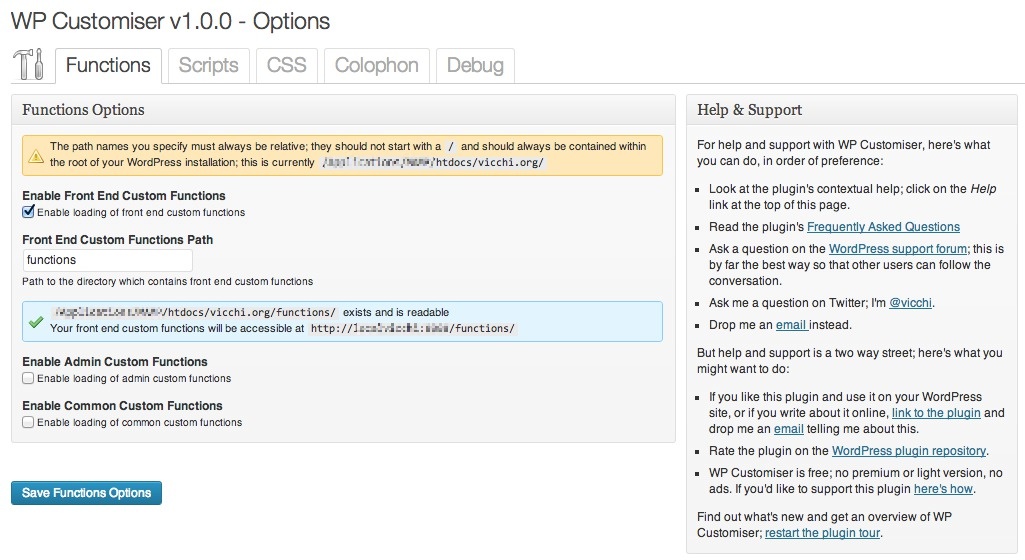
Screenshots


Für Entwickler
Ist das dein Plugin? Zeigen Sie die Zahlen.
Fügen Sie Ihrer Website, Docs oder GitHub Readme ein Live-Badge hinzu. Es wird von selbst aktualisiert - kein Konto erforderlich.
Best WP Customizer alternatives
All customise plugins →Fragen und Antworten
WP Customizer: quick answers
Gerade Antworten, gezogen von Live WordPress.org Daten.
Quelle: WordPress.org
Is WP Customizer free?
Yes. WP Customizer is free to download and use from the official WordPress.org plugin directory.
Is WP Customizer safe to use in 2026?
WP Customizer shows warning signs in 2026 — compare the alternatives below before installing. It runs on 20+ sites, is rated 5/5 and was last updated 9 years ago, and scores 31/100 on our health check.
How many websites use WP Customizer?
WP Customizer is active on 20+ WordPress websites and has been downloaded 4,756 times since it launched in June 2013. It was downloaded 51 times in the last 30 days.
Does WP Customizer work with WordPress 7.1?
WP Customizer is officially tested up to WordPress 4.8.35, while the latest release is 7.1.5. It may still work, but try it on a staging site first.
When was WP Customizer last updated?
The latest version, 1.0.2, was released on November 9, 2017 (9 years ago).
Who makes WP Customizer?
WP Customizer is developed and maintained by vicchi.
What are the best alternatives to WP Customizer?
The most popular alternatives to WP Customizer are MS Custom Login (800+ installs), My Favicon (90+ installs) and Debrandify · Remove or Repl… (70+ installs).
Angetrieben von PageForge
Eine Vorlage und eine Tabelle. Eine echte Seite für jede Suche.
PageForge Verwandelt jede Zeile eines CSV in eine WordPress-Seite mit eigenem Titel, URL, SEO Felder und Schema entworfen. Kostenlos auf WordPress.org.
- CSV und XLSX, plus Google Sheets auf Beruf und Unternehmen
- seinen eigenen Titel, URL, SEO Felder und Schema für jede Seite
- Arbeitet mit dem Blockeditor, Elementor, Divi und Avada
- Kostenlos auf WordPress.org, keine Kreditkarte