


Stealth Update
This plugin allows you to choose to update a post without having WordPress automatically update the post’s post_modified timestamp.

Betrachten Sie eine Alternative
Stealth Update shows warning signs in 2026 — compare the alternatives below before installing. It runs on 100+ sites, is rated 5/5 and was last updated 11 years ago, and scores 37/100 on our health check.
- Kleine Benutzerbasis (100+ aktive Installationen)
- Kein Update in 10 Jahren
- Nur getestet bis WordPress 4.5 (letzt ist 7.1)
Wie stapelt es sich?
Side-by-side bei Installationen, Updates, Bewertungen und Support


Tägliche Downloads
Download-Spitzen folgen normalerweise einer neuen Version - jede Website, die automatisch aktualisiert wird, gilt als Download.
Ranglisten
Where Stealth Update stands todayWordPress.org Ranglisten suchen
Live-Position in der Plugin-Suche, Top 100| Stichwort | Position |
|---|---|
| latest | >100 |
| Post | >100 |
| post_modified | #51 |
| publish | >100 |
| aktualisieren | >100 |
Versionsübernahme
Anteil aktiver Sites pro Release.
Bewertungsaufschlüsselung
★★★★★★★★★★ 5 from 5 reviews
About Stealth Update
From the official readme · v2.5Beschreibung
This plugin allows you to choose to update a post without having WordPress automatically update the post’s post_modified timestamp.
WordPress maintains a post field called post_modified which tracks the date the post was last edited. This value is used by feeds to indicate the latest update to each post or to report the latest updated post. Plugins and themes may also reference the post modification date to call attention to posts that have been updated. However, if an update is such that you don’t want it to be recorded in the post_modified date field (perhaps due to the update being a small formatting/editing change or fixing a typo, or if you just want to keep quiet about an update), then this plugin is for you.
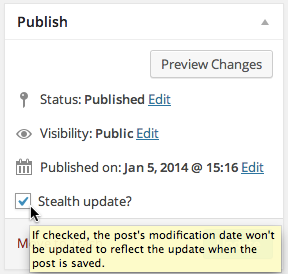
This plugin adds a “Stealth update?” checkbox to the “Publish” box of any post’s or page’s “Edit Post” admin page.
Note: The plugin records when a post is stealth updated, so subsequent edits of the post will have the “Stealth update?” checkbox checked by default.
Links: Plugin Homepage | Plugin Directory Page | Author Homepage
Filters
The plugin is further customizable via two filters. Typically, these customizations would be put into your active theme’s functions.php file, or used by another plugin.
c2c_stealth_update_meta_key (filter)
The ‘c2c_stealth_update_meta_key’ filter allows you to override the name of the custom field key used by the plugin to store a post’s stealth update status. This isn’t a common need.
Argumente:
- $custom_field_key (string): The custom field key to be used by the plugin. By default this is ‘_stealth-update’.
Beispiel:
/**
 * Defines a custom meta key to be used by Stealth Update.
 *
 * @param string $custom_field_key The default custom field key name.
 * @return string
 */
function override_stealth_update_key( $custom_field_key ) {
    return '_my_custom_stealth-update';
}
add_filter( 'c2c_stealth_update_meta_key', 'override_stealth_update_key' );
c2c_stealth_update_default (filter)
The ‘c2c_stealth_update_default’ filter allows you to override the default state of the ‘Stealth Update?’ checkbox.
Argumente:
- $state (boolean): The default state of the checkbox. By default this is false.
- $post (WP_Post): The post currently being created/edited.
Beispiel:
// Have the Stealth Update? checkbox checked by default.
add_filter( 'c2c_stealth_update_default', '__return_true' );
Installation
- Whether installing or updating, whether this plugin or any other, it is always advisable to back-up your data before starting
- Unzip
stealth-update.zipinside the/wp-content/plugins/directory (or install via the built-in WordPress plugin installer) - Aktivieren Sie das Plugin über das Admin-Menü „Plugins“ in WordPress
- Click the ‘Stealth update?’ checkbox when updating a post to prevent the date of the update from being saved for the post.
Änderungsprotokoll
Feature release: added ability to configure 'Stealth Update?' via quick edit; added icon adjacent to post date in posts table; improved support for localization; verified compatibility through WP 4.5; updated copyright date (2016)
2.5 (2016-03-25)
Highlights:
* This release adds the ability to set the stealth update checkbox via the quick edit box, adds a lock icon next to the post date in the admin listing to denote a post has stealth update enabled, adds support for language packs, and has some minor behind-the-scenes changes.
Details:
* New: Add ability to set the ‘Stealth Update?’ value in the Quick Edit form.
* Add add_to_submitbox(), add_to_quick_edit(), admin_enqueue_scripts().
* Add option arg $checked to add_ui() and use its value as the default if not null.
* Props ecdltf.
* New: Add lock icon next to post’s date column in posts table to indicate which posts have stealth update enabled.
* Bugfix: Don’t bother operating on newly created posts since their saving isn’t an update.
* Change: Delete meta key on save if stealth update is not enabled for post.
* Change: Don’t unnecessarily set hidden field with original post_modified value.
* Change: Run esc_attr() on the field name before display for safety.
* Change: Don’t run esc_attr() on meta key name as it need not be so restrictive (and isn’t for display).
* Change: Add support for language packs:
* Set textdomain using a string instead of a variable.
* Don’t load textdomain from file.
* Remove ‘Domain Path’ from plugin header.
* Remove .pot file and /lang subdirectory.
* Change: Add docblocks for class variables.
* New: Add LICENSE file.
* New: Add empty index.php to prevent files from being listed if web server has enabled directory listings.
* Change: Add docblock to example code.
* Change: Note compatibility through WP 4.5+.
* Change: Update copyright date (2016).
2.4.3 (2015-08-09)
- Bugfix: Remove ‘Stealth Update?’ checkbox from quick edit panel as its implementation has since been broken. Potential return in v2.5.
- Update: Note compatibility through WP 4.3+
2.4.2 (2015-02-21)
- Revert to using
dirname(__FILE__); DIR is only supported in PHP 5.3+
2.4.1 (2015-02-17)
- Add more unit tests
- Reformat plugin header
- Use DIR instead of
dirname(__FILE__) - Note compatibility through WP 4.1+
- Change documentation links to w.org to be https
- Minor documentation spacing changes throughout
- Update copyright date (2015)
- Add plugin icon
- Regenerate .pot
2.4 (2014-01-23)
- Add unit tests
- Minor documentation improvements
- Minor code reformatting (spacing, bracing)
- Note compatibility through WP 3.8+
- Drop compatibility with version of WP older than 3.6
- Update copyright date (2014)
- Regenerate .pot
- Change donate link
- Update screenshots
- Add banner
2.3
- Deprecate ‘stealth_update_meta_key’ filter in favor of ‘c2c_stealth_update_meta_key’ (but keep it temporarily for backwards compatibility)
- Don’t allow a blank string from ‘c2c_stealth_update_meta_key’ to override the default meta key name
- Remove private static $textdomain and its use; include textdomain name as string in translation calls
- Remove function
load_textdomain() - Add check to prevent execution of code if file is directly accessed
- Re-license as GPLv2 or later (from X11)
- Add ‘License’ and ‘License URI’ header tags to readme.txt and plugin file
- Regenerate .pot
- Tweak description
- Minor improvements to inline and readme documentation
- Minor code reformatting
- Remove ending PHP close tag
- Remove commented out debugging code
- Note compatibility through WP 3.5+
- Tweak installation instructions in readme.txt
- Update copyright date (2013)
- Move screenshots into repo’s assets directory
Screenshots



Für Entwickler
Ist das dein Plugin? Zeigen Sie die Zahlen.
Fügen Sie Ihrer Website, Docs oder GitHub Readme ein Live-Badge hinzu. Es wird von selbst aktualisiert - kein Konto erforderlich.
Best Stealth Update alternatives
All latest plugins →


Fragen und Antworten
Stealth Update: quick answers
Gerade Antworten, gezogen von Live WordPress.org Daten.
Quelle: WordPress.org
Is Stealth Update free?
Yes. Stealth Update is free to download and use from the official WordPress.org plugin directory.
Is Stealth Update safe to use in 2026?
Stealth Update shows warning signs in 2026 — compare the alternatives below before installing. It runs on 100+ sites, is rated 5/5 and was last updated 11 years ago, and scores 37/100 on our health check.
How many websites use Stealth Update?
Stealth Update is active on 100+ WordPress websites and has been downloaded 7,705 times since it launched in September 2010. It was downloaded 166 times in the last 30 days.
Does Stealth Update work with WordPress 7.1?
Stealth Update is officially tested up to WordPress 4.5.33, while the latest release is 7.1.5. It may still work, but try it on a staging site first.
When was Stealth Update last updated?
The latest version, 2.5, was released on April 13, 2016 (11 years ago).
Who makes Stealth Update?
Stealth Update is developed and maintained by Scott Reilly.
What are the best alternatives to Stealth Update?
The most popular alternatives to Stealth Update are Recent Posts (500+ installs), Recent Comments (200+ installs) and ETH Redirect to Latest Post (100+ installs).
Angetrieben von PageForge
Eine Vorlage und eine Tabelle. Eine echte Seite für jede Suche.
PageForge Verwandelt jede Zeile eines CSV in eine WordPress-Seite mit eigenem Titel, URL, SEO Felder und Schema entworfen. Kostenlos auf WordPress.org.
- CSV und XLSX, plus Google Sheets auf Beruf und Unternehmen
- seinen eigenen Titel, URL, SEO Felder und Schema für jede Seite
- Arbeitet mit dem Blockeditor, Elementor, Divi und Avada
- Kostenlos auf WordPress.org, keine Kreditkarte