

SoftIcon Flipbook – PDF Flipbook & Magazine Viewer
Turn any PDF or set of images into a page-turning flipbook with a block editor block. Two-page spreads on desktop, one page on phones.

Solid choice
SoftIcon Flipbook is a solid plugin choice in 2026, with a few things worth checking first. It runs on 200+ sites, is rated 5/5 and was last updated 2 days ago, and scores 76/100 on our health check.
- Actively developed — last update 2 days ago
- Tested with the latest WordPress (7.1)
- Momentum — downloads up 39.6% vs the previous 30 days
- Small user base (200+ active installs)
- Very few reviews so far
How does it stack up?
Side-by-side on installs, updates, ratings & support


Daily downloads
Download spikes usually follow a new release — each site that auto-updates counts as a download.
Rankings
Where SoftIcon Flipbook stands todayWordPress.org search rankings
Live position in the plugin search, top 100| Keyword | Position |
|---|---|
| flip book | #16 |
| flipbook | #9 |
| pdf embed | #37 |
| pdf flipbook | #10 |
| pdf viewer | #34 |
Version adoption
Share of active sites per release.
Rating breakdown
★★★★★★★★★★ 5 from 1 reviews
About SoftIcon Flipbook
From the official readme · v1.10.0Description
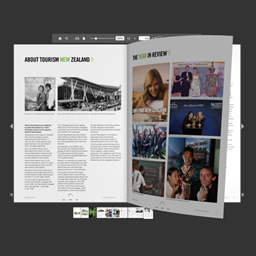
SoftIcon Flipbook turns your brochures, magazines, catalogs, menus and ebooks into a realistic page-turning book, right inside the block editor. Add the Flipbook block, pick a PDF and you see the finished book in the editor. For the Classic Editor and page builders, every flipbook also has a shortcode.
Documentation | Demo | Pricing | Support
Video tutorials: what’s new in 30 seconds, every new option, step by step, the 30-second promo, every setting explained, add a flipbook, the Hardcover design and reading features and the lightbox and the shortcode for the Classic Editor and Elementor and autoplay and right to left and fullscreen on phones, or watch the whole playlist.
Why choose SoftIcon Flipbook?
- No page limit – a PDF with 5 pages or 500, or as many page images as you like, in the free version too.
- Block first – upload or pick a PDF in the block and preview the real flipbook while you edit.
- Readable on phones – the book switches to one page at a time on small screens, two-page spreads on wide ones. Or force one layout.
- Light on your pages – the flipbook engine loads only when the book scrolls into view, and pages are drawn as the reader gets near them. In a lightbox the book loads only when a visitor opens it.
- Many books on one page – show each one as a cover, button or link that opens the book in a popup.
- PDF or images – build a book from a PDF, or from images in reading order.
- Clear errors – if a PDF cannot be shown (for example a link to another website that blocks it), the block says why and keeps a link to the file.
Features
- Lightbox: a cover, button or text link on the page opens the book in a popup over the page, full screen, large or medium, on a dark, light or blurred page
- Open the popup from any link: a menu item, your theme’s button or a link in your text that points to #name, or an address ending in #name; the popup can also open the book straight in full screen
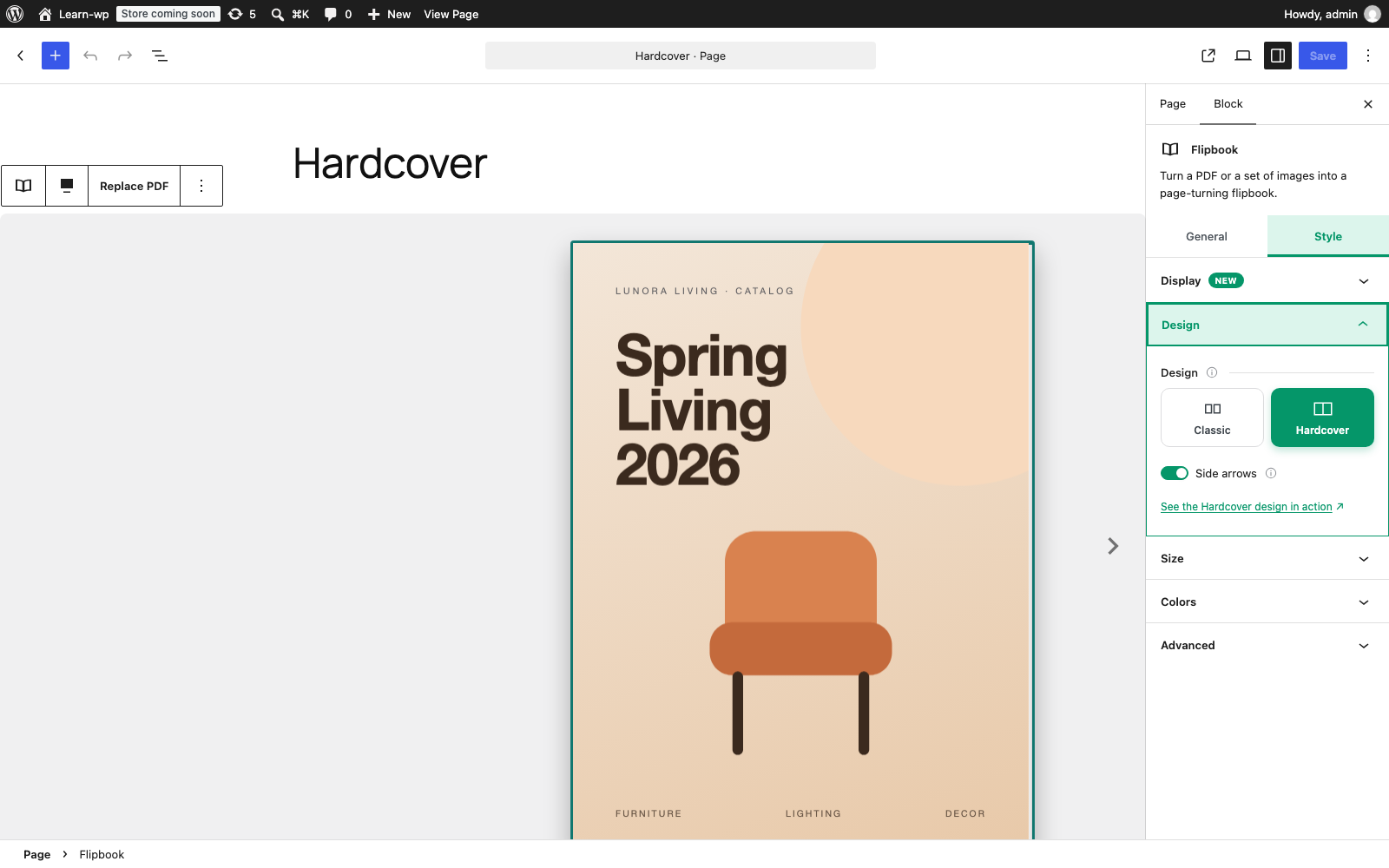
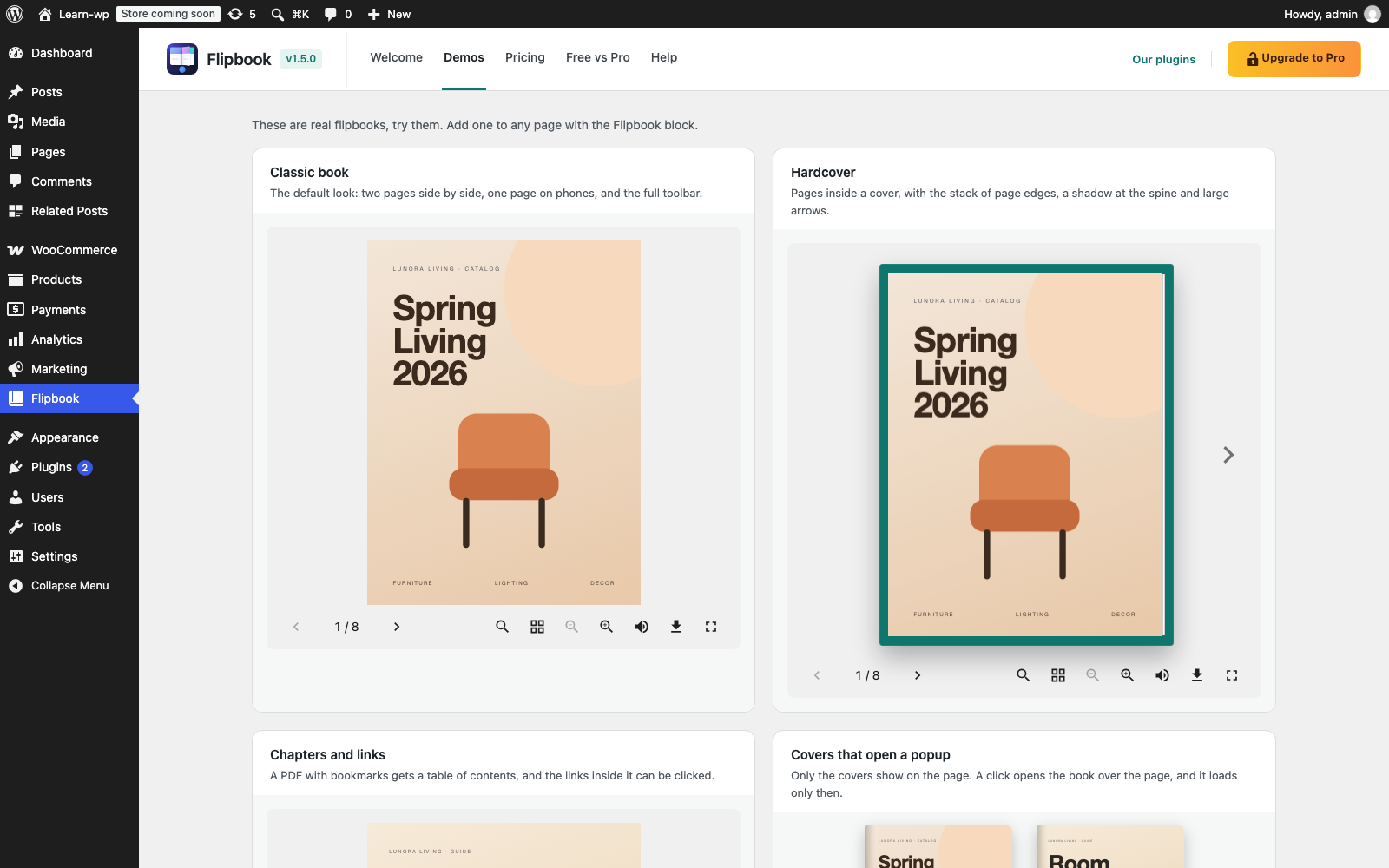
- Two designs: Classic, or Hardcover book with a cover around the pages, the stack of page edges, a shadow at the spine and large arrows beside the book
- PDF flipbook from the Media Library or a link
- Image flipbook from any set of images
- Auto, always-two-pages or always-one-page layout
- Hard cover: first and last pages turn on their own
- Open at any page, jump to a page from the page counter, or link straight to a page with #page=5
- The page number in the address (#page=5) changes as readers turn the pages, so a copied link opens the same page
- Page numbers like the printed book: set the pages before page 1, and those pages show as i, ii, iii
- First and last page buttons, and a page slider to drag to any page
- Turn the pages like a book, or scroll them in one column (also on phones only)
- Page turn hint: the corner of the next page lifts once, so new readers see the pages turn
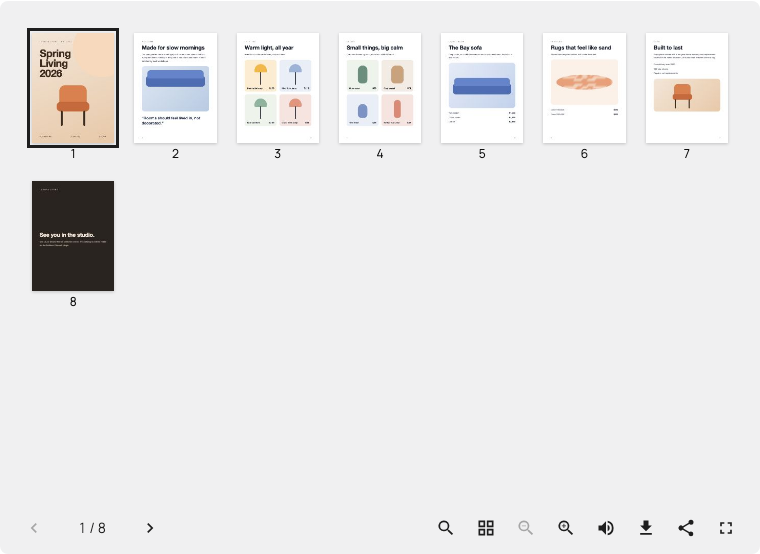
- Thumbnails of all pages: a click opens that page
- Links inside the PDF work: web and email links, and page links that turn the book
- Table of contents from the PDF’s bookmarks, or your own list of chapters, also for books made of images
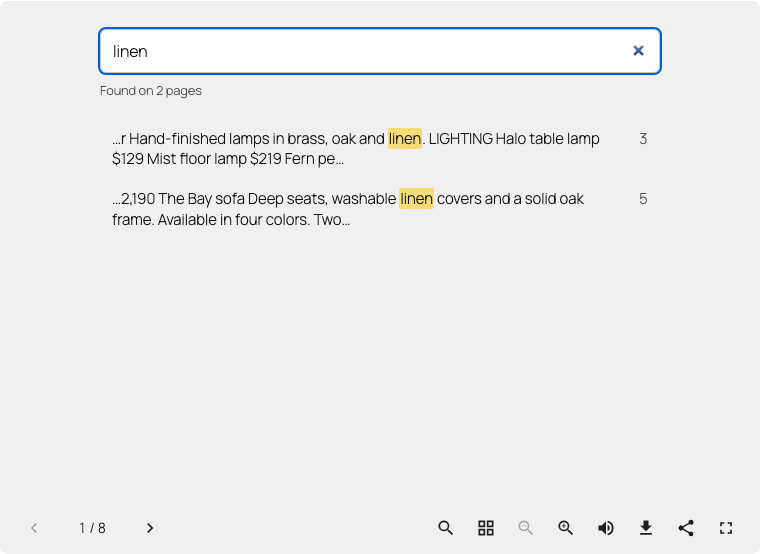
- Search: type a word, see the pages that have it with a short excerpt, and open one with a click
- Share menu: Facebook, X, LinkedIn, Pinterest, email and Copy link for the page that is open; phones use their own share sheet (optional)
- Print: readers print the whole book, one book page on each sheet of paper (optional)
- Zoom with the toolbar buttons, a pinch on phones or Ctrl + scroll on computers; drag to move around a zoomed page
- One or two pages: a toolbar button lets readers switch between a single page and the two-page spread
- Colors for readers: a toolbar button for the book’s own colors, dark, light or high contrast, remembered for every book on the site
- Toolbar with page counter, previous/next, play / pause, thumbnails, zoom, print, download, share, fullscreen and a page-turn sound visitors can mute
- Keyboard and accessibility: the arrow keys turn the pages, ? lists every shortcut, a skip link for keyboard users, no page animation for readers who ask for less motion, and a toolbar that works with screen readers
- Fullscreen that fits the book to the screen, with an iPhone fallback
- Fullscreen on phones: the book shows “Tap to read” and one tap opens it full screen
- Autoplay: the book turns its own pages every few seconds, holds under the mouse, stops when a reader takes over, and can start again at the end
- Right to left, for Arabic, Hebrew, Urdu or Persian books: the book opens from the right and the arrows and arrow keys follow
- Start with the thumbnails or the table of contents, so readers pick a page first
- A title above the book
- Maximum height, with its own height for tablets and phones
- Fit the width: the book takes the full width of its column, as tall as the pages need
- Light, Dark or Auto theme (dark when the reader’s device is), and colors for background, toolbar and icons
- Wide and full width alignment
- Flipbooks with a shortcode, such as
[softicon_flipbook id="123"], for the Classic Editor, Elementor and other page builders
SoftIcon Flipbook Pro
Everything above stays free, with no limits on books or pages. SoftIcon Flipbook Pro is a separate plugin for sites that want more from their books:
- Shelf of books – show many books on a wooden shelf; a click on a cover opens that book in a popup. Watch the shelf.
- Lead capture – ask readers for their name and email after the pages you choose. Leads are saved on your site, with CSV download and an email for each new lead. Watch lead capture.
- Reading analytics – opens and downloads per book, the most read pages and a daily chart, with a CSV export and no cookies. Watch reading analytics.
- PDF protection – no download button, no right-click saving, and the PDF address kept out of the page.
- Password for a book – readers type a password to open it; the password is checked on your site and never put in the page. Watch protection and the password.
- Page buttons – a button under the book while a chosen page is open, linking anywhere or to a WooCommerce product with its name and price. Watch page buttons.
- Hotspots – draw clickable areas on any page: a link, or a WooCommerce product that opens a card with its picture, name and price. Watch hotspots.
- Branding – your logo in the book’s toolbar, with a link, and your own picture behind the book. Watch branding.
- Watermark – your words or logo drawn into every page, also when printed, with the reader’s name or email if you like.
- PDF from a custom field – each post shows the PDF in its own Meta Box or ACF field, so one flipbook in a template, a Query Loop or a shortcode shows every post’s book.
- Bookmarks – readers mark pages with one click and find them again in a small list with page pictures, saved in their own browser.
- Selectable text – readers select and copy the words of the PDF.
- Preview and paywall – readers who are not logged in, or have not bought a WooCommerce product, read a short preview, then a card to log in or buy. The whole PDF never reaches them.
- Text version for search engines – the PDF’s words under the book, so search engines and screen readers can read it.
- PDF for phones – a lighter copy of the PDF that phones open, so big books load fast on mobile data.
- Reader page and QR code – every book gets a page of its own, and the share menu shows its QR code.
- Toolbar style – the toolbar at the bottom, at the top, or floating over the book.
- Resume reading – a reader who comes back opens the book where they stopped.
- Read aloud – the browser’s own voice reads the open pages out loud.
- Videos in hotspots – a YouTube, Vimeo or video file link plays over the page.
- Google Analytics events – opens, pages read, finished books and downloads go to your own Google Analytics.
- Switch from another plugin – once DearFlip, 3D FlipBook, Real3D, Flipa, TNC, PDF Embedder or PDF.js Viewer is turned off, its shortcodes in your posts show as SoftIcon flipbooks.
- Presets, export and import – save a book’s settings as a preset for other books, and move the site defaults and presets to another site in one file.
- Open in a new tab – the cover, button or link opens the book on a page of its own in a new tab, also for a book in a post or page.
- No toolbar – a Toolbar style with no buttons at all: readers turn the pages with the large arrows beside the book.
- Categories and category shelves – sort your books into Flipbook → Categories, and a shelf shows every book of a category, newest first or A–Z; a new book joins the shelf by itself.
- Elementor widget – a Flipbook widget in Elementor: pick a book, show it on the page or in a popup, and set its height, first page and theme.
- Sound in hotspots – an MP3 or other audio link plays in a small player over the page, and stops when the page turns.
- PDF links as flipbooks – one switch in Manage → Settings opens every link to a PDF on your site as a flipbook in a popup.
- Google Drive PDFs in your Media Library – paste a Drive share link and the PDF is copied to your Media Library once, so the book loads from your own site.
- PDFs from Google Drive and other websites – a Google Drive link, a Media Library kept on Google Drive by another plugin, or a PDF on a website that does not allow other sites to show it is read through your own site, which keeps a copy for a week.
See every Pro feature in one minute.
Pro replaces the free plugin when you activate it, and every book you made keeps working. Prices and a full comparison are in Flipbook → Pricing in your dashboard.
Try Pro without risk: start with a free trial from Flipbook → Pricing, no card needed, and every Pro plan comes with a 14-day money-back guarantee. Any problem or question, before or after you buy, email us at support@softiconai.com. We build SoftIcon Flipbook for the people who use it, and your satisfaction comes first.
Third-party libraries
- PDF.js 6.4.299 (npm package pdfjs-dist) by Mozilla – github.com/mozilla/pdf.js – Apache License 2.0. Bundled as build/pdfjs.js and build/pdfjs/pdf.worker.min.js (minified upstream build); license in build/pdfjs/LICENSE.txt.
Also from the pdfjs-dist package: the JavaScript builds of the OpenJPEG (BSD-2) and JBIG2 (BSD-3) image decoders in build/pdfjs/decoders, the Foxit (BSD-3) and Liberation (GPLv2 with font exception) standard fonts in build/pdfjs/standard_fonts, and the Adobe CMaps (BSD-3) in build/pdfjs/cmaps, each with its license file. The fonts and CMaps are binary data files; the build stores each one unchanged as a base64 string in a .json file, which the plugin decodes back to the original bytes for pdf.js. - StPageFlip 2.0.7 (npm package page-flip) by Nodlik – github.com/Nodlik/StPageFlip – MIT License. License in build/page-flip-LICENSE.txt.
- Freemius Checkout 1.5.1 (npm package @freemius/checkout) by Freemius – github.com/Freemius/freemius-checkout-js – MIT License. Bundled in build/dashboard.js, it opens the Pro checkout window on the Flipbook dashboard when you click Get Pro. License in build/freemius-checkout-LICENSE.txt.
The demo PDFs in assets/demo use the Inter font by Rasmus Andersson – rsms.me/inter – SIL Open Font License 1.1, embedded as subsets. Their HTML source is in the plugin’s GitHub repository (tools/demo-pdf).
The unminified source of this plugin is in the src folder, with package.json and webpack.config.js. Build it with npm install and npm run build; the build copies the pdf.js files from node_modules/pdfjs-dist.
Development
The plugin is developed on GitHub: github.com/softiconai/softicon-flipbook. Bug reports and pull requests are welcome there; for help, use the support forum here on WordPress.org.
Installation
- Install and activate the plugin.
- Edit a post or page and add the Flipbook block.
- Upload or choose a PDF (or switch to images) and publish.
Changelog
Open the popup from any link or a menu, full screen popups, Fit the width, page numbers like the printed book, the page in the address, and one-or-two pages and colors buttons for readers. Your flipbooks don't change.
1.10.0
- New: open the popup from any link. Under Open with in the Display panel, choose Any link: nothing shows on the page, and a menu item, a theme button or a link in your text to #name opens the book, as does an address that ends in #name.
- New: Open in full screen. The popup opens the book straight in full screen; Esc closes both.
- New: Fit the width, in the Size panel. The book takes the full width of its column, as tall as its pages need.
- New: Page number in the address, in the Pages panel. The address shows #page=5 as readers turn the pages, so a copied link opens the same page.
- New: Pages before page 1, in the Pages panel. The page counter, thumbnails, search and contents use the page numbers printed in the book, and the pages before page 1 show as i, ii, iii.
- New: One or two pages, a toolbar button that lets readers switch between one page and the two-page spread.
- New: Colors for readers, a toolbar button for the book’s own colors, dark, light or high contrast. The choice is kept for every book on the site.
- Improved: a Google Drive link as the PDF says what to do. Google Drive does not let other websites show its files, so the book asks you to download the PDF from Drive and upload it to your Media Library.
- New: short notices in the block for the new Pro features.
1.9.2
- Improved: during the Black Friday sale (until 5 December 2026), the Pricing and Free vs Pro tabs show the sale price next to the old one, and Get Pro opens the checkout with the 40% coupon already applied, so there is no code to type.
1.9.1
- New: Black Friday offer, 26 November to 5 December 2026: 40% off SoftIcon Flipbook Pro, shown on the Flipbook dashboard, the All Flipbooks list and the Plugins page. Close it with × and it stays closed. It disappears by itself after the sale, and never shows with Pro active.
- New: the Welcome tab links to SoftIcon Document Viewer, our free plugin for Word, Excel and PowerPoint files, with a button to open, activate or install it. The FAQ says when to use it.
1.9.0
- New: First and last page buttons, and a page slider to drag to any page. On the slider the arrow keys move a whole spread. Turn them on in the Toolbar panel.
- New: your own table of contents, under Table of contents in the Toolbar panel: a title and a page for each chapter. It takes the place of the PDF’s bookmarks, and books made of images get one too.
- New: Scroll. How pages move, in the Pages panel: Turn as before, Scroll (the pages one under the other) or Scroll on phones.
- New: Page turn hint. When a book first comes into view, the corner of the next page lifts once, so readers see that the pages turn. On by default, with a switch in the Pages panel.
- New: popup options. The popup’s size (full screen, large or medium), a dark, light or blurred page behind the book, and rel=”nofollow” on the cover, button or link. Flipbook Popup, Flipbook Button and Flipbook Link are in the block inserter.
- New: accessibility. Pages turn without the animation for readers whose device asks for less motion. The ? key lists every keyboard shortcut, each also a button. A “Skip the flipbook” link for keyboard users, and keys pressed right after the page opens go to the book in view.
- Changed: a new empty block, and a Source panel with the same Upload, Media Library and Insert from URL. The preview in the editor has the same toolbar as the page, and its pages turn by dragging.
- New: short notices in the block for the new Pro features.
1.8.0
- New: the Welcome tab asks how you want to add your flipbook: as a block in a page, or with a shortcode for the Classic Editor, Elementor and other page builders. The way that fits your site is marked, and the block then shows the steps for it.
- New: change a flipbook’s settings in one place with its shortcode, such as
[softicon_flipbook id="123" height="500" theme="dark" show_download="no"]. The flipbook keeps its own settings everywhere else. Any setting of the block works, by its name; a name or value the shortcode can’t use is left out, with a note that only the flipbook’s editors see. The block’s Help panel shows how. - Changed: after you activate the plugin, the Flipbook dashboard opens.
1.7.0
- New: a Manage menu on the Flipbook dashboard. It shows what Pro’s reading analytics, lead capture, site defaults and settings do, each with a working demo you can click, using sample data.
- New: a new Help page with the ways to reach us (a support ticket, the docs, video tutorials and the forum), quick answers you can search, and your site details (WordPress, PHP and theme versions) to copy into a ticket. The details are only copied, never sent.
- New: a short notice in the block’s Colors panel: Pro can set the colors, size and toolbar once for every flipbook.
- Changed: the dashboard uses more of a wide screen, and the Pricing and Free vs Pro pages line up with the rest.
- Changed: the support email is now support@softiconai.com.
Screenshots



For developers
Is this your plugin? Show off the numbers.
Add a live badge to your site, docs or GitHub README. It updates on its own — no account needed.
Best SoftIcon Flipbook alternatives
All flip book plugins →



FAQ
SoftIcon Flipbook: quick answers
Straight answers, pulled from live WordPress.org data.
Source: WordPress.org
Is SoftIcon Flipbook free?
Yes. SoftIcon Flipbook is free to download and use from the official WordPress.org plugin directory.
Is SoftIcon Flipbook safe to use in 2026?
SoftIcon Flipbook is a solid plugin choice in 2026, with a few things worth checking first. It runs on 200+ sites, is rated 5/5 and was last updated 2 days ago, and scores 76/100 on our health check.
How many websites use SoftIcon Flipbook?
SoftIcon Flipbook is active on 200+ WordPress websites and has been downloaded 4,578 times since it launched in October 2026. It was downloaded 4,158 times in the last 30 days.
Does SoftIcon Flipbook work with WordPress 7.1?
Yes. The developer has tested SoftIcon Flipbook up to WordPress 7.1.5, the latest release. It requires WordPress 6.5 or newer.
What PHP version does SoftIcon Flipbook need?
SoftIcon Flipbook requires PHP 7.1 or higher. Most hosts run PHP 8.x today, so it works on any modern WordPress hosting.
When was SoftIcon Flipbook last updated?
The latest version, 1.10.0, was released on November 27, 2026 (2 days ago).
Who makes SoftIcon Flipbook?
SoftIcon Flipbook is developed and maintained by SoftIcon.
What are the best alternatives to SoftIcon Flipbook?
The most popular alternatives to SoftIcon Flipbook are DearFlip (200K+ installs), 3D FlipBook (70K+ installs) and flowpaper (10K+ installs).
Powered by PageForge
One template and a spreadsheet. A real page for every search.
PageForge turns each row of a CSV into a WordPress page with its own title, URL, SEO fields and schema, built on the layout you already designed. Free on WordPress.org.
- CSV and XLSX, plus Google Sheets on Professional and Enterprise
- Its own title, URL, SEO fields and schema for every page
- Works with the block editor, Elementor, Divi and Avada
- Free on WordPress.org, no credit card