

Preserve Code Formatting
Preserve formatting of code for display by preventing its modification by WordPress and other plugins while also retaining whitespace.

Mit Vorsicht verwenden
Preserve Code Formatting works, but test it on a staging site before relying on it in 2026. It runs on 400+ sites, is rated 4.7/5 and was last updated 1 year ago, and scores 42/100 on our health check.
- Kleine Benutzerbasis (400+ aktive Installationen)
- Bisher sehr wenige Bewertungen
- Kein Update in über einem Jahr
- Nur getestet bis WordPress 6.8 (letzt ist 7.1)
Wie stapelt es sich?
Side-by-side bei Installationen, Updates, Bewertungen und Support



Tägliche Downloads
Download-Spitzen folgen normalerweise einer neuen Version - jede Website, die automatisch aktualisiert wird, gilt als Download.
Ranglisten
Where Preserve Code Formatting stands todayWordPress.org Ranglisten suchen
Live-Position in der Plugin-Suche, Top 100| Stichwort | Position |
|---|---|
| code | >100 |
| Inhalt | >100 |
| escape | #24 |
| formatting | #3 |
| Post | >100 |
Versionsübernahme
Anteil aktiver Sites pro Release.
Bewertungsaufschlüsselung
★★★★★★★★★★ 4.7 from 3 reviews
About Preserve Code Formatting
From the official readme · v5.0Beschreibung
This plugin preserves formatting of code for display by preventing its modification by WordPress and other plugins while also retaining whitespace.
NOTE: This plugin does NOT handle posts containing blocks. For such posts, use the built-in code or preformatted blocks to format your code for display. However, this plugin would still be needed if you have text-based posts from before using the blocks-based editor.
NOTE: Use of the visual text editor will pose problems as it can mangle your intent in terms of code tags. I strongly suggest you not use the visual editor in conjunction with this plugin as I have taken no effort to make the two compatible.
Notes:
Basically, you can just paste code into code, pre, and/or other tags you additionally specify and this plugin will:
- Prevent WordPress from HTML-encoding text (i.e. single- and double-quotes will not become curly; “–” and “—” will not become en dash and em dash, respectively; “…” will not become a horizontal ellipsis, etc)
- Prevent most other plugins from modifying preserved code
- Prevent shortcodes from being processed
- Optionally preserve whitespace (in a variety of methods)
- Optionally preserve code added in comments
Keep these things in mind:
- ALL embedded HTML tags and HTML entities will be rendered as text to browsers, appearing exactly as you wrote them (including any
brtags). - By default this plugin filters ‘the_content’ (post content), ‘the_excerpt’ (post excerpt), and ‘get_comment_text (comment content)’.
Beispiel:
A post containing this within code tags:
$wpdb->query("
        INSERT INTO $tablepostmeta
        (post_id,meta_key,meta_value)
        VALUES ('$post_id','link','$extended')
");
Would, with this plugin enabled, look in a browser pretty much how it does above, instead of like:
$wpdb->query(—
INSERT INTO $tablepostmeta
(post_id,meta_key,meta_value)
VALUES ('$post_id','link','$extended')
―);
Links: Plugin-Homepage | Plugin-Verzeichnisseite | Github | Auto-Homepage
Installation
- Whether installing or updating, whether this plugin or any other, it is always advisable to back-up your data before starting
- Installieren Sie über das integrierte WordPress-Plugin-Installationsprogramm. Oder laden und entpacken Sie
preserve-code-formatting.zipim Plugins-Verzeichnis für Ihre Website (normalerweisewp-content/plugins/) - Aktivieren Sie das Plugin über das Admin-Menü „Plugins“ in WordPress
- Go to the
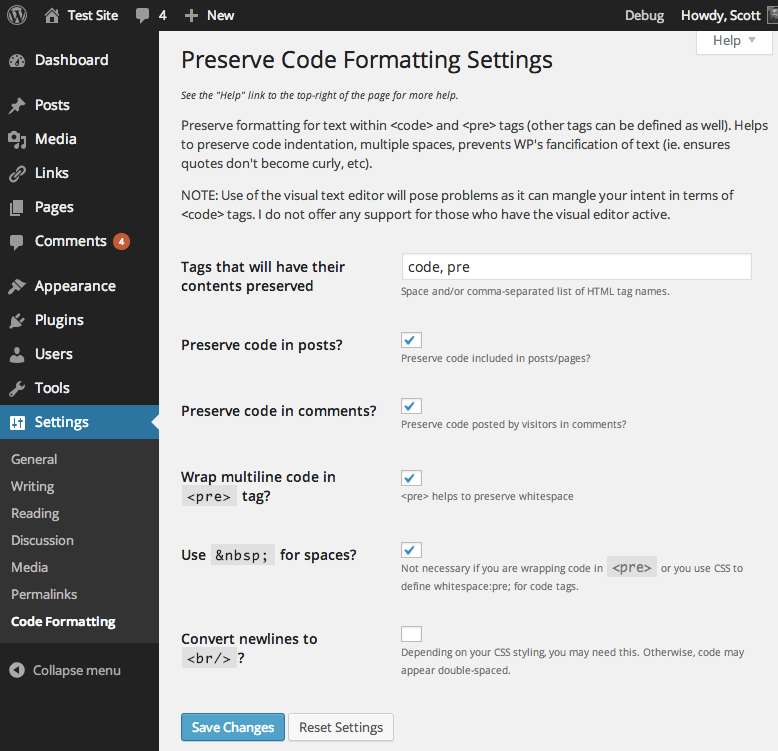
Settings->Code Formattingadmin settings page (which you can also get to via the Settings link next to the plugin on the Manage Plugins page) and customize the settings. - Write a post with code contained within opening and closing
codetags. If you are using the block editor (aka Gutenberg), then this plugin is only useful for maintaining code formatting for posts written before WP 5.0 (or whenever you started creating posts with the block editor). You should be using the built-in code or preformatted blocks when including code into the block editor. Otherwise, if you are actively using the classic editor, be sure to use the HTML (aka “Text”) editor and not the “Visual” editor or you’ll encounter formatting issues.
Änderungsprotokoll
Major release: significant improved security, performance, compatibility. Updated plugin framework to v070 for enhanced security, features. Excluded all block editor content (plugin only designed for text view). Added class to preserved tags. WP compat now 5.5-6.8+. Updated copyright date (2025).
5.0 (2025-08-10)
Highlights:
This major release significantly improves security, performance, and compatibility. The plugin framework updates to version 070 for enhanced security and features. Block editor content is now properly excluded (the plugin was designed for text view), and compatibility extends through WordPress 6.8+ while dropping support for versions older than 5.5. Additional improvements include better error handling, enhanced documentation, and the addition of CSS classes for styling processed code blocks.
Details:
- Security and hardening:
- Hardening: Prevent regex pattern injection vulnerability
- Hardening: Prevent object injection vulnerability. Props Patchstack.
- Hardening: Prevent bypassing preprocessor by removing any explicit pseudo-tags from content
- Hardening: Prevent processing of excessively large content
- Hardening: Prevent unintended markup in translated strings before display
- Hardening: Prevent content-native usage of token string used internally to chunk data
- Performance:
- Change: Improve performance of processing tags to be preserved
- Change: Bail early if there are no tags configured to be preserved
- Change: Skip tags that have no content
- Change: Centralize regex patterns in new
get_preprocess_regex_pattern()andget_postprocess_regex_pattern() - Change: Use more efficient
preg_replace_callback()for tag extractions
- Block editor and content handling:
- New: Prevent processing of all block editor content (plugin was designed for text view, not block editor)
- Fix: Prevent unintended greediness when multiple instances of a tag are present
- UI and styling:
- New: Output class of “preserve-code-formatting” for all tags that were processed
- Change: Output example ‘code’ and ‘pre’ tags within ‘code’ tags within setting page description
- Framework and compatibility:
- Change: Update plugin framework to 070
- Change: Note compatibility through WP 6.8+
- Change: Drop compatibility with versions of WP older than 5.5
- Change: Note compatibility through PHP 8.3+
- Change: Update copyright date (2025)
- Code quality and documentation:
- New: Add FAQ entry explaining nested tag deficiency
- Change: Update
get_c2c_string()to add new strings - Change: Improve some docblock documentation
- Change: Tweak some
README.mdformatting - Change: Tweak installation instructions
- Change: Reduce number of tags defined in readme.txt
- Change: Note removal of development and testing related files from release packaging
- Change: Add missing release dates for earlier releases, as well as add an omitted release
4.0.1 (2021-04-14)
- Fix: Update plugin framework to 061 to fix a bug preventing settings from getting saved
4.0 (2021-04-03)
Highlights:
- This recommended release prevents potential conflicts with other plugins (such as SyntaxHighlighter), updates the plugin framework, and notes compatibility through WP 5.7+.
Details:
- Change: Use
{!{and}!}instead of[[and]]to prevent interpretation as shortcodes, fixing conflict with SyntaxHighlighter. Props azito122. - Change: Update plugin framework to 060
- 060:
- Rename class from
c2c_{PluginName}_Plugin_051toc2c_Plugin_060 - Move string translation handling into inheriting class making the plugin framework code plugin-agnostic
- Add abstract function
get_c2c_string()as a getter for translated strings - Replace all existing string usage with calls to
get_c2c_string()
- Add abstract function
- Handle WordPress’s deprecation of the use of the term “whitelist”
- Change: Rename
whitelist_options()toallowed_options() - Change: Use
add_allowed_options()instead of deprecatedadd_option_whitelist()for WP 5.5+ - Change: Hook
allowed_optionsfilter instead of deprecatedwhitelist_optionsfor WP 5.5+
- Change: Rename
- New: Add initial unit tests (currently just covering
is_wp_version_cmp()andget_c2c_string()) - Add
is_wp_version_cmp()as a utility to compare current WP version against a given WP version - Refactor
contextual_help()to be easier to read, and correct function docblocks - Don’t translate urlencoded donation email body text
- Add inline comments for translators to clarify purpose of placeholders
- Change PHP package name (make it singular)
- Tweak inline function description
- Note compatibility through WP 5.7+
- Update copyright date (2021)
- 051:
- Allow setting integer input value to include commas
- Use
number_format_i18n()to format integer value within input field - Update link to coffee2code.com to be HTTPS
- Update
readme_url()to refer to plugin’s readme.txt on plugins.svn.wordpress.org - Remove defunct line of code
- Change: Move translation of all parent class strings into main plugin file
- Änderung: Beachten Sie die Kompatibilität durch WP 5.7+
- Änderung: Aktualisierung des Urheberrechtsdatums (2021)
Das vollständige Änderungsprotokoll ist in Changelog.md verfügbar.
Screenshots
Für Entwickler
Ist das dein Plugin? Zeigen Sie die Zahlen.
Fügen Sie Ihrer Website, Docs oder GitHub Readme ein Live-Badge hinzu. Es wird von selbst aktualisiert - kein Konto erforderlich.
Best Preserve Code Formatting alternatives
All code plugins →




Fragen und Antworten
Preserve Code Formatting: quick answers
Gerade Antworten, gezogen von Live WordPress.org Daten.
Quelle: WordPress.org
Is Preserve Code Formatting free?
Yes. Preserve Code Formatting is free to download and use from the official WordPress.org plugin directory.
Is Preserve Code Formatting safe to use in 2026?
Preserve Code Formatting works, but test it on a staging site before relying on it in 2026. It runs on 400+ sites, is rated 4.7/5 and was last updated 1 year ago, and scores 42/100 on our health check.
How many websites use Preserve Code Formatting?
Preserve Code Formatting is active on 400+ WordPress websites and has been downloaded 50,349 times since it launched in April 2005. It was downloaded 256 times in the last 30 days.
Does Preserve Code Formatting work with WordPress 7.1?
Preserve Code Formatting is officially tested up to WordPress 6.8.13, while the latest release is 7.1.5. It may still work, but try it on a staging site first.
When was Preserve Code Formatting last updated?
The latest version, 5.0, was released on August 15, 2025 (1 year ago).
Who makes Preserve Code Formatting?
Preserve Code Formatting is developed and maintained by Scott Reilly.
What are the best alternatives to Preserve Code Formatting?
The most popular alternatives to Preserve Code Formatting are WPCode (3M+ installs), Code Snippets (1M+ installs) and Head & Footer Code (100K+ installs).
Angetrieben von PageForge
Eine Vorlage und eine Tabelle. Eine echte Seite für jede Suche.
PageForge Verwandelt jede Zeile eines CSV in eine WordPress-Seite mit eigenem Titel, URL, SEO Felder und Schema entworfen. Kostenlos auf WordPress.org.
- CSV und XLSX, plus Google Sheets auf Beruf und Unternehmen
- seinen eigenen Titel, URL, SEO Felder und Schema für jede Seite
- Arbeitet mit dem Blockeditor, Elementor, Divi und Avada
- Kostenlos auf WordPress.org, keine Kreditkarte