

PDF Viewer Nova
Embed polished, customizable PDF viewers with handy bookmark navigation, search, and support for Gutenberg and Elementor.

Use with caution
PDF Viewer Nova works, but test it on a staging site before relying on it in 2026. Was last updated 4 months ago, and scores 49/100 on our health check.
- Small user base (<10 active installs)
- Very few reviews so far
How does it stack up?
Side-by-side on installs, updates, ratings & support



Daily downloads
Download spikes usually follow a new release — each site that auto-updates counts as a download.
Rankings
Where PDF Viewer Nova stands todayWordPress.org search rankings
Live position in the plugin search, top 100| Keyword | Position |
|---|---|
| block-editor | >100 |
| elementor | >100 |
| >100 | |
| pdf embed | >100 |
| pdf viewer | >100 |
About PDF Viewer Nova
From the official readme · v1.0.3Description
PDF Viewer Nova helps WordPress site owners embed polished, full-featured PDF reading experiences directly inside pages and posts.
Use the PDF Viewer Nova block in the WordPress Block Editor or the PDF Viewer Nova widget in Elementor to place PDFs from the Media Library or from public external URLs.
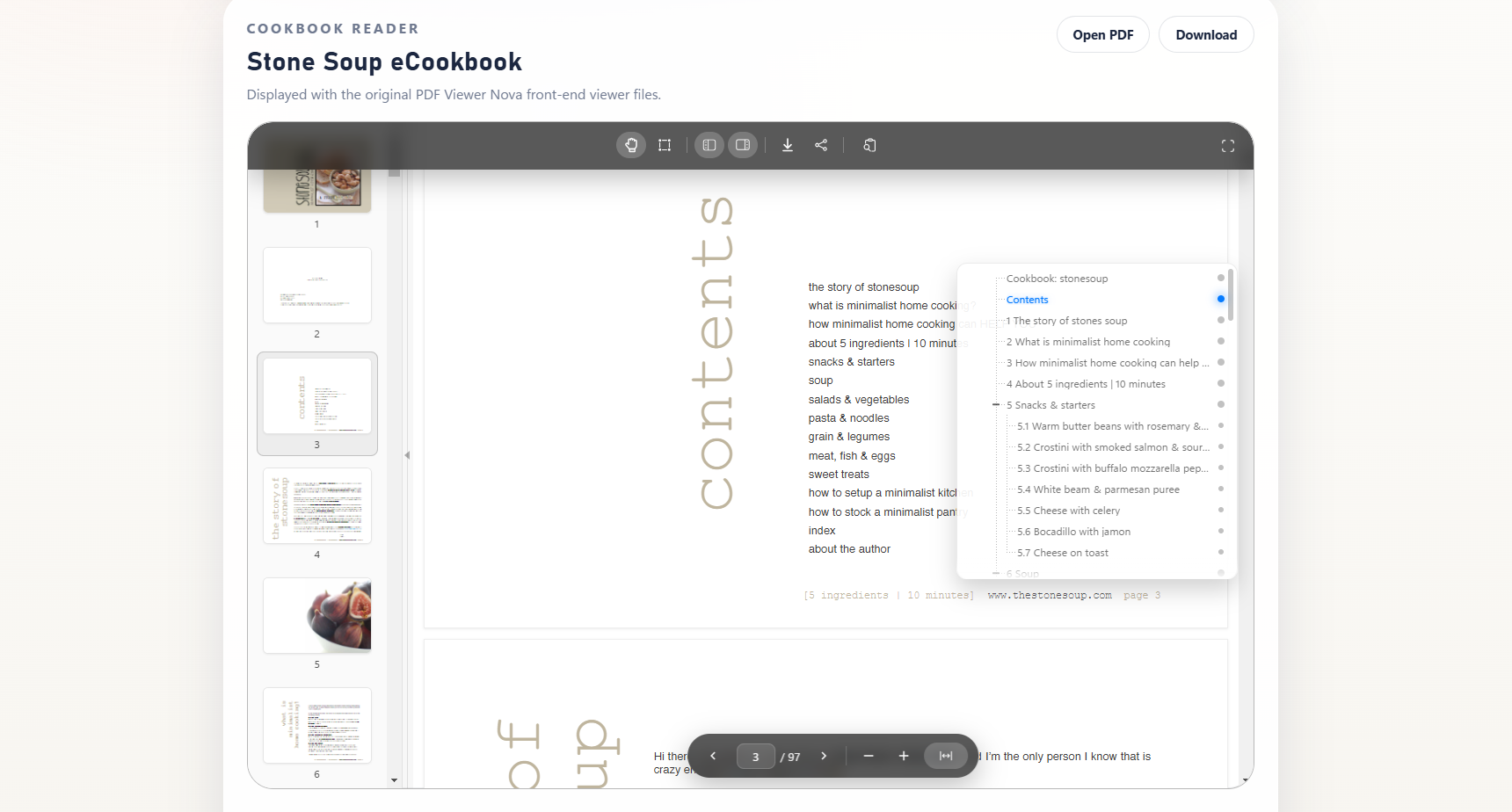
The viewer is powered by PDF.js and highlights a handy bookmark and outline navigation panel for long PDFs, along with responsive layout controls, floating toolbars, page navigation, zoom controls, fullscreen modes, thumbnails, search, text selection, configurable viewer sizing, and ready-made style presets.
PDF Viewer Nova is built for easy document embedding, smooth PDF reading, and better experience for visitors to your WordPress site.
PDF Viewer Nova Pro is distributed separately by WP Essentia outside the free package for advanced PDF viewing and downloading control.
Free Features
- Bookmark and outline navigation panel for long PDFs.
- Auto-hiding top and bottom controls for clean PDF view when the reader is not interacting.
- Ready-made style presets for quickly styling the viewer, toolbars, thumbnails, and bookmark panel in Gutenberg or Elementor, with a Custom option for manual styling.
- In-page fullscreen and native fullscreen modes for focused reading.
- Pan and text-selection interaction modes.
- Responsive embedded PDF viewer.
- Media Library PDF selection or public external PDF URL embedding.
- Thumbnail sidebar for quick page navigation.
- Full-text search with result navigation.
- Zoom, fit width, page input, previous page, and next page controls.
- Share button in the top toolbar.
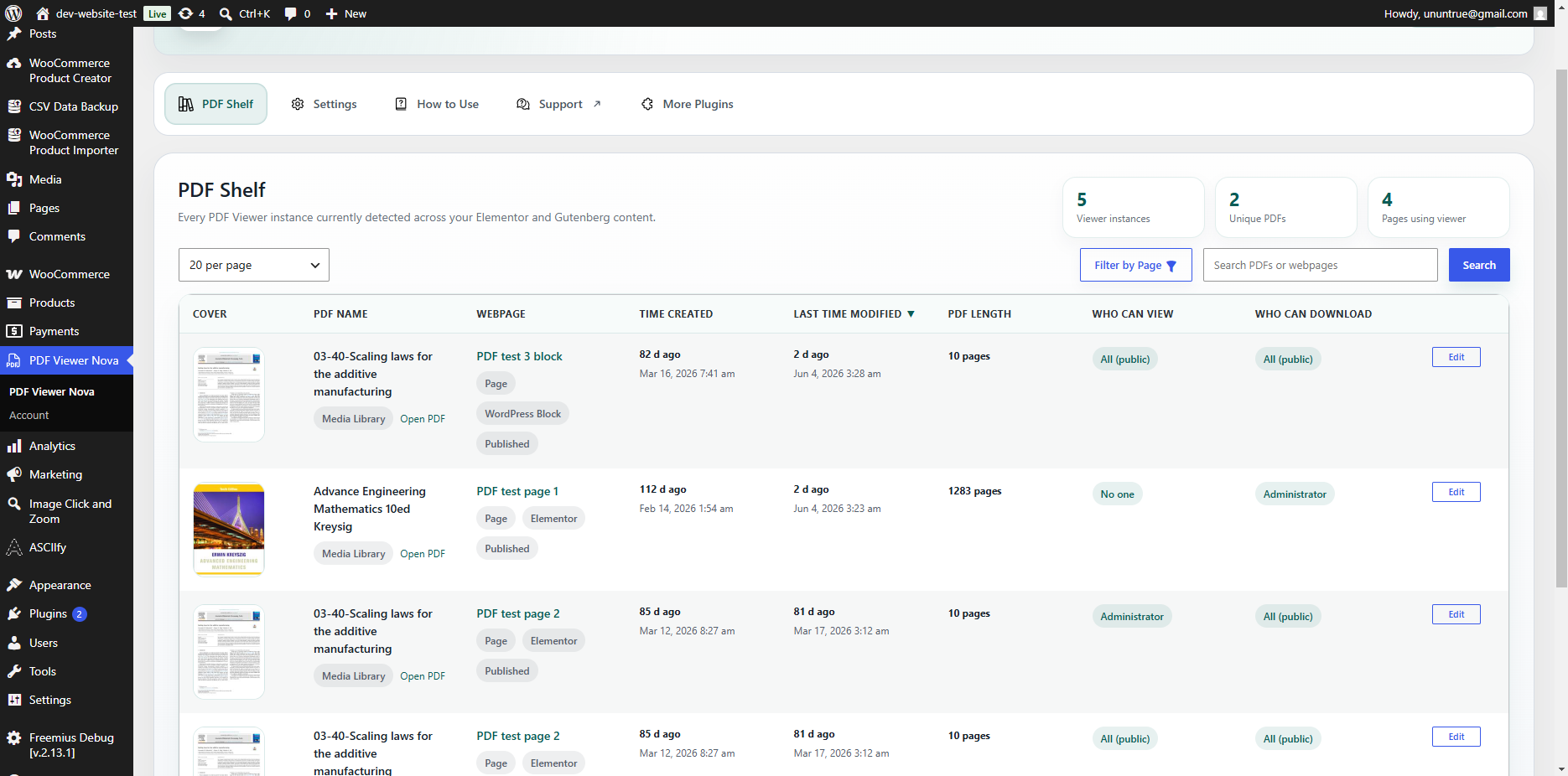
- Admin PDF Shelf to discover where PDF viewers are used across the site.
- One-click settings to enable or disable the Elementor widget and WordPress block.
- WordPress Block Editor block for Gutenberg pages and posts.
- Elementor widget for page builder workflows.
Pro Features
PDF Viewer Nova Pro is a separately distributed version for advanced PDF publishing workflows, designed to help increase PDF control, premium PDF sales, and membership sign-ups.
- Choose PDF display behavior by guest status or WordPress role.
- Choose PDF download behavior by guest status or WordPress role.
- Easy Digital Downloads (EDD) integration: Restrict PDF viewing and downloading based on qualifying purchases, active subscriptions, or All Access passes.
- WooCommerce and WooCommerce Memberships integration: Restrict PDF viewing based on product purchases or active memberships, and restrict downloading based on valid download permissions or active memberships while preserving native download limits and expiry.
- MemberPress integration: Restrict PDF viewing and downloading to users with any active membership or one of your selected active memberships.
- Show selected preview page ranges for restricted viewers.
- Optionally append a lock page for restricted viewers, with a customizable message and click-through redirection.
- Show a image instead of the PDF viewer for restricted viewers.
- Render a selected PDF page as a teaser preview image for restricted viewers.
- Show custom popup messages with customizable redirection, such as to your subscription or membership page, when downloading is restricted.
For more information about PDF Viewer Nova Pro, visit the PDF Viewer Nova product page.
Third-Party Libraries and External Services
PDF Viewer Nova includes PDF.js build files in the plugin’s assets/pdfjs/build/ directory for local PDF rendering. PDF.js is licensed under the Apache License 2.0, which is GPLv3-compatible.
PDF Viewer Nova includes Motion, an MIT-licensed animation library, for local interface animations such as the bookmark panel.
PDF Viewer Nova includes the Freemius SDK for checkout functionality. On first activation, Freemius displays its own opt-in screen before collecting diagnostic or account data. You can skip that opt-in and continue using all free PDF Viewer Nova features.
Freemius Terms of Service: https://freemius.com/terms/
Freemius Privacy Policy: https://freemius.com/privacy/
The admin How to Use tab includes embedded tutorial videos from YouTube’s privacy-enhanced domain. These embeds are loaded only when an administrator opens the How to Use tab.
YouTube Terms of Service: https://www.youtube.com/t/terms
Google Privacy Policy: https://policies.google.com/privacy
Installation
- Upload the plugin folder to
/wp-content/plugins/pdf-viewer-nova/, or install the plugin ZIP through the WordPress Plugins screen. - Activate PDF Viewer Nova from the Plugins screen.
- PDF.js build files are bundled locally in
assets/pdfjs/build/; no third-party PDF.js CDN is required. - To use Elementor, make sure Elementor is installed and activated.
- Open a page or post and insert the PDF Viewer Nova block, or open Elementor and add the PDF Viewer Nova widget.
- Select a PDF, configure the viewer options, then publish or update the page.
Changelog
Adds current-page sharing, improves PDF Shelf access-policy details and readability, and fixes High Contrast bookmark styling on published pages.
1.0.3
- Added on-site current-page sharing that opens the same viewer and page without exposing the PDF source URL in the shared link.
- Improved PDF Shelf restriction summaries.
- Removed PDF Length from PDF Shelf and widened the Who can view and Who can download columns with multi-line labels.
- Fixed bookmark-panel preset colors, borders, and shadows on published pages, including the High Contrast preset.
1.0.2
- Added five ready-made viewer style presets, plus Custom styling, to both Gutenberg and Elementor.
- Extended preset styling across the viewer shell, floating controls, thumbnails, and bookmark navigation panel.
- Improved PDF Shelf loading with more focused cache invalidation and table-only updates for sorting, filtering, search, and pagination.
1.0.1
- Stabilized the bookmark panel in the Elementor editor.
1.0.0
- Initial public version of PDF Viewer Nova.
- Added Gutenberg block and Elementor widget integrations.
- Added responsive PDF.js viewer with floating controls, thumbnails, bookmarks, search, zoom, and fullscreen support.
- Added PDF Shelf admin dashboard for discovering viewer usage across supported authoring paths.
- Added plugin settings for builder toggles and uninstall cleanup behavior.
Screenshots



For developers
Is this your plugin? Show off the numbers.
Add a live badge to your site, docs or GitHub README. It updates on its own — no account needed.
Best PDF Viewer Nova alternatives
All block-editor plugins →





FAQ
PDF Viewer Nova: quick answers
Straight answers, pulled from live WordPress.org data.
Source: WordPress.org
Is PDF Viewer Nova free?
Yes. PDF Viewer Nova is free to download and use from the official WordPress.org plugin directory.
Is PDF Viewer Nova safe to use in 2026?
PDF Viewer Nova works, but test it on a staging site before relying on it in 2026. Was last updated 4 months ago, and scores 49/100 on our health check.
How many websites use PDF Viewer Nova?
PDF Viewer Nova is active on <10 WordPress websites and has been downloaded 529 times since it launched in June 2026. It was downloaded 85 times in the last 30 days.
Does PDF Viewer Nova work with WordPress 7.1?
PDF Viewer Nova is officially tested up to WordPress 7.0.9, while the latest release is 7.1.5. It may still work, but try it on a staging site first.
What PHP version does PDF Viewer Nova need?
PDF Viewer Nova requires PHP 7.4 or higher. Most hosts run PHP 8.x today, so it works on any modern WordPress hosting.
When was PDF Viewer Nova last updated?
The latest version, 1.0.3, was released on July 30, 2026 (4 months ago).
Who makes PDF Viewer Nova?
PDF Viewer Nova is developed and maintained by wpessentia.
What are the best alternatives to PDF Viewer Nova?
The most popular alternatives to PDF Viewer Nova are Classic Editor (8M+ installs), Advanced Editor Tools (1M+ installs) and Disable Gutenberg (500K+ installs).
Powered by PageForge
One template and a spreadsheet. A real page for every search.
PageForge turns each row of a CSV into a WordPress page with its own title, URL, SEO fields and schema, built on the layout you already designed. Free on WordPress.org.
- CSV and XLSX, plus Google Sheets on Professional and Enterprise
- Its own title, URL, SEO fields and schema for every page
- Works with the block editor, Elementor, Divi and Avada
- Free on WordPress.org, no credit card