


Open Search Document
Lets browsers search your site straight from the address bar.

Solide Wahl
Open Search Document is a solid plugin choice in 2026, with a few things worth checking first. It runs on 200+ sites, is rated 5/5 and was last updated 2 months ago, and scores 72/100 on our health check.
- Getestet mit dem neuesten WordPress (7.1)
- Kleine Benutzerbasis (über 200 aktive Installationen)
- Bisher sehr wenige Bewertungen
Tägliche Downloads
Download-Spitzen folgen normalerweise einer neuen Version - jede Website, die automatisch aktualisiert wird, gilt als Download.
Ranglisten
Where Open Search Document stands todayWordPress.org Ranglisten suchen
Live-Position in der Plugin-Suche, Top 100| Stichwort | Position |
|---|---|
| autodiscovery | #1 |
| browser | #94 |
| opensearch | #1 |
| search | #87 |
| suggestions | #41 |
Versionsübernahme
Anteil aktiver Sites pro Release.
Bewertungsaufschlüsselung
★★★★★★★★★★ 5 from 4 reviews
About Open Search Document
From the official readme · v4.2.0Beschreibung
Browsers can learn how to search a website if the site tells them. This plugin adds that information to your WordPress site, in the form of an OpenSearch description document.
Once activated, visitors can add your site as a search engine in their browser, or the browser picks it up on its own. Typing a keyword and a search term into the address bar then searches your site instead of the web.
There is nothing to configure. Install it, activate it, done.
What visitors get
- Chrome and Edge: your site shows up under “Site search” in the browser settings. After activating it there, visitors type your domain, hit
Taband search your site. Chrome calls this “Tab to Search”. - Firefox: the address bar offers to add your site as a search engine. Visitors can also right click the address bar and pick “Add” (OpenSearch in Firefox).
- Safari: with “Quick Website Search” enabled, Safari remembers your site after the first search and offers it in the address bar.
- Search suggestions: while typing, the browser can show suggestions. The plugin uses your tags for that.
- Your site icon is used as the icon of the search engine, if you have one set under Appearance > Customize > Site Identity.
What the plugin adds
- The OpenSearch description document at
/wp-json/opensearch/1.1/document - A suggestions endpoint at
/wp-json/opensearch/1.1/suggestions?s=… - Autodiscovery links in the HTML head and in the Atom and RSS feeds
- A search provider entry in the web app manifest, for the “search_provider” WebExtension setting
- Links in host-meta and WebFinger, if those plugins are installed
- Search URLs for the Atom and RSS search responses and the OpenSearch Suggestions extension
Installation
- Install the plugin from the WordPress plugin directory, or upload the
open-search-documentfolder to/wp-content/plugins/ - Activate it through the Plugins menu
- That’s it, there are no settings
Änderungsprotokoll
4.2.0
- The REST controller extends the WordPress
WP_REST_Controllerclass - Search suggestions keep spaces and upper case letters in the query
- The document no longer has a stray
nullat the end - Site name, description and URLs are escaped for XML
- The suggestions URL has
rel="suggestions"and the document links to itself withrel="self" - Site icons carry their MIME type
- The
Tagselement lists the most used tags of the site, filterable withosd_tags - Removed the
Contactelement, the spec expects an email address there - Removed the
Developerelement - Removed the XRDS-Simple integration, the plugin is closed on WordPress.org
url_template()andfeed_url_template()are deprecated, useget_url_template()- Requires WordPress 6.4 and PHP 7.4
- Added tests and a new readme
4.1.3
- update plugin structure
4.1.1
- fix PHP deprecated: strstr(): Passing null to parameter
4.1.0
- added “search_provider” WebExtension support
4.0.1
- fix broken XML output
4.0.0
- modernize code
- added filters for the search URLs in the OSD document
3.0.3
- fix missing permission callback
3.0.2
- update requirements
3.0.1
- added screenshots
- code improvements
3.0.0
- moved to WordPress API
2.1.2
- fixed site icon implementation
2.1.1
- fixed site icon implementation
2.1.0
- fixed XML output
- encapsulated XML data
2.0.0
- complete refactoring
- WordPress coding style
- Site icon support
1.3.1
- Some smaller fixes
1.3
- fixed host-meta link
- added webfinger support
1.2.2
- Added function to flush rewrite_rules
1.2.1
- Autodiscovery for host-meta
1.2
- OpenSearch Suggestions extension
1.1
- WordPress 2.8.x compatibility
- Autodiscovery for RSS/Atom and XRDS
- Profile-Services
1.0
- Erste Freigabe
Screenshots
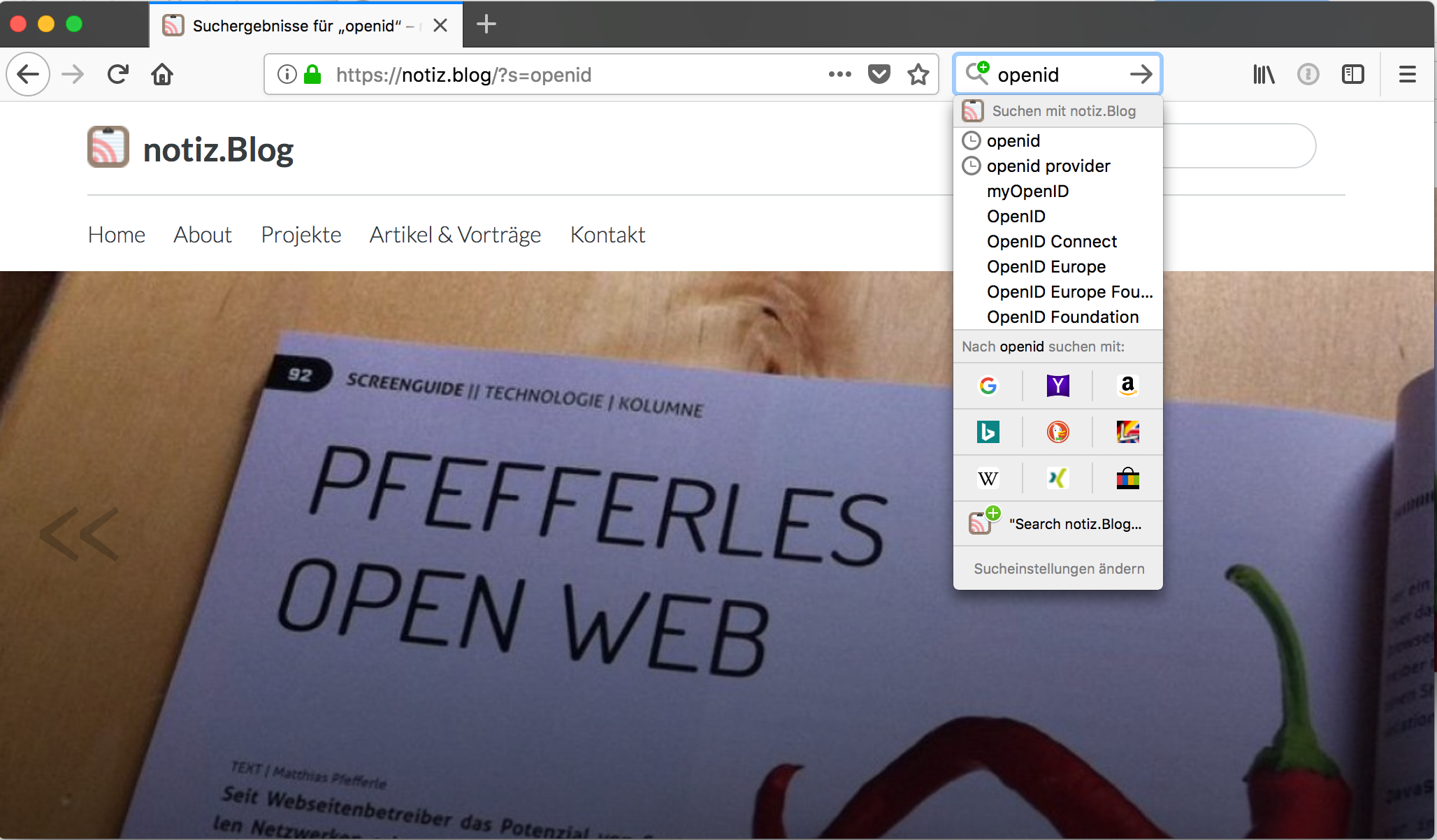


Für Entwickler
Ist das dein Plugin? Zeigen Sie die Zahlen.
Fügen Sie Ihrer Website, Docs oder GitHub Readme ein Live-Badge hinzu. Es wird von selbst aktualisiert - kein Konto erforderlich.
Fragen und Antworten
Open Search Document: quick answers
Gerade Antworten, gezogen von Live WordPress.org Daten.
Quelle: WordPress.org
Is Open Search Document free?
Yes. Open Search Document is free to download and use from the official WordPress.org plugin directory.
Is Open Search Document safe to use in 2026?
Open Search Document is a solid plugin choice in 2026, with a few things worth checking first. It runs on 200+ sites, is rated 5/5 and was last updated 2 months ago, and scores 72/100 on our health check.
How many websites use Open Search Document?
Open Search Document is active on 200+ WordPress websites and has been downloaded 12,360 times since it launched in June 2007. It was downloaded 267 times in the last 30 days.
Does Open Search Document work with WordPress 7.1?
Yes. The developer has tested Open Search Document up to WordPress 7.1.5, the latest release. It requires WordPress 6.4 or newer.
What PHP version does Open Search Document need?
Open Search Document requires PHP 7.4 or higher. Most hosts run PHP 8.x today, so it works on any modern WordPress hosting.
When was Open Search Document last updated?
The latest version, 4.2.0, was released on September 20, 2026 (2 months ago).
Who makes Open Search Document?
Open Search Document is developed and maintained by Matthias Pfefferle.
Angetrieben von PageForge
Eine Vorlage und eine Tabelle. Eine echte Seite für jede Suche.
PageForge Verwandelt jede Zeile eines CSV in eine WordPress-Seite mit eigenem Titel, URL, SEO Felder und Schema entworfen. Kostenlos auf WordPress.org.
- CSV und XLSX, plus Google Sheets auf Beruf und Unternehmen
- seinen eigenen Titel, URL, SEO Felder und Schema für jede Seite
- Arbeitet mit dem Blockeditor, Elementor, Divi und Avada
- Kostenlos auf WordPress.org, keine Kreditkarte