

Lesending
Publish posts locally or sync them to remote WordPress sites via REST API or a bridge script.

Mit Vorsicht verwenden
Lesending works, but test it on a staging site before relying on it in 2026. Was last updated 1 month ago, and scores 60/100 on our health check.
- Getestet mit dem neuesten WordPress (7.1)
- Kleine Benutzerbasis (<10 aktive Installationen)
- Bisher sehr wenige Bewertungen
Wie stapelt es sich?
Side-by-side bei Installationen, Updates, Bewertungen und Support



Tägliche Downloads
Download-Spitzen folgen normalerweise einer neuen Version - jede Website, die automatisch aktualisiert wird, gilt als Download.
Ranglisten
Where Lesending stands todayWordPress.org Ranglisten suchen
Live-Position in der Plugin-Suche, Top 100| Stichwort | Position |
|---|---|
| bridge | >100 |
| cross post | >100 |
| remote | >100 |
| rest | >100 |
| syndication | #46 |
About Lesending
From the official readme · v1.1.2Beschreibung
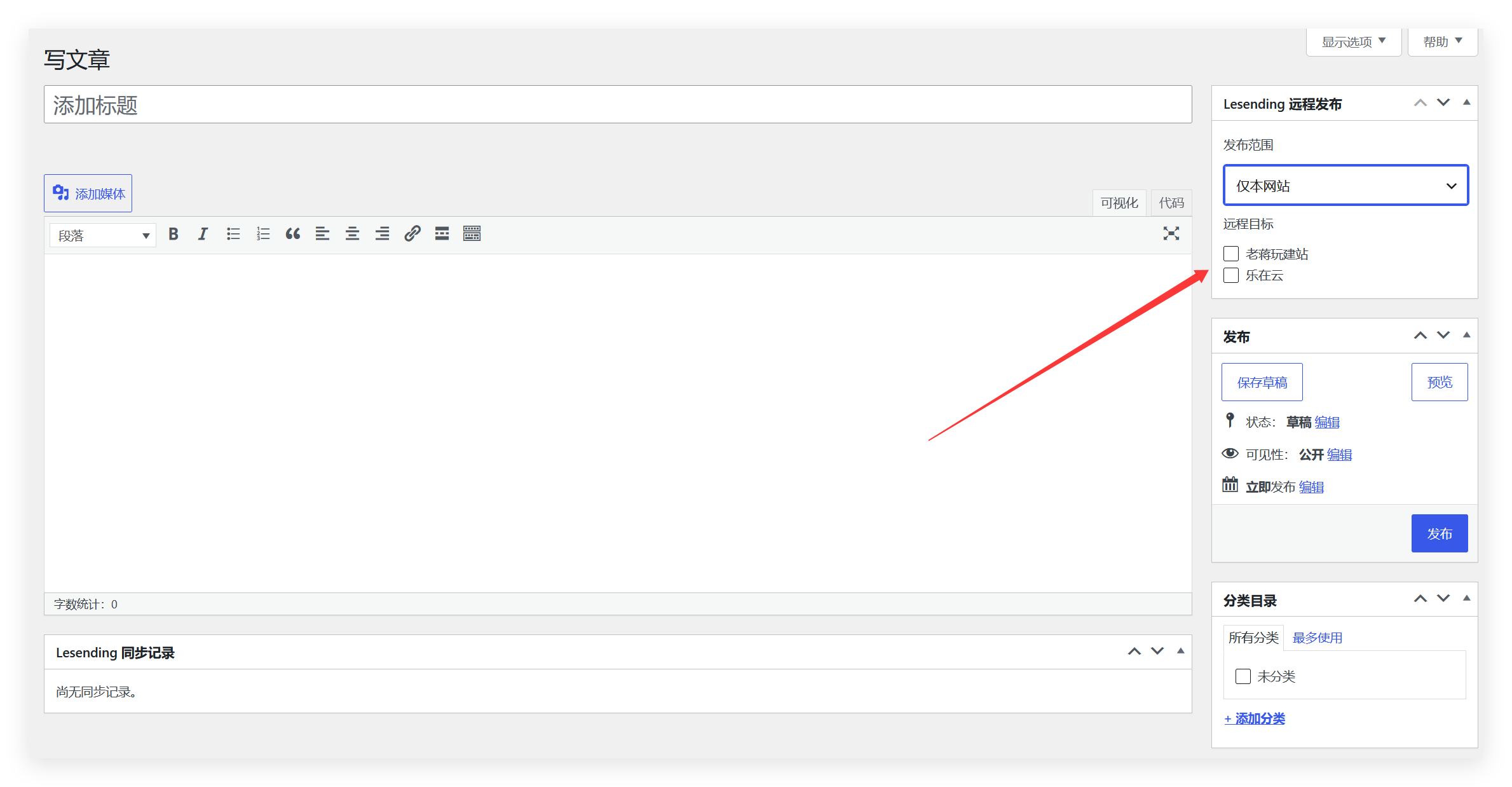
Lesending lets you choose a publish target while editing: local site only, local plus remote, or remote only (after a successful sync the local post is saved as a draft and the mode resets to local only).
This plugin is developed by Lezaiyun Studio and maintained by LaoJiang.
Official product page: https://www.lezaiyun.com/lesending.html
Developer blog: https://www.laojiang.me
Connection modes
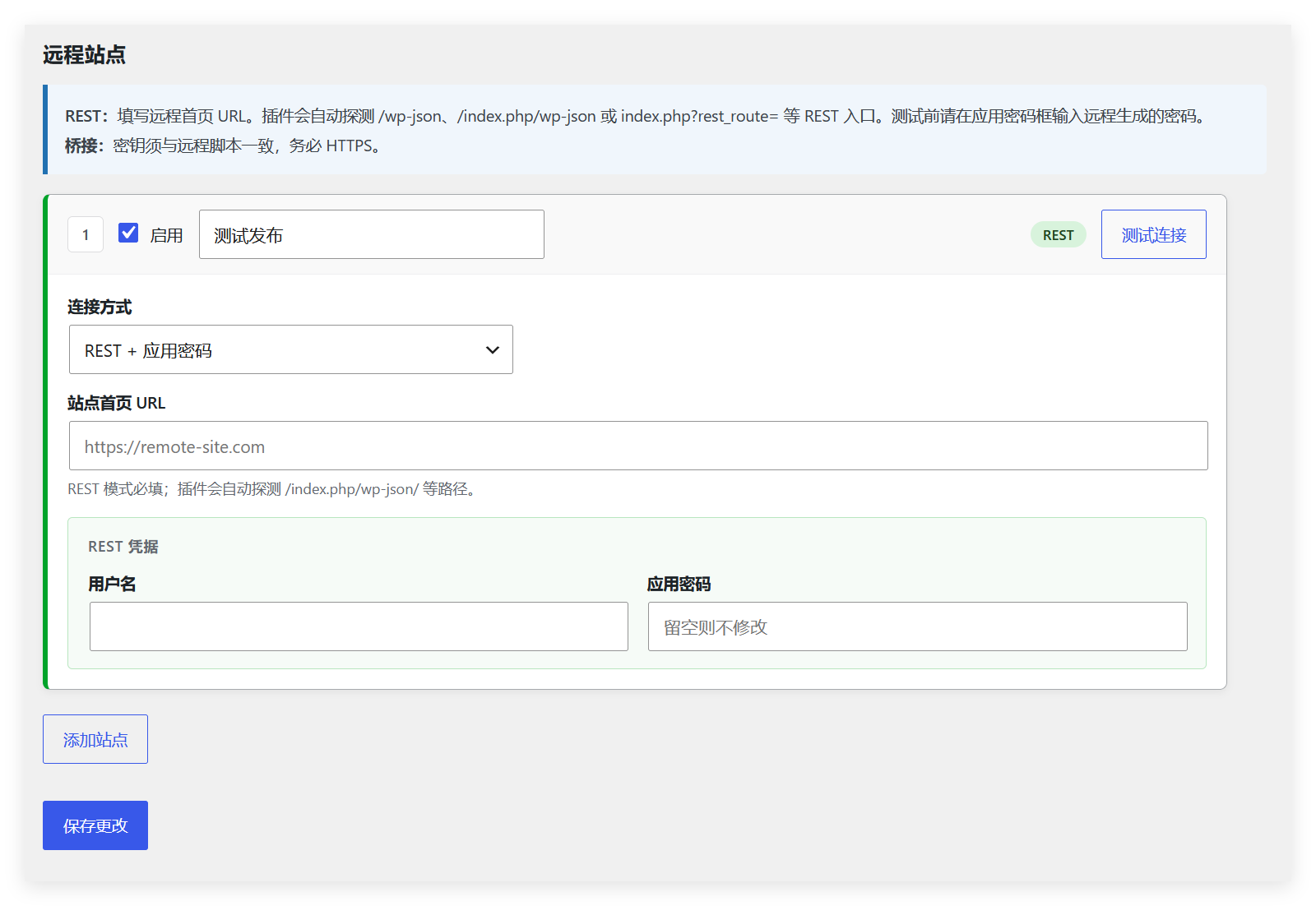
- REST + Application Passwords: for sites with a working WordPress REST API. The plugin auto-detects /wp-json, /index.php/wp-json, and index.php?rest_route= endpoints.
- Bridge file: when remote REST is restricted, upload a standalone PHP bridge to the remote WordPress root and authenticate with a shared secret.
Editor
- Gutenberg sidebar panel
- Classic editor meta box
- Sync log meta box with per-site results
Media sync
- Toggle image sync in plugin settings
- When enabled, content images and the featured image are uploaded to the remote media library and URLs are rewritten
- Supports REST media upload and bridge sideload
Einstellungen
- Card-style remote site list
- Connection test for REST and bridge modes
- Bridge script download (optional custom .php filename)
Uninstalling the plugin removes options and related post meta (see uninstall.php).
Installation
- Upload the
lesendingfolder to/wp-content/plugins/. - Activate Lesending under Plugins.
- Go to Settings → Lesending, enable remote publishing, and add remote sites.
- For bridge mode: download the bridge script, upload it to the remote WordPress root (same folder as wp-config.php), set the secret and user ID, then enter the bridge URL and the same secret on this site.
Änderungsprotokoll
1.1.2
- Plugin Check compliance: English readme, languages folder, bridge shipped as downloadable template with ABSPATH-protected stub.
- Admin download uses WP_Filesystem; stricter input sanitization; settings view variable prefixes.
1.1.1
- Security hardening: remote sync requires publish_posts; credentialed requests use wp_safe_remote_* with no redirects; HTTPS required by default.
- Credential storage upgraded to AES-256-GCM (legacy ciphertext still supported); public editor site list no longer exposes remote usernames.
- Bridge: minimum 32-char secret, explicit user ID, optional IP allowlist, sideload limits, minimal ping payload.
1.1.0
- Sync content images and featured image to the remote media library (REST upload / bridge sideload).
- Settings toggle for image sync.
- Bridge refactor: validate secret before loading WordPress; improved ping and error JSON.
- REST discovery for index.php?rest_route= and Link header parsing.
- Card-style settings UI; connection tests can reuse a saved bridge secret.
1.0.0
- Initial release: REST sync, three publish modes, block editor sidebar, settings page, and uninstall cleanup.
Screenshots

Für Entwickler
Ist das dein Plugin? Zeigen Sie die Zahlen.
Fügen Sie Ihrer Website, Docs oder GitHub Readme ein Live-Badge hinzu. Es wird von selbst aktualisiert - kein Konto erforderlich.
Best Lesending alternatives
All bridge plugins →




Fragen und Antworten
Lesending: quick answers
Gerade Antworten, gezogen von Live WordPress.org Daten.
Quelle: WordPress.org
Is Lesending free?
Yes. Lesending is free to download and use from the official WordPress.org plugin directory.
Is Lesending safe to use in 2026?
Lesending works, but test it on a staging site before relying on it in 2026. Was last updated 1 month ago, and scores 60/100 on our health check.
How many websites use Lesending?
Lesending is active on <10 WordPress websites and has been downloaded 153 times since it launched in October 2026. It was downloaded 96 times in the last 30 days.
Does Lesending work with WordPress 7.1?
Yes. The developer has tested Lesending up to WordPress 7.1.5, the latest release. It requires WordPress 5.8 or newer.
What PHP version does Lesending need?
Lesending requires PHP 7.4 or higher. Most hosts run PHP 8.x today, so it works on any modern WordPress hosting.
When was Lesending last updated?
The latest version, 1.1.2, was released on October 28, 2026 (1 month ago).
Who makes Lesending?
Lesending is developed and maintained by 老蒋和他的小伙伴.
What are the best alternatives to Lesending?
The most popular alternatives to Lesending are Custom Database Application… (400+ installs), TNG WordPress Integration (100+ installs) and Caspio Deployment Plugin (70+ installs).
Angetrieben von PageForge
Eine Vorlage und eine Tabelle. Eine echte Seite für jede Suche.
PageForge Verwandelt jede Zeile eines CSV in eine WordPress-Seite mit eigenem Titel, URL, SEO Felder und Schema entworfen. Kostenlos auf WordPress.org.
- CSV und XLSX, plus Google Sheets auf Beruf und Unternehmen
- seinen eigenen Titel, URL, SEO Felder und Schema für jede Seite
- Arbeitet mit dem Blockeditor, Elementor, Divi und Avada
- Kostenlos auf WordPress.org, keine Kreditkarte