


Internet Archive Wayback Machine Link Fixer
Automatically fix broken links by replacing them with archived versions from the Internet Archive's Wayback Machine.

Solid choice
Internet Archive Wayback Machin… is a solid plugin choice in 2026, with a few things worth checking first. It runs on 1K+ sites, is rated 3.8/5 and was last updated 4 weeks ago, and scores 66/100 on our health check.
- Actively developed — last update 4 weeks ago
- Tested with the latest WordPress (7.1)
- Momentum — downloads up 401% vs the previous 30 days
Daily downloads
Download spikes usually follow a new release — each site that auto-updates counts as a download.
Rankings
Where Internet Archive Wayback Ma… stands todayWordPress.org search rankings
Live position in the plugin search, top 100| Keyword | Position |
|---|---|
| archive links | #1 |
| broken links | #38 |
| internet archive | #1 |
| Wayback Machine | #1 |
Version adoption
Share of active sites per release.
Rating breakdown
★★★★★★★★★★ 3.8 from 8 reviews
About Internet Archive Wayback Machine Link F…
From the official readme · v1.5.0Description
Internet Archive Wayback Machine Link Fixer is a WordPress plugin designed to combat link rot—the gradual decay of web links as pages are moved, changed, or taken down. It automatically scans your post content—on save and across existing posts—to detect outbound links. For each one, it checks the Internet Archive’s Wayback Machine for an archived version and creates a snapshot if one isn’t available.
When a linked page disappears, the plugin helps preserve your user experience by redirecting visitors to a reliable archived version. It also works proactively by archiving your own posts every time they’re updated, creating a consistent backup of your content’s history.
Protect your links, preserve your content, and automate the archiving process—all with minimal effort.
Key Features
- Automatically scans for outbound links in post content
- Checks the Wayback Machine for existing archives
- Creates new snapshots if no archive exists
- Redirects broken or missing links to archived versions
- Archives your own posts on updates
- Works on both new and existing content
- Helps maintain long-term content reliability and SEO
External Services
This plugin connects to external services provided by the Internet Archive to provide its core functionality. The following information details what data is sent, when, and why:
Internet Archive Wayback Machine API (web.archive.org)
What the service is and what it is used for:
The Internet Archive Wayback Machine is a digital archive of the World Wide Web. This plugin uses their API to check for existing archived versions of web pages, create new snapshots of pages, and verify the status of archiving jobs.
What data is sent and when:
- System Status Check: No personal data is sent. Used to verify if the Wayback Machine service is online.
- User Account Validation: When you configure an API key, your access key and secret key are sent in the Authorization header to validate your account and retrieve usage statistics (available snapshots, daily limits, etc.).
- URL Archiving: URLs from your website content are sent to create new snapshots in the Wayback Machine. This includes both external links found in your content and your own post URLs when auto-archiving is enabled.
- Snapshot Status Checks: Job IDs are sent to check the status of archiving requests.
- Existing Snapshot Lookups: URLs are sent to search for existing archived versions of web pages.
Service Terms and Privacy Policy:
- Terms of Service: https://archive.org/about/terms.php
- Privacy Policy: https://archive.org/about/privacy.php
Internet Archive Bot API (iabot-api.archive.org)
What the service is and what it is used for:
This service checks if web pages are accessible and retrieves final URLs after redirects. It’s used to determine if links are broken and need to be replaced with archived versions.
What data is sent and when:
- Link Accessibility Checks: URLs from your website content are sent to check if they are accessible and to get the final destination URL after any redirects.
- Impersonation Parameter: A technical parameter (
impersonate=1) is sent to ensure proper link checking behavior.
Service Terms and Privacy Policy:
- Terms of Service: https://archive.org/about/terms.php
- Privacy Policy: https://archive.org/about/privacy.php
Internet Archive Wayback Availability API (archive.org)
What the service is and what it is used for:
This API reports whether a URL already has a snapshot in the Wayback Machine. The plugin uses it to find the most recent snapshot for a link, and to find the snapshot closest to a given date.
What data is sent and when:
- Existing Snapshot Lookups: URLs from your website content are sent to check whether an archived version already exists, along with a date when looking for the closest snapshot to that date.
- Account Credentials: If you have configured an API key, your access key and secret key are sent in the Authorization header.
Service Terms and Privacy Policy:
- Terms of Service: https://archive.org/about/terms.php
- Privacy Policy: https://archive.org/about/privacy.php
Internet Archive Save Page Now Status API (web-wp.archive.org)
What the service is and what it is used for:
This service reports the progress of a snapshot that has already been requested. The plugin uses it to find out whether a snapshot has completed, failed, or is still pending.
What data is sent and when:
- Snapshot Status Checks: The job ID returned when the snapshot was requested is sent to retrieve that job’s current status. No personal data is sent.
- Account Credentials: If you have configured an API key, your access key and secret key are sent in the Authorization header.
Service Terms and Privacy Policy:
- Terms of Service: https://archive.org/about/terms.php
- Privacy Policy: https://archive.org/about/privacy.php
Data Retention and Privacy:
The Internet Archive is a non-profit organization dedicated to preserving digital content for public access. URLs sent to these services become part of the public archive and may be accessible through the Wayback Machine interface. Apart from the Archive.org API credentials you choose to configure, no personal information beyond the URLs themselves is transmitted to these services.
Developer Documentation
For developer docs and source code, see the GitHub repository: https://github.com/a8cteam51/internet-archive-wayback-machine-link-fixer
Installation
The plugin stores its link data in a JSON column, so it requires MySQL 5.7 or later, or MariaDB 10.2 or later. Activation is blocked with an explanatory notice on anything older.
- Upload the plugin folder to
/wp-content/plugins/, or install it through the Plugins screen in WordPress. - Activate the plugin through the Plugins screen in WordPress.
- A setup wizard opens on activation and walks you through choosing which post types to scan, whether to archive your own content, and how links should be handled.
The wizard can be run again at any time from the plugin’s settings page.
An Archive.org account is not required, but adding your API keys on the settings page raises the number of snapshots you can create per day.
Changelog
Security release. Fixes an unauthenticated request that could spend your archive.org credentials, stops the settings page printing those keys in its page source, and restores TLS verification on snapshot creation. Also fixes a stray line break at the end of Classic Editor posts. Now requires MySQL 5.7 or MariaDB 10.2.
1.5.0
- Security fixes around the archive.org credentials, the link check endpoint and admin access. See the upgrade notice.
- Adds a “Last Archived” column to the posts list, enabled from Screen Options.
- Now finds links inside shortcodes, dynamic blocks and international URLs, which were previously skipped.
- Fix: a stray line break at the end of Classic Editor posts.
- Fix: the auto archiver could push back its own queue and never run.
- Fix: Advanced Settings links shown to editors who cannot open it.
- Fix: Advanced Settings Link Icon row, post exclusion search and “%20” in link exclusion rules.
- Fix: Dashboard broken link count and onboarding with drafts or excluded posts.
- Fix: more broken link formats are now replaced, including on pages that list posts.
- The front end now checks at most 2 links at a time.
- Fix: links on sites that block the link checker (401, 403, 429 or 503) are no longer marked broken or replaced, and are flagged in the Links table instead.
- Redirects (300 to 308) no longer count as a failed check.
- medium.com, nytimes.com, udemy.com, kickstarter.com, player.fm, washingtonpost.com, reuters.com and perplexity.ai are added to the built-in exclusion list.
- Various fixes to the links report, link checking and the settings screen.
- Performance and accessibility improvements throughout the admin.
- Now requires MySQL 5.7 or MariaDB 10.2, checked on install.
1.4.3
- Adds a global set of excluded urls that will never be archived or checked due to the sites blocking the internet archive.
- Reintroduces a Scan but do nothing outcome for broken links.
- Fix: a non-200 response from the link checker is now treated as the service being offline and rescheduled, rather than marking a good link as broken.
1.4.2
- Fix: Manually excluded links sometimes revert to unexcluded and can still be run through the link checker process. Now fully respects manual exclusions.
1.4.1
- Fix: link data span now survives themes that wrap post content in
wp_kses_post(previously the JSON could leak as visible text on category and archive templates).
1.4.0
- Changes to how we store link information in posts, now uses an escaped
<script>tag. - Move the frontend link checker from Ajax-driven to REST.
- Improvements to link table queries for better memory usage.
- Various small UI fixes.
- Added optional link icon displayed next to fixed links on the frontend, with before/after positioning and third-party extensibility via the
iawmlf_link_iconsfilter.
1.3.6
- Allows posts to be selected to be excluded from link fixing and/or auto archiving.
- Improves cleanup of passed attempts to create and verify snapshots
- Adds an Archive.org donation notice.
- Improves translatable strings for betting internationalisation.
Screenshots

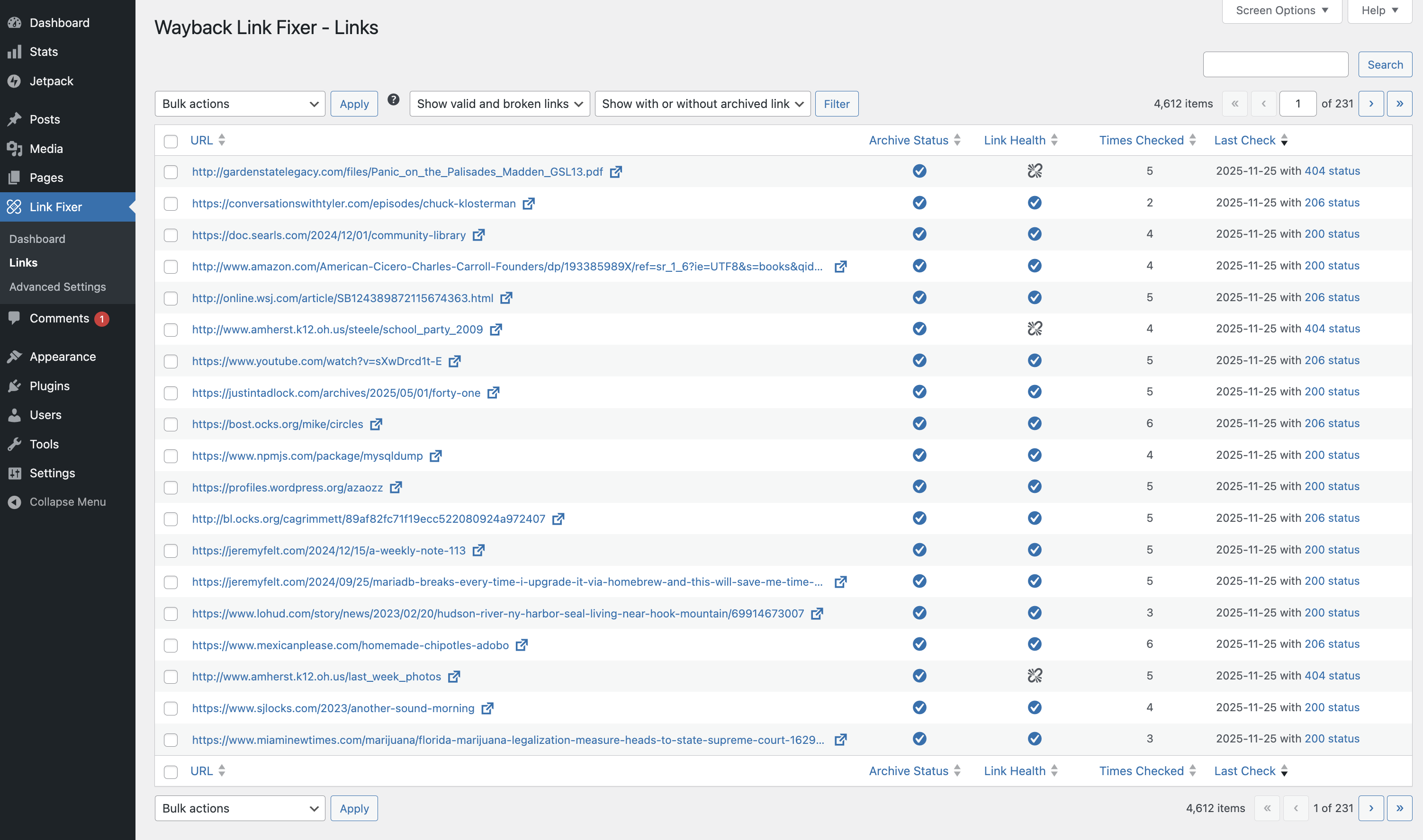
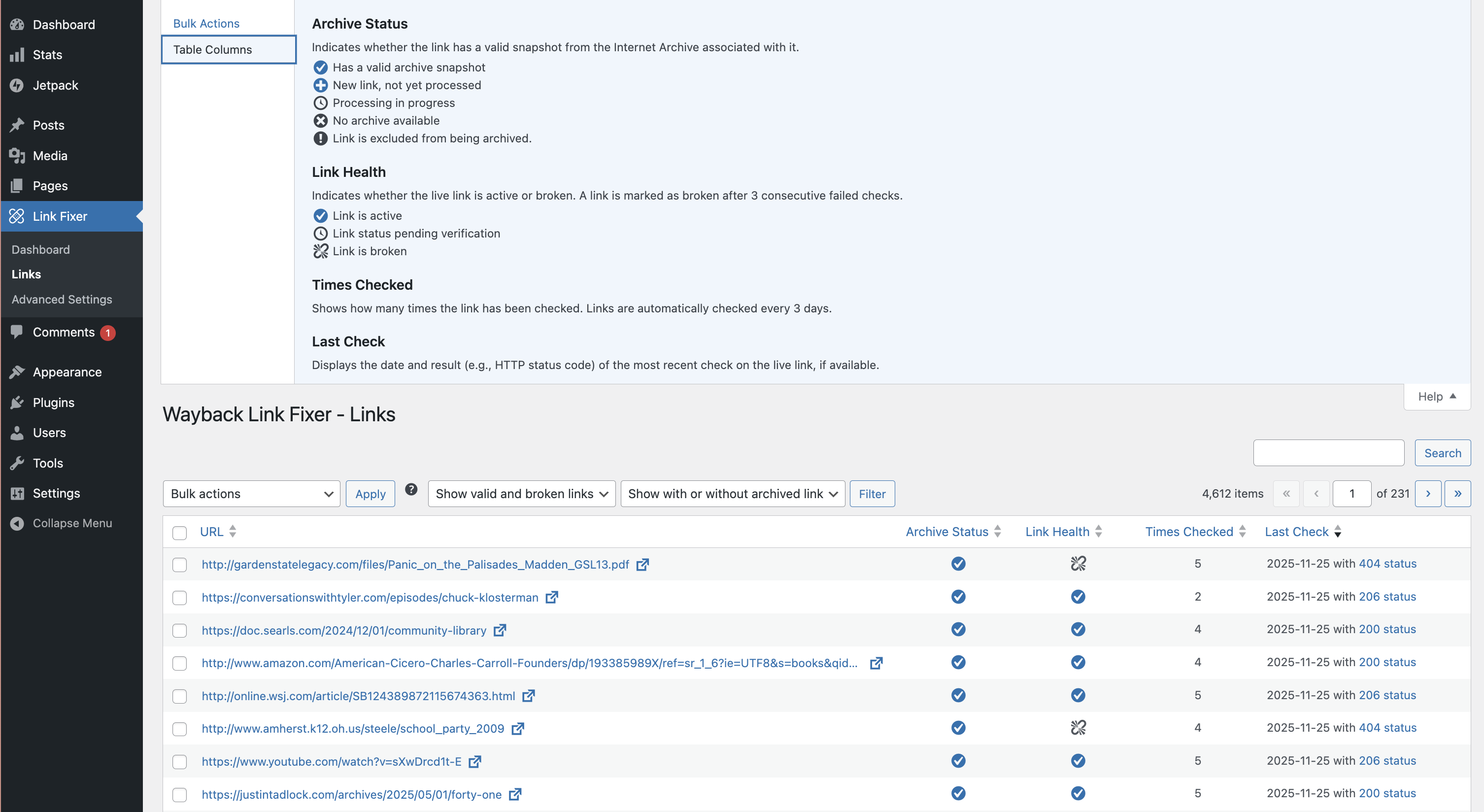
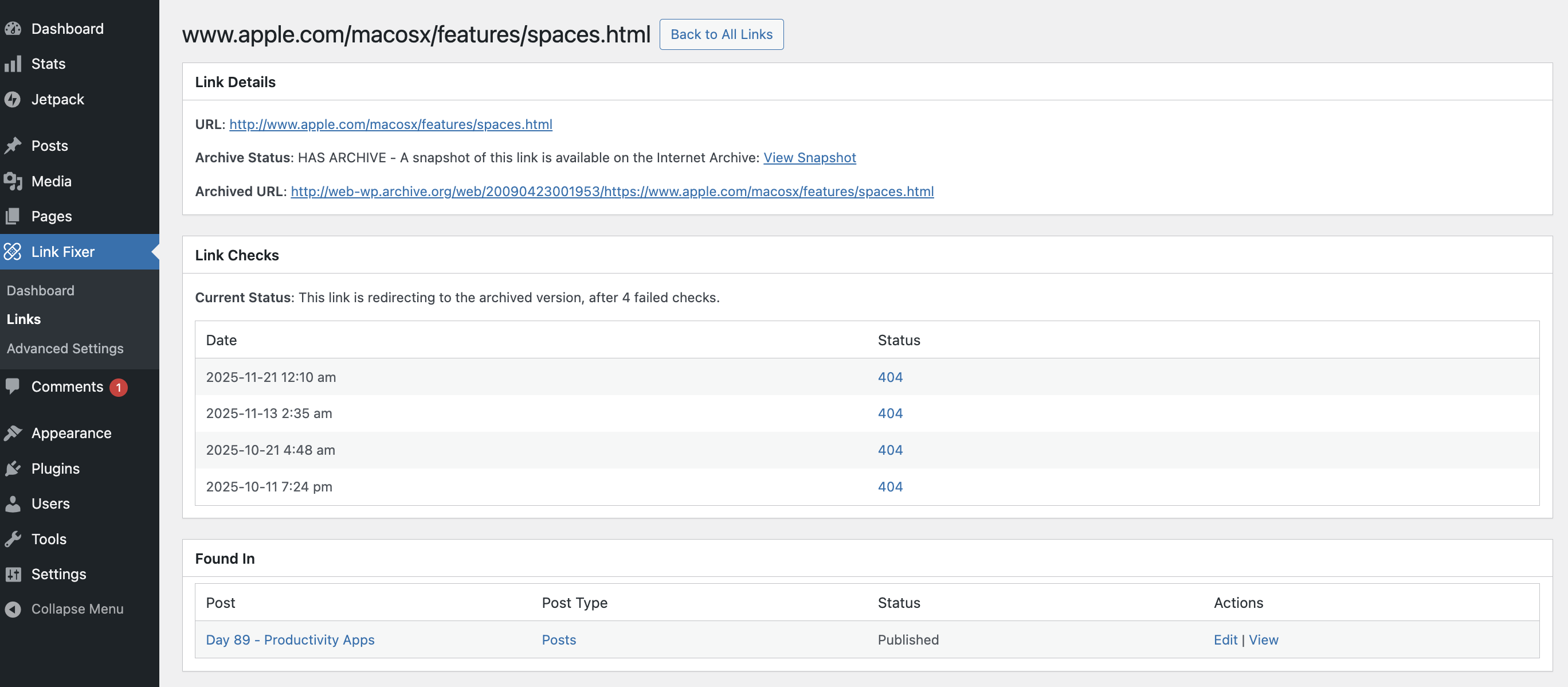
For developers
Is this your plugin? Show off the numbers.
Add a live badge to your site, docs or GitHub README. It updates on its own — no account needed.
FAQ
Internet Archive Wayback Machine Li…: quick answers
Straight answers, pulled from live WordPress.org data.
Source: WordPress.org
Is Internet Archive Wayback Machin… free?
Yes. Internet Archive Wayback Machin… is free to download and use from the official WordPress.org plugin directory.
Is Internet Archive Wayback Machin… safe to use in 2026?
Internet Archive Wayback Machin… is a solid plugin choice in 2026, with a few things worth checking first. It runs on 1K+ sites, is rated 3.8/5 and was last updated 4 weeks ago, and scores 66/100 on our health check.
How many websites use Internet Archive Wayback Machin…?
Internet Archive Wayback Machin… is active on 1K+ WordPress websites and has been downloaded 23,052 times since it launched in October 2025. It was downloaded 3,397 times in the last 30 days.
Does Internet Archive Wayback Machin… work with WordPress 7.1?
Yes. The developer has tested Internet Archive Wayback Machin… up to WordPress 7.1.4, the latest release. It requires WordPress 6.4 or newer.
What PHP version does Internet Archive Wayback Machin… need?
Internet Archive Wayback Machin… requires PHP 7.4 or higher. Most hosts run PHP 8.x today, so it works on any modern WordPress hosting.
When was Internet Archive Wayback Machin… last updated?
The latest version, 1.5.0, was released on October 20, 2026 (4 weeks ago).
Who makes Internet Archive Wayback Machin…?
Internet Archive Wayback Machin… is developed and maintained by Internet Archive.
Powered by PageForge
One template and a spreadsheet. A real page for every search.
PageForge turns each row of a CSV into a WordPress page with its own title, URL, SEO fields and schema, built on the layout you already designed. Free on WordPress.org.
- CSV and XLSX, plus Google Sheets on Professional and Enterprise
- Its own title, URL, SEO fields and schema for every page
- Works with the block editor, Elementor, Divi and Avada
- Free on WordPress.org, no credit card