


GravityExport Lite for Gravity Forms
Export all Gravity Forms entries to Excel (.xlsx) or CSV via a download button or a secret shareable URL.

Safe pick
Yes — GravityExport Lite for Gravity… is a safe, well-maintained plugin to use in 2026. It runs on 10K+ sites, is rated 5/5 and was last updated 2 weeks ago, and scores 94/100 on our health check.
- Proven at scale on 10K+ active sites
- Loved by users — 5/5 from 39 reviews
- Actively developed — last update 2 weeks ago
- Tested with the latest WordPress (7.1)
- Momentum — downloads up 32.2% vs the previous 30 days
How does it stack up?
Side-by-side on installs, updates, ratings & support


Daily downloads
Download spikes usually follow a new release — each site that auto-updates counts as a download.
Rankings
Where GravityExport Lite for Grav… stands todayWordPress.org search rankings
Live position in the plugin search, top 100| Keyword | Position |
|---|---|
| entries | #6 |
| excel | #6 |
| export | >100 |
| gravity forms | #9 |
| GravityForms | #6 |
Version adoption
Share of active sites per release.
Rating breakdown
★★★★★★★★★★ 5 from 39 reviews
About GravityExport Lite for Gravity Forms
From the official readme · v2.7.7Description
GravityExport (Gravity Form Entries in Excel) is the ultimate no-hassle solution for exporting data from Gravity Forms.
Powerful new functionality is available with GravityExport! Save exports to FTP & Dropbox, export as PDF, and format exports for data analysis.
Export entries using a secure URL
When you configure a new export, the plugin will generate a secure download URL that you can share with anyone who needs the data (No need to log in!). Reports will automatically update as new entries are added.
GravityExport Lite includes many features:
- Limit access to downloads—either make a URL public or require users to be logged-in with correct permissions
- Download reports from multiple forms at once
- Export entry notes along with entries
- Transpose data (instead of one entry per-row, it would be one entry per column)
- Attach entry exports to notifications
Export Gravity Forms entries directly to Excel (.xlsx)
Export your entries directly to .xlsx format. No more wasting time importing your CSV files into Excel and re-configuring columns.
Export Gravity Forms submissions as CSV
If you’d prefer to have your reports generated as CSV, GravityExport Lite makes it easy.
Add search filters to the URL
Once you have your download URL, you can easily filter by date range and field value.
Configure export fields
Save time generating exports in Gravity Forms: Configure the fields that are included in your CSV or Excel export. No need to set up every time!
Documentation & support
If you have any questions regarding GravityExport Lite, check out our documentation.
If you need further assistance, read this first and our support team will gladly give you a helping hand!
Requirements
- PHP 7.4
php-xmlandphp-ziplibraries. The plugin will check for those.- Gravity Forms 2.5 or higher
Gain additional powerful functionality
The full version of GravityExport unlocks these game-changing features:
- 📄 PDF Export
GravityExport supports exporting entries as PDF! You can choose to have a PDF generated for each entry or one PDF that includes all entries. You can also customize the PDF output by adjusting the size, orientation, and more. - 📦 Dropbox integration
Save your form data directly to Dropbox. - 👩🏽💻 Send reports to FTP
Store reports on your own FTP server! GravityExport supports the SFTP, FTP + SSL, and FTP protocols. - ⬇️ Multiple download URLs
Create multiple export URLs that output to different formats and include different fields. - 📊 Export data ready for analysis
Make it easier to process your Gravity Forms data by splitting fields with multiple values into different rows.
We’ve written an article that contains all you need to know about exporting data from Gravity Forms.
Credits
- The GravityExport Lite plugin was created by Doeke Norg
Installation
This section describes how to install the plugin and get it working.
- Upload
gravityexport-liteto the/wp-content/plugins/directory - Activate the plugin through the ‘Plugins’ menu in WordPress
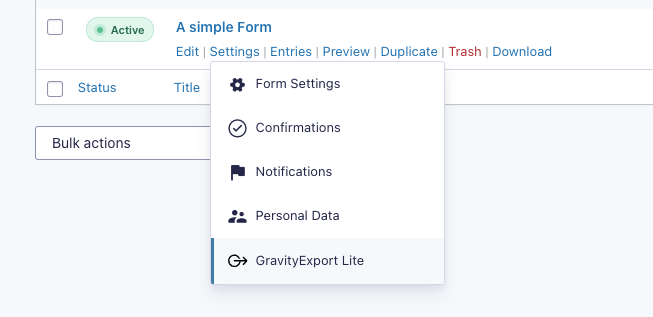
- Go to Forms > Select a form > Settings > Results in Excel to obtain your URL
- Download that Excel file!
Changelog
2.7.7 on November 5, 2026
This release updates the bundled PhpSpreadsheet library to clear security scanner reports, and fixes exports of List fields that failed on PHP 8.
- Security: Updated the bundled PhpSpreadsheet library from 1.19.0 to 1.30.7 to clear CVE-2026-34084, CVE-2026-45034, and other vulnerabilities that security scanners report, none of which affected GravityExport Lite.
- Fixed: Exporting a form failed with a critical error on PHP 8 or newer when an entry created through the Gravity Forms REST API had an empty List field with columns.
2.7.6 on October 29, 2026
This release fixes how Repeater fields export, translates two labels in the form settings, and adds a filter for who can download a secured export.
- Fixed: Issues with Repeater fields in exports:
- Values could appear under the wrong column;
- Values from two rows could look like one row;
- The Repeater field was offered as a sort field, but sorting by it did nothing.
- Fixed: The “Enable download URL” button and the “Copied!” label on a form’s GravityExport Lite settings tab now show in the site’s language.
Developer Updates:
* Added: gk/gravityexport/download/can-download filter to allow or refuse a secured GravityExport Lite download URL for a given feed and user. By default, only users with the gravityforms_export_entries capability can download secured exports; public download URLs are not affected.
2.7.5 on October 22, 2026
- Fixed: On sites upgraded from a version before 2.0, the global and form export settings could revert to their pre-2.0 values.
- Fixed: In the field settings, the number of fields matching a search and the number of fields moved used the wrong plural form in languages such as Arabic, Russian and Polish.
- Fixed: If a field label contained a list, “Enable all” and “Disable all” in the field settings moved its items as if they were fields, and searching for a field hid them.
- Fixed: New installs on PHP 8.1 or newer logged a PHP “deprecated” notice.
2.7.4 on October 3, 2026
Note: GravityExport Lite now requires WordPress 6.5 or newer.
- Security: Field values starting with characters such as
=could be interpreted as formulas when a CSV export was opened in a spreadsheet application. These values now begin with a single quote (') so they display as plain text, while regular numbers such as-5are left unchanged (thanks to Ali Hidayat for the report). - Fixed: Download links created by other GravityExport add-ons could return a “not found” error when a GravityExport Lite feed’s settings happened to contain the same security key. These links now work correctly.
Developer Updates:
* Added: gk/gravityexport/renderer/csv/escape-formulas filter to turn off formula escaping in CSV exports (useful when CSV files are imported into other systems rather than opened in a spreadsheet application).
2.7.3 on September 18, 2026
- Security: On some sites, a request to the download URL that carried no security key returned a form’s entries to a visitor who was not logged in. Thanks to Ashish Agarwal for the report.
- Security: Disabling a form’s download URL did not always stop downloads, because a request that carried no security key was still served.
- Security: When an export failed, the error page showed server file paths, a stack trace and the plugin, Gravity Forms, PHP and WordPress versions to visitors.
- Fixed: A download URL could return “not found” when another add-on’s settings happened to contain the same security key.
- Fixed: A file extension added to the end of a download URL was used as-is, so an export could be returned in a file format the plugin does not offer. Unsupported extensions now fall back to the file type configured for the form.
- Fixed: A malformed download URL could trigger a PHP fatal error on the site. Malformed URLs are now rejected.
2.7.2 on September 17, 2026
Note: GravityExport Lite now requires PHP 7.4 or newer.
- Fixed: PDF exports were not sent with a PDF file type, which could cause browsers, proxies and file previewers to handle the downloaded file incorrectly.
- Fixed: A browser console error appeared on a form’s GravityExport Lite settings page before a download URL was enabled.
Screenshots


For developers
Is this your plugin? Show off the numbers.
Add a live badge to your site, docs or GitHub README. It updates on its own — no account needed.
Best GravityExport Lite for Gravit… alternatives
All entries plugins →





FAQ
GravityExport Lite for Gravity Forms: quick answers
Straight answers, pulled from live WordPress.org data.
Source: WordPress.org
Is GravityExport Lite for Gravity… free?
Yes. GravityExport Lite for Gravity… is free to download and use from the official WordPress.org plugin directory.
Is GravityExport Lite for Gravity… safe to use in 2026?
Yes — GravityExport Lite for Gravity… is a safe, well-maintained plugin to use in 2026. It runs on 10K+ sites, is rated 5/5 and was last updated 2 weeks ago, and scores 94/100 on our health check.
How many websites use GravityExport Lite for Gravity…?
GravityExport Lite for Gravity… is active on 10K+ WordPress websites and has been downloaded 446,315 times since it launched in August 2017. It was downloaded 20,560 times in the last 30 days.
Does GravityExport Lite for Gravity… work with WordPress 7.1?
Yes. The developer has tested GravityExport Lite for Gravity… up to WordPress 7.1.4, the latest release. It requires WordPress 6.5 or newer.
What PHP version does GravityExport Lite for Gravity… need?
GravityExport Lite for Gravity… requires PHP 7.4.0 or higher. Most hosts run PHP 8.x today, so it works on any modern WordPress hosting.
When was GravityExport Lite for Gravity… last updated?
The latest version, 2.7.7, was released on November 6, 2026 (2 weeks ago).
Who makes GravityExport Lite for Gravity…?
GravityExport Lite for Gravity… is developed and maintained by GravityKit.
What are the best alternatives to GravityExport Lite for Gravity…?
The most popular alternatives to GravityExport Lite for Gravity… are Gravity Forms Export Entries (200+ installs), Page Builder for WPForms (100+ installs) and Add entries functionality t… (100+ installs).
Powered by PageForge
One template and a spreadsheet. A real page for every search.
PageForge turns each row of a CSV into a WordPress page with its own title, URL, SEO fields and schema, built on the layout you already designed. Free on WordPress.org.
- CSV and XLSX, plus Google Sheets on Professional and Enterprise
- Its own title, URL, SEO fields and schema for every page
- Works with the block editor, Elementor, Divi and Avada
- Free on WordPress.org, no credit card