


FV Flowplayer Video Player
WordPress's most reliable, easy to use and feature-rich video player. Supports responsive design, HTML5, playlists, ads, stats, Vimeo and YouTube.

Solide Wahl
FV Flowplayer Video Player is a solid plugin choice in 2026, with a few things worth checking first. It runs on 10K+ sites, is rated 4.4/5 and was last updated 2 weeks ago, and scores 72/100 on our health check.
- Bewährt im Maßstab auf 10k + aktiven Standorten
- Aktiv entwickelt — letztes Update vor 2 Wochen
- Nur getestet bis WordPress 6.9 (letzt ist 7.1)
Wie stapelt es sich?
Side-by-side bei Installationen, Updates, Bewertungen und Support


Tägliche Downloads
Download-Spitzen folgen normalerweise einer neuen Version - jede Website, die automatisch aktualisiert wird, gilt als Download.
Ranglisten
Where FV Flowplayer Video Player stands todayWordPress.org Ranglisten suchen
Live-Position in der Plugin-Suche, Top 100| Stichwort | Position |
|---|---|
| flowplayer | #1 |
| HTML5 video | #11 |
| mobile video | #18 |
| video player | #10 |
| vimeo | #58 |
Versionsübernahme
Anteil aktiver Sites pro Release.
Bewertungsaufschlüsselung
★★★★★★★★★★ 4.4 from 90 reviews
About FV Flowplayer Video Player
From the official readme · v7.5.58.7212Beschreibung
Custom HTML 5 video on your own site with Flash fallback for legacy browsers is here.
FV Player is a free, easy-to-use, and complete solution for embedding FLV or MP4 videos into your posts or pages. With MP4 videos, FV Player offers 98% coverage even on mobile devices.
- Remembering video position both both guest users and members
- Built in video plays stats
- API for custom video fields
- easy AB looped playback for your visitors (great for teaching sites)
- improved and more powerful playlists (more playlist features coming soon).
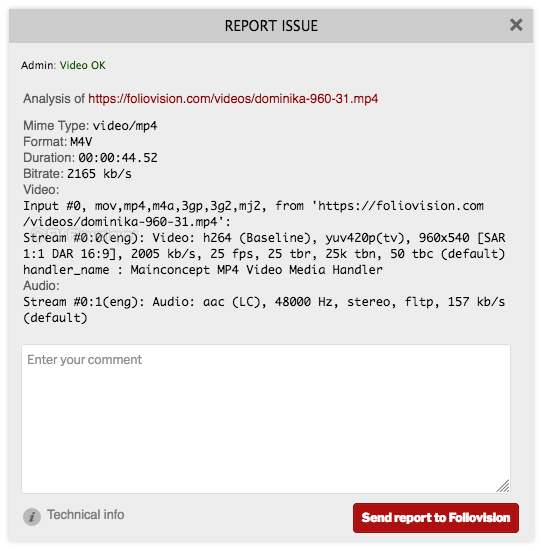
- Automated checking of video encoding for logged in admins
- FV Player is a completely responsive WordPress video player.
- Custom start and end screens are built right in. You can use your own custom design before and after the video.
- Enjoy unlimited instances in a single page.
- No expensive plugins: unlike other players who nickel and dime you for every feature, with FV Player all advanced features are available in the standard license (Google Analytics, Cuepoints, Native fullscreen, Keyboard shortcuts, Subtitles, Slow motion, Random seeking, Retina ready)
- Single site pro license available (JW Player requires five pack for full features)
- Ultra-efficient player: just 55.6kB of Javascript. Rest is loaded later when user is going to play the video. You can extend FV Player using just HTML and CSS, leaving the JavaScript heavy lifting up to us.
- 98% Browser coverage. Built-in Flash fallback will get the job done on older browsers while HLS.js library gives you HLS playback on desktop browsers.
- Full support for Amazon S3, Cloudfront and other CDN’s.
- Totally Brandable (requires license, free version includes the Flowplayer library logo). Stop selling YouTube and start selling yourself. Even design your own player.
- Supports video intelligence video ads
- Integration with the Coconut.co video encoding service – using a free addon plugin: https://foliovision.com/downloads/fv-player-coconut
To remove our branding and add your own branding and get access to additional pro support, you can buy your own license here.
Back to school special 25% off pro licenses until end of September.
Additional Technical information
- Core video engine: open source Flowplayer 7.
- Supported video formats are MP4, WebM and OGV (read about HTML5 video formats).
- Supported video streaming formats are HLS (Flash and JavaScript fallback available for incompatible devices), MPEG DASH and RTMP.
- Default options for all the embedded videos can be set in comprehensive administration menu.
-
In comparison with WordPress Flowplayer plugin, there are several improvements:
- Allows user to display clickable splash screen at the beginning of video (which not only looks good, but improves the performance significantly).
- Allows user to display popup box after the video ends, with any HTML content (clickable links, images, styling, etc.)
- Does not use configuration file, but WordPress Options
- Does not drive you to use an in-house proprietary CDN but supports all CDN.
- Includes advanced built-in social sharing.
- Inexpensive pro support available.
- Includes an advanced built-in video encoding and theme checker to make sure your videos are encoded properly and your site is set up for video playback.
Additional Documentation at Foliovision.com
Support |
Change Log |
Installation|
User Guide |
Detailed FAQ
This new version uses Flowplayer 5 running on HTML5, so we recommend you read first two questions of FAQ first.
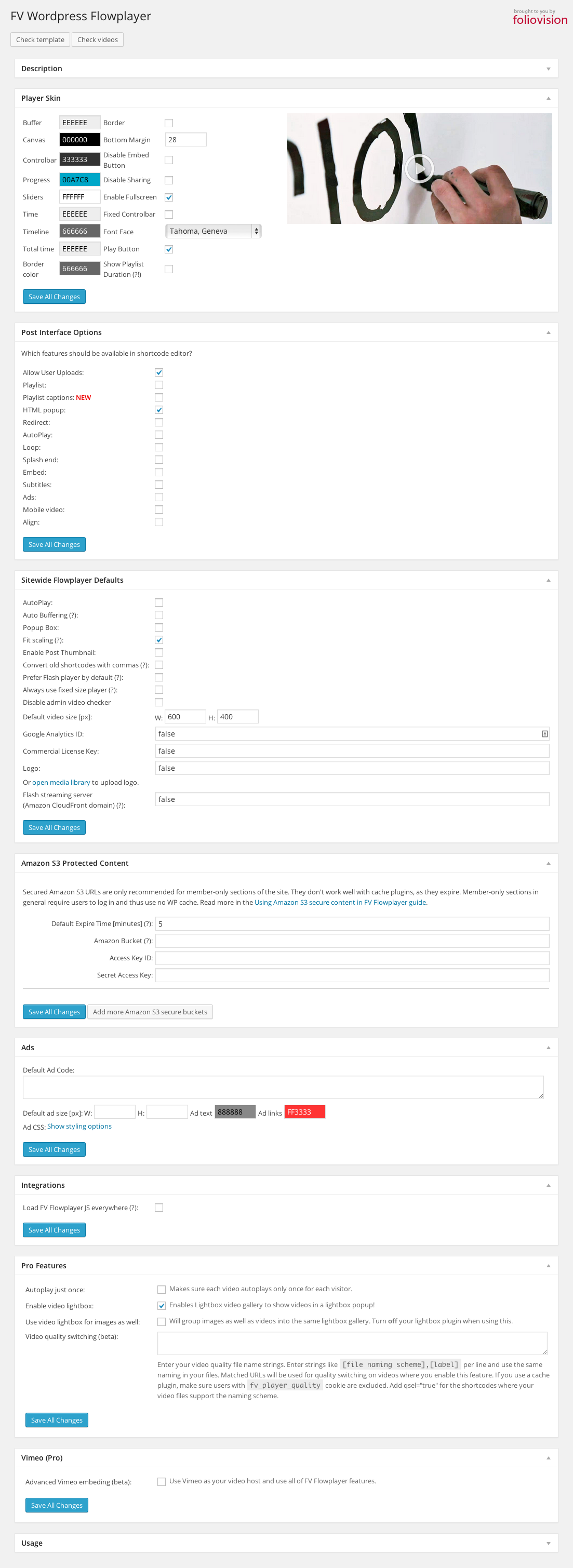
Once the plugin is uploaded and activated, there will be a submenu of settings menu called FV Player. In that submenu, you can modify following settings:
- AutoPlay – decides whether the video starts playing automatically, when the page/post is displayed.
- AutoBuffering – decides whether the video starts buffering automatically, when the page/post is displayed. If AutoPlay is set to true, you can ignore this setting.
- Popup Box – decides whether a popup box with “replay” and “share” buttons will be displayed when video ends.
- Enable Full-screen Mode – select false if you do not wish the fullscreen option to be displayed.
- Allow User Uploads – select true if you like to upload new videos via Media Library.
- Enable Post Thumbnail – select true if you wish the screen shot appear as post thumbnail. Works only when uploading new splash image via Media Library.
- Convert old shortcodes with commas – older versions of this plugin used commas to separate shortcode parameters. This option will make sure it works with current version.
- Commercial Licence Key – enter your licence key here to get the completely unbranded version of the player
- Colors of all the parts of flowplayer instances on page/post (controlbar, canvas, sliders, buttons, mouseover buttons, time and total time, progress and buffer sliders).
On the right side of this screen, you can see the current visual configuration of flowplayer. If you click Apply Changes button, this player’s looks refreshes.
Installation
There aren’t any special requirements for FV Player to work, and you don’t need to install any additional plugins.
- Download and unpack zip archive containing the plugin.
- Upload the fv-wordpress-flowplayer directory into wp-content/plugins/ directory of your wordpress installation.
- Go into WordPress plugins setup in WordPress administration interface and activate FV Player plugin.
- If you want to embed videos denoted just by their filename, you can create the /videos/ directory located directly in the root of your domain and place your videos there(you use complete URL of video files).
- Go to plugin Settings screen and click both “Check template” and “Check videos” buttons to check your template and videos mime type.
Visit our site for a fully featured guide with screenshots and more!
Änderungsprotokoll
7.5.58.7212 – 2026-11-18
- Security: Avoid unauthenticated XSS via inline onclick handlers (CVE-2026-121985), if using “Parse Vimeo and YouTube links” setting
- Security: Avoid Stored XSS via URL-encoded video source used as the fallback video caption in the FV Player list, [fvplayer_watched] shortcode and editor player dropdown (CVE-2026-126005)
- Bugfix: Function _load_textdomain_just_in_time was called incorrectly
7.5.57.7212 – 2026-11-03
- Security: Conversion: Avoid PHP Object Injection via C-Format Conversion Meta by Shop manager user role (CVE-2026-118079), reported by Ananda Dhakal (Patchstack)
- Security: Enable profile videos setting: Sanitize user input shortcodes
- Security: Parse Vimeo and YouTube links: Sanitize user input shortcodes
7.5.56.7212 – 2026-10-28
- Security: Avoid Subscriber-level attacker to overwrite any existing video record using an enumerable video ID, if using “Enable profile videos” (CVE-2026-108067)
- Security: Avoid Contributor+ SSRF via the splash image download for the post featured image, only public addresses are fetched and only real images are stored (CVE-2026-85351)
- Security: Avoid Subscriber+ cloud storage file listing disclosure via the media browser AJAX handlers (CVE-2026-85346), reported by Karthik Ramakrishnan
- Security: Avoid Contributor+ Stored XSS via the text-lightbox caption(CVE-2026-85347), reported by Karthik Ramakrishnan
- Security: Bunny Stream upload improvements
- Security: Remove legacy [flowplayer] to [fvplayer] shortcode conversion which Subscriber+ users could run, although no damage would be done (CVE-2026-85344), reported by Karthik Ramakrishnan
- Security: Restrict access to migration wizard as Contributors were able to load it (CVE-2026-108068)
7.5.55.7212 – 2026-10-06
- Security: Enable profile videos setting: Authenticated (Subscriber+) arbitrary file upload, if using “Enable profile videos” setting
- Security: Enable profile videos setting: Authenticated (Subscriber+) stored XSS via unquoted ‘popup’ shortcode attribute, if using “Enable profile videos” setting
- Security: Enable profile videos setting: Unauthenticated stored XSS via ‘synopsis’ shortcode attribute, if using “Parse Vimeo and YouTube links” setting
7.5.54.7212 – 2026-08-18
- Security: Email Popups: Avoid storing and exporting CSV values that would get interpreted by old Microsoft Excel when opening such CSV export
7.5.53.7212 – 2026-07-07
- Bugfix: Rename unload event internally to avoid issues with certain Google Chrome configurations
Screenshots
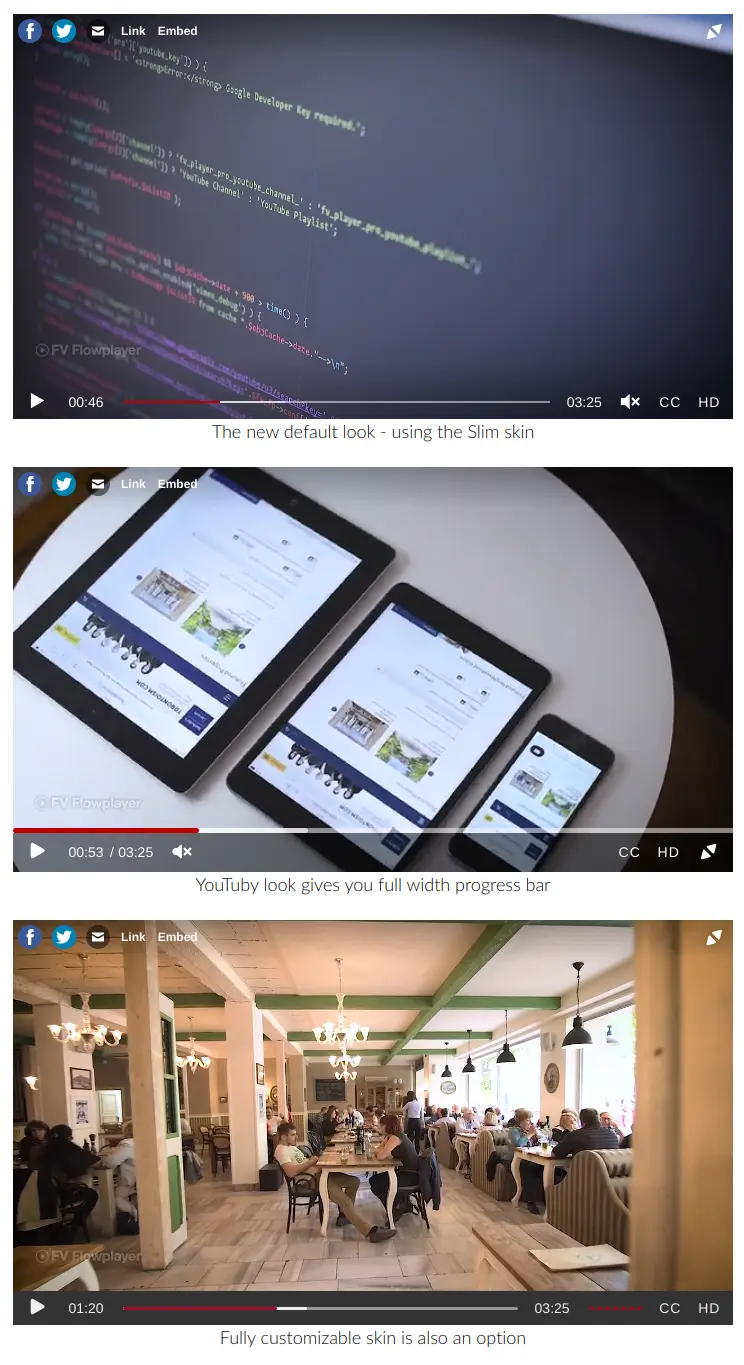

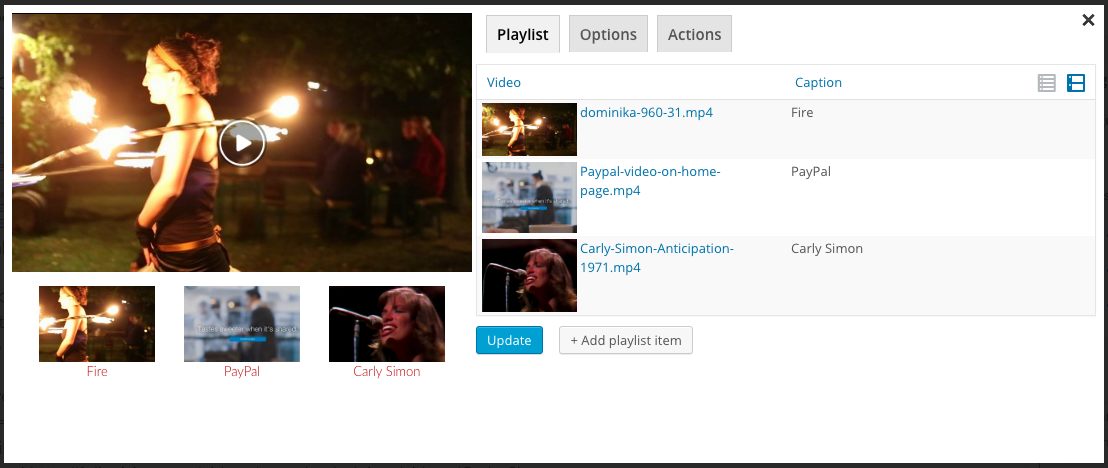
Für Entwickler
Ist das dein Plugin? Zeigen Sie die Zahlen.
Fügen Sie Ihrer Website, Docs oder GitHub Readme ein Live-Badge hinzu. Es wird von selbst aktualisiert - kein Konto erforderlich.
Best FV Flowplayer Video Player alternatives
All flowplayer plugins →


Fragen und Antworten
FV Flowplayer Video Player: quick answers
Gerade Antworten, gezogen von Live WordPress.org Daten.
Quelle: WordPress.org
Is FV Flowplayer Video Player free?
Yes. FV Flowplayer Video Player is free to download and use from the official WordPress.org plugin directory.
Is FV Flowplayer Video Player safe to use in 2026?
FV Flowplayer Video Player is a solid plugin choice in 2026, with a few things worth checking first. It runs on 10K+ sites, is rated 4.4/5 and was last updated 2 weeks ago, and scores 72/100 on our health check.
How many websites use FV Flowplayer Video Player?
FV Flowplayer Video Player is active on 10K+ WordPress websites and has been downloaded 2,476,428 times since it launched in September 2009. It was downloaded 21,772 times in the last 30 days.
Does FV Flowplayer Video Player work with WordPress 7.1?
FV Flowplayer Video Player is officially tested up to WordPress 6.9.12, while the latest release is 7.1.5. It may still work, but try it on a staging site first.
When was FV Flowplayer Video Player last updated?
The latest version, 7.5.58.7212, was released on November 18, 2026 (2 weeks ago).
Who makes FV Flowplayer Video Player?
FV Flowplayer Video Player is developed and maintained by FolioVision.
What are the best alternatives to FV Flowplayer Video Player?
The most popular alternatives to FV Flowplayer Video Player are Flowplayer Video Player (900+ installs), Flowplayer for WordPress (40+ installs) and Flowplayer Platform Embed (20+ installs).
Angetrieben von PageForge
Eine Vorlage und eine Tabelle. Eine echte Seite für jede Suche.
PageForge Verwandelt jede Zeile eines CSV in eine WordPress-Seite mit eigenem Titel, URL, SEO Felder und Schema entworfen. Kostenlos auf WordPress.org.
- CSV und XLSX, plus Google Sheets auf Beruf und Unternehmen
- seinen eigenen Titel, URL, SEO Felder und Schema für jede Seite
- Arbeitet mit dem Blockeditor, Elementor, Divi und Avada
- Kostenlos auf WordPress.org, keine Kreditkarte