


FCB Cache Watch – Auto Clear & Purge Every Cache Layer
Automatically clear every cache layer when your site changes: cache plugins, hosts, Cloudflare, Varnish and Redis. Then warm pages again.

Solide Wahl
FCB Cache Watch is a solid plugin choice in 2026, with a few things worth checking first. It runs on 10+ sites and was last updated 3 days ago, and scores 66/100 on our health check.
- Aktiv entwickelt – letztes Update vor 3 Tagen
- Getestet mit dem neuesten WordPress (7.1)
- Kleine Benutzerbasis (10+ aktive Installationen)
- Bisher sehr wenige Bewertungen
Wie stapelt es sich?
Side-by-side bei Installationen, Updates, Bewertungen und Support



Tägliche Downloads
Download-Spitzen folgen normalerweise einer neuen Version - jede Website, die automatisch aktualisiert wird, gilt als Download.
Ranglisten
Where FCB Cache Watch stands todayWordPress.org Ranglisten suchen
Live-Position in der Plugin-Suche, Top 100| Stichwort | Position |
|---|---|
| Zwischenspeicher | >100 |
| clear cache | >100 |
| cloudflare | >100 |
| purge cache | >100 |
| varnish | #48 |
Versionsübernahme
Anteil aktiver Sites pro Release.
About FCB Cache Watch
Aus der offiziellen Readme · V1.2.1Beschreibung
Most WordPress sites have three or four caches stacked on top of each other: a cache plugin, the host’s server cache, a CDN like Cloudflare and the object cache. When you change something, you often don’t know which one is still showing the old version.
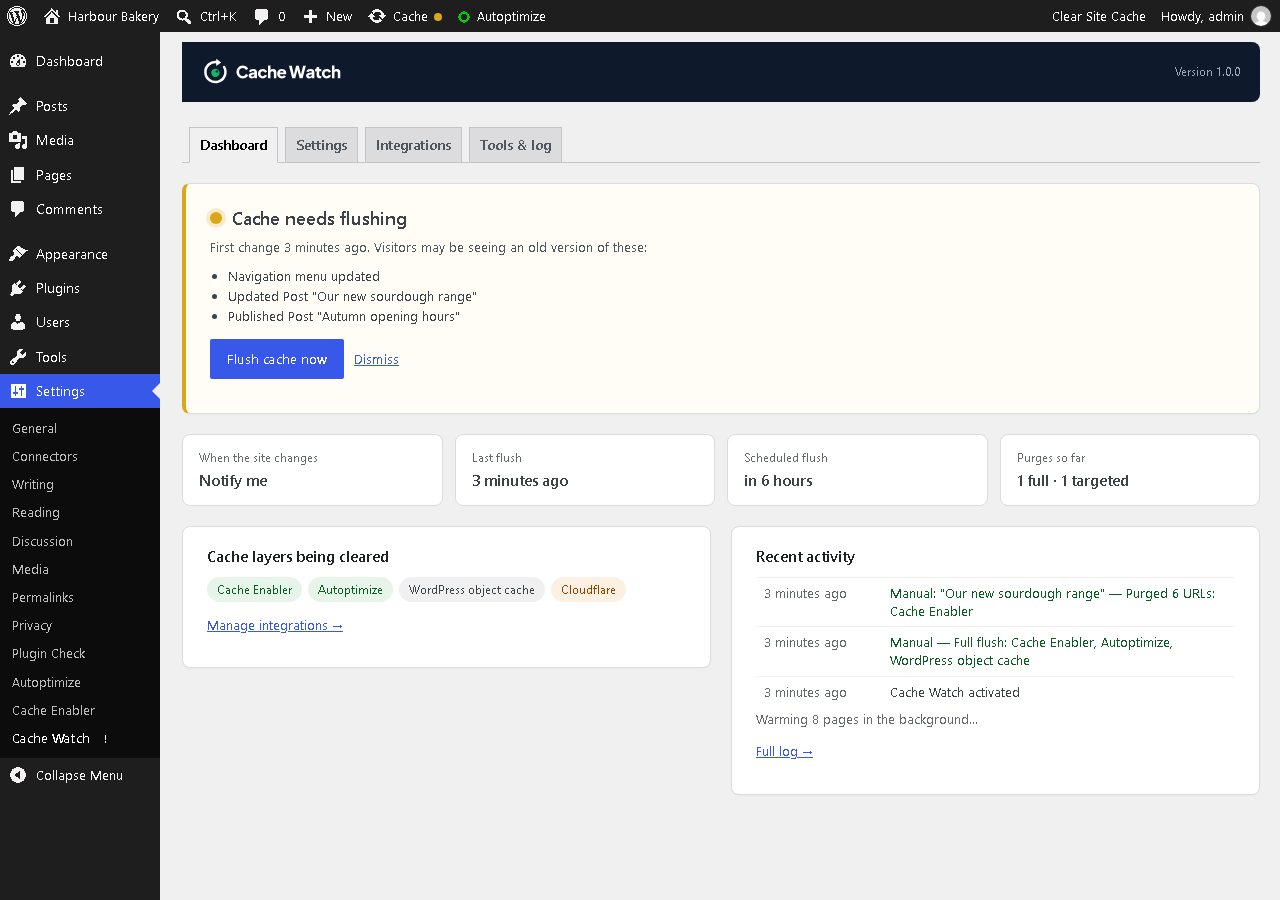
FCB Cache Watch is the control centre for all of them. It notices when something on your site changes, tells you (or just deals with it), clears every cache layer it finds, then quietly rebuilds the cache so visitors never hit a slow page.
It works alongside your existing cache plugin. It doesn’t replace it.
Knows when your site has changed
- Posts, pages, products and custom post types published, updated, unpublished or deleted
- Slug changes (the old URL is purged too)
- Block theme templates, template parts, global styles, patterns and navigation
- Menus, widgets, Customizer, site title, tagline, homepage and permalink settings
- Categories, tags and other public taxonomies
- Theme switches, plugin activations, and core, plugin and theme updates
- Approved comments, WooCommerce stock changes and ACF options pages
- Theme and plugin files saved in the WordPress file editor, picked up the moment you save
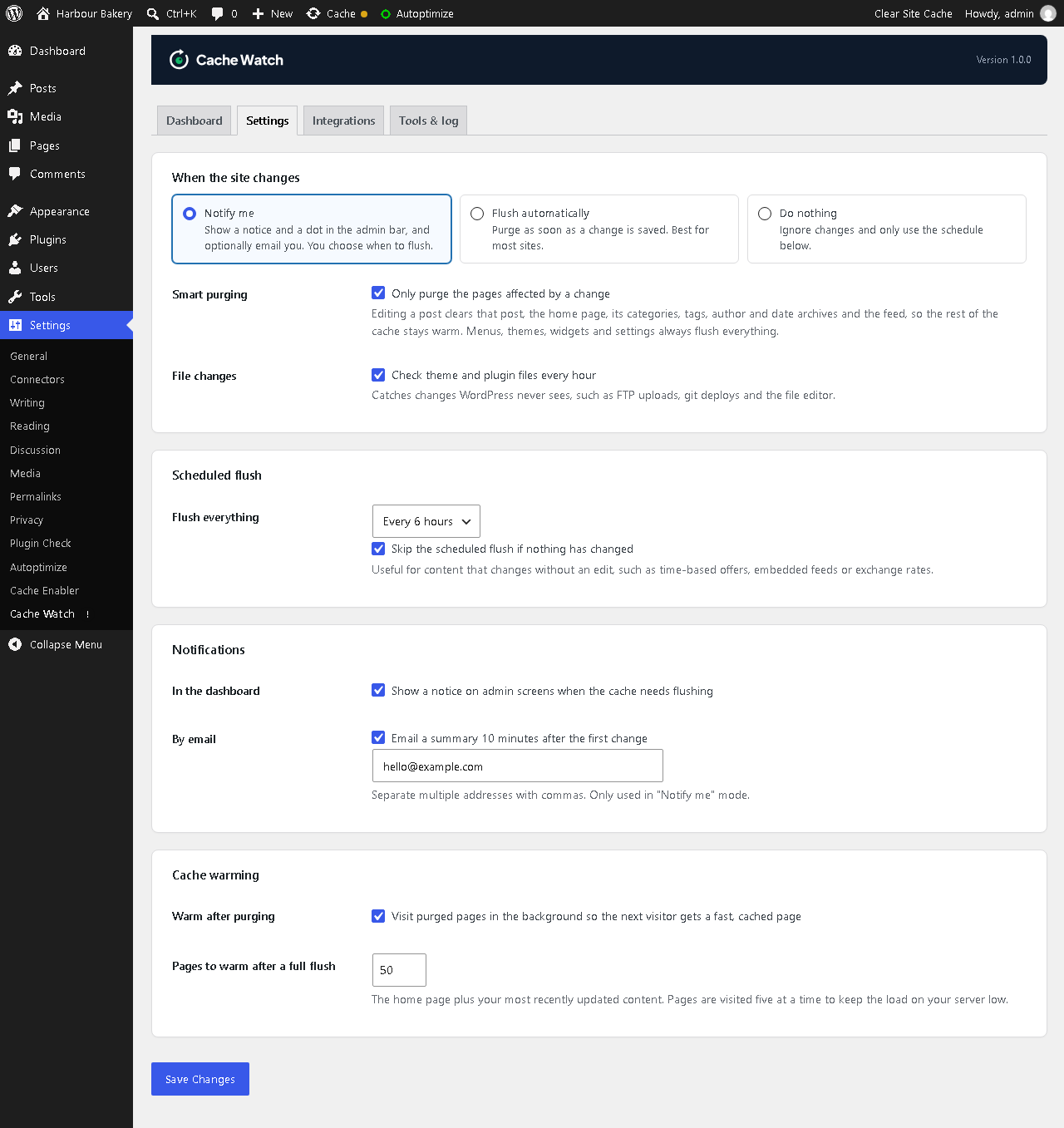
- Changes WordPress never sees: a scan of theme, plugin and must-use plugin files catches FTP uploads and git deploys. It runs hourly, and every 5 minutes while you’re in wp-admin.
You choose what happens
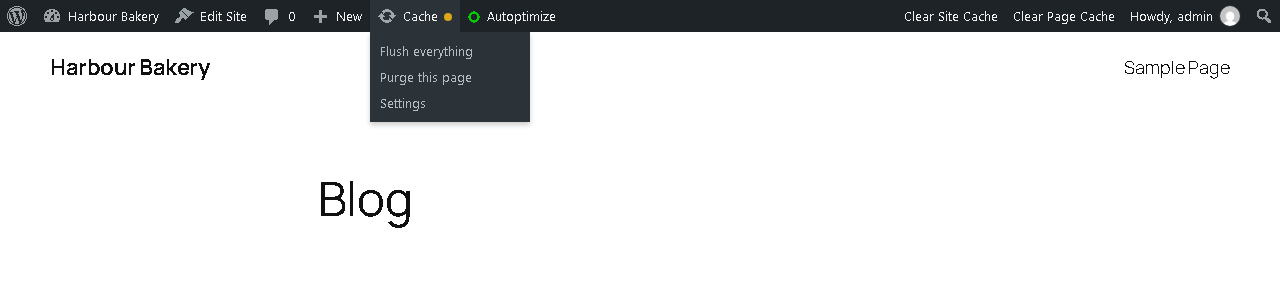
- Notify me: an admin notice, a status dot in the admin bar, a dashboard widget and an optional email summary with a link to flush
- Flush automatically: purge the moment a change is saved
- Scheduled flush: every 1, 3, 6 or 12 hours, daily or weekly. It can skip the flush when nothing has changed.
Smart purging
Editing one post doesn’t need to wipe your whole cache. FCB Cache Watch purges only that post, the home page, its categories and tags, the author, date archives and the feed, so the rest of the site stays fast. Menus, themes and settings changes still flush everything.
Clears every layer
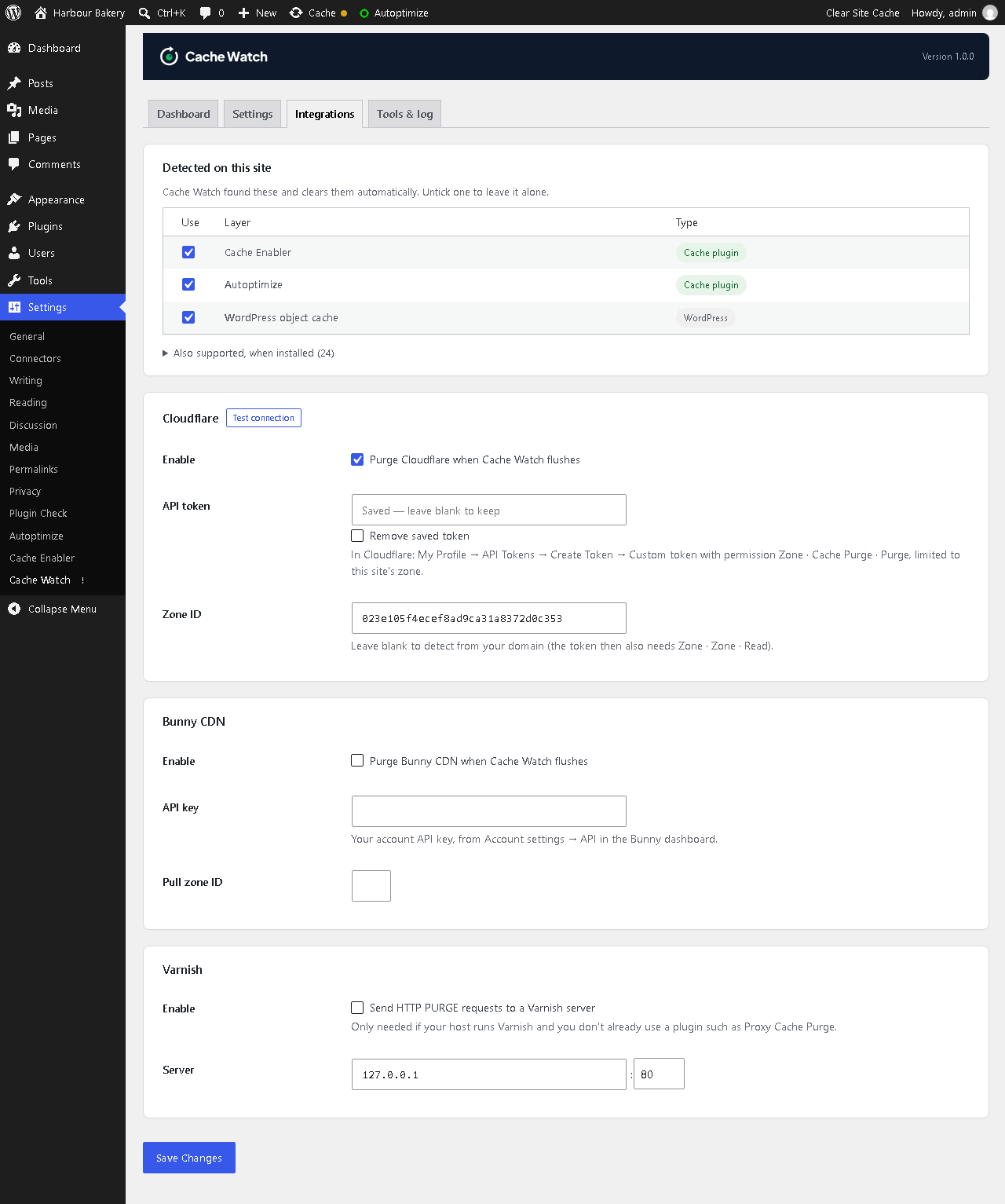
Cache plugins: WP Rocket, W3 Total Cache, WP Super Cache, LiteSpeed Cache, WP Fastest Cache, WP-Optimize, FlyingPress, Warp Performance, NitroPack, Jetpack Boost, Cache Enabler, Hummingbird, Swift Performance, Comet Cache, Super Page Cache, SpeedyCache, Powered Cache, Cachify, Hyper Cache, Surge, Autoptimize, Fast Velocity Minify
Hosts: Kinsta, WP Engine, SiteGround, Cloudways (Breeze), Bluehost and HostGator, Pantheon, GoDaddy Managed WordPress, Pagely, SpinupWP, Pressable / WordPress VIP (Batcache), Servebolt, RunCloud (RunCache), FlyWP
CDN and firewall: Cloudflare (with an API token, or through the official Cloudflare plugin), Bunny CDN, KeyCDN, Fastly, Gcore CDN, Amazon CloudFront, Sucuri Firewall, Hostinger CDN (with the Hostinger Tools plugin)
Server: Varnish (direct HTTP PURGE or Proxy Cache Purge), Nginx Helper
Generated CSS: Elementor, Divi, Beaver Builder, Spectra and Perfmatters Used CSS
WordPress: the object cache, including Redis and Memcached
Cache warming
After a purge, FCB Cache Watch visits the affected pages in the background, five at a time, so the next real visitor gets a fast, cached page instead of a slow one.
For developers and agencies
- WP-CLI:
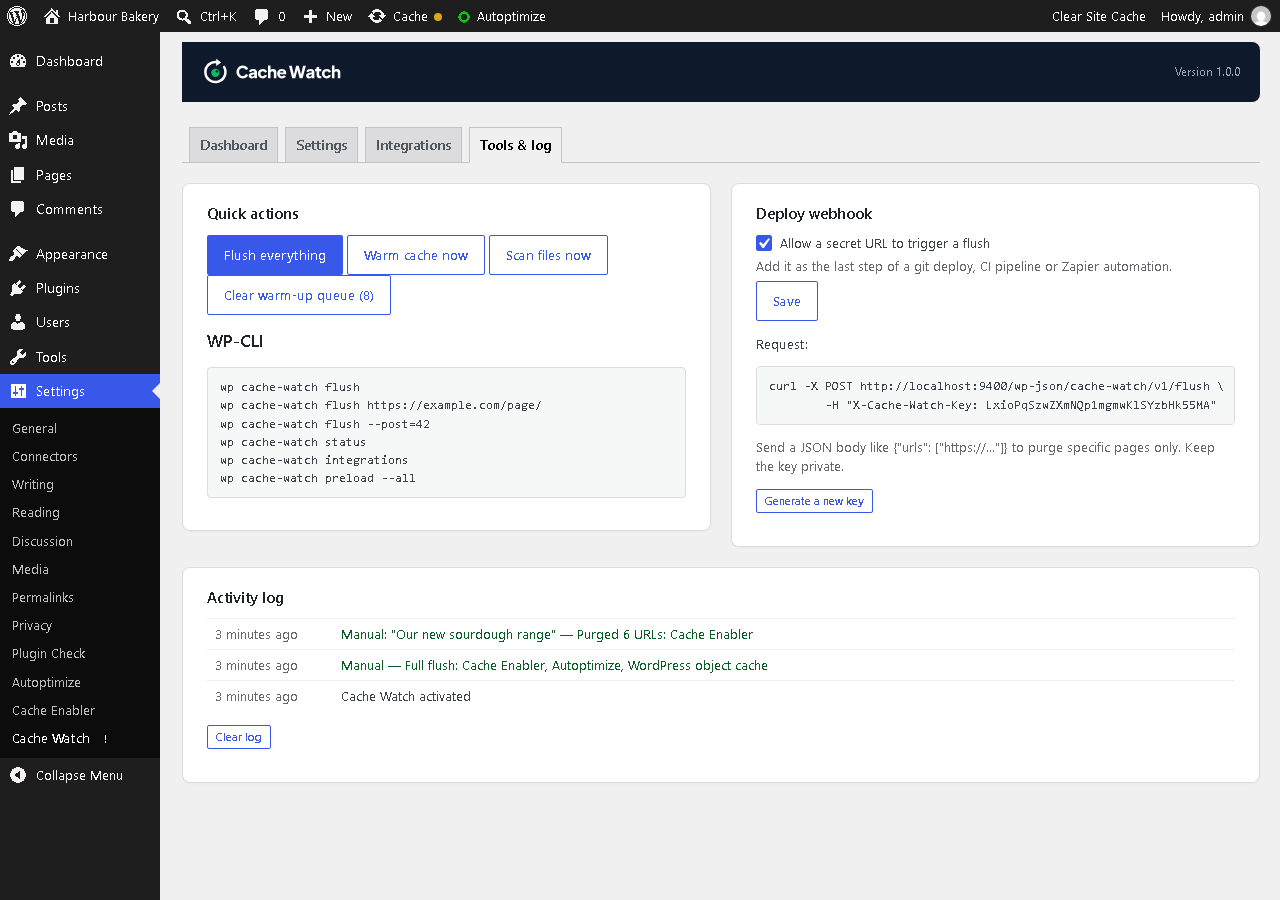
wp fcb-cache-watch flush,flush <url>,flush --post=<id>,status,integrations,scan,preload - Deploy webhook: one secret URL to flush from GitHub Actions, a deploy script or Zapier, with optional per-URL purging (up to 500 URLs per request). The key goes in the
X-FCB-Cache-Watch-Keyheader. - Purge buttons in the admin bar (“Purge this page”) and in post lists
- Activity log of every change, purge, email and error
- Hooks to add your own cache layer, change which URLs are purged, or run code after a flush
Externe Dienste
FCB Cache Watch does not send analytics or telemetry. Cloudflare, Bunny CDN, KeyCDN, Fastly, Gcore, Amazon CloudFront and Sucuri are contacted only when you enable the integration and provide its credentials on the Integrations tab. Varnish requests are sent only when you enable it and configure a server. When FCB Cache Watch purges through another plugin (for example the official Cloudflare plugin, Warp Performance or NitroPack), that plugin makes its own requests under its own terms.
FCB Cache Watch stores its settings, change status, activity log and cache-warming queue in this WordPress site’s database. API credentials are stored in the plugin settings. These options are removed when the plugin is deleted. Optional email summaries are sent to the addresses you configure using this site’s WordPress mail service. Cache warming makes requests to this site’s own pages.
Cloudflare
Used to purge your Cloudflare cache. When FCB Cache Watch flushes, it sends your API token and either a “purge everything” request or the list of page URLs to purge to the Cloudflare API (api.cloudflare.com). When you test the connection, or haven’t entered a Zone ID, it also sends your domain name to look up the zone.
Bunny CDN
Used to purge your Bunny CDN pull zone. When FCB Cache Watch flushes, it sends your API key and either your pull zone ID or the page URLs to purge to the Bunny API (api.bunny.net).
KeyCDN
Used to purge your KeyCDN zone. When FCB Cache Watch flushes, it sends your API key, your zone ID and either a “purge zone” request or the list of URLs to purge to the KeyCDN API (api.keycdn.com).
Fastly
Used to purge your Fastly service. When FCB Cache Watch flushes everything, it sends your API token and service ID to the Fastly API (api.fastly.com). To purge single pages, it sends a PURGE request with your API token to each page URL, which Fastly answers at its edge.
Gcore
Used to purge your Gcore CDN resource. When FCB Cache Watch flushes, it sends your API token, your CDN resource ID and either a “purge everything” request or the list of page paths to purge to the Gcore API (api.gcore.com).
Amazon CloudFront
Used to invalidate your CloudFront distribution. When FCB Cache Watch flushes, it sends a request signed with your IAM access key, containing your distribution ID and the paths to invalidate, to the CloudFront API (cloudfront.amazonaws.com). The secret access key is used to sign requests and is never sent.
Sucuri Firewall
Used to clear the Sucuri Website Firewall cache. When FCB Cache Watch flushes, it sends your firewall API key and secret and either a “clear cache” request or the page paths to clear to the Sucuri firewall API (waf.sucuri.net).
Varnish purges and cache warming only send requests to your own server.
Installation
- Install from Plugins > Add New, or upload the
fcb-cache-watchfolder to/wp-content/plugins/. - Aktivieren Sie das Plugin.
- Go to Settings > FCB Cache Watch. Your cache plugin and host are detected automatically.
- Choose Notify me or Flush automatically, and set a schedule if you want one.
- If you use a CDN or firewall (Cloudflare, Bunny CDN, KeyCDN, Fastly, Gcore, Amazon CloudFront or Sucuri) or Varnish, add the details on the Integrations tab and click Test connection. If the official Cloudflare plugin is connected, FCB Cache Watch purges Cloudflare through it and you can skip the API token.
Änderungsprotokoll
Security and reliability fixes. If your deploy webhook sends the key as ?key= in the URL, move it to the X-FCB-Cache-Watch-Key header.
1.2.1
- Changed: the plugin is now called “FCB Cache Watch – Auto Clear & Purge Every Cache Layer”, and its website is https://cachewatch.co.uk.
- Security: the deploy webhook no longer accepts its key in the URL (
?key=), because URLs are saved in server, proxy and CDN logs. Send it in theX-FCB-Cache-Watch-Keyheader (or askeyin the request body). - Security: Fastly single-page purges are always sent over HTTPS, so the Fastly API token is never sent unencrypted.
- Security: a webhook request can purge up to 500 URLs. A request whose URLs are all on other sites now returns an error instead of reporting success.
- Hardened: purge and cache-warming lists only accept http and https addresses on this site. The domain check no longer cares about upper or lower case.
- Fix: people given access with the
fcb_cache_watch_capabilityfilter can now save the settings, not only view them. - Fix: moderating a comment visitors never saw, such as marking a pending comment as spam, no longer flags the cache. Permanently deleting an approved comment now does.
1.2.0
- New: cache plugin integrations for Warp Performance, NitroPack, Jetpack Boost, SpeedyCache, Powered Cache, Cachify, Hyper Cache, Surge and Fast Velocity Minify.
- New: host integrations for Servebolt, RunCloud (RunCache) and FlyWP.
- New: KeyCDN, Fastly, Gcore CDN, Amazon CloudFront and Sucuri Firewall, set up under “More CDNs and firewalls” on the Integrations tab, each with a connection test.
- New: Cloudflare can be purged through the official Cloudflare plugin, with no separate API token.
- New: Perfmatters Used CSS is cleared with the other generated CSS on a full flush.
- New: files saved in the Theme File Editor or Plugin File Editor are detected straight away, with a notice and flush button on the editor screen.
- Improved: the file scan also covers must-use plugins, catches uploads that keep their original file dates, and runs every 5 minutes while you’re in wp-admin. The first scan after updating records a new baseline without reporting a change.
- Improved: a failed purge from a host or plugin integration now shows in the activity log.
1.1.0
- New: Super Page Cache integration. Clears its disk cache and connected Cloudflare cache, with the changed URLs sent in one batch.
- New: Hostinger CDN integration, through the Hostinger Tools plugin. Cleared on full flushes (theme, plugin and file changes), since Hostinger CDN only caches static files.
- New: Bluehost and HostGator integration, for both the current Bluehost / HostGator plugin cache and the older Endurance Page Cache.
- New: Spectra integration. Regenerates Spectra’s CSS files on a full flush.
1.0.1
- Renamed to FCB Cache Watch. The plugin folder is now fcb-cache-watch. Settings, activity log and schedules move across automatically and the old Cache Watch plugin is switched off, so you can delete it.
- The deploy webhook is now /wp-json/fcb-cache-watch/v1/flush with the X-FCB-Cache-Watch-Key header. The old URL and header keep working.
1.0.0
- Erste Veröffentlichung.
Screenshots
Für Entwickler
Ist das dein Plugin? Zeigen Sie die Zahlen.
Fügen Sie Ihrer Website, Docs oder GitHub Readme ein Live-Badge hinzu. Es wird von selbst aktualisiert - kein Konto erforderlich.
Best FCB Cache Watch alternatives
Alle Cache-Plugins →



Fragen und Antworten
FCB Cache Watch: quick answers
Gerade Antworten, gezogen von Live WordPress.org Daten.
Quelle: WordPress.org
Is FCB Cache Watch free?
Yes. FCB Cache Watch is free to download and use from the official WordPress.org plugin directory.
Is FCB Cache Watch safe to use in 2026?
FCB Cache Watch is a solid plugin choice in 2026, with a few things worth checking first. It runs on 10+ sites and was last updated 3 days ago, and scores 66/100 on our health check.
How many websites use FCB Cache Watch?
FCB Cache Watch is active on 10+ WordPress websites and has been downloaded 479 times since it launched in October 2026. It was downloaded 482 times in the last 30 days.
Does FCB Cache Watch work with WordPress 7.1?
Yes. The developer has tested FCB Cache Watch up to WordPress 7.1.5, the latest release. It requires WordPress 6.2 or newer.
What PHP version does FCB Cache Watch need?
FCB Cache Watch requires PHP 7.4 or higher. Most hosts run PHP 8.x today, so it works on any modern WordPress hosting.
When was FCB Cache Watch last updated?
The latest version, 1.2.1, was released on November 26, 2026 (3 days ago).
Who makes FCB Cache Watch?
FCB Cache Watch is developed and maintained by FCB Digital Ltd.
What are the best alternatives to FCB Cache Watch?
The most popular alternatives to FCB Cache Watch are WP Super Cache (1M+ installs), WP Fastest Cache (1M+ installs) and WP-Optimize (1M+ installs).
Angetrieben von PageForge
Eine Vorlage und eine Tabelle. Eine echte Seite für jede Suche.
PageForge Verwandelt jede Zeile eines CSV in eine WordPress-Seite mit eigenem Titel, URL, SEO Felder und Schema entworfen. Kostenlos auf WordPress.org.
- CSV und XLSX, plus Google Sheets auf Beruf und Unternehmen
- seinen eigenen Titel, URL, SEO Felder und Schema für jede Seite
- Arbeitet mit dem Blockeditor, Elementor, Divi und Avada
- Kostenlos auf WordPress.org, keine Kreditkarte