

Decimal Product Quantity for WooCommerce
Products like: Pizza, Liquid on the filling, Custom weight, etc. (Piece of Product). Min, Max, Step & Default preset Quantity. Variable Supported.

Use with caution
Decimal Product Quantity for Wo… works, but test it on a staging site before relying on it in 2026. It runs on 900+ sites, is rated 4.5/5 and was last updated 9 months ago, and scores 56/100 on our health check.
- Small user base (900+ active installs)
- Only tested up to WordPress 6.9 (latest is 7.1)
How does it stack up?
Side-by-side on installs, updates, ratings & support

Daily downloads
Download spikes usually follow a new release — each site that auto-updates counts as a download.
Rankings
Where Decimal Product Quantity fo… stands todayWordPress.org search rankings
Live position in the plugin search, top 100| Keyword | Position |
|---|---|
| decimal | #1 |
| piece | #6 |
| quantity | #13 |
| variation | >100 |
| woocommerce | >100 |
Version adoption
Share of active sites per release.
Rating breakdown
★★★★★★★★★★ 4.5 from 11 reviews
About Decimal Product Quantity for WooCommerce
From the official readme · v20.65Description
The plugin makes it possible to sell Products as whole or in parts: 0.5 1.5 etc.
(Piece of Product). Min, Max, Step & Default preset Quantity. Variable Products Supported.
For example:
Pizza. You can sell 1.5 Pizzas, or a quarter. With the price set for 1 piece.
Liquids on tap. For example, Kerosene or Olive Oil. You can sell 1.5 liters, with the price set for 1 liter.
Bulk materials. For example, Tobacco or Golden Sand. You can sell 0.1 g at a price quoted for 1 g.
Futured
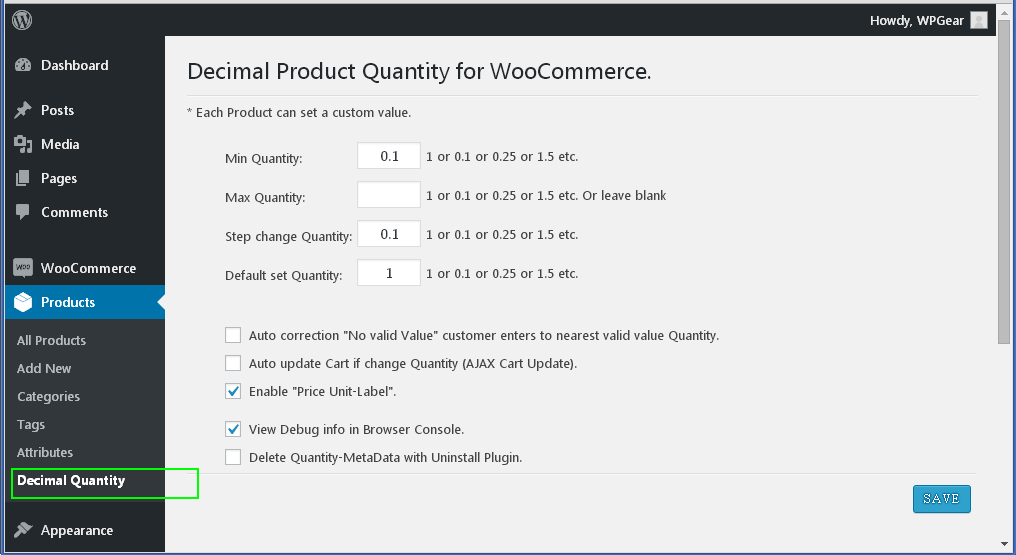
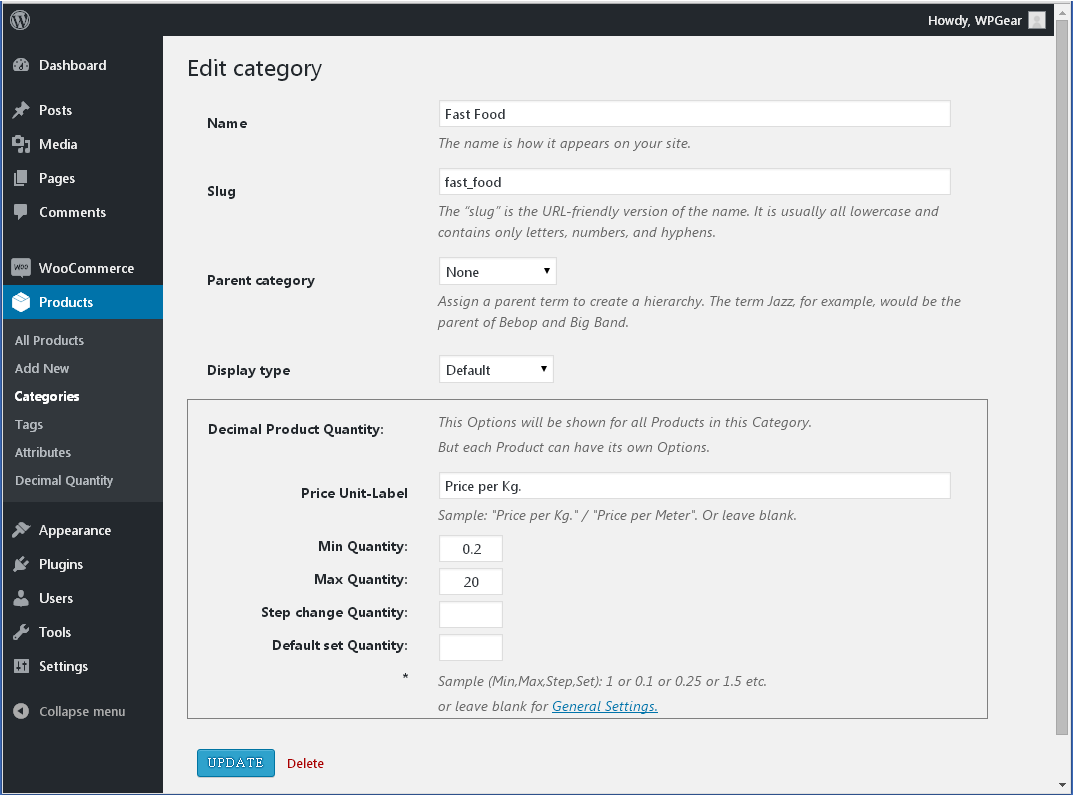
- You can set the Minimum product Quantity for all Products by default (preset = 1). But at the same time, each Product / Categories can have its own Minimum Quantity value.
- You can set the Step of Changing the Quantity of goods for all Products by default (preset = 1). But at the same time, each Product / Categories can have its own value for the Change in Quantity Step.
- You can set the Default – Choice product quantity for all Products by default (preset = 1). But at the same time, each Product / Categories can have its own Default – Choice Quantity value.
- You can set the Maximum product Quantity for all Products by default. But at the same time, each Product / Categories can have its own Maximum Quantity value.
- Works correctly with Variable Products.
- Auto correction “No valid value” customer enters to nearest valid value.
- Auto correction considering with “Maximum allowed for Product”.
- Column “Quantity” on Products List.
- Update Cart Automatically on Quantity Change (AJAX Cart Update)
- You can set a “Value Label” for each individual Item. Individually or as a whole for the Category. For example: “Price per Meter”, “Price per Liter”.
- It is possible to use Product – JS Object for Ext.Integration: QNT_Data. Function: WDPQ_Get_QuantityData (Product_ID).
- Works with WooCommerce specifics from v3.4.8 & more
- Buttons: +/- To select the Quantity on the Product page and in the Cart.
-
Compatibility with Plugin: “WPGear Composite Products for WooCommerce” (https://wpgear.xyz/wpgear-composite-products-woo).
PRO Version Features:
- You can set separate Minimum Product Quantity, Step of Changing the Quantity & Default preset Quantity – for each Variable Product Variation.
- You can create RSS Feed for WooCommerce. Support: “Google Merchant Center” (Product data specification) for “Price_Unit_Label” -> [unit_pricing_measure], separate hierarchy Categories -> Products.
Installation
- Upload ‘decimal-product-quantity-for-woocommerce’ folder to the
/wp-content/plugins/directory. - Activate the plugin through the ‘Plugins’ menu in WordPress.
- Go to Settings: Products -> Decimal Quantity. Set: Min cart Quantity, Max cart Quantity, Step change Quantity, Default preset Quantity (default preset = 1).
- If you have any problems – please ask for support.
Changelog
20.65
2026.03.17
* (Thanks to PR24)
* Fix "Get_WDPQ_CartItem_by_ProductID".
* Add Link to Setup Options Page.
20.64
2026.02.19
* Fix Normalize_Number.
* Fix Change Quantity in Cart after Refresh Page.
* Tested to WP: 6.9.1
* Tested to WooCommerce: 10.5.2
20.63
2026.02.13
* (Thanks to PR24)
* Fix Column "Quantity" for Product Category List.
* Fix Call Debuger. (Product Setup).
* Fix Check_Input_Parameters.
* Fix Normalize_Number.
* Fix DecimalValueFormatting.
* Fix Remove Cart Item.
* Ready for MiniCarts (experience).
20.62
2025.12.11
* Fix Add Product to Cart from Catalog (AJAX Processing).
20.61
2025.12.05
* Fix using the Decimal Separator from Woo Settings. (Exception: Orders. The System Separator will be displayed.)
* Tested to WooCommerce: 10.3.5
19.60
2025.11.06
* Fix Rounding the result of Quantity correction when entering manually. (Thanks to Chris Murphy)
* Tested to WP: 6.8.3
* Tested to WooCommerce: 10.2.2
Screenshots


For developers
Is this your plugin? Show off the numbers.
Add a live badge to your site, docs or GitHub README. It updates on its own — no account needed.
Best Decimal Product Quantity for… alternatives
All decimal plugins →FAQ
Decimal Product Quantity for WooCom…: quick answers
Straight answers, pulled from live WordPress.org data.
Source: WordPress.org
Is Decimal Product Quantity for Wo… free?
Yes. Decimal Product Quantity for Wo… is free to download and use from the official WordPress.org plugin directory.
Is Decimal Product Quantity for Wo… safe to use in 2026?
Decimal Product Quantity for Wo… works, but test it on a staging site before relying on it in 2026. It runs on 900+ sites, is rated 4.5/5 and was last updated 9 months ago, and scores 56/100 on our health check.
How many websites use Decimal Product Quantity for Wo…?
Decimal Product Quantity for Wo… is active on 900+ WordPress websites and has been downloaded 37,819 times since it launched in April 2021. It was downloaded 504 times in the last 30 days.
Does Decimal Product Quantity for Wo… work with WordPress 7.1?
Decimal Product Quantity for Wo… is officially tested up to WordPress 6.9.12, while the latest release is 7.1.5. It may still work, but try it on a staging site first.
What PHP version does Decimal Product Quantity for Wo… need?
Decimal Product Quantity for Wo… requires PHP 5.4 or higher. Most hosts run PHP 8.x today, so it works on any modern WordPress hosting.
When was Decimal Product Quantity for Wo… last updated?
The latest version, 20.65, was released on March 17, 2026 (9 months ago).
Who makes Decimal Product Quantity for Wo…?
Decimal Product Quantity for Wo… is developed and maintained by wpgear.
What are the best alternatives to Decimal Product Quantity for Wo…?
The most popular alternatives to Decimal Product Quantity for Wo… are Unit Price for WooCommerce (900+ installs) and Smart Units for WooCommerce (<10 installs).
Powered by PageForge
One template and a spreadsheet. A real page for every search.
PageForge turns each row of a CSV into a WordPress page with its own title, URL, SEO fields and schema, built on the layout you already designed. Free on WordPress.org.
- CSV and XLSX, plus Google Sheets on Professional and Enterprise
- Its own title, URL, SEO fields and schema for every page
- Works with the block editor, Elementor, Divi and Avada
- Free on WordPress.org, no credit card