


Block Class Manager – Gutenberg Blocks & Class-Based Styling
Build flexible layouts in Gutenberg with lightweight blocks, reusable CSS classes and responsive styling.

Solid choice
Block Class Manager is a solid plugin choice in 2026, with a few things worth checking first. It runs on 10+ sites, is rated 5/5 and was last updated 2 days ago, and scores 73/100 on our health check.
- Actively developed — last update 2 days ago
- Tested with the latest WordPress (7.1)
- Small user base (10+ active installs)
- Very few reviews so far
How does it stack up?
Side-by-side on installs, updates, ratings & support



Daily downloads
Download spikes usually follow a new release — each site that auto-updates counts as a download.
Rankings
Where Block Class Manager stands todayWordPress.org search rankings
Live position in the plugin search, top 100| Keyword | Position |
|---|---|
| block-editor | >100 |
| css | >100 |
| gutenberg | >100 |
| responsive | >100 |
| wordpress blocks | >100 |
Version adoption
Share of active sites per release.
Rating breakdown
★★★★★★★★★★ 5 from 1 reviews
About Block Class Manager
From the official readme · v0.0.7Description
Build flexible layouts in Gutenberg with lightweight blocks, reusable CSS classes and responsive styling.
Build layouts with Gutenberg
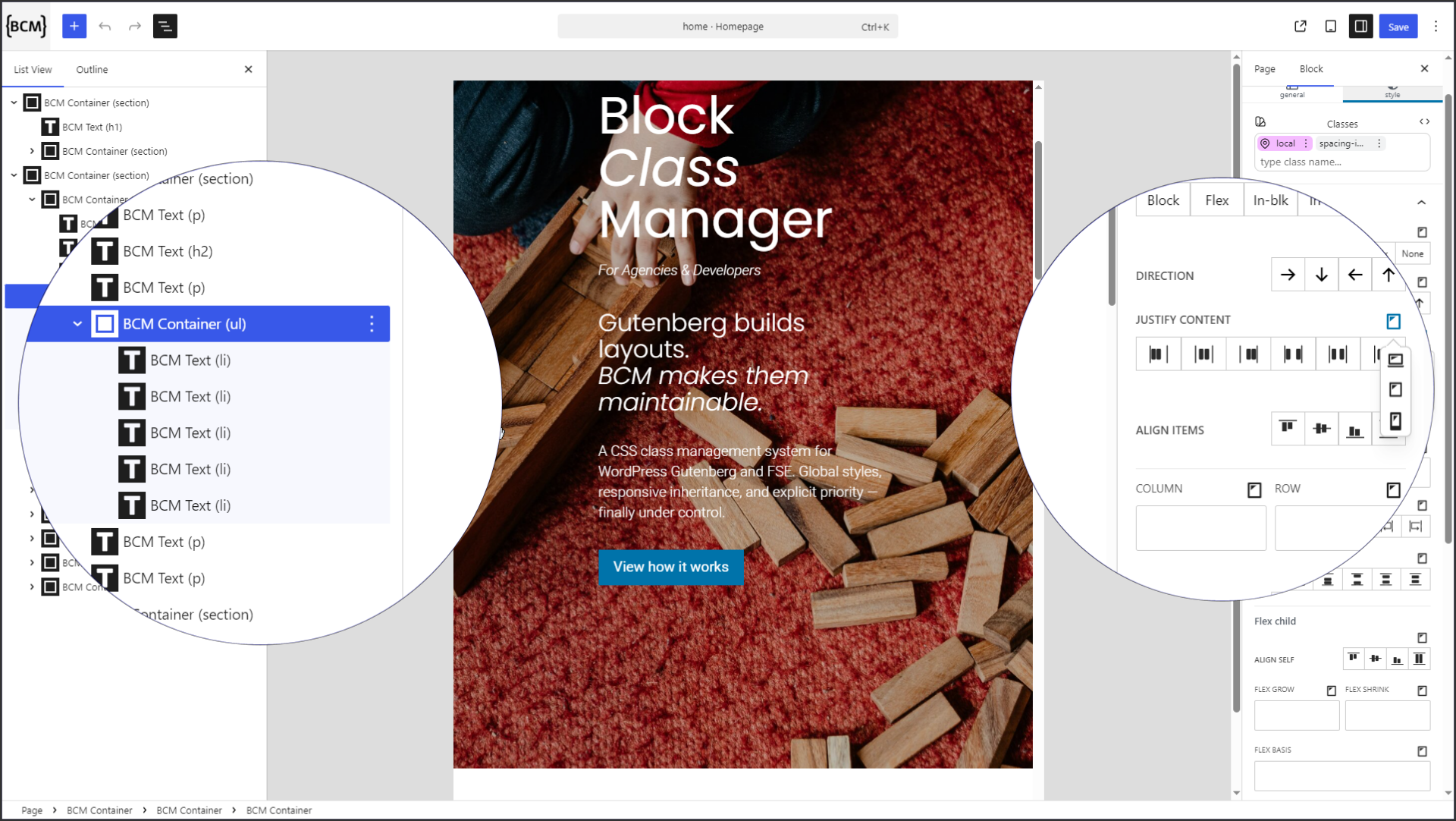
Block Class Manager provides a lightweight set of configurable blocks for building layouts and content directly in Gutenberg.
Its class-based styling system lets you combine local styles with reusable Global Classes and responsive controls, without replacing the native WordPress editor.
🧪 Try BCM in WordPress Playground
Want to see BCM in action without installing anything?
Explore Global Classes, responsive styling, and the BCM workflow directly in a real WordPress editor.
🧱 Build with Lightweight Gutenberg Blocks
BCM includes a focused set of configurable blocks that provide the building elements for creating layouts and content directly in Gutenberg.
- Container: Build flexible layouts and organize nested content.
- Text: Create text elements using different HTML tags.
- Heading: Configure semantic heading elements.
- Media: Add and configure image elements.
- Button: Create customizable button elements.
Each block provides visual controls for layout and styling, with support for local styles and reusable Global Classes.
These blocks form the foundation of the BCM workflow, combining flexible content structures with a consistent, class-based styling system.
✨ Global Classes & Responsive Styling
Create once. Reuse across your layouts.
BCM lets you create reusable Global Classes and apply them to BCM blocks. Define your styling rules once and reuse them wherever the same design pattern is needed.
You can also control responsive values for desktop, tablet, and mobile, using the breakpoint values provided by your active WordPress theme.
With BCM you can:
- Create and manage up to 10 reusable Global Classes
- Apply Global Classes to BCM blocks
- Convert local styles into reusable Global Classes
- Configure responsive values per device
- Control layout and styling directly inside Gutenberg
- Generate frontend CSS automatically
- Add HTML attributes such as id, data-*, and aria-*
- Use BCM with pages, posts, and FSE template parts
🎨 Local Styles & Global Styling
BCM provides visual controls for configuring CSS properties directly inside the Gutenberg editor.
You can style each block individually using Local Styles, or create reusable Global Classes to apply the same styling rules across multiple blocks.
This combination lets you manage both one-off adjustments and shared design patterns within a single workflow, while keeping your styling rules organized and consistent.
🔄 How It Works
- Add a BCM block: Choose a Container, Text, Heading, Media, or Button block.
- Configure its styling: Use visual controls to define layout and appearance through Local Styles.
- Create a Global Class: Save reusable styling rules as a Global Class.
- Apply and reuse: Assign the same Global Class to other BCM blocks to maintain consistent styling.
- Set responsive values: Customize how your styles behave on desktop, tablet, and mobile.
BCM manages your styling rules directly inside the Gutenberg editor and automatically generates the corresponding frontend CSS.
🔌 Gutenberg & WordPress Integration
BCM extends the native WordPress editing experience with styling and layout controls integrated directly into the Gutenberg block editor.
- Gutenberg Editor: Configure BCM blocks using visual controls without leaving the native editing interface.
- Full Site Editing (FSE): Use BCM within block-based themes, templates, and template parts.
- WordPress Content: Build layouts in pages, posts, and FSE template parts.
- Native WordPress Blocks: Extend the use of BCM Global Classes to Core blocks with the optional BCM Extension.
The free version provides the complete BCM styling workflow for its foundation blocks. The BCM Extension expands this workflow by adding Global Class support for native WordPress Core blocks.
🧰 BCM Extension
BCM Extension unlocks the full power of Block Class Manager for larger sites, agencies, and native WordPress Core blocks.
Upgrade your workflow with:
- Native WordPress Core Block Support: Apply BCM Global Classes directly to Core blocks (Group, Columns, Paragraph, Image, Cover, and more).
- Unlimited Global Classes: Remove the 10-class limit of the core plugin.
- Visual Class Priority: Reorder classes via drag-and-drop to explicitly control CSS specificity without
!importanthacks. - Style Origin Inspector: Visualize the exact cascade origin and spot style overrides in real time.
- Generated CSS Inspector: Inspect compiled Global and Local CSS directly inside the editor.
- Usage Counter: Track where every Global Class is used across your site.
- Class Suggestions: Search and apply Global Classes directly from the native “Additional CSS Class(es)” field.
🎁 Early Adopter Window: Claim a free 12-month license (no credit card required, no auto-renewals) while spots remain, before transitioning to standard commercial plans.
👉 Get BCM Extension (Early Adopter Access)
⚡ Why Developers Choose BCM
Styling complex layouts in Gutenberg usually means fighting CSS specificity, duplicating block settings, or loading heavy page builders. Block Class Manager gives you a clean, predictable class architecture directly inside the native editor.
- Zero Bloat & Clean HTML: Generates lightweight frontend CSS and lets you assign semantic HTML tags (
section,article,div,span,h1–h6) and custom attributes (data-*,aria-*). - Reusable Design Systems: Standardize spacing, typography, and layout patterns with Global Classes—update a class once and sync changes site-wide.
- Local + Global Flexibility: Combine shared Global Classes with one-off Local Styles for block-specific tweaks without breaking your system.
- Theme-Aligned Responsive Controls: Manage desktop, tablet, and mobile rules directly inside Gutenberg using your active theme’s breakpoints.
- Built for Full Site Editing (FSE): Works seamlessly across pages, posts, templates, and template parts without replacing the core WordPress workflow.
📦 Installation
Requirements
- WordPress 6.7 or higher
- PHP 8.0 or higher
Installation Steps
- Upload the plugin to
/wp-content/plugins/or install it through the WordPress plugin installer. - Activate Block Class Manager.
- Open the Gutenberg editor and add a BCM block.
- Start creating local styles and reusable Global Classes.
Changelog
Updated plugin documentation and readme for clearer feature descriptions and installation information.
0.0.7 – 10-11-2026
- Update: Updated plugin documentation and readme for clearer feature descriptions and installation information.
0.0.6 – 09-09-2026
- Update: Improved UI labels and styling for a clearer and more consistent user experience.
0.0.5 – 02-09-2026
- Fix: Corrected stylesheet registration to ensure proper CSS versioning and cache invalidation.
0.0.4 – 28-08-2026
- Update: BCM now uses the breakpoint values defined by the active theme via
theme.json, with fallback values for compatibility.
0.0.3 – 20-08-2026
- Fix: Placeholder image path.
- Update: Added the
bcm-blockbase class to improve frontend styling consistency and provide a shared selector for BCM blocks.
0.0.2 – 04-08-2026
- Fix: Improved handling of block styles after duplicating or removing blocks in the editor.
Screenshots


For developers
Is this your plugin? Show off the numbers.
Add a live badge to your site, docs or GitHub README. It updates on its own — no account needed.
Best Block Class Manager alternatives
All block-editor plugins →





FAQ
Block Class Manager: quick answers
Straight answers, pulled from live WordPress.org data.
Source: WordPress.org
Is Block Class Manager free?
Yes. Block Class Manager is free to download and use from the official WordPress.org plugin directory.
Is Block Class Manager safe to use in 2026?
Block Class Manager is a solid plugin choice in 2026, with a few things worth checking first. It runs on 10+ sites, is rated 5/5 and was last updated 2 days ago, and scores 73/100 on our health check.
How many websites use Block Class Manager?
Block Class Manager is active on 10+ WordPress websites and has been downloaded 848 times since it launched in July 2026. It was downloaded 240 times in the last 30 days.
Does Block Class Manager work with WordPress 7.1?
Yes. The developer has tested Block Class Manager up to WordPress 7.1.5, the latest release. It requires WordPress 7.0 or newer.
What PHP version does Block Class Manager need?
Block Class Manager requires PHP 8.0 or higher. Most hosts run PHP 8.x today, so it works on any modern WordPress hosting.
When was Block Class Manager last updated?
The latest version, 0.0.7, was released on November 27, 2026 (2 days ago).
Who makes Block Class Manager?
Block Class Manager is developed and maintained by Block Class Manager.
What are the best alternatives to Block Class Manager?
The most popular alternatives to Block Class Manager are Classic Editor (8M+ installs), Advanced Editor Tools (1M+ installs) and Disable Gutenberg (500K+ installs).
Powered by PageForge
One template and a spreadsheet. A real page for every search.
PageForge turns each row of a CSV into a WordPress page with its own title, URL, SEO fields and schema, built on the layout you already designed. Free on WordPress.org.
- CSV and XLSX, plus Google Sheets on Professional and Enterprise
- Its own title, URL, SEO fields and schema for every page
- Works with the block editor, Elementor, Divi and Avada
- Free on WordPress.org, no credit card