


Advanced Automatic Updates
Advanced Automatic Updates adds extra options to WordPress’ built-in Automatic Updates feature. On top of security updates, it also supports installing major releases, plugins, themes, or even regular SVN checkouts!

Use with caution
Advanced Automatic Updates works, but test it on a staging site before relying on it in 2026. It runs on 20K+ sites, is rated 4.7/5 and was last updated 5 years ago, and scores 46/100 on our health check.
- Proven at scale on 20K+ active sites
- Loved by users — 4.7/5 from 61 reviews
- Momentum — downloads up 38.7% vs the previous 30 days
- No update in 5 years
- Only tested up to WordPress 5.0 (latest is 7.1)
How does it stack up?
Side-by-side on installs, updates, ratings & support



Daily downloads
Download spikes usually follow a new release — each site that auto-updates counts as a download.
Rankings
Where Advanced Automatic Updates stands todayWordPress.org search rankings
Live position in the plugin search, top 100| Keyword | Position |
|---|---|
| core | >100 |
| plugins | >100 |
| stable | >100 |
| themes | >100 |
| updates | >100 |
Version adoption
Share of active sites per release.
Rating breakdown
★★★★★★★★★★ 4.7 from 61 reviews
About Advanced Automatic Updates
From the official readme · v1.0.2Description
Advanced Automatic Updates adds extra options to WordPress’ built-in Automatic Updates feature. On top of security updates, it also supports installing major releases, plugins, themes, or even regular SVN checkouts!
If you’re working on a WordPress Multisite install, it will properly restrict the options page to your Network Admin.
While this will be useful for the vast majority of sites, please exercise caution, particularly if you have any custom themes or plugins running on your site.
Installation
The Good Way
- In your WordPress Admin, go to the Add New Plugins page
- Search for: advanced automatic updates
- Advanced Automatic Updates should be the first result. Click the Install link.
The Old Way
- Upload the plugin to the
/wp-content/plugins/directory - Activate the plugin through the ‘Plugins’ menu in WordPress
The Living-On-The-Edge Way
(Please don’t do this in production, you will almost certainly break something!)
- Checkout the current development version from https://plugins.svn.wordpress.org/automatic-updater/trunk/
- Subscribe to the RSS feed to be notified of changes
Changelog
With the release of WordPress 3.7, Automatic Updater is now know as Advanced Automatic Updates!
1.0.2
- ADDED: Strictly disallow activation on versions of WordPress earlier than 3.7
- CHANGED: Update filter name for redirecting debug emails (only available in WordPress 3.8+)
1.0.1
- CHANGED: Fresh installs now disable Major updates by default, to match Core behaviour
- UPDATED: German (de_DE) translation. Props Alexander Pfabel
- UPDATED: Japanese (日本語) (ja) translation. Props Tai
- UPDATED: Italian (it_IT) translation. Props Stefano Giolo
- UPDATED: Dutch (nl_NL) translation.
- FIXED: Fresh installs had Minor updates disabled
1.0
With the release of WordPress 3.7, Automatic Updater is now know as Advanced Automatic Updates!
- ADDED: Options to enable Major and Minor Core updates
- ADDED: Warning in wp-admin when AUTOMATIC_UPDATER_DISABLED is set
- ADDED: Turkish (tr_TR) translation. Props Tufan Tunç
- CHANGED: Debug Email option now allows enabling only for dev upgrades (default)
- UPDATED: Language POT file
- FIXED: PHP notice in PHP 5.4+ with WP_DEBUG enabled
0.9.1
- UPDATED: Language POT file
- UPDATED: German (de_DE) translation. Props Alexander Pfabel
- UPDATED: Dutch (nl_NL) translation.
- FIXED: If the
svn upoutput was empty, don’t send an update email - FIXED: Removed pass-by-reference, it’s too old school for @wonderboymusic
- FIXED: The settings link was incorrect in Multisite
0.9
- ADDED: Warning when Better WP Security is hiding update info
- ADDED: Warning when the user can’t update directly, but hasn’t defined S/FTP login details
- ADDED: AUTOMATIC_UPDATER_DISABLED wp-config option, for forcing updates to never happen
- ADDED: Sanity check to make sure the plugin isn’t accessed directly
- CHANGED: For nightly build upgrade notification emails, include the build numbers
- UPDATED: Tested up to WordPress 3.6
- FIXED: Don’t send a notification email if the core upgrade didn’t change versions (ie, a nightly build with no changes)
- FIXED: Settings page CSS wasn’t loading if the plugin was installed in a symlink directory
- FIXED: Themes and plugins in non-writeable directories weren’t being highlighted correctly on the settings page
- FIXED: Core upgrade retry emails were not showing the correct retry limit
- FIXED: Nightly core upgrades can sometimes repeat more than once every 24 hours
0.8.5
- FIXED: Disable email notifications option was being set, but not showing up as set
- FIXED: Only write to the options table when options have actually change
- FIXED: Funky email layout if svn up’ing multiple things in one go
- FIXED: Possible PHP error caused by including some core class definitions multiple times
Screenshots
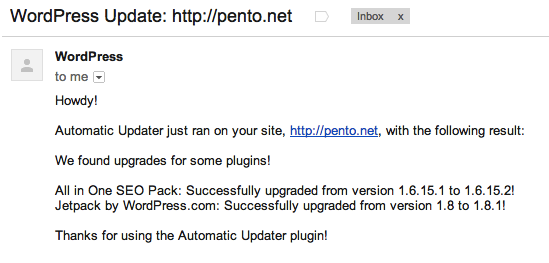
For developers
Is this your plugin? Show off the numbers.
Add a live badge to your site, docs or GitHub README. It updates on its own — no account needed.
Best Advanced Automatic Updates alternatives
All core plugins →





FAQ
Advanced Automatic Updates: quick answers
Straight answers, pulled from live WordPress.org data.
Source: WordPress.org
Is Advanced Automatic Updates free?
Yes. Advanced Automatic Updates is free to download and use from the official WordPress.org plugin directory.
Is Advanced Automatic Updates safe to use in 2026?
Advanced Automatic Updates works, but test it on a staging site before relying on it in 2026. It runs on 20K+ sites, is rated 4.7/5 and was last updated 5 years ago, and scores 46/100 on our health check.
How many websites use Advanced Automatic Updates?
Advanced Automatic Updates is active on 20K+ WordPress websites and has been downloaded 259,079 times since it launched in September 2012. It was downloaded 856 times in the last 30 days.
Does Advanced Automatic Updates work with WordPress 7.1?
Advanced Automatic Updates is officially tested up to WordPress 5.0.32, while the latest release is 7.1.5. It may still work, but try it on a staging site first.
When was Advanced Automatic Updates last updated?
The latest version, 1.0.2, was released on June 4, 2021 (5 years ago).
Who makes Advanced Automatic Updates?
Advanced Automatic Updates is developed and maintained by Gary Pendergast.
What are the best alternatives to Advanced Automatic Updates?
The most popular alternatives to Advanced Automatic Updates are WP Downgrade (100K+ installs), Core Rollback (20K+ installs) and WP Sanitize File Name Plus (1K+ installs).
Powered by PageForge
One template and a spreadsheet. A real page for every search.
PageForge turns each row of a CSV into a WordPress page with its own title, URL, SEO fields and schema, built on the layout you already designed. Free on WordPress.org.
- CSV and XLSX, plus Google Sheets on Professional and Enterprise
- Its own title, URL, SEO fields and schema for every page
- Works with the block editor, Elementor, Divi and Avada
- Free on WordPress.org, no credit card